
1. Introduktion
Denne manual indeholder omfattende instruktioner til FTDI TTL-232R-3V3 USB til UART-kablet. Dette kabel tilbyder en enkel og pålidelig løsning til tilslutning af enheder med +3.3V TTL-niveau UART-signaler til en computer via en USB-port. Det er designet til ingeniører, hobbyfolk og udviklere, der arbejder med indlejrede systemer, mikrocontrollere og andre serielle kommunikationsapplikationer.
2. Sikkerhedsoplysninger
- Sørg for korrekt voltage-niveauer (+3.3V) opretholdes for at forhindre skader på tilsluttede enheder.
- Udsæt ikke kablet for ekstreme temperaturer, fugt eller korrosive miljøer.
- Undgå at bøje eller vride kablet for meget, da dette kan beskadige de indvendige ledninger.
- Frakobl kablet fra både computeren og målenheden, før du udfører vedligeholdelse eller ændringer.
3. Pakkens indhold
Bekræft at alle varer er til stede i din pakke:
- 1 x FTDI TTL-232R-3V3 USB til UART-kabel
- (Valgfrit: Driver-cd eller link til driverdownload, hvis relevant. Se producentens webhjemmeside for de nyeste drivere.)
4. Produktet er slutview
FTDI TTL-232R-3V3 er et USB til serielt UART (Universal Asynchronous Receiver/Transmitter) konverterkabel. Det har et USB-A-stik i den ene ende og et 6-benet SIL (Single In-Line)-stik med 0.1" pitch i den anden ende, hvilket giver +3.3V TTL-niveausignaler. Kablet integrerer en FT232R IC, der håndterer al USB-signalering og -protokoller.
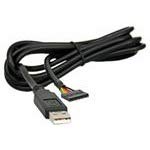
Figur 1: FTDI TTL-232R-3V3 USB til UART-kabel. Dette billede viser det sorte USB-A-stik i den ene ende og 6-bens headeren i den anden, med kablet oprullet.
4.1 Pinout Beskrivelse
Det 6-benede SIL-stik leverer følgende signaler:
| Stift | Signal | Beskrivelse |
|---|---|---|
| 1 | GND | Jord |
| 2 | CTS | Ryd at sende (input til FT232R) |
| 3 | VCC | +5V strømudgang fra USB |
| 4 | TXD | Overfør data (output fra FT232R) |
| 5 | RXD | Modtag data (input til FT232R) |
| 6 | RTS | Anmodning om at sende (output fra FT232R) |
Bemærk: VCC-benet (ben 3) leverer +5V fra USB-porten, som kan bruges til at forsyne eksterne kredsløb med strøm på op til 75mA. Datasignalerne (TXD, RXD, CTS, RTS) fungerer ved +3.3V TTL-niveauer.
5. Opsætning
5.1 Driverinstallation
FTDI TTL-232R-3V3-kablet kræver specifikke drivere for at fungere korrekt på din computer. Disse drivere installeres ofte automatisk af moderne operativsystemer (Windows 10/11, macOS, Linux), når kablet tilsluttes første gang. Hvis automatisk installation mislykkes, eller for ældre operativsystemer, kan manuel installation være nødvendig.
- Download drivere: Besøg den officielle FTDI webwebsted (www.ftdichip.com/Drivers/VCP.htm) for at downloade de nyeste Virtual COM Port (VCP)-drivere til dit operativsystem.
- Installer drivere: Følg instruktionerne, der følger med den downloadede driverpakke. Dette involverer typisk at køre en eksekverbar fil. file eller ved at følge instruktionerne på skærmen.
- Tilslut kabel: Sæt USB-A-enden af TTL-223R-3V3-kablet i en ledig USB-port på din computer.
- Bekræft installationen:
- Windows: Åbn Enhedshåndtering (søg efter "Enhedshåndtering" i Start-menuen). Se under "Porte (COM & LPT)" efter en post som "USB Seriel Port (COMx)", hvor 'x' er et tal.
- MacOS: Åbn Terminal og skriv
ls /dev/tty.usbserial*Du bør se en post, der svarer til kablet. - Linux: Åbn Terminal og skriv
ls /dev/ttyUSB*Du bør se en post, der svarer til kablet.
5.2 Forbindelse til en målenhed
Tilslut det 6-benede SIL-stik til din målenheds UART-grænseflade. Sørg for korrekt pinjustering:
- Tilslut kablets TXD (Pin 4) til målenhedens RXD.
- Tilslut kablets RXD (Pin 5) til målenhedens TXD.
- Tilslut kablets GND (Pin 1) til målenhedens GND.
- Hvis der anvendes hardwareflowkontrol, skal der tilsluttes CTS (Pin 2) til målets RTS og RTS (Pin 6) til målets CTS.
- Hvis målenheden strømforsynes fra kablet, skal kablets VCC (Pin 3) til målenhedens +5V indgang (sørg for, at målenheden kan acceptere 5V, og at dens strømforbrug ikke overstiger 75mA).
Forsigtighed: Dobbelttjek altid pinout'en på din målenhed for at undgå skader på grund af forkerte tilslutninger.
6. Betjeningsvejledning
Når driverne er installeret, og kablet er tilsluttet din målenhed, kan du bruge et serielt terminalprogram til at kommunikere.
- Åbn terminalprogram: Brug et serielt terminalprogram såsom PuTTY (Windows), CoolTerm (macOS/Windows) eller Minicom/screen (Linux).
- Vælg COM-port: I indstillingerne for terminalprogrammet skal du vælge det COM-portnummer, der blev identificeret under driverinstallationen (f.eks. COM3, /dev/ttyUSB0).
- Konfigurer serielle indstillinger:
- Baudrate: Indstil den til at matche din målenheds baudrate (f.eks. 9600, 115200, op til 3 MBaud).
- Databits: Typisk 8
- Paritet: Ingen
- Stopbits: Typisk 1
- Flow kontrol: Ingen, eller Hardware (RTS/CTS), hvis aktiveret på din målenhed.
- Opret forbindelse: Åbn den serielle forbindelse i dit terminalprogram. Du burde nu kunne sende og modtage data fra din målenhed.
7. Vedligeholdelse
- Rensning: Brug en blød, tør klud til at rengøre kablet og stikkene. Brug ikke flydende rengøringsmidler eller opløsningsmidler.
- Opbevaring: Opbevar kablet et køligt og tørt sted, væk fra direkte sollys og ekstreme temperaturer. Undgå at kablet bliver filtret sammen.
- Inspektion: Undersøg kablet regelmæssigt for tegn på skader, såsom flossede ledninger, bøjede ben eller revnet isolering. Stop brugen, hvis der konstateres skader.
8. Fejlfinding
8.1 Almindelige problemer og løsninger
- Ingen COM-port fundet:
- Sørg for, at driverne er korrekt installeret (se afsnit 5.1).
- Prøv en anden USB-port på din computer.
- Genstart din computer.
- Kontroller kablet for fysiske skader.
- Ingen dataoverførsel/modtagelse:
- Bekræft pinout-forbindelserne mellem kablet og din målenhed (TXD til RXD, RXD til TXD, GND til GND).
- Bekræft, at de serielle indstillinger (baudhastighed, databits, paritet, stopbits, flowkontrol) i dit terminalprogram stemmer overens med dine målenheder.
- Sørg for, at målenheden er tændt og fungerer korrekt.
- Kontroller, om målenhedens UART er aktiveret og konfigureret.
- Intermitterende forbindelse:
- Kontrollér for løse forbindelser i både USB- og 6-bens enden.
- Undgå elektromagnetisk interferens fra andre enheder.
- Sørg for, at kablet ikke er for bøjet eller belastet.
9. Specifikationer
| Varenummer | TTL-232R-3V3 |
| USB hastighed | Fuld hastighed (12 Mbps) |
| UART-signalniveauer | +3.3V TTL |
| Datahastigheder | Op til 3 MBaud |
| USB-stik | Type A |
| Afslut stik | 6-benet SIL, 0.1" afstand |
| Kabellængde | 1.8m |
| Kabel detaljer | 6-kernet, 5 mm UL2464 24 AWG |
| I/O bindtage | 3.3V |
| Maksimal effekt (VCC) | +5V / 75mA |
| Intern IC | FT232R |
| Driftstemperatur | -40°C til +85°C |
| Kompatible operativsystemer | Windows, macOS, Linux, Android |
10. Garanti og support
For garantioplysninger og teknisk support henvises til den officielle FTDI webwebstedet eller kontakt dit købssted. FTDI tilbyder omfattende dokumentation og supportressourcer til deres produkter.
- FTDI Webwebsted: www.ftdichip.com
- Driver support: www.ftdichip.com/Drivers/VCP.htm