1. Introduktion
This manual provides detailed instructions for the safe and efficient use of your ODK LED Desk Light Strip. Please read this manual thoroughly before installation and operation, and retain it for future reference.
2. Sikkerhedsoplysninger
- Ensure the power source is DC and matches the product's requirements.
- Dette produkt er kun beregnet til indendørs brug. Må ikke udsættes for vand eller høj luftfugtighed.
- Do not attempt to disassemble or modify the light strip. This may void the warranty and pose a safety risk.
- Opbevares utilgængeligt for børn.
- Undgå direkte øjeneksponering for LED-lys i længere perioder.
- If any damage is observed, discontinue use immediately and contact customer support.
3. Pakkens indhold
Bekræft at alle varer er til stede i din pakke:
- 1 x ODK LED Desk Light Strip (Model: C02013501004USANQWERTY)
- 1 x USB Cable with Integrated Controller
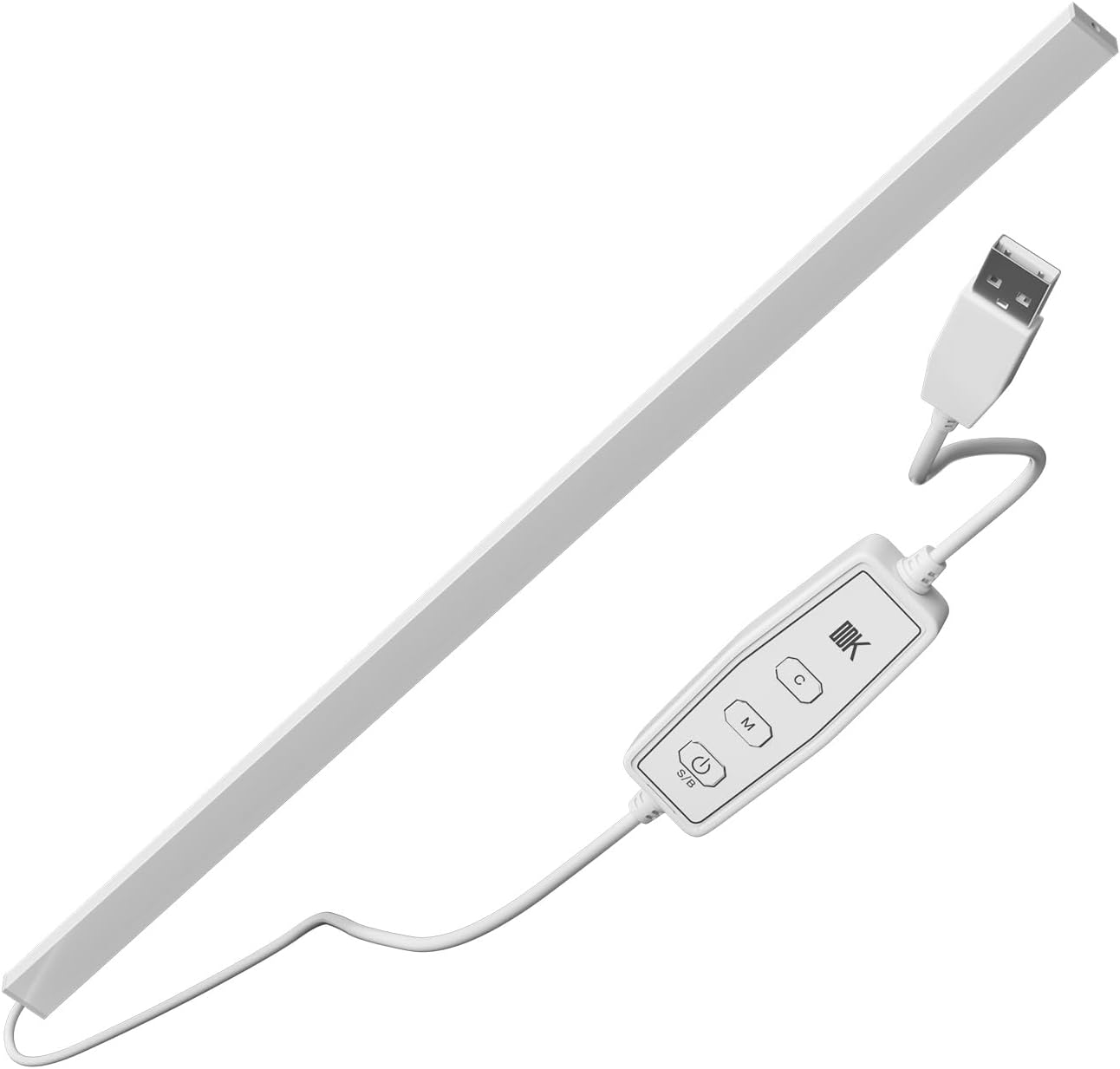
Image 1: ODK LED Desk Light Strip with its USB cable and inline controller. The light strip is a long, white bar, connected to a white cable that leads to a rectangular inline controller with four buttons, and then to a standard USB-A connector.
4. Opsætning og installation
- Vælg placering: Select a suitable indoor location for your light strip, such as a desk or shelf. The light strip is designed for tabletop mounting.
- Position the Light Strip: Place the light strip in the desired position. Ensure the cable can reach a USB power source without strain.
- Tilslut til strøm: Insert the USB-A connector of the light strip's cable into a compatible USB power source (e.g., computer USB port, USB wall adapter, power bank). The power source must provide DC power.
- Første gang tændt: Once connected, the light strip should power on or be ready for activation via the inline controller.
5. Betjeningsvejledning
The ODK LED Desk Light Strip is controlled via the inline push-button controller. Refer to Image 2 for button identification.
Billede 2: Nærbillede view of the inline controller for the ODK LED Desk Light Strip. The controller is white and rectangular, featuring four distinct buttons: a power/mode button (S/B), an 'M' button for mode selection, a 'C' button for color selection, and a button with a light bulb icon for brightness/speed adjustment.
- Power On/Off (S/B Button - first button from left): Press this button to turn the light strip on or off. This button may also cycle through different lighting effects or speeds depending on the mode.
- Mode Selection (M Button): Press the 'M' button to cycle through various lighting modes (e.g., static colors, dynamic effects).
- Color Selection (C Button): Press the 'C' button to change the static color of the light strip when in a static color mode. The light strip supports multicolor output.
- Brightness/Speed Adjustment (Light Bulb Icon Button): Use this button to adjust the brightness of static colors or the speed of dynamic lighting effects.
6. Vedligeholdelse
- Rensning: Gently wipe the light strip and controller with a soft, dry cloth. Do not use liquid cleaners or abrasive materials.
- Opbevaring: When not in use for extended periods, disconnect the light strip from the power source and store it in a cool, dry place.
- Kabelpleje: Undgå at bøje eller vride USB-kablet for meget for at forhindre indvendig skade.
7. Fejlfinding
| Problem | Mulig årsag | Løsning |
|---|---|---|
| Lysstriben tændes ikke. | Ingen strøm, løs forbindelse, defekt USB-port. | Sørg for, at USB-kablet er korrekt tilsluttet. Prøv en anden USB-port eller strømadapter. |
| Lysene er svage eller flimrende. | Insufficient power, brightness setting too low. | Use a USB power source with adequate output. Adjust brightness using the controller. |
| Farverne ændrer sig ikke. | Forkert tilstand valgt. | Press the 'M' button to cycle through modes, then use the 'C' button to change colors. |
8. Specifikationer
- Modelnummer: C02013501004USANQWERTY (Part DD-015 RGB1-125-80)
- Mærke: ODK
- Lyskildetype: LED
- Lys farve: Flerfarvet
- Strømkilde: DC (USB)
- Speciel funktion: ledning
- Switch Type: Tryk knap
- Kabellængde: Approximately 39.37 inches (1 meter)
- Indendørs/udendørs brug: Kun indendørs
- Materiale: Metal (grundmateriale)
- Varens vægt: 12.8 ounce
- Pakkedimensioner: 32.8 x 1.5 x 1.5 tommer
9. Garanti og support
For warranty information or technical support, please contact ODK customer service through the retailer where the product was purchased or visit the official ODK website. Please have your model number (C02013501004USANQWERTY) and purchase details ready.


