Muse M-980 BT trådløs Bluetooth-højttaler brugermanual
Model: M-980 BT
Indledning
The Muse M-980 BT is a powerful and portable wireless Bluetooth speaker designed to deliver high-quality audio with vibrant LED lighting. Featuring 300W output, IPX6 water resistance, and over 10 hours of music playback, it's perfect for various environments. This manual provides detailed instructions on how to set up, operate, and maintain your speaker, ensuring you get the most out of its features.
Vigtige sikkerhedsoplysninger
- Læs disse instruktioner omhyggeligt, før du bruger produktet.
- Gem denne vejledning til fremtidig reference.
- Udsæt ikke højttaleren for ekstreme temperaturer, fugtighed eller direkte sollys.
- Do not immerse the speaker in water, despite its IPX6 rating. IPX6 protects against strong water jets, not submersion.
- Brug kun det medfølgende strømkabel til opladning.
- Forsøg ikke at adskille eller modificere højttaleren.
- Opbevares utilgængeligt for børn.
- Sørg for tilstrækkelig ventilation under drift.
Pakkens indhold
Kontroller venligst, at alle nedenstående varer er inkluderet i din pakke:
- Muse M-980 BT Wireless Bluetooth Speaker
- Strømkabel
- USB-C ladekabel
- Aux-In kabel
- Brugervejledning (dette dokument)
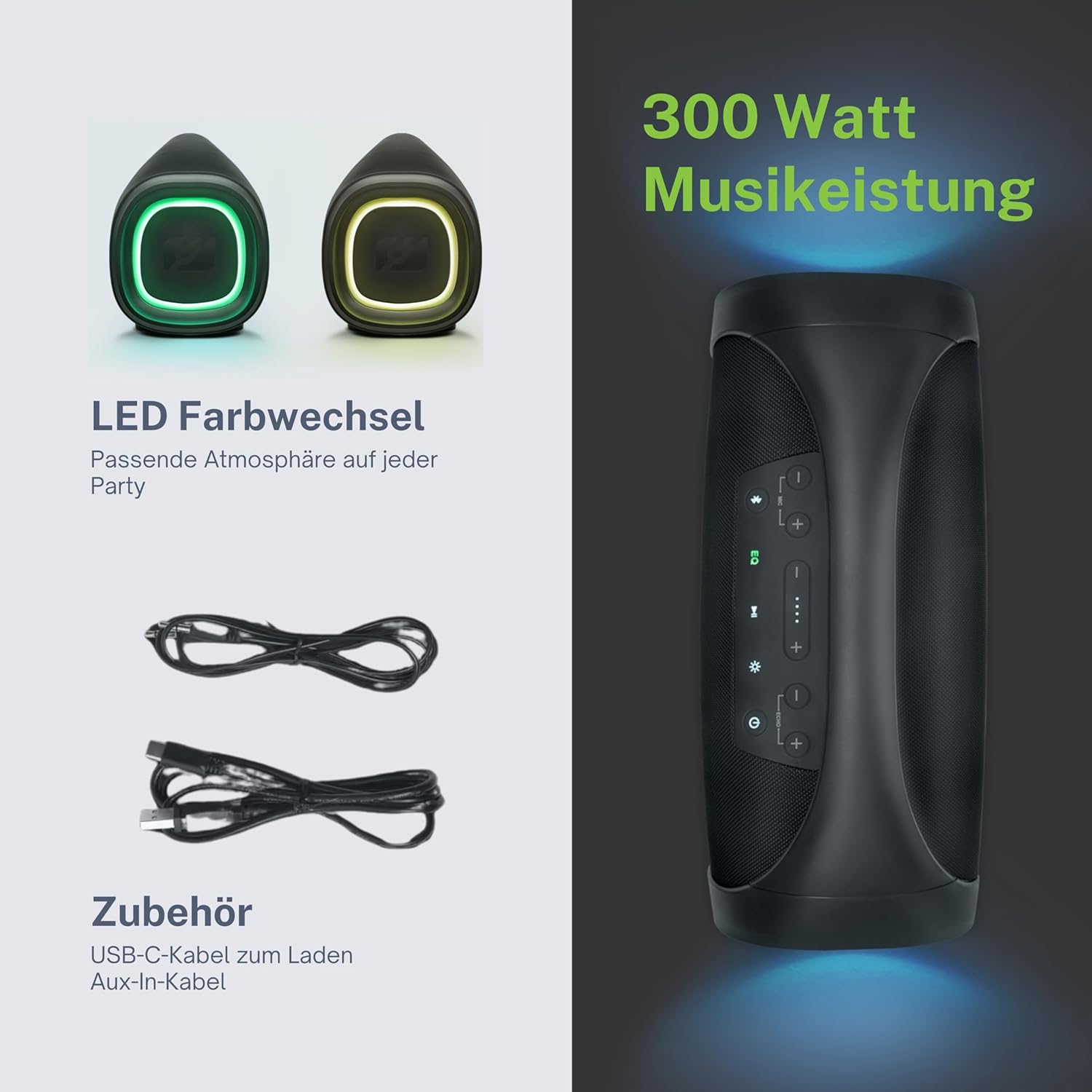
Produkt overview
Familiarize yourself with the various parts and controls of your Muse M-980 BT speaker.


Kontrolpanel
The top panel of the speaker features various buttons for controlling playback, volume, and other functions:
- Power knap: Tryk og hold nede for at tænde eller slukke for højttaleren.
- Bluetooth knap: Tryk på for at gå ind i Bluetooth-parringstilstand.
- EQ knap: Adjust equalization settings (Bass/Treble).
- Knapper til lydstyrke op / ned: Øg eller sænk lydstyrken.
- Afspil/pause knap: Styr lydafspilning.
- Lystilstandsknap: Cycle through different LED light modes.
Ports and Inputs
- USB-C opladningsport: Til opladning af højttalerens interne batteri.
- USB-port: Til afspilning af MP3 files fra et USB-drev.
- AUX-indgang: Tilslut eksterne lydenheder via et 3.5 mm lydkabel.
- Microphone Jacks (x2): Tilslut mikrofoner til karaoke eller højttaleroptræden.
Opsætning
Opladning af højttaleren
Before first use, fully charge the speaker. Connect the provided USB-C charging cable to the speaker's USB-C port and the other end to a suitable USB power adapter (not included) or a computer's USB port. The battery indicator display will show the charging status. A full charge provides over 10 hours of music playback.
Tænd/sluk
Tryk og hold på Power knap on the top panel for a few seconds to turn the speaker on. You will hear an audible prompt. To turn off, press and hold the Power knap igen.
Betjeningsvejledning
Bluetooth-forbindelse
- Turn on the Muse M-980 BT speaker. It will automatically enter Bluetooth pairing mode, indicated by a flashing Bluetooth indicator light.
- Aktiver Bluetooth på din mobilenhed (smartphone, tablet, computer) og søg efter tilgængelige enheder.
- Select "M-980 BT" from the list of devices.
- Når der er oprettet forbindelse, lyser Bluetooth-indikatoren konstant, og du vil høre en bekræftelseslyd.
- Du kan nu afspille lyd fra din enhed via højttaleren.
AUX-indgangstilstand
To play audio from a device without Bluetooth, use the AUX input:
- Connect one end of the 3.5mm Aux-In cable to the AUX port on the speaker.
- Tilslut den anden ende af kablet til hovedtelefonstikket eller lydudgangen på din eksterne enhed.
- The speaker will automatically switch to AUX mode, or you may need to press a mode button (if available).
- Styr afspilning og lydstyrke fra din tilsluttede enhed eller højttalerens knapper.
USB-afspilning
The speaker supports playing MP3 audio filedirekte fra et USB-flashdrev:
- Indsæt et USB-flashdrev, der indeholder MP3 files i USB-porten på højttaleren.
- The speaker will automatically detect the USB drive and begin playing the audio files.
- Use the speaker's playback controls (Play/Pause, Next/Previous) to manage your music.
Brug af mikrofoner
The Muse M-980 BT features two microphone jacks for karaoke or public speaking:
- Connect your microphones (not included) to the MIC 1 and/or MIC 2 jacks.
- Adjust the microphone volume using the dedicated controls on the speaker (if available, or through main volume).
- Ensure the main volume of the speaker is set to a comfortable level.
LED-lystilstande
The speaker features dynamic LED lights that enhance your listening experience:
- Tryk på Lystilstandsknap to cycle through various pre-set lighting effects and colors.
- Press the button repeatedly to find your preferred light show.
Stereo Pairing (TWS)
You can pair two Muse M-980 BT speakers together for a true wireless stereo experience:
- Sørg for, at begge højttalere er tændt og ikke er forbundet til nogen Bluetooth-enhed.
- On one speaker (this will be the primary speaker), press and hold the Bluetooth button until you hear a specific pairing tone.
- The two speakers will automatically connect to each other. Once connected, the primary speaker's Bluetooth indicator will flash slowly, and the secondary speaker's will be solid.
- Now, connect your mobile device to the primary speaker via Bluetooth as described in the "Bluetooth Connection" section.
- Lyden afspilles nu i stereo gennem begge højttalere.
Justering af bas og diskant
Brug EQ knap on the control panel to adjust the bass and treble levels to suit your audio preference.
Opretholdelse
Rensning
Wipe the speaker with a soft, dry cloth. Do not use abrasive cleaners, waxes, or solvents. Ensure all ports are dry before charging or connecting devices.
Opbevaring
Når højttaleren ikke er i brug i længere perioder, skal den opbevares et køligt og tørt sted væk fra direkte sollys og ekstreme temperaturer. Det anbefales at oplade batteriet mindst én gang hver tredje måned for at forlænge dens levetid.
Fejlfinding
| Problem | Mulig årsag | Løsning |
|---|---|---|
| Højttaleren tænder ikke. | Batteriet er afladet. | Oplad højttaleren ved hjælp af det medfølgende USB-C-kabel. |
| Ingen lyd. | Lydstyrken er for lav eller slået fra. Forkert inputtilstand. | Increase volume on both the speaker and the connected device. Ensure the correct input mode (Bluetooth, AUX, USB) is selected. |
| Bluetooth-forbindelse mislykkes. | Højttaleren er ikke i parringstilstand. Enheden er for langt væk. Interferens. | Ensure speaker is in pairing mode. Move device closer to speaker. Turn off other Bluetooth devices. Forget "M-980 BT" on your device and re-pair. |
| Lydforvrængning. | Volume too high. Audio source quality. | Skru ned for lydstyrken. Prøv en anden lydkilde eller file. Adjust EQ settings. |
| LED-lysene virker ikke. | Light mode off or malfunction. | Press the Light Mode Button to activate or cycle through modes. If issue persists, contact support. |
Specifikationer
| Modelnavn | M-980 BT |
| Modelnummer | 322950 |
| Udgangseffekt | 300 watt |
| Forbindelsesteknologi | Bluetooth, USB, AUX |
| Batterilevetid | Op til 10 timer |
| Vandmodstand | IPX6 (stænksikker) |
| Dimensioner (L x B x H) | 49.54 x 20.4 x 27.28 cm (19.5 x 8.0 x 10.7 tommer) |
| Vægt | 5.02 kilo (11.07 lbs) |
| Farve | Sort |
| Materiale | Plast eller gummi |

Garanti og support
Your Muse M-980 BT speaker comes with a limited warranty. Please refer to the warranty card included in your package for specific terms and conditions. For technical support, troubleshooting assistance, or warranty claims, please contact Muse customer service through their official webwebstedet eller de kontaktoplysninger, der er angivet med dit køb.
For the latest information and support, visit the official MUSE webwebsted: www.muse-europe.com


