1. Introduktion
This manual provides instructions for the SHREYANS Mini Barcode Scanner, model M_SRS710UB. This device is designed for efficient scanning of both 1D and 2D barcodes, offering versatile connectivity options including 2.4G wireless, Bluetooth, and USB wired connections. It is compatible with a wide range of operating systems and devices, making it suitable for various applications.
2. Pakkens indhold
Kontroller venligst, at alle varer er til stede i pakken:
- SHREYANS Mini Barcode Scanner
- 2.4G trådløs USB-dongle
- USB-C ladekabel
- USB-A adapter
- Wrist Lanyard
- Brugervejledning (dette dokument)
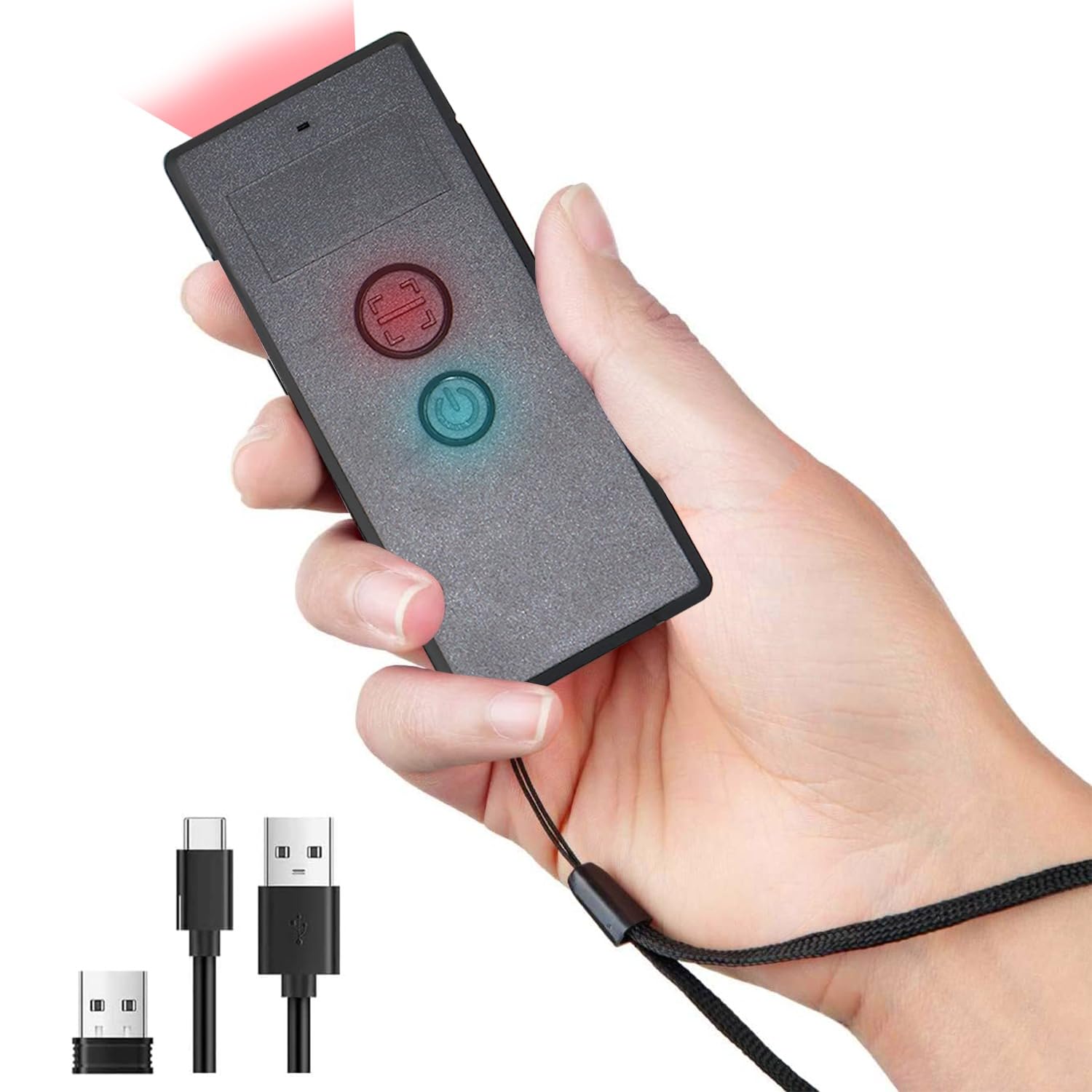
Image: The SHREYANS Mini Barcode Scanner held in a hand, alongside its 2.4G wireless USB dongle, USB-C charging cable, and USB-A adapter.
3. Produktet er slutview
The SHREYANS Mini Barcode Scanner features a compact design with intuitive controls.
- Scan knap: Starter stregkodescanning.
- Power knap: Turns the device on/off and controls Bluetooth pairing.
- LED-indikator: Provides status feedback (e.g., power, connection, scan success).
- Opladningsport: USB-C port for charging the internal battery.

Image: A close-up of the SHREYANS Mini Barcode Scanner held in a hand, highlighting its small, portable design.
4. Setup and Connection Modes
The scanner supports three connection modes: 2.4G Wireless, Bluetooth, and USB Wired.
4.1. 2.4G trådløs forbindelse
- Insert the 2.4G wireless USB dongle into an available USB port on your computer (Desktop, Laptop).
- Power on the barcode scanner by pressing and holding the Power button until the LED indicator lights up.
- The scanner will automatically connect to the dongle. A successful connection is indicated by a specific LED pattern (refer to the LED indicator section for details).

Image: An illustration showing the three available connection modes: Bluetooth, 2.4G Wireless via USB dongle, and direct USB Wired connection.
4.2. Bluetooth-forbindelse
- Sørg for, at scanneren er tændt.
- Activate Bluetooth pairing mode on the scanner (usually by holding the Power button for an extended period or scanning a specific configuration barcode). Refer to the quick start guide for the exact barcode.
- On your device (Android, iOS, Windows, macOS, Linux), go to Bluetooth settings and search for available devices.
- Select "SHREYANS Scanner" or a similar name from the list to pair.
- Once paired, the LED indicator will confirm the successful connection.
4.3. USB-kablet forbindelse
- Connect the USB-C end of the charging cable to the scanner's charging port.
- Connect the USB-A end of the cable (or use the USB-A adapter if needed) to an available USB port on your computer.
- The scanner will function as a wired device and also charge its internal battery. No additional drivers are typically required.
5. Betjeningsvejledning
5.1. Scanning af stregkoder
- Ensure the scanner is connected to your device via one of the methods described above.
- Åbn en teksteditor, et regneark eller et andet program, hvor du vil have de scannede data vist.
- Point the scanner's laser at the barcode you wish to scan.
- Press the Scan button. A successful scan will be indicated by an audible beep and/or a change in the LED indicator.
- The scanned data will appear in the active input field on your connected device.

Image: A visual representation of the scanning process, where the scanner reads a barcode from a package and the data is synchronously uploaded to a laptop.
5.2. Understøttede stregkodetyper
The SHREYANS Mini Barcode Scanner supports a variety of 1D and 2D barcode symbologies, including:
- 1D stregkoder: UPC/EAN, Code 128, Code 39, Code 93, Code 11, Interleaved 2 of 5, Industrial 2 of 5, Matrix 2 of 5, Standard 2 of 5, Codabar, MSI, GS1 DataBar, etc.
- 2D stregkoder: QR Code, Data Matrix, PDF417, Aztec Code, Micro PDF417, etc.

Image: Various 1D and 2D barcode types such as QR Code, Data Matrix, PDF417, Aztec Code, and Micro PDF417, demonstrating the scanner's comprehensive readability.
6. Kompatibilitet
The scanner is designed for broad compatibility with various devices and operating systems:
- Operativsystemer: Windows (7/8/10/XP), Android, iOS/macOS, Linux.
- Enheder: PC, POS systems, Laptops, Tablets, iPads, Smartphones.

Image: A graphic illustrating the scanner's high compatibility with Windows, Android, iOS/macOS, Linux, and Mac OS, connecting to PCs, laptops, tablets, and smartphones.
7. Vedligeholdelse
To ensure optimal performance and longevity of your SHREYANS Mini Barcode Scanner, follow these maintenance guidelines:
- Rensning: Use a soft, dry, lint-free cloth to clean the scanner's exterior. For the scanning window, use a lens cleaning cloth and a mild cleaning solution if necessary. Avoid abrasive materials or harsh chemicals.
- Opbevaring: Opbevar scanneren et køligt, tørt sted væk fra direkte sollys og ekstreme temperaturer.
- Batteri: For prolonged storage, ensure the battery is charged to approximately 50%. Recharge the battery periodically if not in use for extended periods to prevent deep discharge.
- Håndtering: Undgå at tabe scanneren eller udsætte den for kraftige stød.
8. Fejlfinding
Hvis du støder på problemer med din scanner, kan du se følgende almindelige problemer og løsninger:
| Problem | Mulig årsag | Løsning |
|---|---|---|
| Scanneren tænder ikke. | Lavt batteri. | Charge the scanner using the provided USB-C cable. |
| Kan ikke oprette forbindelse via 2.4G trådløst. | Dongle not properly inserted or scanner not in 2.4G mode. | Ensure the dongle is fully inserted. Verify the scanner is in 2.4G wireless mode (refer to quick start guide for mode switching). |
| Kan ikke oprette forbindelse via Bluetooth. | Scanner not in pairing mode, Bluetooth off on host device, or already paired with another device. | Put the scanner into Bluetooth pairing mode. Enable Bluetooth on your device. Forget previous pairings if necessary and re-pair. |
| Scanneren læser ikke stregkoder. | Barcode damaged, incorrect angle, or scanner not configured for barcode type. | Ensure the barcode is clear and undamaged. Adjust scanning angle and distance. Check if the barcode type is enabled in the scanner's configuration (scan specific setup barcodes). |
| Scannede data vises forkert. | Keyboard layout mismatch or scanner configuration issue. | Ensure your computer's keyboard layout matches the scanner's default or configure the scanner to match your layout. Reset scanner to factory defaults if needed. |
9. Specifikationer
- Model: M_SRS710UB
- Dimensioner: 3 x 8 x 5 cm (ca. 3.07 x 1.50 x 0.47 tommer)
- Vægt: 50 g (ca. 1.23 oz)
- Forbindelse: 2.4G Wireless, Bluetooth 4.1, USB Wired
- Understøttede stregkoder: 1D (UPC/EAN, Code 128, Code 39, etc.), 2D (QR Code, Data Matrix, PDF417, Aztec Code, etc.)
- Kompatibilitet: Windows, Android, iOS/macOS, Linux (PC, POS, Laptop, Tablet, Smartphone)
- Fabrikant: Shreyans
10. Garanti og support
For warranty information and technical support, please contact SHREYANS customer service. Details can typically be found on the product packaging or the official SHREYANS webwebsted.
Producentkontakt: 9324776246
For yderligere hjælp, besøg SHREYANS Store on Amazon.

