1. Introduktion
The AJAZZ AKP815 is a 75% low-profile mechanical keyboard designed for enhanced productivity and gaming. It features a unique 4.33-inch LED touch screen, programmable RGB lighting, and a gasket-mounted structure for a comfortable typing experience. This manual provides detailed instructions for setup, operation, and maintenance.
2. Pakkens indhold
Kontroller venligst, at alle varer er til stede i pakken:
- AJAZZ AKP815 Mechanical Keyboard
- USB-C til USB-A-kabel
- Keycap aftrækker
- Brugervejledning (dette dokument)
3. Fysisk overview
Familiarize yourself with the keyboard's components:
- 75% Layout: Compact design with 81 keys.
- 4.33'' LCD Touch Screen: Located on the right side for customizable controls.
- Lav Profile HUANO Mechanical Switches: Designed for a responsive typing experience.
- Adjustable Two-Level Stand: For ergonomic typing angles.
- USB-C grænseflade: Til kabelforbindelse og opladning.
- Systemtilstandsskifter: Located on the underside to toggle between Windows and Mac compatibility.

4. Opsætning og tilslutning
4.1. Valg af systemtilstand
Before connecting, locate the switch on the underside of the keyboard to select the appropriate operating system mode (Windows or Mac).
4.2. Kablet forbindelse
- Tilslut det medfølgende USB-C-kabel til tastaturets USB-C-port.
- Tilslut USB-A-enden af kablet til en ledig USB-port på din computer.
- Tastaturet vil automatisk blive genkendt af dit system.
4.3. 2.4G trådløs forbindelse
The keyboard supports 2.4G wireless connectivity via a USB dongle. The dongle is typically stored in a compartment on the underside of the keyboard.
- Remove the 2.4G USB dongle from its storage slot on the keyboard's underside.
- Sæt donglen i en ledig USB-port på din computer.
- Ensure the keyboard is switched to 2.4G wireless mode (refer to the underside switch).
- Tastaturet burde oprette forbindelse automatisk.
4.4. Bluetooth-forbindelse
The keyboard supports Bluetooth connectivity for up to three devices.
- Ensure the keyboard is switched to Bluetooth mode (refer to the underside switch).
- Aktiver Bluetooth på din enhed (computer, tablet, smartphone) og søg efter nye enheder.
- Select 'AJAZZ AKP815' (or similar) from the list of available devices to pair.
- Følg eventuelle anvisninger på skærmen for at fuldføre parringsprocessen.

5. Driver installation
For full functionality and customization of both the keyboard and the touch screen, specific drivers are required.
- Tastaturdriver: Download the keyboard driver from the official AJAZZ webwebsted.
- Touch Screen Controller Driver:
For Windows-systemer: AJAZZ.key123.vip/ENGwin
For Mac systems: AJAZZ.key123.vip/ENGmac
Important: Always download drivers from the official AJAZZ website or the provided links to ensure compatibility and security.
6. Betjeningsvejledning
6.1. Berøringsskærmbetjening
The 4.33-inch LCD touch screen acts as a customizable desktop control center with 15 programmable buttons. Use the dedicated driver to:
- Manage desktop applications.
- Adgang webwebsteder.
- Control chat applications.
- Edit shortcuts in software like Photoshop.
- Utilize a calculator or analyze stock market data.
- Customize key icons for quick control.


6.2. Tilpasning af RGB-belysning
The keyboard features programmable RGB lighting with 16.8 million color spectrums. Use the keyboard driver to:
- Select from various lighting modes and effects.
- Adjust lighting brightness.
- Synchronize lighting with music rhythms.
The south-facing LED design and two-color injection molded non-shine keycaps ensure soft and clear RGB illumination.


6.3. FN Key Functionality
The FN key provides access to secondary functions for various keys, enhancing efficiency for work or gaming. Refer to the keyboard's keycap legends for specific FN key combinations.
7. Avancerede funktioner
- Gasket Structure Technology: Built-in EVA sandwich cotton reduces hollow sounds and improves typing feel.
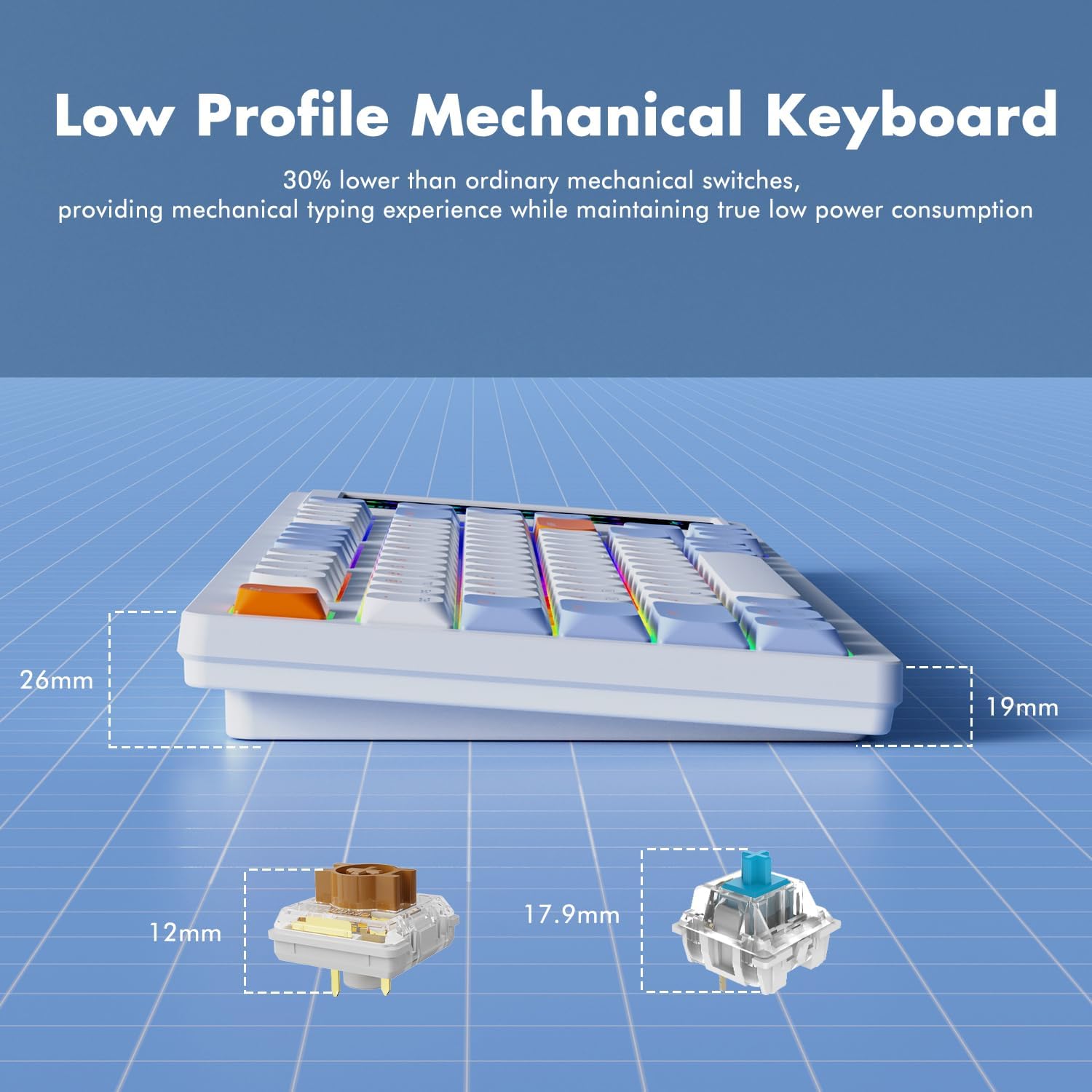
- 30% Ultra-Thin Design: Achieved with thin keycaps and low-profile HUANO mechanical switches, offering a mechanical typing experience with low power consumption.
- N-Key Rollover: Each key is controlled by a separate switch, allowing multiple keys to be pressed simultaneously without conflict.

8. Vedligeholdelse
To ensure the longevity and optimal performance of your AJAZZ AKP815 keyboard, follow these maintenance guidelines:
- Rensning: Use a soft, dry cloth to wipe down the keyboard surface. For deeper cleaning, use the provided keycap puller to remove keycaps and clean underneath with compressed air or a small brush.
- Undgå væsker: Udsæt ikke tastaturet for væsker. I tilfælde af spild skal du straks frakoble tastaturet og lade det tørre helt, før du tilslutter det igen.
- Opbevaring: Opbevar tastaturet et køligt, tørt sted væk fra direkte sollys og ekstreme temperaturer.
9. Fejlfinding
- Tastaturet reagerer ikke:
- Ensure the USB cable is securely connected or the wireless dongle is properly inserted.
- Verify the system mode switch (Windows/Mac) is set correctly.
- For wireless connections, check battery level and ensure proper pairing. - Problemer med berøringsskærm:
- Ensure the touch screen controller driver is correctly installed and running.
- Restart the driver software or your computer.
- Check for any physical obstructions or damage to the screen. - RGB-belysning virker ikke:
- Ensure the keyboard driver is installed.
- Check lighting settings within the driver software.
- Try cycling through lighting modes using FN key combinations. - Accidental Touch Screen Activation:
- Adjust your typing posture to avoid unintentional contact with the screen.
- Vedrview touch screen driver settings for sensitivity adjustments if available.
10. Specifikationer
| Feature | Detalje |
|---|---|
| Modelnummer | AKP815 |
| Produktdimensioner | 40 x 13.7 x 2 cm (L x B x H) |
| Varens vægt | 1.98 pund (0.9 kg) |
| Tastaturlayout | 75 % (81 nøgler) |
| Touch Screen Size | 4.33 tommer |
| Switch Type | Lav Profile HUANO Mechanical Switches |
| Forbindelse | USB-C Wired, 2.4G Wireless, Bluetooth |
| Baggrundsbelysning | Programmerbar RGB |
| Kompatible enheder | Laptop, PC, Smart TV, Smartphone, Tablet |
| Kompatibel OS | Windows, Mac |
11. Officiel produktvideo
Watch this official video for a brief overview of the AJAZZ AKP815 keyboard.
12. Garanti og support
For warranty information, technical support, or further assistance, please visit the official AJAZZ website. Ensure you have your product model number (AKP815) available when contacting support.


