1. Introduktion
Thank you for choosing the WalkerFit Smart Watch for Men. This 1.84-inch big screen fitness watch is designed to enhance your daily life with features like heart rate monitoring, sleep tracking, stress management, and a wide array of sports modes. It offers seamless connectivity with Android phones and iPhones, ensuring you stay connected and informed. This manual provides detailed instructions to help you get the most out of your new smartwatch.

Image: The WalkerFit Smart Watch displaying its main interface and call functions.
2. Pakkens indhold
Markér venligst feltet for at sikre, at alle varer er til stede:
- Smart ur x 1
- Brugervejledning x 1
- Opladningskabel x 1
3. Kom godt i gang
3.1 Opladning af enheden
Oplad dit smartwatch helt før første brug. Tilslut det magnetiske opladningskabel til opladningspunkterne på bagsiden af uret, og sæt USB-enden i en strømadapter (medfølger ikke) eller en computers USB-port.
- Opladningstid: Cirka 2.5 timer
- Active Usage: Up to 7 days
- Standbytid: Op til 25 dage

Image: The WalkerFit Smart Watch being charged, highlighting its fast charging and extended battery life.
3.2 Appinstallation og parring
- Scan the QR code in the manual or search for the companion app (e.g., 'FitCloudPro' or similar, check manual for exact name) on your smartphone's app store (Google Play Store for Android, Apple App Store for iOS).
- Installer appen, og opret en konto, hvis du bliver bedt om det.
- Aktiver Bluetooth på din smartphone.
- Open the app, navigate to 'Device' or 'My Device', and select 'Add Device'.
- Select 'SW205-A1PRO' or the corresponding device name from the list to pair. Follow the on-screen prompts to complete the pairing process.
3.3 Iført uret
Wear the watch comfortably on your wrist, about one finger's width from your wrist bone. Ensure the sensor on the back of the watch is in contact with your skin for accurate health monitoring.
4. Grundlæggende betjening
4.1 Navigering i brugerfladen
The WalkerFit Smart Watch features a vibrant 1.84-inch touchscreen. Swipe left, right, up, or down to access different functions and menus. The side button typically serves as a power button or a return-to-home button.
4.2 Foretage og modtage opkald
The watch is equipped with a built-in speaker and microphone, allowing you to handle calls directly from your wrist via Bluetooth 5.3 connection to your smartphone.
- Foretage opkald: Access the phone function on the watch to view recent calls, use a dial pad, or access contacts (synced from your phone).
- Modtagelse af opkald: When a call comes in, the watch will display the caller ID. You can answer, reject, or mute the call directly from the watch screen.

Image: Bluetooth 5.3 connectivity features, including call handling and notifications.
4.3 Meddelelser
Stay synchronized with your iPhone or Android phone for real-time notifications from social media, texts, and apps like Facebook, WhatsApp, and Twitter. Ensure notification permissions are enabled in the companion app and your phone settings.
4.4 Tilpasning af urskiver
Personalize your watch by changing the watch face. Long press on the current watch face to access available options. You can also customize styles through the smartphone app, with numerous digital and analog options available.
5. Funktioner til sundhedsovervågning
The WalkerFit Smart Watch provides continuous 24/7 health monitoring to help you track your well-being.

Image: The watch's health sensors and examples of health data graphs.
5.1 Pulsmåling
Monitor your heart rate throughout the day. The watch provides real-time heart rate data, which can be viewed on the watch or in the app for historical trends.
5.2 Søvnovervågning
Uret sporer automatisk dine søvnmønstre, herunder dyb søvn, let søvn og vågentidspunkter.view your sleep quality and duration in the app to improve your rest.
5.3 Stress Tracking
The watch can help monitor your stress levels, providing insights into your mental well-being. Refer to the app for detailed stress data and trends.
5.4 Pedometer and Activity Tracking
The built-in pedometer accurately tracks your daily walking steps and miles. It also monitors calories burned and active time, serving as an indispensable health companion.
5.5 Sporing af kvinders sundhed
The watch supports period tracking, allowing users to log and predict menstrual cycles through the companion app.
6. Sportstilstande
Pursue your fitness goals with over 120 sports modes available on this activity tracker. The watch can track various metrics depending on the sport, including calories, steps, time, and distances.
- Setting Workout Targets: Set specific goals for your workouts within the watch or app.
- Vandtæt Design: The watch's waterproof design makes it suitable for various exercise routines, including those involving sweat or light water exposure.

Image: The watch's sports tracking interface and various sport mode icons.
7. Yderligere smarte funktioner
The WalkerFit Smart Watch offers several convenient functions to enhance your daily experience.
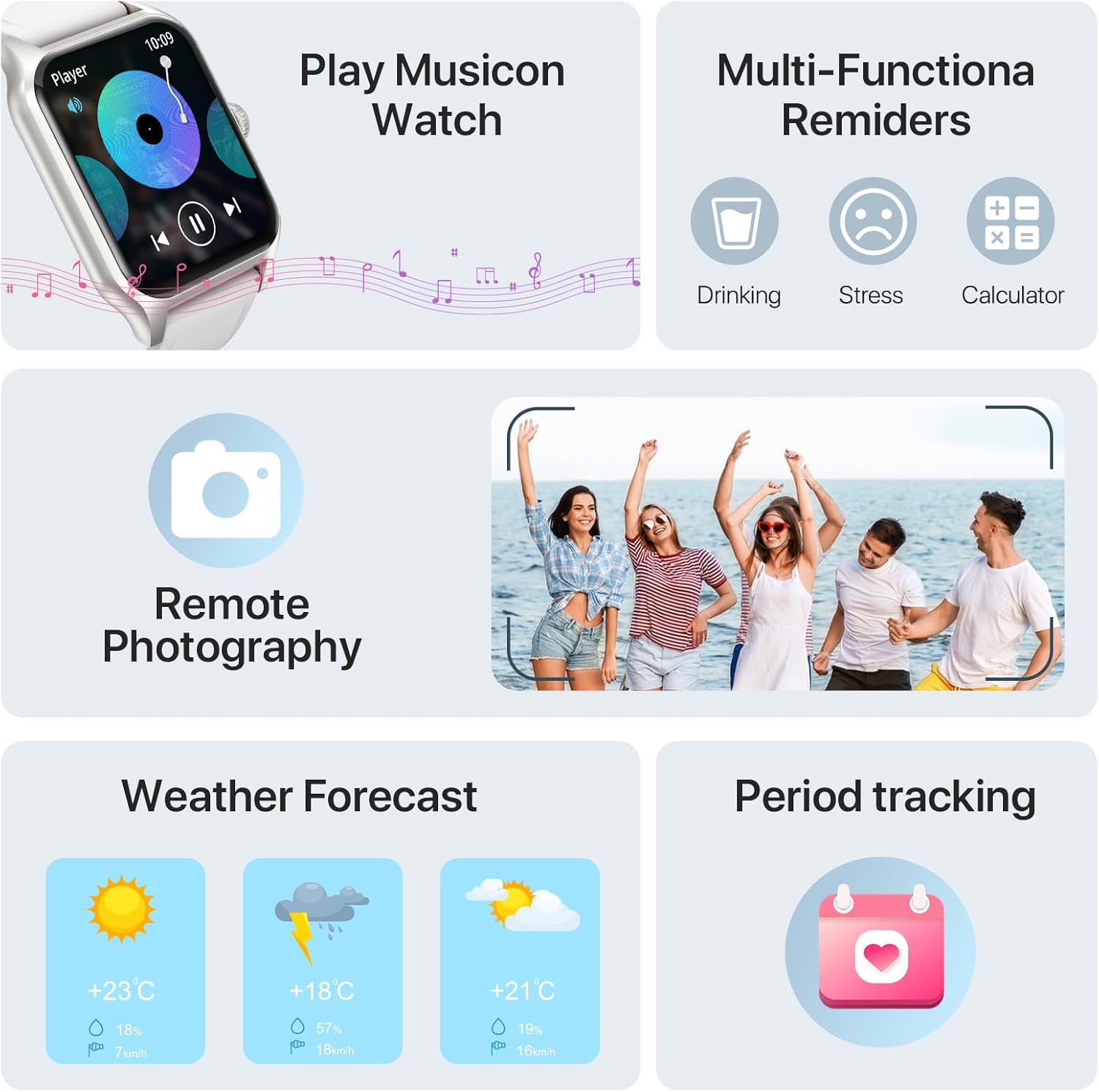
Image: Various smart functions including music control, reminders, remote camera, weather, and period tracking.
7.1 Musikkontrol
Styr musikafspilningen på din smartphone direkte fra dit ur. Afspil, sæt på pause, spring numre over og juster lydstyrken uden at skulle tage din telefon frem.
7.2 Fjernkamera
Use your watch as a remote shutter for your smartphone's camera. Open the remote camera function on the watch and shake your wrist to take a photo.
7.3 Vejrudsigt
Check the current weather conditions and forecast directly on your smartwatch by raising your wrist.
7.4 Alarmer og påmindelser
Set alarms on your watch to wake up or for important reminders. The watch also supports multi-functional reminders such as drinking water reminders and stress reminders.
7.5 AI Voice Recognition
Utilize AI voice recognition for quick commands and information, such as asking about the weather or initiating calls.
8. Specifikationer
| Feature | Detalje |
|---|---|
| Modelnummer | SW205-A1PRO |
| Skærmstørrelse | 1.83 Inches (visible screen diagonal: 2" / 5 cm) |
| Forbindelsesteknologi | Bluetooth 5.3 |
| Batterikapacitet | 260mAh Lithium Polymer |
| Opladningstid | Ca. 2.5 timer |
| Active Usage Time | Op til 7 dage |
| Standby tid | Op til 25 dage |
| Operativsystem | Android compatible |
| Særlige funktioner | Cycle Tracking, Multisport Tracker, Activity Tracker, Notifications, Music Player, Heart Rate Monitor, Sleep Monitor, Stress Monitor, Pedometer |
| Varens vægt | 160 gram (5.6 ounce) |
| Dimensioner (urskive) | 37mm (1.45in) width, 52mm (2.04in) height, 10mm (0.39in) thickness |
| Samlet længde (ur + rem) | 250 mm (9.8in) |

Image: Detailed product dimensions of the WalkerFit Smart Watch.
9. Fejlfinding
9.1 Uret tænder ikke
- Sørg for, at uret er fuldt opladet. Tilslut det til opladningskablet og en strømkilde i mindst 30 minutter.
- Press and hold the side button for several seconds to power on.
9.2 Kan ikke parres med smartphone
- Sørg for, at Bluetooth er aktiveret på din smartphone.
- Sørg for, at uret er inden for din telefons Bluetooth-rækkevidde.
- Genstart både dit ur og din smartphone.
- Check if the companion app has necessary permissions (location, Bluetooth, notifications).
- If previously paired, try unpairing the device from your phone's Bluetooth settings and re-pairing through the app.
9.3 Unøjagtige sundhedsdata
- Sørg for, at uret sidder tæt på dit håndled, med sensorerne i korrekt kontakt med din hud.
- Rengør sensorområdet på bagsiden af uret regelmæssigt.
- Undgå overdreven bevægelse under målingerne.
9.4 Notifikationer vises ikke
- Verify that notifications are enabled in the companion app.
- Check your smartphone's notification settings to ensure the app is allowed to send notifications.
- Sørg for, at uret er forbundet via Bluetooth.
10. Garanti og support
At WalkerFit, we are committed to providing high-quality products and excellent customer service. Your WalkerFit Smart Watch undergoes rigorous quality checks before leaving the factory.
- Garanti: All WalkerFit smartwatches carry a two-year warranty from the date of purchase.
- Eftersalgssupport: If you encounter any issues upon receiving or using your smartwatch, please contact our 24/7 after-sales team immediately. We are committed to swift issue resolution.
Thank you for choosing WalkerFit.


