Fachixy FC300 trådløst gamingheadset brugermanual
Model: FC-300
Indledning
Thank you for choosing the Fachixy FC300 Wireless Gaming Headset. This manual provides detailed instructions for setting up, operating, and maintaining your headset to ensure optimal performance and longevity. The FC300 offers a seamless gaming experience with its 2.4GHz lossless wireless and Bluetooth connectivity, long-lasting battery, and immersive audio.
Sikkerhedsoplysninger
- Udsæt ikke headsettet for ekstreme temperaturer, fugtighed eller væsker.
- Undgå at tabe headsettet eller udsætte det for kraftige stød.
- Forsøg ikke at skille headsettet ad eller ændre det. Dette vil ugyldiggøre garantien.
- Lyt ved moderat lydstyrke for at undgå høreskader.
- Opbevares utilgængeligt for børn.
Pakkens indhold
Tjek venligst pakken for følgende varer:
- Fachixy FC300 Wireless Gaming Headset
- 2.4 GHz USB-dongle
- USB-C ladekabel
- Brugervejledning (dette dokument)

Image: The Fachixy FC300 Wireless Gaming Headset in white and purple, shown with its accompanying USB dongle.
Produkt overview
Familiarize yourself with the various components and controls of your FC300 headset.

Image: A detailed diagram highlighting the control buttons on the left earcup of the Fachixy FC300 headset, including power, volume, mic, and RGB controls.
- Tænd/sluk-/multifunktionsknap: Turn on/off, play/pause, answer/reject calls.
- Lydstyrke ned/Forrige nummer: Decrease volume, skip to previous track.
- Lydstyrke op/Næste nummer: Increase volume, skip to next track.
- Microphone Mute/Bluetooth Pairing: Mute/unmute microphone, initiate Bluetooth pairing.
- RGB lyskontrol: Turn RGB lights on/off.
Opsætning
1. Opladning af headsettet
Before first use, fully charge the headset. Connect the USB-C charging cable to the headset's charging port and the other end to a USB power source (e.g., computer USB port, wall adapter). The LED indicator will show charging status.
- Batterikapacitet: 1200mAh
- Fuld opladningstid: Cirka 2.5 timer
- Playtime: Up to 50 hours (without RGB), 40 hours (with RGB)

Image: Visual representation of the headset's 1200mAh battery capacity and up to 50 hours of playtime on a 2.5-hour charge.
2. Connecting via 2.4GHz Wireless (for PC, PS5, PS4, Switch, Mac, Laptops)
- Insert the 2.4GHz USB dongle into an available USB port on your device.
- Power on the headset by long-pressing the Power button (1) for 3 seconds.
- The headset will automatically connect to the dongle. A stable connection is indicated by the LED light on the headset.
- Sørg for, at headsettet er valgt som lydudgangs-/inputenhed i dine systemindstillinger.

Image: A user wearing the headset connected wirelessly to a gaming PC via the 2.4GHz USB dongle, illustrating low-latency connectivity.
3. Connecting via Bluetooth (for Mobile Phones, Tablets, iPad)
Note: Bluetooth mode is not compatible with PS4 or PS5.
- Sørg for, at headsettet er tændt.
- Long-press the Microphone Mute/Bluetooth Pairing button (4) for 3 seconds to enter Bluetooth pairing mode. The LED indicator will flash rapidly.
- On your device, enable Bluetooth and search for "Fachixy FC300" in the list of available devices.
- Select "Fachixy FC300" to connect. The LED indicator will become solid once connected.
Betjeningsvejledning
Tænd/sluk
- Tænd: Long-press the Power button (1) for 3 seconds.
- Sluk: Long-press the Power button (1) for 3 seconds.
Lydstyrkekontrol
- Lydstyrke op: Single click the Volume Up button (3).
- Skrue ned for lyden: Single click the Volume Down button (2).
Mikrofon kontrol
- Slå mikrofon fra/til: Single click the Microphone Mute button (4).
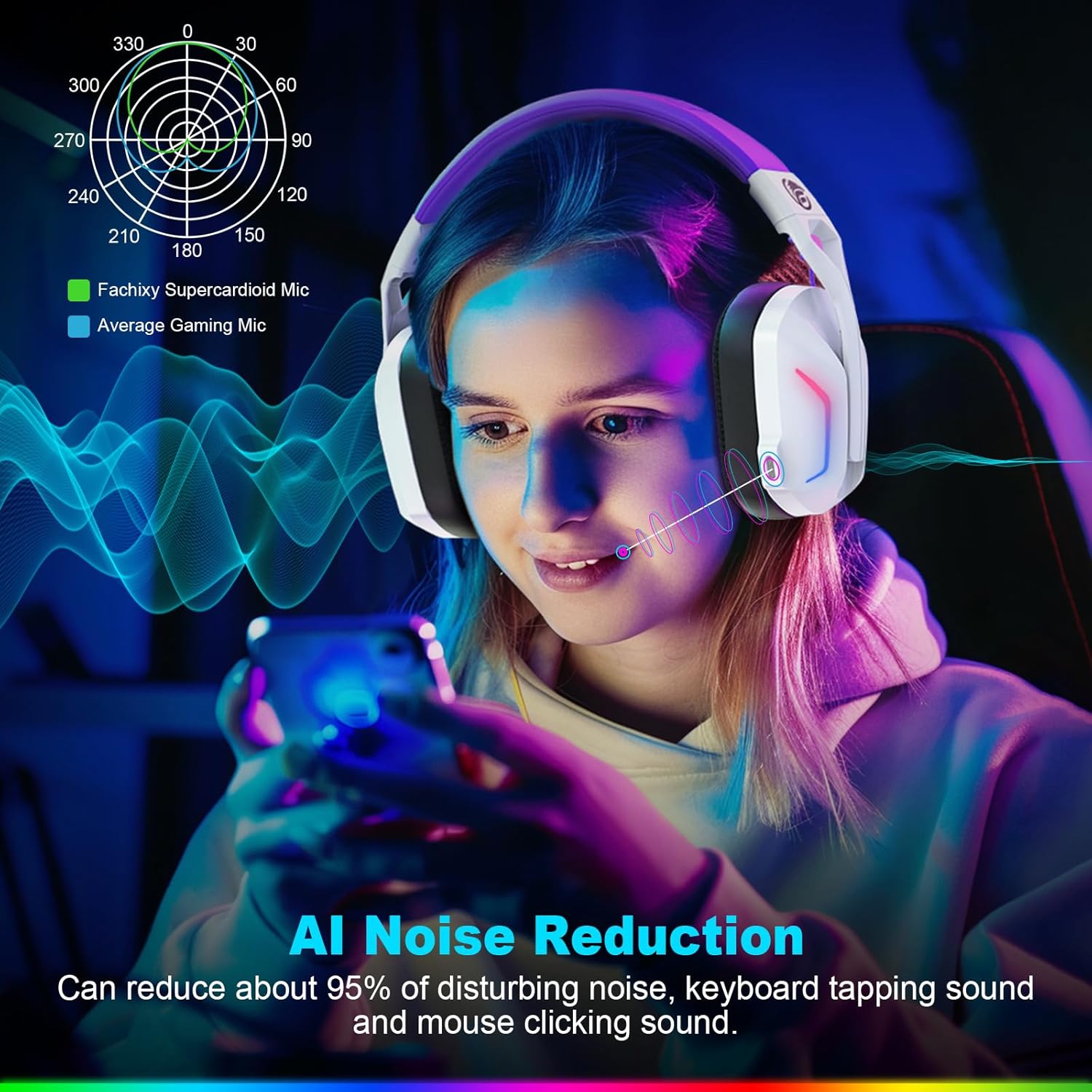
Image: A graphic illustrating the AI Noise Reduction capability of the Fachixy Supercardioid Mic, showing reduction of background noise like keyboard tapping and mouse clicking.
RGB lysstyring
- Slå RGB til/fra: Single click the RGB Light Control button (5).

Image: A person wearing the Fachixy FC300 headset, showcasing its vibrant RGB lighting effects on the earcups.
Opkaldshåndtering (i Bluetooth-tilstand)
- Besvar/læg på: Single click the Power button (1).
- Afvis opkald: Long-press the Power button (1) for 2 seconds.
Musikafspilningskontrol (i Bluetooth-tilstand)
- Afspil/pause: Single click the Power button (1).
- Næste nummer: Long-press the Volume Up button (3) for 2 seconds.
- Forrige nummer: Long-press the Volume Down button (2) for 2 seconds.
- Traceback (Redial last number): Double click the Power button (1).

Billede: En eksploderet view diagram illustrating the 50mm Neodymium magnet driver and Titanium Coat Diaphragm responsible for the headset's immersive 3D surround sound quality.
Opretholdelse
- Rensning: Brug en blød, tør klud til at rengøre headsettet. Brug ikke slibende rengøringsmidler eller opløsningsmidler.
- Opbevaring: Opbevar headsettet et køligt, tørt sted væk fra direkte sollys og ekstreme temperaturer.
- Batteripleje: For at forlænge batteriets levetid, undgå at aflade batteriet helt ofte. Oplad det regelmæssigt, selvom det ikke er i brug i længere perioder.

Image: A close-up of the headset's earcup and headband, highlighting features like soft protein earmuffs, memory foam, foldable structure, and adjustable slider for all-day comfort.
Fejlfinding
| Problem | Mulig årsag | Løsning |
|---|---|---|
| Headsettet tænder ikke. | Lavt batteri. | Oplad headsettet helt. |
| Ingen lyd eller dårlig lydkvalitet. | Incorrect audio output selected; headset not connected; volume too low. | Check system audio settings; ensure headset is properly connected (2.4GHz dongle or Bluetooth); increase volume. |
| Mikrofon virker ikke. | Mikrofon slået fra; forkert inputenhed valgt. | Unmute microphone (single click button 4); check system audio input settings. |
| Kan ikke oprette forbindelse via 2.4 GHz trådløst. | Dongle not properly inserted; interference. | Ensure dongle is fully inserted; try a different USB port; move closer to the dongle. |
| Kan ikke oprette forbindelse via Bluetooth. | Headset not in pairing mode; device Bluetooth off; incompatible device. | Long-press button 4 to enter pairing mode; enable Bluetooth on your device; note that Bluetooth is not compatible with PS4/PS5. |
| RGB-lysene virker ikke. | RGB lights turned off. | Single click button 5 to turn RGB lights on. |
Clear All Devices (Reset Pairing): Press Volume Up (3) and Volume Down (2) buttons together for 6 seconds while in Bluetooth mode. The headset will auto turn off after this operation.
Specifikationer
| Feature | Detalje |
|---|---|
| Mærke | Fachixy |
| Modelnummer | FC-300 |
| Farve | Hvid / Lilla |
| Headset-type | Over-Ear |
| Forbindelse | 2.4 GHz trådløs, Bluetooth |
| Særlige funktioner | Fast Charge, RGB Lighting, AI Noise Reduction Mic |
| Batterisammensætning | Lithium-ion |
| Batterikapacitet | 1200 mAh |
| Opladningstid | Ca. 2.5 timer |
| Playtime (without RGB) | Op til 50 timer |
| Playtime (with RGB) | Op til 40 timer |
| Vægt | Ca. 360 g |
| Driver størrelse | 50 mm neodym |
| Kompatibilitet | 2.4GHz: PS5, PC, PS4, Switch, Mac, Laptops. Bluetooth: Mobile phones, tablets, iPad. |
Garanti og support
Fachixy products are designed and manufactured to the highest quality standards. For warranty information or technical support, please refer to the contact details provided on the product packaging or the official Fachixy webwebsted. Gem venligst din købsbevis til garantikrav.


