Akai AKBT1400 Bluetooth Partyhøjttaler Brugermanual
Model: AKBT1400
1. Introduktion
This manual provides essential information for the safe and efficient operation of your Akai AKBT1400 Bluetooth Party Speaker. Please read this manual thoroughly before using the device and retain it for future reference. This speaker is designed for portable audio playback, featuring Bluetooth connectivity and integrated lighting effects.
2. Sikkerhedsoplysninger
- Udsæt ikke højttaleren for vand, fugt eller ekstreme temperaturer.
- Undgå at placere højttaleren i nærheden af varmekilder eller i direkte sollys.
- Do not attempt to disassemble or modify the speaker. Refer all servicing to qualified personnel.
- Use only the specified power adapter or charging cable (if applicable).
- Hold højttaleren væk fra børn og kæledyr.
- Sørg for ordentlig ventilation, når du bruger højttaleren.
3. Pakkens indhold
Kontroller venligst, at alle varer er til stede:
- Akai AKBT1400 Bluetooth Party Speaker
- Brugermanual
- Charging Cable (if included, not specified in data)
- Microphone (if included, based on product description)
Note: Specific accessories may vary.
4. Produktet er slutview
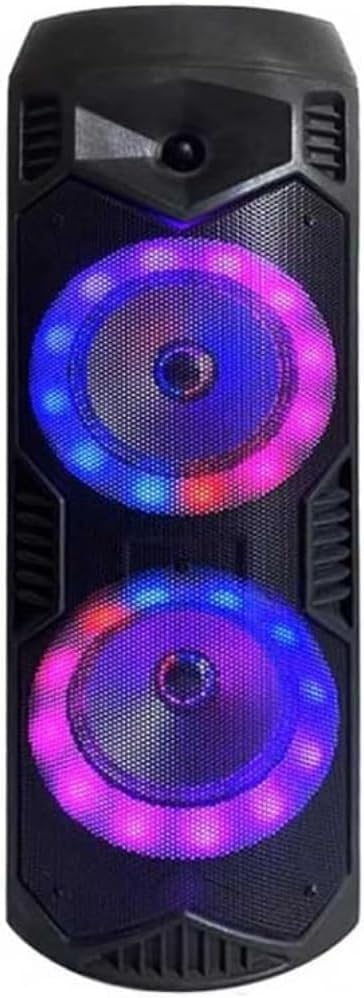
Figur 1: Front view of the Akai AKBT1400 Bluetooth Party Speaker.
This image displays the Akai AKBT1400 Bluetooth Party Speaker. It features a black, rectangular cabinet with a robust design. The front panel is dominated by two large circular speaker grilles, each housing a woofer. These woofers are surrounded by vibrant, multi-colored LED lights (blue and purple are prominent), indicating the speaker's party-oriented functionality. The top and bottom sections of the speaker casing have textured details and what appear to be ventilation slots or design accents. The overall appearance suggests a portable and durable audio device.
Nøglefunktioner:
- Bluetooth Connectivity for wireless audio streaming.
- Integrated LED lighting effects for a party atmosphere.
- Portable design for use in various locations.
- Powerful audio output (4 Watts).
Control Panel (Assumed based on typical party speakers):
While specific controls are not detailed, typical party speakers include:
- Tænd/sluk-knap.
- Volume Up/Down buttons or knob.
- Mode button (to switch between Bluetooth, AUX, USB, etc.).
- Play/Pause, Skip Track buttons.
- LED light mode button.
- Opladningsport.
- AUX input port.
- Mikrofonindgang.
5. Opsætning
5.1 Tænd/sluk
- To power on the speaker, press and hold the Power button (location typically on the top or rear panel) for a few seconds until the indicator lights illuminate.
- To power off, press and hold the Power button again until the indicator lights turn off.
5.2 Charging (if battery-powered)
If your speaker is battery-powered, connect the charging cable to the speaker's charging port and the other end to a suitable USB power adapter (not included) or a powered USB port. The charging indicator light will show the charging status and turn off or change color when fully charged.
6. Betjeningsvejledning
6.1 Bluetooth -parring
- Sørg for, at højttaleren er tændt og i Bluetooth-parringstilstand. Bluetooth-indikatorlampen blinker typisk hurtigt.
- Gå til Bluetooth-indstillingerne på din smartphone, tablet eller anden Bluetooth-aktiveret enhed.
- Søg efter available devices. You should see "AKBT1400" or a similar name in the list.
- Select "AKBT1400" to connect. Once paired, the Bluetooth indicator light will stop flashing and remain solid.
- You can now play audio wirelessly through the speaker.
6.2 Lydafspilning
- Lydstyrkekontrol: Adjust the volume using the volume buttons/knob on the speaker or directly from your connected device.
- Afspil/pause: Press the Play/Pause button on the speaker to control playback.
- Spornavigation: Use the Previous/Next track buttons on the speaker to skip songs.
6.3 LED-lyseffekter
Press the dedicated LED light button (if available) to cycle through different lighting modes or to turn the lights on/off. Refer to the specific controls on your speaker for exact functionality.
6.4 Microphone Usage (if applicable)
If your speaker includes a microphone input, connect a compatible microphone to the designated port. Adjust the microphone volume or echo effects using the corresponding controls on the speaker.
7. Vedligeholdelse
- Rensning: Brug en blød, tør klud til at rengøre højttalerens yderside. Brug ikke slibende rengøringsmidler eller opløsningsmidler.
- Opbevaring: Når højttaleren ikke er i brug i længere perioder, skal den opbevares køligt og tørt, væk fra direkte sollys og ekstreme temperaturer.
- Batteripleje: If the speaker has a built-in rechargeable battery, charge it periodically even when not in use to maintain battery health.
8. Fejlfinding
| Problem | Mulig løsning |
|---|---|
| Højttaleren tænder ikke. | Ensure the speaker is charged or connected to a power source. Check the power cable connection. |
| Kan ikke parres via Bluetooth. |
|
| Ingen lyd eller lav lydstyrke. |
|
| Lydforvrængning. | Reduce the volume on both the speaker and your connected device. Ensure the audio file quality is good. |
9. Specifikationer
| Feature | Detalje |
|---|---|
| Mærke | AKAI |
| Modelnummer | AKBT1400 |
| Maksimal højttalerudgangseffekt | 4 watt |
| Speciel funktion | Bluetooth |
| Kompatible enheder | Smartphone, tablet |
| Monteringstype | Floor Mount, Table Mount |
| Farve | Flerfarvet |
| Produktets vægt | 800 g |
| Pakkedimensioner | 35 x 25 x 20 cm |
| Batterier medfølger | Ingen |
10. Garanti og support
For warranty information and technical support, please refer to the warranty card included with your product or visit the official AKAI webwebsted. Gem din købsbevis i tilfælde af garantikrav.
For further assistance, please contact AKAI customer service.


