1. Introduktion
This manual provides detailed instructions for the installation, operation, and maintenance of your TAFFIO TXH6701-4 Android Head Unit. This device integrates advanced navigation, communication, and entertainment features into your Porsche Macan, enhancing your driving experience.
2. Produktet er slutview
The TAFFIO TXH6701-4 is a 12.3-inch touchscreen Android head unit designed to seamlessly integrate with Porsche Macan vehicles equipped with PCM 4.0. It offers a high-resolution display and a comprehensive suite of features.
Nøglefunktioner:
- 1920 x 720 Full HD Video Resolution Capacitive Touchscreen Display
- Intuitive 3D User Interface
- Powered by a Snapdragon Qualcomm 668s 8-core processor (2.0 GHz) with 8 GB RAM and 128 GB internal storage
- Integrated Wireless Apple CarPlay and Android Auto functionality
- Built-in Wi-Fi for direct connection to hotspots
- 4G LTE SIM card slot for mobile internet connectivity
- FM/AM radio tuner with RDS
- USB slots for media playback
- Bluetooth A2DP for music streaming
- Supports original car functions including rearview camera and parking distance control (PDC)
- Automatic screen brightness adjustment (Day & Night Display function)
- Subwoofer output, 4x audio output, 2x video out, 1x AUX video in

Figure 2.1: The TAFFIO TXH6701-4 Android Head Unit displaying its main interface with various application icons.
3. Kompatibilitet
This head unit is compatible with Porsche Macan models from 2017 onwards that are equipped with the PCM 4.0 system. It is crucial to verify your vehicle's current system to ensure proper functionality.
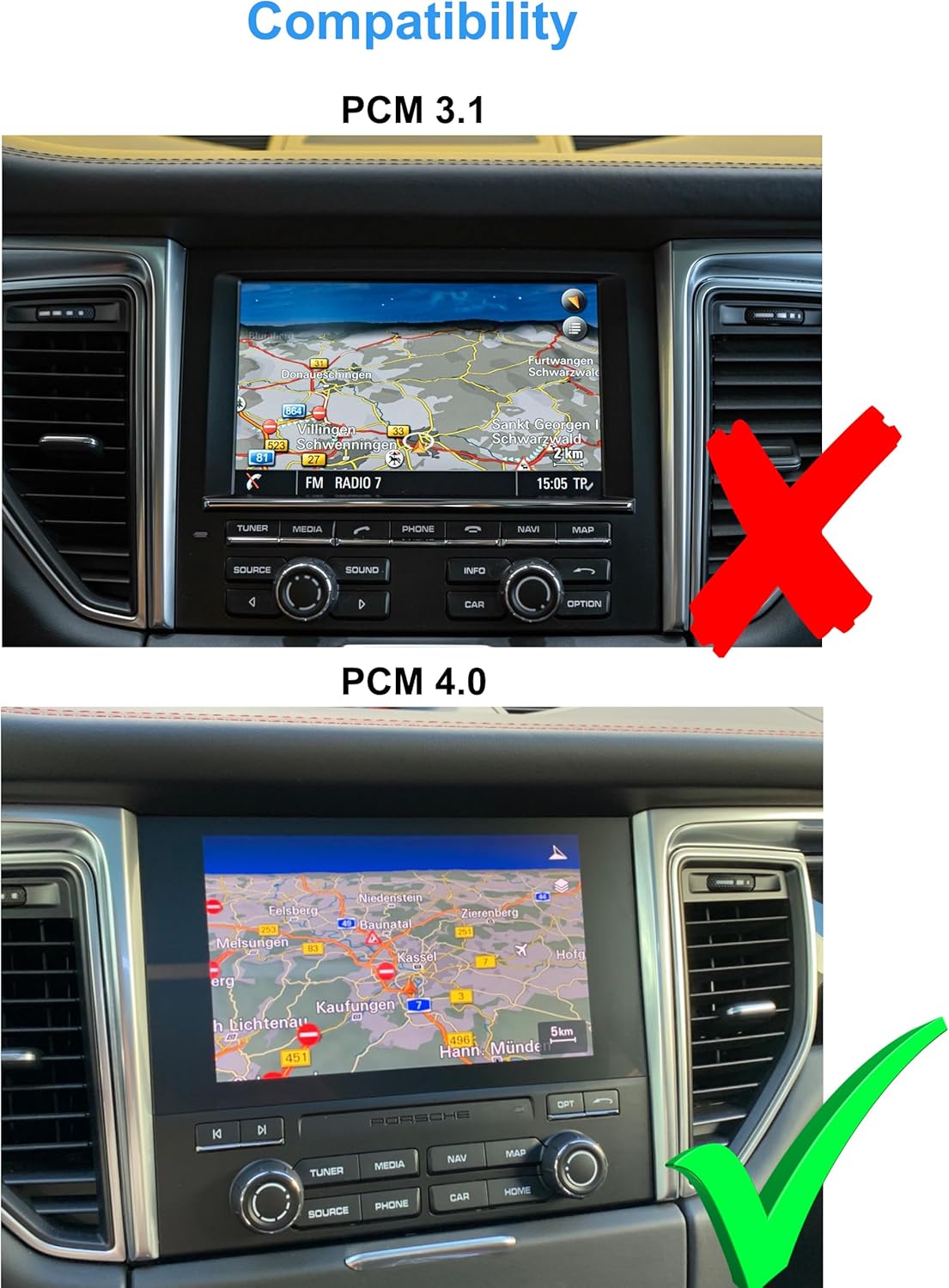
Figure 3.1: Visual guide for identifying PCM 3.1 (incompatible, marked with a red X) versus PCM 4.0 (compatible, marked with a green checkmark) in a Porsche Macan dashboard.
4. Pakkens indhold
Please ensure all items listed below are present in your package before proceeding with installation.
- 1x Multimedia Display
- Panels and mounting accessories
- 1x Power cable with Canbus decoder
- 2x USB-kabler
- 2x Radio antenna adapters
- 1x Audio/Video cable
- 1x GPS antenne
- 2x 4G antennas
- 1x PDF manual (available for download)
- 1x Invoice and 24 months warranty information

Figur 4.1: En overview of all components included in the TAFFIO TXH6701-4 package, including the multimedia display, power cables, antennas, and various adapters.
5. Opsætning og installation
The TAFFIO TXH6701-4 is designed for a Plug & Play installation, minimizing the need for additional adapters or mounting frames. However, professional installation is recommended to ensure correct wiring and functionality.
Installationstrin (generel vejledning):
- Forberedelse: Sørg for, at køretøjets tænding er slukket, og at batteriet er frakoblet, før du starter.
- Fjern original enhed: Carefully remove the existing PCM unit and associated trim panels from the dashboard. Refer to your vehicle's service manual for specific instructions on panel removal.
- Tilslut ledninger: Connect the provided power cable with the Canbus decoder to the vehicle's wiring harness. Connect the GPS antenna, 4G antennas, USB cables, and audio/video cables as indicated in the wiring diagram.
- Monter ny enhed: Secure the TAFFIO multimedia display using the provided mounting plates and frames. Ensure all connections are firm and properly routed to avoid pinching.
- Test funktionalitet: Reconnect the battery and turn on the ignition. Test all functions of the new head unit, including touch response, audio, navigation, radio, and connectivity features.
- Saml igen: Når alle funktioner er verificeret, skal du forsigtigt samle instrumentbrættets beklædningspaneler igen.

Figure 5.1: The Porsche Macan dashboard showing the original PCM unit before the installation of the TAFFIO Android Head Unit.
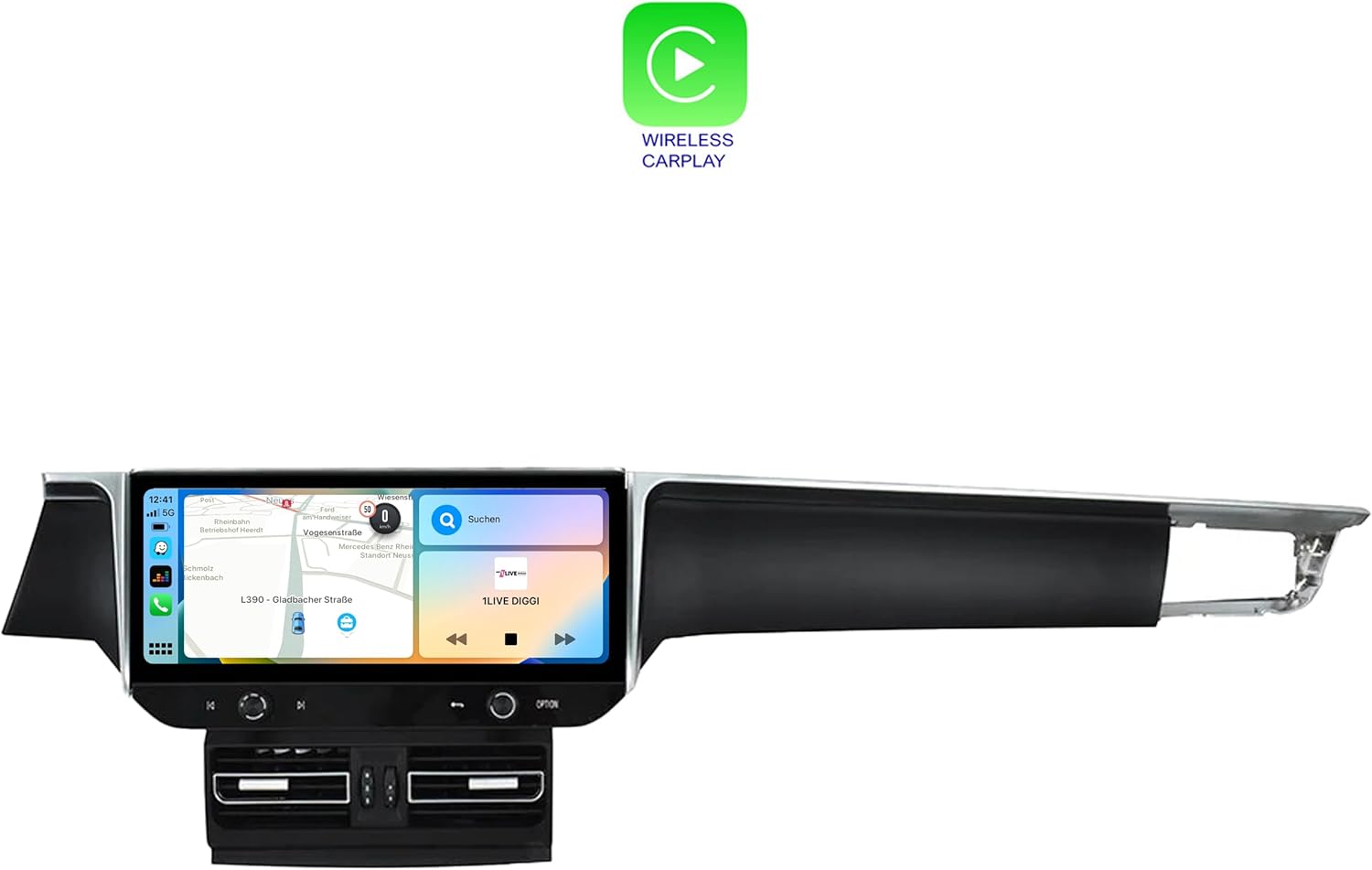
Figure 5.2: The Porsche Macan dashboard after the successful installation of the TAFFIO Android Head Unit, showcasing dens integrerede udseende.

Figure 5.3: Detailed wiring diagram illustrating the connections for the TAFFIO TXH6701-4 head unit, including connections to the radio, GPS, 4G antennas, USB, and RCA plugs.
6. Betjeningsvejledning
The TAFFIO Android Head Unit features a user-friendly touchscreen interface. Navigate through menus by tapping icons and swiping across the screen.
6.1. Grundlæggende navigation
- Startskærm: Access primary functions like Navigation, Radio, Music, and Setup directly from the home screen.
- App Skuffe: Stryg opad eller tryk på appikonet for at view alle installerede applikationer.
- Indstillinger: Access system settings for display, sound, network, and vehicle-specific configurations.

Figure 6.1: The application menu of the TAFFIO Android Head Unit, showing various pre-installed and user-installed apps such as Chrome, Android Settings, Phone Link, and navigation applications.
6.2. Apple CarPlay og Android Auto
The unit supports integrated Wireless Apple CarPlay and Android Auto. Connect your smartphone wirelessly to access navigation, music, messages, and other compatible apps directly on the head unit's display.
- Aktivering: Ensure Bluetooth and Wi-Fi are enabled on your smartphone. Follow the on-screen prompts on the head unit to pair your device.
- Funktionalitet: Once connected, your phone's compatible apps will appear on the head unit's screen, allowing for voice control and touch interaction.

Figure 6.2: The Wireless Apple CarPlay interface displayed on the TAFFIO head unit, showing navigation, communication, and media applications.

Figure 6.3: The Android Auto interface displayed on the TAFFIO head unit, featuring navigation and media controls.
6.3. Radio
The unit includes an FM/AM radio tuner with RDS. Access the radio application from the home screen to tune into stations.
- Scanning: Use the on-screen controls to scan for available stations.
- Presets: Gem dine yndlingsstationer for hurtig adgang.

Figure 6.4: The radio interface of the TAFFIO head unit, showing frequency display and controls for tuning and saving favorite stations.
6.4. Navigation
The unit comes with current GPS navigation map material and offers free lifetime updates. Access the navigation application from the home screen.
- Destinationsindtastning: Input destinations via the touchscreen or voice command.
- Kortopdateringer: Information on map updates will be provided by the manufacturer.
6.5. Connectivity (Wi-Fi & 4G LTE)
- Wi-Fi: Connect to available Wi-Fi hotspots or your smartphone's hotspot for internet access.
- 4G LTE: Insert a 4G LTE SIM card into the designated slot for mobile internet connectivity without relying on Wi-Fi.
7. Vedligeholdelse
To ensure the longevity and optimal performance of your TAFFIO Android Head Unit, follow these maintenance guidelines:
- Rengøring af skærm: Brug en blød, fnugfri klud, der er specielt designet til elektroniske skærme.ampen the cloth slightly with water or a screen-cleaning solution if necessary. Avoid harsh chemicals or abrasive materials.
- Softwareopdateringer: Periodically check for software updates provided by TAFFIO to ensure you have the latest features and security patches.
- Miljøforhold: Undgå at udsætte enheden for ekstreme temperaturer, direkte sollys i længere perioder eller for høj fugtighed.
- Kabelforbindelser: Sørg for, at alle kabler er korrekt tilsluttet. Undgå at trække i kablerne med magt.
8. Fejlfinding
If you encounter issues with your TAFFIO Android Head Unit, refer to the following common troubleshooting steps. If the problem persists, contact customer support.
Almindelige problemer og løsninger:
- Enheden tænder ikke:
- Kontrollér alle strømtilslutninger, og sørg for, at de er tilsluttet korrekt.
- Verify the vehicle's battery is charged and connected.
- Check for blown fuses in the vehicle's fuse box related to the infotainment system.
- Ingen lyd:
- Sørg for, at lydstyrken ikke er slået fra eller indstillet til et meget lavt niveau.
- Kontroller lydkabelforbindelserne.
- Verify the correct audio output source is selected in the settings.
- Touchskærm reagerer ikke:
- Restart the unit by turning off the vehicle's ignition and restarting after a few minutes.
- Sørg for, at skærmen er ren og fri for snavs.
- GPS-signal mistet/unøjagtigt:
- Sørg for, at GPS-antennen er korrekt installeret og har en klar view af himlen.
- Kontroller GPS-antennens forbindelse til hovedenheden.
- CarPlay/Android Auto opretter ikke forbindelse:
- Ensure Bluetooth and Wi-Fi are enabled on your smartphone and the head unit.
- Forget the device on both the phone and head unit, then attempt to re-pair.
- Update your smartphone's operating system to the latest version.
9. Specifikationer
| Modelnavn | TXH6701-4 |
| Skærmstørrelse | 12.3 tommer |
| Opløsning | 1920 x 720 |
| Processor | Snapdragon Qualcomm 668s 8x 2.0 GHz |
| VÆDDER | 8 GB |
| Intern hukommelse | 128 GB |
| Operativsystem | Android 13 |
| Forbindelse | Bluetooth, USB, Wi-Fi, 4G LTE |
| Særlige funktioner | Touchscreen, Integrated CarPlay & Android Auto |
| Korttype | Verdensomspændende (med gratis livstidsopdateringer) |
| Lydudgangstilstand | AUX |
| Monteringstype | Dashboard montering |
10. Garanti og support
The TAFFIO TXH6701-4 Android Head Unit comes with a 2 års producentgaranti. Denne garanti dækker fejl i materialer og udførelse ved normal brug.
For Warranty Claims and Technical Support:
Please retain your purchase invoice as proof of purchase for any warranty claims. For technical assistance, troubleshooting beyond this manual, or to initiate a warranty claim, please contact TAFFIO customer support through the retailer where the product was purchased or refer to the contact information provided with your product documentation.
11. Sikkerhedsoplysninger
Observe the following safety symbols and guidelines for safe handling and disposal of the product.
Figure 11.1: Standard safety and handling symbols including 'This Way Up', 'Fragile', 'Keep Dry', CE Mark, FCC Mark, Recycling Symbol, and Waste Electrical and Electronic Equipment (WEEE) symbol.
- Installation: Ensure installation is performed by qualified personnel to prevent damage to the unit or vehicle.
- Operation: Betjen ikke enheden på en måde, der distraherer dig fra kørslen. Prioritér altid trafiksikkerhed.
- Bortskaffelse: Dispose of this product responsibly at designated collection points for electronic waste, in accordance with local regulations. Do not dispose of with household waste.


