1. Introduktion
The XTAR MX4 is an advanced 4-slot intelligent battery charger designed for a wide range of rechargeable batteries. It supports 1.5V Li-ion, 3.6V/3.7V Li-ion, 3.2V LiFePO4, and 1.2V Ni-MH battery types, offering a versatile charging solution. The MX4 incorporates multiple safety features and smart charging technology to ensure efficient and safe battery charging.
2. Pakkens indhold
Bekræft at alle varer er til stede i pakken:
- XTAR MX4 Battery Charger
- USB A til C kabel
- Brugervejledning (dette dokument)

Image: The XTAR MX4 charger, a USB-A to USB-C cable, and the user manual are shown neatly arranged next to the product packaging.
3. Specifikationer
| Feature | Detalje |
|---|---|
| Model | MX4 |
| Input | 5V - 2A |
| Konstant ladestrøm | 1 A x 2 / 0.5 A x 4 |
| Charge Cutoff Voltage (3.6/3.7V Li-ion) | 4.20 ± 0.05V |
| Charge Cutoff Voltage (1.5V Li-ion) | N/A (Internal regulation by battery) |
| Charge Cutoff Voltage (3.2V LiFePO4) | 3.65 ± 0.05V |
| Charge Cutoff Voltage (1.2V Ni-MH) | 1.45 ± 0.1V |
| Opladningsafskæringsstrøm | ≤100mA |
| Driftstemperatur | 0-40°C |
| Dimensioner | L100 x W97 x H26.3mm (3.9 x 3.8 x 1 inches) |
| Nettovægt | 100 g (5.6 ounce) |
| Certificeringer | CE, FCC, RoHS |
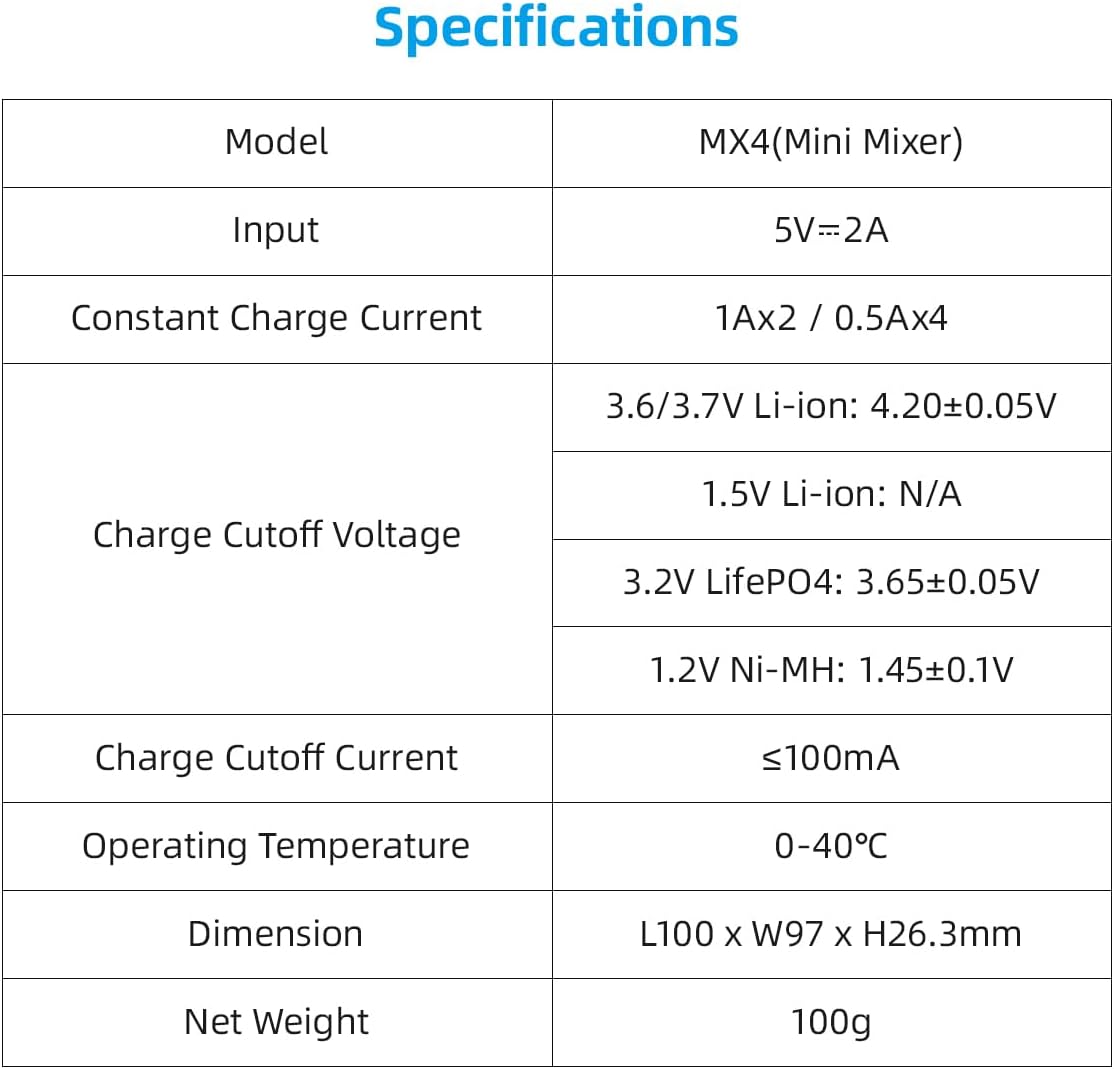
Image: A detailed table outlining the technical specifications of the XTAR MX4 charger, including input voltage, charge currents, cutoff voltages for different battery types, operating temperature, dimensions, and weight.
4. Opsætning
To set up your XTAR MX4 charger:
- Tilslut strøm: Use the provided USB A to C cable to connect the charger to a 5V 2A USB power adapter or a compatible USB power source. The charger's indicator lights will illuminate briefly upon connection.
- Placering: Placer opladeren på en stabil, flad og ikke-brandbar overflade, væk fra direkte sollys eller varmekilder.
5. Betjeningsvejledning
The XTAR MX4 features intelligent battery recognition and independent charging slots.
5.1 Isætning af batterier
Carefully insert one or more rechargeable batteries into the charging slots, ensuring the positive (+) and negative (-) terminals align correctly with the markings on the charger. The spring-loaded contacts accommodate various battery lengths.

Image: The XTAR MX4 charger with four different types of batteries inserted into its slots, demonstrating its multi-chemistry compatibility. Each battery type is clearly labeled with its voltage og kapacitet.
5.2 Opladningsproces
Upon insertion, the charger will automatically detect the battery type and initiate the appropriate charging mode. The LED indicator above each slot provides charging status:
- Rødt lys (fast): Batteriet oplades.
- Red Light (Slow Flash): Battery identification/activation in progress.
- Red Light (Rapid Flash): Recovery failed or an anomaly occurred.
- Grønt lys (fast): Charging is complete or no battery is present.
The charger employs an intelligent charging strategy (TC-CC-CV for Li-ion) to optimize battery lifespan and performance, automatically stopping when fully charged.
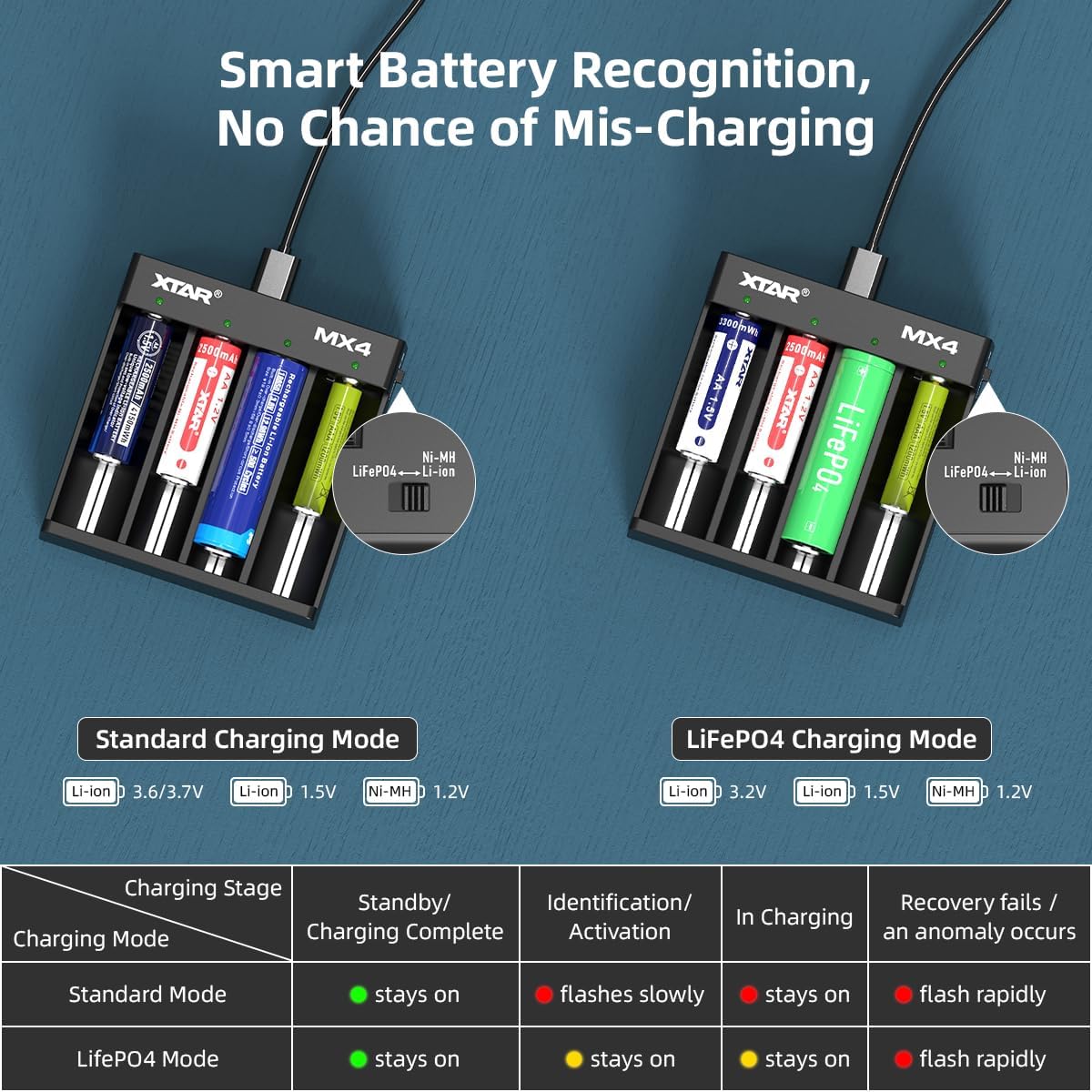
Image: A diagram illustrating the XTAR MX4's smart battery recognition feature, showing how it distinguishes between standard charging mode (Li-ion, Ni-MH) and LiFePO4 charging mode. A table below details the meaning of the LED indicator lights for each charging stage and mode.
6. Batterikompatibilitet
The XTAR MX4 is compatible with a wide range of cylindrical rechargeable batteries from 34mm to 70mm in length. Supported battery types include:
- 3.6V/3.7V Li-ion: 10440, 14500, 16340, 18350, 18500, 18650, 18700, 20700, 21700 (unprotected)
- 3.2V LiFePO4
- 1.5V litiumionbatteri: AAA, AA
- 1.2V Ni-MH: AAA, AA, A, SC, C

Image: A visual representation of the XTAR MX4's wide compatibility, showing various battery types and sizes (Li-ion, LiFePO4, Ni-MH, 1.5V Li-ion) that can be charged, along with a diagram of the charger itself.
7. Sikkerhedsoplysninger og beskyttelsesfunktioner
The XTAR MX4 charger is designed with multiple safety features to ensure a secure charging experience. Always adhere to the following safety guidelines:
- Use only compatible rechargeable batteries. Do not attempt to charge non-rechargeable batteries.
- Sørg for korrekt batteripolaritet, når du isætter batterier.
- Opladeren må ikke skilles ad eller modificeres.
- Hold opladeren væk fra vand, fugt og høje temperaturer.
- Tag opladeren ud af strømkilden, når den ikke er i brug eller under rengøring.
7.1 Built-in Protection Features
The MX4 incorporates advanced protection technologies:
- Intelligent detektion: Automatically identifies battery type and selects optimal charging parameters.
- Blød start: Gradually increases charging current to protect batteries.
- Kortslutningsbeskyttelse: Forhindrer skader fra kortslutninger.
- Overopladningsbeskyttelse: Automatically stops charging when batteries are full.
- Over-bindtage Beskyttelse: Beskyttelse mod overdreven volumentage input.
- Omvendt polaritetsbeskyttelse: Forhindrer skader, hvis batterierne isættes forkert.
- Timely Stop When Fully Charged: Ensures batteries are not overcharged, preserving their lifespan.

Image: A graphic illustrating the various protection technologies integrated into the XTAR MX4 charger, including intelligent detection, soft start, short circuit protection, over-charge protection, over-voltage protection, reverse polarity protection, and timely stop when fully charged.
8. Vedligeholdelse
To ensure the longevity and optimal performance of your XTAR MX4 charger:
- Rensning: Disconnect the charger from power before cleaning. Use a soft, dry cloth to wipe the surface. Do not use abrasive cleaners or solvents.
- Opbevaring: Opbevar opladeren på et køligt, tørt sted, når den ikke er i brug.
- Undgå dråber: Protect the charger from physical shocks and drops.
9. Fejlfinding
| Problem | Mulig årsag | Løsning |
|---|---|---|
| Opladeren tænder ikke. | Ingen strømforbindelse eller defekt kabel/adapter. | Ensure the USB cable is securely connected to both the charger and a working 5V 2A power source. Try a different USB cable or power adapter. |
| Battery not charging (Red light flashing rapidly). | Battery inserted incorrectly, battery is severely over-discharged, or battery is damaged. | Re-insert the battery ensuring correct polarity. If the issue persists, the battery may be too deeply discharged for recovery or is faulty. Try a different battery. |
| Opladningen er langsom. | Insufficient input power or charging too many batteries at high current. | Ensure your USB power adapter provides at least 5V 2A. The charger provides 1A for two slots or 0.5A for four slots. Charging four batteries simultaneously will result in 0.5A per slot. |
| LED is green but battery is not fully charged. | Poor contact with battery terminals or battery is not rechargeable. | Adjust the battery position to ensure good contact. Verify that the battery is indeed a rechargeable type compatible with the MX4. |
10. Garanti og support
XTAR products are manufactured with high quality standards. If your product arrives damaged or you encounter any issues, please contact XTAR customer support immediately. For products purchased on Amazon, you may reach out to the seller, AllmaybeDirect, for assistance. Replacements for damaged products can be swiftly dispatched from our California warehouse.
For further support or inquiries, please visit the official XTAR webwebstedet eller kontakt deres kundeservicekanaler.


