1. Vigtige sikkerhedsinstruktioner
Læs og forstå venligst alle sikkerhedsinstruktioner, før du bruger dette produkt. Gem denne manual til senere brug.
- Strømkilde: Use only the provided DC 5V 1A power adapter. Ensure the voltage matches the power supply before connecting.
- Vand og fugt: Do not expose the unit to rain, moisture, or liquids. Do not place objects filled with liquids, such as vases, on the unit.
- Varme: Hold enheden væk fra varmekilder såsom radiatorer, varmeapparater, komfurer eller andre apparater (herunder ampløftere), der producerer varme.
- Ventilation: Sørg for tilstrækkelig ventilation. Bloker ikke ventilationsåbninger.
- Rensning: Clean only with a dry cloth. Unplug the unit from the power outlet before cleaning.
- Service: Forsøg ikke selv at servicere dette produkt. Overlad al service til kvalificeret servicepersonale.
- Placering: Placer enheden på en stabil, plan overflade for at forhindre den i at falde.
- Stylus: Handle the stylus carefully to avoid damage. Keep out of reach of children.
2. Pakkens indhold
Bekræft, at alle nedenstående varer er inkluderet i din pakke:
- 1x Linen Suitcase Turntable
- 1x brugermanual
- 1x 7-inch Turntable Pad & Extra Stylus
- 1x 45RPM Adapter & DC 5V 1A Power Adapter
3. Produktet er slutview
3.1 Hovedkomponenter

Figur 1: Samlet set view of the TANLANIN TE-001D Record Player. This image shows the open suitcase design, the turntable platter with a pink record, the tone arm, and the built-in speakers.
The TANLANIN TE-001D is a portable suitcase-style vinyl record player designed for ease of use and versatility. Key components include:
- Pladespillerfad: Where vinyl records are placed for playback.
- Tonearm: Holds the stylus and tracks the grooves of the record.
- Stylus: The needle that reads the record's grooves.
- Indbyggede højttalere: Til direkte lydudgang.
- Kontrolpanel: Located on the top surface, featuring various buttons and ports.
- Suitcase Casing: Provides portability and protection.
3.2 Kontrolpanel og tilslutninger
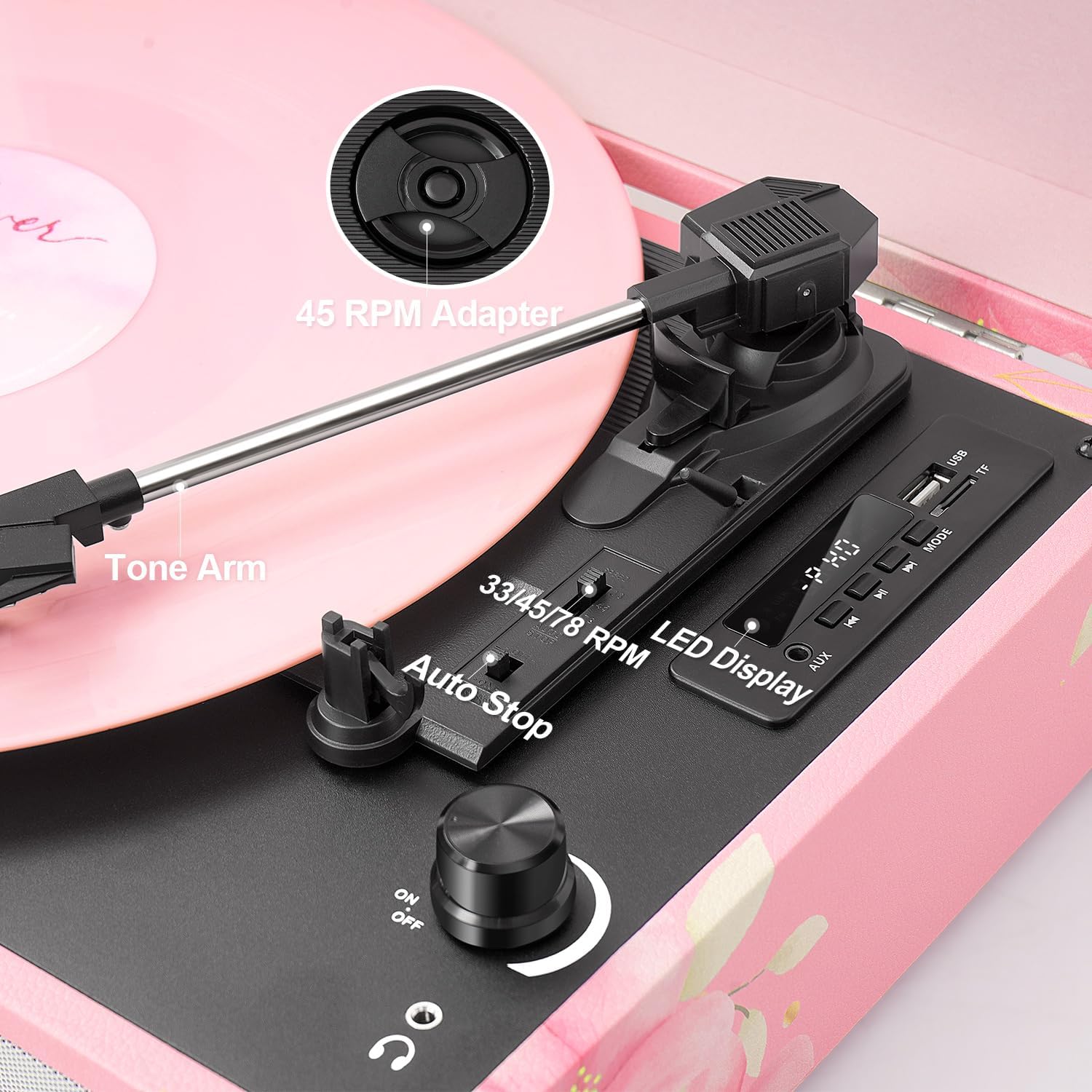
Figure 2: Close-up of the turntable's control area, showing the speed selector, auto-stop switch, and tone arm components.
Familiarize yourself with the following controls and connections:
- 33/45/78 RPM Selector: Switch to select playback speed for vinyl records.
- Automatisk stopknap: Enables or disables the automatic stop function at the end of a record.
- Power ON/OFF & Volume Knob: Tænder/slukker enheden og justerer højttalerens lydstyrke.
- Mode knap: Cycles through input modes (Phono, Bluetooth, AUX, USB, TF).
- EQ-tilstande: Selectable sound equalization presets (Pop, Rock, Jazz, Classic, Flat).
- USB-port: Til afspilning og optagelse fra USB-drev.
- TF-kortslot: Til afspilning og optagelse fra TF-kort.
- LED display: Viser den aktuelle tilstand og sporoplysninger.
- AUX-indgang: 3.5 mm jackstik til tilslutning af eksterne lydenheder.
- RCA-udgang: Til tilslutning til ekstern ampløftere eller elektriske højttalere.
- Hovedtelefonstik: 3.5 mm jackstik til privat lytning.
- DC IN-port: Til tilslutning af strømadapteren.
4. Opsætning
- Pakker ud: Tag forsigtigt pladespilleren ud af emballagen.
- Placering: Place the unit on a flat, stable surface away from direct sunlight, heat sources, and excessive dust or vibration.
- Strømtilslutning: Connect the DC 5V 1A power adapter to the DC IN port on the back of the unit, then plug the adapter into a wall outlet.
- Støvdæksel: Open the suitcase lid. Remove any protective materials from the turntable platter and tone arm.
- Turntable Pad: Place the included 7-inch turntable pad on the platter.
5. Betjeningsvejledning
5.1 Afspilning af vinylplader
- Tænd: Turn the Power ON/OFF & Volume knob clockwise to power on the unit.
- Vælg tilstand: Press the Mode button until 'PHONO' is displayed.
- Stedrekord: Placer en vinylplade på pladespillerens pladetallerken. Hvis du afspiller en 45 RPM single, skal du placere 45 RPM-adapteren på den midterste aksel først.
- Vælg hastighed: Set the 33/45/78 RPM selector to match the speed of your record.
- Auto stop: Set the Auto Stop switch to ON if you want the platter to stop automatically at the end of the record. Set to OFF for continuous play or for some records that may trigger auto-stop prematurely.
- Start afspilning: Gently lift the tone arm using the cue lever and position the stylus over the desired starting groove of the record. Slowly lower the tone arm onto the record.
- Juster lydstyrken: Rotate the Power ON/OFF & Volume knob to adjust the sound level.
- Afslut afspilning: At the end of the record (or when manually stopping), gently lift the tone arm using the cue lever and return it to the tone arm rest. Secure it with the tone arm clip.
5.2 Bluetooth-tilstand

Figure 3: The record player connected via Bluetooth to a smartphone, enabling wireless music streaming.
- Vælg tilstand: Press the Mode button until 'BLUE' (or 'BT') is displayed on the LED screen. The unit will emit an audible tone, indicating it is in pairing mode.
- Aktiver Bluetooth: Aktiver Bluetooth på din mobilenhed (smartphone, tablet osv.) og søg efter tilgængelige enheder.
- Par: Select 'TANLANIN' (or similar device name) from the list of found devices. Once paired, the unit will emit another audible tone.
- Afspil musik: You can now play music from your device through the record player's speakers. Adjust volume using both the record player's knob and your device's volume controls.
5.3 USB/TF-kortafspilning

Figure 4: The control panel showing a USB drive inserted, indicating readiness for USB/TF playback or recording.
- Indsæt medie: Insert a USB drive into the USB port or a TF card into the TF card slot.
- Vælg tilstand: Press the Mode button until 'USB' or 'TF' is displayed. The unit will automatically begin playing MP3 files fra det indsatte medie.
- Kontrolelementer: Use the playback control buttons (Play/Pause, Next Track, Previous Track) on the control panel to manage your music.
5.4 USB/TF Card Recording (Vinyl to Digital)
- Indsæt medie: Ensure a USB drive or TF card is inserted into the corresponding slot.
- Vælg Phono-tilstand: Press the Mode button until 'PHONO' is displayed.
- Start optagelse: While a record is playing, press and hold the 'REC' button (often combined with the Play/Pause button) on the control panel. The LED display may indicate 'REC' or a recording timer.
- Stop optagelse: Press the 'REC' button again to stop recording. The recorded audio will be saved as an MP3 file on your USB drive or TF card.
5.5 EQ-tilstande
The unit features five equalization modes to customize your listening experience:
- Pop
- Klippe
- Jazz
- Klassisk
- Flad (default, no equalization)
To select an EQ mode, press the 'EQ' button (often combined with the Mode button or a dedicated button) repeatedly until the desired mode is displayed on the LED screen.
5.6 Eksterne forbindelser
- AUX-indgang: Connect an external audio source (e.g., MP3 player, smartphone) to the AUX IN jack using a 3.5mm audio cable. Select 'AUX' mode on the record player.
- RCA-udgang: Connect the RCA OUT jacks (red for right, white for left) to an external amplifier or powered speakers for enhanced sound.
- Hovedtelefonstik: Plug 3.5mm headphones into the headphone jack for private listening. The built-in speakers will be muted when headphones are connected.
6. Vedligeholdelse
6.1 Rengøring af enheden
- Tag altid stikket ud af stikkontakten før rengøring.
- Use a soft, dry cloth to wipe the exterior surfaces. Do not use abrasive cleaners, waxes, or solvents.
- Gently wipe the dust cover with a soft cloth.
6.2 Pleje af pennen
- Pennen er sart. Håndter den med ekstrem forsigtighed.
- Rengør pennen med jævne mellemrum med en blød børste, og børst forsigtigt bagfra og forfra.
- A worn stylus can damage records and degrade sound quality. Replace the stylus after approximately 200-300 hours of playback.
6.3 Udskiftning af pennen
Refer to the diagram below for stylus replacement. If unsure, consult a qualified technician.
- Gently pull the old stylus cartridge downwards and forwards to detach it.
- Align the new stylus cartridge and push it upwards and backwards until it clicks into place.
7. Fejlfinding
| Problem | Mulig årsag | Løsning |
|---|---|---|
| Ingen strøm | Strømadapter ikke tilsluttet; Strømafbryder slukket | Ensure power adapter is securely connected and plugged into a working outlet. Turn the Power ON/OFF knob clockwise. |
| Ingen lyd | Lydstyrken er for lav; Hovedtelefoner er tilsluttet; Forkert tilstand valgt | Increase volume. Disconnect headphones. Select the correct input mode (e.g., PHONO for records). |
| Spring over rekord | Dirty record; Worn stylus; Unit not level | Clean the record. Replace the stylus. Place the unit on a stable, level surface. |
| Bluetooth forbinder ikke | Not in Bluetooth mode; Device too far; Already connected to another device | Ensure unit is in Bluetooth mode. Move device closer. Disconnect from other Bluetooth devices. |
| USB/TF not playing | Incorrect mode; Unsupported file format; Beskadiget medie | Select USB/TF mode. Ensure files are MP3 format. Try different USB/TF media. |
8. Specifikationer

Figure 5: Product dimensions for the TANLANIN TE-001D.
| Feature | Detalje |
|---|---|
| Modelnavn | TE-001D |
| Mærke | TANLANIN |
| Produktdimensioner | 13.5 x 10.5 x 5 tommer |
| Varens vægt | 6 pund |
| Maksimal rotationshastighed | 78 RPM (Supports 33, 45, 78 RPM) |
| Forbindelse | Bluetooth 5.0, USB, TF Card, AUX Input, RCA Output, Headphone Jack |
| Særlige funktioner | Anti-Resonance, Digital Recorder (Vinyl to USB/TF), Headphone Jack Output, EQ Modes |
| Materiale | Engineered Wood, Metal, Plastic |
| Strømforbrug (tændt tilstand) | 5 watt |
| Inkluderede komponenter | 1x 45RPM Adapter, 1x DC 5V 1A Power Adapter, 1x 7-inch Turntable Pad, 1x Extra Stylus, 1x Linen Suitcase Turntable, 1x User Manual |
9. Garanti og support
This product comes with a standard manufacturer's warranty. For detailed warranty information, please refer to the warranty card included in your package or contact TANLANIN customer support.
If you encounter any issues or have questions regarding your TANLANIN TE-001D record player, please contact our customer support team through the retailer's platform or the contact information provided in your product documentation. Please have your model number (TE-001D) and purchase date ready when contacting support.


