1. Introduktion
Thank you for choosing the Flyrivergo YZM-61 Digital Platform Scale. This manual provides essential information for the safe and efficient operation of your scale. Please read these instructions carefully before use and retain them for future reference. This industrial-grade digital platform scale is designed for accurate weighing in various settings, including industrial, commercial, and small business environments, with a maximum capacity of 660 lbs (300 kg) and an accuracy of 0.1 lbs (50g).
2. Sikkerhedsoplysninger
Observe the following safety precautions to prevent injury or damage to the scale:
- Overskrid ikke den maksimale vægtkapacitet på 300 kg.
- Placer vægten på en stabil, plan overflade for at sikre nøjagtige aflæsninger.
- Undgå at tabe vægten eller udsætte den for kraftige stød.
- Hold vægten væk fra vand og overdreven fugt.
- Do not attempt to disassemble or repair the scale yourself. Contact qualified personnel for service.
- Use only the provided AC adapter for charging and power.
- Ensure proper ventilation when charging the battery.
3. Pakkens indhold
Kontroller, at alle komponenter er til stede ved udpakning:
- Digital Platform Scale (Platform and Display Unit with Stand)
- AC strømadapter
- Brugermanual
4. Samling og opsætning
Follow these steps to assemble and prepare your scale for first use:
- Udpakning: Tag forsigtigt alle komponenter ud af emballagen. Undersøg for eventuelle skader.
- Saml stativet: Attach the display unit to the vertical stand, and then secure the stand to the weighing platform. Ensure all connections are firm. Some models may require screwing the stand to the platform from underneath.
- Strømtilslutning: Connect the AC power adapter to the scale's power input and plug it into a standard electrical outlet. The scale can operate directly from AC power or use its internal rechargeable DC battery.
- Indledende opladning: For optimal battery life, fully charge the scale before its first use. The battery indicator on the display will show charging status. The scale can operate while charging.
- Placering: Place the assembled scale on a firm, level surface. Adjust the four adjustable feet at the base of the platform to ensure stability and prevent wobbling. This is crucial for accurate measurements.
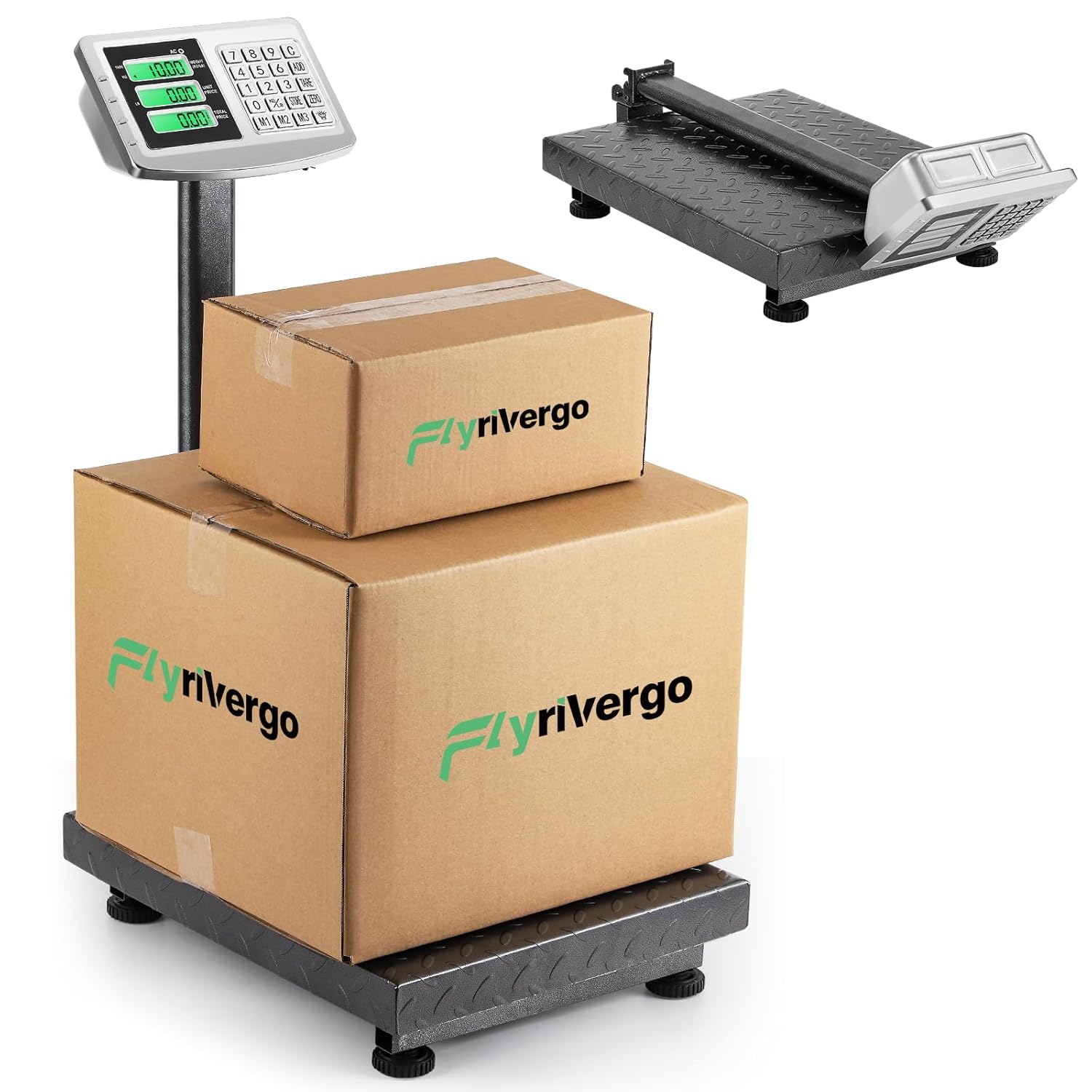
The Flyrivergo YZM-61 Digital Platform Scale, fully assembled, with two packages placed on its robust weighing platform. This image illustrates the scale's operational setup and capacity for handling various package sizes.

This image highlights the large platform of the Flyrivergo YZM-61 scale, showing the adjustable feet for stability and the textured carbon steel surface designed for secure weighing.
5. Betjeningsvejledning
Familiarize yourself with the scale's functions for accurate and efficient weighing.
5.1 Tænd/sluk
- Tryk på [ON/OFF] knappen for at tænde eller slukke vægten.
- The display will illuminate and perform a self-check before showing '0.00'.
5.2 Zeroing and Calibration
To ensure accuracy, zero the scale before each use or after placing an empty container.
- With nothing on the platform, press the [NUL] knappen. Displayet nulstilles til '0.00'.
- This function compensates for minor weight fluctuations or an empty container.
5.3 Vejningsprocedure
- Sørg for, at vægten er nulstillet.
- Carefully place the item to be weighed onto the center of the platform.
- Aflæs den stabile vægt, der vises på skærmen.
5.4 Unit Conversion (LB/KG)
The scale supports switching between pounds (LB) and kilograms (KG).
- Tryk på [LB/KG] button to toggle between the two units.
- The active unit (KG or LB) will be indicated on the display.

The display of the Flyrivergo YZM-61 scale illustrating the unit conversion feature, showing how the weight indication changes between kilograms (KG) and pounds (LB).
5.5 Tara funktion
Use the Tare function to subtract the weight of a container, allowing you to weigh only the contents.
- Anbring en tom beholder på platformen.
- Tryk på [TARE] button. The display will reset to '0.00', effectively removing the container's weight.
- Now, place the items to be weighed into the container. The display will show the net weight of the items.
5.6 Pricing Function
This scale includes a pricing function for calculating total cost based on weight and unit price.
- After weighing an item, enter the unit price using the numeric keypad.
- The scale will automatically calculate and display the total price.
- Use memory buttons [M1], [M2], [M3] to store and recall frequently used unit prices.
5.7 Akkumuleringsfunktion
The accumulation function allows you to sum the weights or prices of multiple items.
- After weighing an item and, if applicable, setting its price, press the [TILFØJE] button. The weight/price will be added to the total.
- Repeat for subsequent items.
- Til view the accumulated total, refer to the display.
5.8 Battery Display and Overweight Reminder
- The display includes an indicator for the current battery level. Recharge the scale when the battery is low.
- An overweight reminder will activate if the weight on the platform exceeds the maximum capacity, protecting the scale from damage.

A close-up of the Flyrivergo YZM-61 scale's control panel and display, detailing its versatile functionality. Icons represent features such as unit conversion (KG/LB), tare removal, pricing, accumulation, and battery level display, indicating a comprehensive tool for various weighing needs.
6. Vedligeholdelse
Korrekt vedligeholdelse sikrer din vægts levetid og nøjagtighed.
- Rensning: Tør vægtens overflade af med en blød kludamp klud. Brug ikke slibende rengøringsmidler, og nedsænk ikke vægten i vand.
- Opbevaring: When not in use, the scale's 90-degree folding design allows for convenient storage. Fold the display stand down to save space. Store in a dry, cool environment.
- Batteripleje: Recharge the battery regularly, even if the scale is not in frequent use, to maintain battery health. Avoid completely draining the battery for extended periods.

This image illustrates the Flyrivergo YZM-61 scale's 90-degree folding design. It shows the scale in its upright, operational position and then transitioning to a compact, folded state, emphasizing its convenience for storage and transport.
7. Fejlfinding
Hvis du støder på problemer med din vægt, kan du se følgende almindelige problemer og løsninger:
| Problem | Mulig årsag | Løsning |
|---|---|---|
| Skalaen tænder ikke | Lavt batteri eller ingen strømforbindelse | Connect the AC adapter and charge the battery. Ensure the power outlet is functional. |
| Unøjagtige aflæsninger | Scale not level, unstable surface, or not zeroed | Place the scale on a firm, level surface. Adjust feet. Press [NUL] before weighing. Avoid drafts or vibrations. |
| Display shows 'OVERLOAD' | Vægten overstiger den maksimale kapacitet | Fjern overskydende vægt med det samme for at forhindre skader. |
| Cannot switch units (e.g., stuck on KG) | Incorrect operation or temporary software glitch | Ensure no weight is on the platform. Press [LB/KG] firmly. If issue persists, power cycle the scale (turn off, wait 10 seconds, turn on). |
| Skærmen er svag eller flimrer | Lavt batteri | Genoplad vægtens batteri. |
8. Specifikationer
| Feature | Detalje |
|---|---|
| Modelnummer | YZM-61 |
| Mærke | Flyrivergo |
| Vægt kapacitet | 660 lbs (300 kg) |
| Nøjagtighed | 0.1 lbs (50 g) |
| Display Type | LCD |
| Strømforsyning | AC Adapter / DC Rechargeable Battery |
| Batterilevetid | Up to 10 continuous days (on full charge) |
| Materiale | All Stainless Steel body, Carbon Steel surface |
| Formfaktor | Sammenfoldelig |
| Farve | Grå |
| Omtrentlige dimensioner (samlet) | Height: 31.5 inches (80 cm), Width: 15.7 inches (40 cm), Depth: 19.6 inches (50 cm) |
| Omtrentlige pakkemål | 29.05 x 16.45 x 7.1 tommer |
| Omtrentlig varevægt | 21.75 pund |

The Flyrivergo YZM-61 scale is shown with its key dimensions labeled: 31.5 inches (80 cm) height, 15.7 inches (40 cm) width, and 19.6 inches (50 cm) depth. This provides a clear understanding of the scale's physical footprint and capacity for handling various item sizes.
9. Garanti og support
For warranty information or technical support, please refer to the contact details provided with your purchase documentation or visit the official Flyrivergo webwebsted. Gem din købskvittering som købsbevis i tilfælde af garantikrav.


