1. Introduktion
The LAUNCH Creader Elite V2.0 is an advanced diagnostic scan tool specifically designed for GM, Buick, Chevrolet, Cadillac, and GMC vehicles. This device offers comprehensive OE-level full system diagnostics, powerful bi-directional control (active tests), and a wide range of maintenance service resets. It supports AutoVIN for quick vehicle identification and includes full OBD2 modes for all vehicle brands manufactured after 1996. With its enhanced hardware and software, including a dismountable USB cable, larger 2G+16GB extended memory, Android 8.1 OS, and a 3000mAh battery, it provides a faster and smarter diagnostic experience. The tool also features lifetime free updates and online diagnostic feedback for continuous improvement and support.
2. Opsætningsvejledning
2.1. Unboxing and Initial Device Overview
Upon unboxing your LAUNCH Creader Elite V2.0, you will find the main diagnostic unit, an OBDII connector cable, a user manual, and a quick start guide. The device features a USB-C port for charging and data transfer, along with a dedicated serial port for connecting the OBDII cable. It is equipped with a touchscreen interface for intuitive navigation and control.

Figure 1: LAUNCH Creader Elite V2.0 Scan Tool and included accessories.
2.2. Initial Power-Up and Software Updates
Before connecting to a vehicle, it is highly recommended to power on the device indoors, connect it to a power source via the USB-C port, and connect it to your Wi-Fi network. This allows the device to download and install all available software updates, ensuring you have the latest features and vehicle compatibility. This update process may take some time, potentially 30 minutes or longer, depending on the number of updates.
2.3. Tilslutning til dit køretøj
Locate your vehicle's OBDII port, typically found under the dashboard on the driver's side. Connect the provided OBDII cable to the port and then to the serial port on the LAUNCH Creader Elite V2.0. The device will draw power from the vehicle's battery once connected.
3. Driftsprocedurer
3.1. OE-Level Full Systems Diagnostic
The LAUNCH Creader Elite V2.0 provides comprehensive diagnostics for all available vehicle modules, including ECM, BCM, SAS, ABS, TCM, and more. It supports reading and clearing fault codes, viewing live data streams, retrieving module information, and turning off warning lights. The device can automatically detect your vehicle's VIN for quick and accurate diagnostics.

Figur 2: Overview of OE-Level All Systems Diagnostics capabilities.
3.2. Powerful Bi-Directional Control (Active Tests)
This tool can send commands directly from the scanner to the vehicle's ECU to perform active tests on various components and parts. This helps confirm whether a part is functioning normally and assists in pinpointing potential problems. Examples include testing doors, windows, mirrors, lights, headlamps, wipers, sunroofs, air pump relays, fuel pump relays, spark advance, and cooling fan speeds.

Figur 3: Eksamples of bi-directional control functions.
3.3. All Free Maintenance Service Resets
The Creader Elite V2.0 offers a wide array of service options including Reset, Relearn, Match, Adaptation, Calibration, and Initialization. These functions cover common maintenance tasks such as Oil Light Reset, EPB, SAS, Throttle Relearn, DPF Regeneration, ABS Bleeding, Injector Coding, CVT, Air Suspension, Crankshaft Relearn, Gear Learning, and Battery Registration. Compatibility of functions may vary by vehicle model and year.

Figure 4: Various maintenance reset functions available.
3.4. AutoVIN and Full OBD2 Modes
For 2006+ GM cars (Buick, Chevy, Cadillac, GMC, etc.), the AutoVIN feature allows automatic access to car information and system scanning with a single touch, eliminating the need for manual VIN input. Additionally, the tool supports all 10 OBD2 test modes for all vehicle brands manufactured after 1996, including I/M readiness, O2 Monitor Test, EVAP test (Mode 8), and On-board Monitor test (Mode 6).

Figure 5: Full OBD2 functionality for various car brands.
3.5. Live Data Stream and Health Reports
The device allows for intuitive viewing of 4-in-1 live data streams, presenting vehicle conditions in text or graph format to help analyze abnormal parameters. You can also generate and share vehicle health reports via email for easy record-keeping and printing.
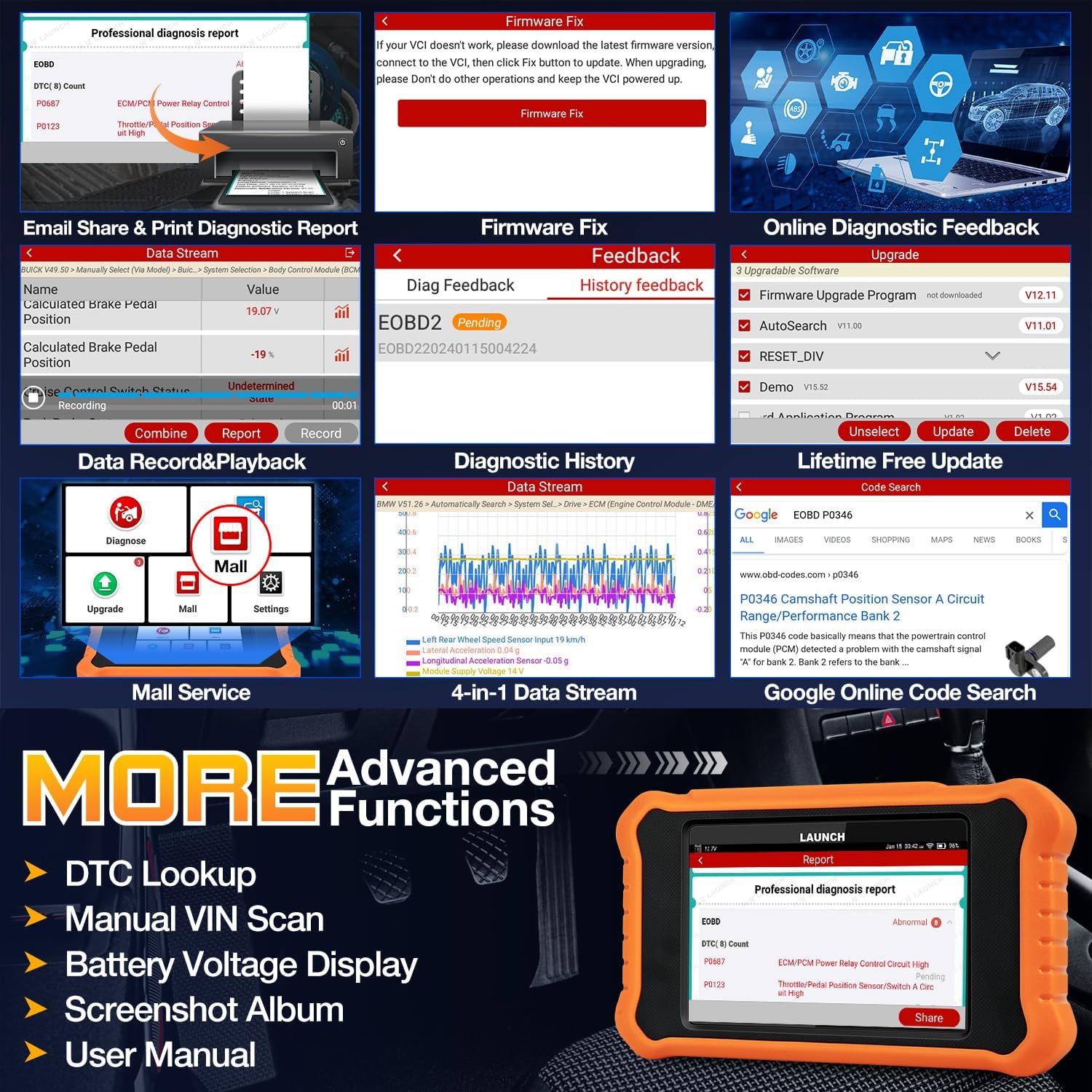
Figure 6: Advanced functions including diagnostic reports and data stream.
3.6. Using Special Functions and Active Tests
Video 1: This video demonstrates how to access Special Functions and Active Tests on the LAUNCH Creader Elite V2.0, showing the process of navigating the menu to perform specific diagnostic actions.
4. Vedligeholdelse
4.1. Livstids gratis opdateringer
The LAUNCH Creader Elite V2.0 comes with lifetime free software updates, ensuring that your device always has the latest vehicle models and diagnostic features. Updates are performed via Wi-Fi, eliminating the need for SD cards or PC connections.

Figure 7: The device supports lifetime free updates via Wi-Fi.
4.2. Online Diagnostic Feedback
If you encounter any diagnostic problems or issues, the device allows you to submit online feedback directly to LAUNCH for analysis and troubleshooting. This feature helps you get valuable solutions and ensures continuous improvement of the product.
5. Fejlfinding
5.1. Sletning af diagnostiske fejlkoder (DTC'er)
The LAUNCH Creader Elite V2.0 can clear DTCs from your vehicle's systems, which will turn off associated warning lights. To clear codes, navigate to the 'Clear DTCs' option within the diagnostic menu and confirm the action. It is crucial to understand that clearing codes only removes the warning light; it does not fix the underlying problem that caused the code. If the root cause is not addressed, the code will reappear.
Video 2: This video illustrates the process of clearing diagnostic trouble codes (DTCs) using the LAUNCH Creader Elite V2.0. It shows the steps to navigate to the 'Clear DTCs' function and confirm the action, which can reset warning lights on the vehicle dashboard.
5.2. Connectivity and Update Issues
Ensure the device has a stable Wi-Fi connection for all operations, including software updates and online features. If updates are slow or fail, verify your network connection. The device charges via the vehicle's OBDII port when connected, but it's advisable to fully charge it via USB-C before extensive use.
6. Specifikationer
| Feature | Specifikation |
|---|---|
| Mærke | LANCERING |
| Modelnummer | LAUNCH X431 Elite 2.0 fit for GM |
| Operativsystem | Android 8.1 |
| Skærmopløsning | 800x480 |
| Varens vægt | 1.52 pund |
| Pakkedimensioner | 7.95 x 7.56 x 1.77 tommer |
| Batterier | 1 A-batterier påkrævet (medfølger) |
| Forbindelse | Wi-Fi, USB-C, OBDII Serial Port |
7. Garanti og support
7.1. Garantioplysninger
The LAUNCH Creader Elite V2.0 comes with a 5-year warranty. Additionally, a 60-day refund and replacement policy is available for eligible purchases.
7.2. Teknisk support
Enjoy lifetime free technical support for your device. For further assistance or to explore additional products, please visit the official LANCERING Butik.


