1. Introduktion
The Ibiza MOBILE800 is a versatile, battery-powered 800W portable audio system designed for various events and mobile use. It features multiple audio input options, including Bluetooth, USB, microSD, and AUX, along with dedicated inputs for microphones and a guitar. The system also includes sound effects, adjustable EQ, TWS (True Wireless Stereo) functionality, integrated lighting modes, and a recording feature. Its built-in wheels and trolley handle ensure easy transport.
This manual provides essential information for the safe and efficient operation of your MOBILE800 audio system. Please read it thoroughly before use and retain it for future reference.
2. Sikkerhedsinstruktioner
- Læs alle instruktioner, før du betjener enheden.
- Hold enheden væk fra vand, fugt og ekstreme temperaturer.
- Åbn ikke c'enasing. Der er ingen dele indeni, som kan serviceres af brugeren. Overlad al service til kvalificeret personale.
- Brug kun den medfølgende strømadapter til opladning.
- Sørg for korrekt ventilation omkring enheden for at forhindre overophedning.
- Undgå at placere tunge genstande på enheden.
- Do not expose the battery to excessive heat or direct sunlight.
- Bortskaf batterier ansvarligt i henhold til lokale regler.
3. Pakkens indhold
Kontroller venligst, at alle genstande er til stede ved udpakning:
- Ibiza MOBILE800 Portable Party Audio System
- Kablet mikrofon
- Strømadapter
- Brugervejledning (dette dokument)
4. Produktet er slutview
4.1. Forside og side View

Dette billede viser forsiden view of the Ibiza MOBILE800 portable audio system. It highlights the integrated trolley handle at the top, sturdy wheels at the bottom, and the vibrant multi-color LED lighting that frames the main speaker grille. A wired microphone and its connecting cable are shown in the foreground, indicating included accessories.
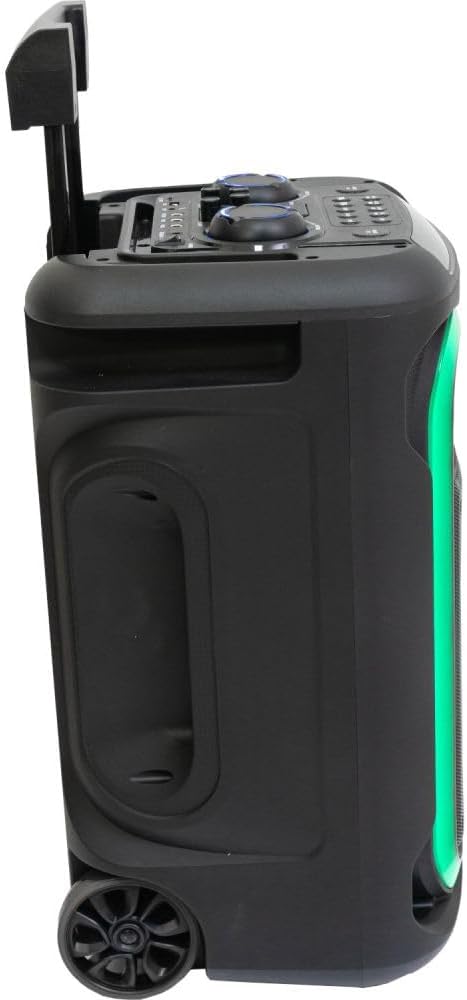
Dette billede viser en side view of the Ibiza MOBILE800 with its trolley handle fully extended, illustrating its readiness for transport. The side panel includes a recessed handle for easy lifting, and the dynamic LED lighting along the front edge is visible.
4.2. Kontrolpanel

Dette top-down view details the control panel of the Ibiza MOBILE800. It features various rotary knobs for adjusting volume, bass, treble, echo, and delay. Below these, a row of buttons provides control for mode selection, track navigation (previous, next), play/pause, record, TWS pairing, X-Bass activation, and LED lighting modes. Input ports for TF card, USB, AUX, Guitar, and two Microphones (MIC1, MIC2) are clearly labeled, along with the DC 15V power input and the main power switch (ON/OFF).
4.3. Portability Features
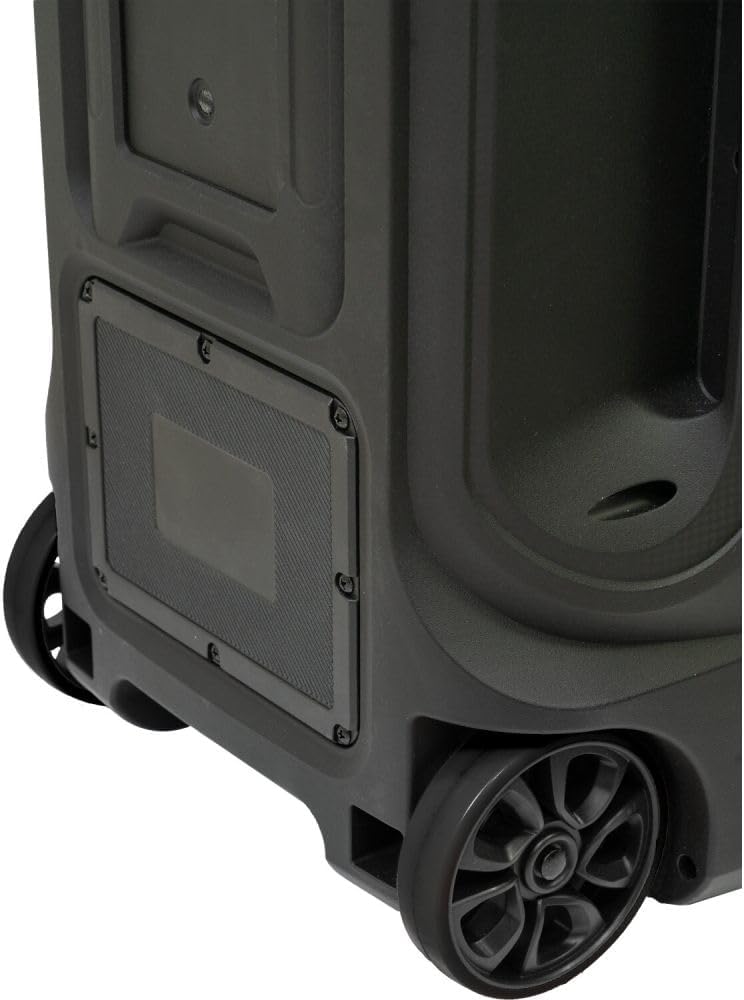
This close-up image focuses on the bottom rear section of the Ibiza MOBILE800, showcasing its robust wheels and the integrated mechanism for the trolley handle. These features are designed to facilitate easy and convenient transportation of the audio system.
5. Opsætning
5.1. Opladning af batteriet
- Connect the provided power adapter to the DC 15V input port on the control panel.
- Sæt strømadapteren i en passende stikkontakt.
- The charging indicator (if available) will illuminate. Allow sufficient time for a full charge before first use (typically 4-6 hours).
- Enheden kan bruges under opladning.
5.2. Første opstart
- Ensure the unit is charged or connected to power.
- Locate the POWER switch on the control panel.
- Flip the switch to the 'ON' position. The display will light up, indicating the unit is active.
6. Betjeningsvejledning
6.1. Valg af inputtilstand
Tryk på MODE button repeatedly to cycle through available input sources: Bluetooth, USB, microSD, and AUX.
6.2. Bluetooth-forbindelse
- Skift enheden til Bluetooth-tilstand ved hjælp af MODE button. The display will show 'BLUE' or a similar indicator, and a pairing tone may sound.
- On your mobile device, enable Bluetooth and search for 'MOBILE800'.
- Select 'MOBILE800' to pair. A confirmation tone will sound upon successful connection.
True Wireless Stereo (TWS) funktion
To connect two MOBILE800 units for stereo sound:
- Ensure both MOBILE800 units are powered on and in Bluetooth mode.
- On one unit (this will be the master), press and hold the TWS button. It will search for the other unit.
- Once connected, a confirmation tone will sound, and both units will play in stereo.
- Connect your mobile device to the master unit via Bluetooth as described above.
6.3. USB/MicroSD-afspilning
- Insert a USB drive or microSD card into the respective port.
- The unit will automatically switch to USB or microSD mode and begin playback. If not, press the MODE knap.
- Brug FORR, NÆSTE, og AFSPIL/PAUSE knapper til mediestyring.
6.4. AUX -indgang
- Tilslut en ekstern lydenhed (f.eks. smartphone, MP3-afspiller) til AUX input ved hjælp af et 3.5 mm lydkabel.
- Switch the unit to AUX mode using the MODE knap.
- Styr afspilningen fra din tilsluttede enhed.
6.5. Mikrofon- og guitarindgange
- Connect the wired microphone to either MIC1 or MIC2 input.
- Tilslut en guitar til GUITAR input.
- Juster mikrofonens lydstyrke ved hjælp af MIC.VOL knop.
- Adjust the guitar volume using the GT.VOL knop.
- Brug EKKO og FORSINKE knobs to add effects to the microphone/guitar sound.
- Tryk på MIC.PRI button to activate microphone priority, which automatically lowers music volume when speaking into the microphone.
6.6. Lydjusteringer
- BIND: Justerer den samlede masterlydstyrke.
- BAS: Justerer lavfrekvensudgangen.
- DISKANT: Justerer højfrekvent udgang.
- X-BAS: Press this button to activate or deactivate the bass boost function for enhanced low-end sound.
6.7. Belysningstilstande
Tryk på LED-TILSTAND button repeatedly to cycle through different integrated lighting effects or to turn the lights off.
6.8. Optagefunktion
The unit can record audio from microphone/guitar inputs directly to a connected USB drive or microSD card.
- Ensure a USB drive or microSD card is inserted.
- Connect your microphone or guitar.
- Tryk på REC knappen for at starte optagelsen.
- Tryk på REC knappen igen for at stoppe optagelsen.
- Optaget files will be saved to the USB drive or microSD card.
7. Vedligeholdelse
- Rensning: Brug en blød, tør klud til at rengøre enhedens yderside. Brug ikke slibende rengøringsmidler eller opløsningsmidler.
- Batteripleje: To prolong battery life, avoid fully discharging the battery frequently. Recharge the unit regularly, even if not in use, to maintain battery health. Store in a cool, dry place.
- Opbevaring: When storing the unit for extended periods, ensure it is fully charged and stored in a dry environment.
8. Fejlfinding
| Problem | Mulig årsag | Løsning |
|---|---|---|
| Ingen strøm | Battery discharged; Power switch off; Power adapter not connected. | Charge the battery; Turn the power switch ON; Connect the power adapter securely. |
| Ingen lyd | Lydstyrken er for lav; Forkert inputtilstand; Enheden er ikke tilsluttet korrekt. | Increase master volume; Select correct input mode; Check cable connections or Bluetooth pairing. |
| Bluetooth ikke parring | Unit not in Bluetooth mode; Device too far; Interference. | Sørg for, at enheden er i Bluetooth-tilstand; Flyt enheden tættere på; Genstart begge enheder. |
| Mikrofon/guitar virker ikke | Volume knob too low; Cable not connected; Microphone/Guitar issue. | Increase MIC.VOL/GT.VOL; Ensure cables are fully inserted; Test with another microphone/guitar if possible. |
| TWS-forbindelse mislykkes | Units too far apart; One unit not in Bluetooth mode. | Ensure both units are in Bluetooth mode and close to each other; Try re-initiating TWS pairing. |
9. Specifikationer
| Feature | Detalje |
|---|---|
| Modelnummer | 10-5591 |
| Strømudgang | 800 W (peak) |
| Musikkilder | Bluetooth, USB, microSD, AUX |
| Indgange | 1x Guitar, 2x Microphone (6.35mm), 1x AUX (3.5mm) |
| Effekter | Echo, Delay, Bass Boost (X-BASS) |
| Batteritype | Lead Acid 12 V 7 A |
| Strømforsyning | 15 Vdc 2 A |
| Strømforbrug | 120 W |
| Bluetooth-frekvens | 2402-2480 MHz |
| Dimensioner (L x B x H) | 350 x 300 x 590 mm (13.78 x 11.81 x 23.23 tommer) |
| Vægt | 11.35 kg (25 lbs) |
| Materiale | Plast |
| Inkluderede komponenter | Wired Microphone, Power Adapter |
10. Garanti og support
The Ibiza MOBILE800 audio system is covered by a manufacturer's warranty against defects in materials and workmanship. Please refer to the warranty card included with your product or contact your retailer for specific warranty terms and conditions.
For technical support, troubleshooting assistance, or service inquiries, please contact the retailer where you purchased the product or visit the official Ibiza Sound webwebsted for kontaktoplysninger.


