1. Produktet er slutview
The SUPVAN T200M is a compact and lightweight portable thermal printer designed for on-the-go printing. It utilizes thermal printing technology, eliminating the need for ink or ribbons. This manual provides essential information for setting up, operating, and maintaining your device.

Figure 1: SUPVAN T200M Portable Printer in use, showing a document being printed.
2. Hvad er der i æsken
- T200M Printer
- Stack Paper (50 sheets included)
- Roll Paper (1 roll included)
- USB C-kabel
- PC Software Harddrive (for driver installation)

Figure 2: The SUPVAN T200M printer alongside its included accessories, including paper and cables.
3. Opsætningsvejledning
3.1 Opladning af printeren
Before initial use, fully charge the printer using the provided USB-C cable. The indicator light will blink green while charging and turn solid green when fully charged. A 10-minute fast charge provides enough power to print approximately 20 pages.
3.2 Ilægning af papir
The T200M supports both stack paper and roll paper.
Loading Stack Paper:
- Open the paper entry cover.
- Insert the stack paper into the paper entry slot, ensuring the print side is facing the correct direction (usually the side that reacts to heat).
- The printer features an automatic paper loading function for batch printing.

Figure 3: Illustration of how to load stack paper into the printer for batch printing.
Loading Roll Paper:
- Open the printer's case by pulling both latches.
- Place the roll paper into the designated compartment inside the printer.
- Ensure the paper feeds smoothly through the print mechanism.
- Close the case securely. The printer has an on-device blade for tearing off prints.
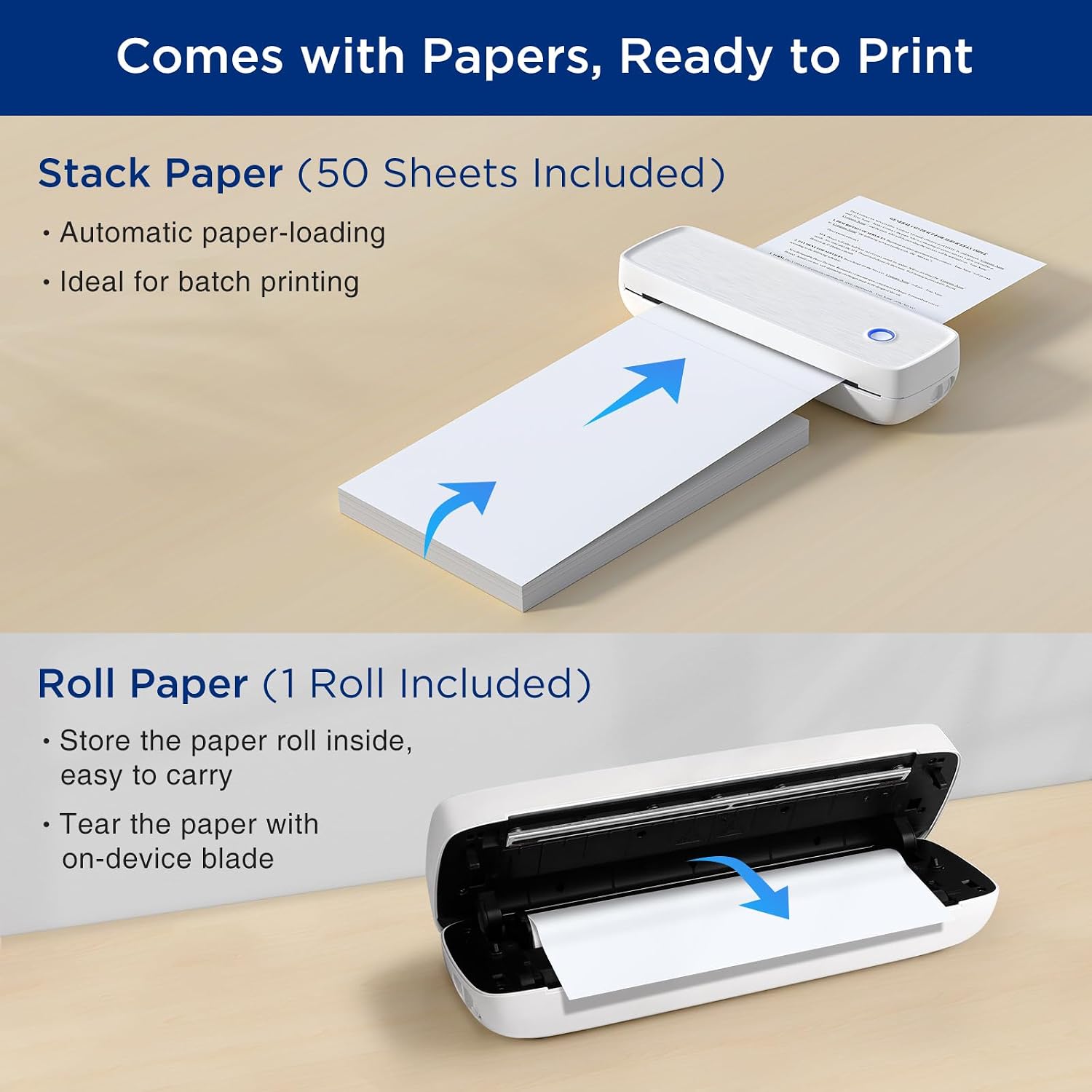
Figure 4: Steps for loading roll paper into the printer's internal compartment.
3.3 Tilslutning til din enhed
The SUPVAN T200M supports both stack paper and roll paper.
Smartphone Connection (Bluetooth):
- Download the "Katasymbol" App from the App Store (iOS) or Google Play Store (Android).
- Tænd for Bluetooth på din smartphone.
- Long press the power button on the printer to turn it on.
- Open the "Katasymbol" App, click "Add printer", and find "T200M printer" to connect.
PC/Laptop Connection (USB):
- Install the printer's driver for Windows or macOS from the included PC Software Harddrive or download it from the official webwebsted.
- Connect the printer to your PC/laptop using the provided USB-C cable.
4. Betjening af printeren
Once connected, you can use the "Katasymbol" App or your computer's print function to print documents, images, and various templates.
4.1 Udskrivning af dokumenter og billeder
- File Trykke: Import documents (PDF, Word, Excel, etc.) directly into the app for printing.
- File Scan: Use the app's scanning feature to digitize physical documents and print them.
- Images Print: Select images from your device's gallery to print.

Figure 5: The SUPVAN T200M printer being used in different professional and personal settings.
4.2 Print Quality and Performance
- Høj opløsning: The T200M offers 300 DPI print resolution, ensuring clear and detailed monochrome prints.
- Batteriydelse: Equipped with a 2600 mAh battery, it can print up to 400 pages or 366 feet of roll paper on a single charge.

Figure 6: Visual representation of the 300 DPI print resolution, highlighting its clarity for detailed graphics.
5. Vedligeholdelse
5.1 Indikatorlys betydninger
- Grøn: Normal operation / Charge completed
- Grøn blinker: Opladning
- Rød: Charging / No paper / Overheating / Case opening
- Røde blinker: Lavt batteri
- Blå: Bluetooth tilsluttet
- Blue blinks: Bluetooth fejl
5.2 Rengøring af printerhovedet
To ensure optimal print quality and longevity, regularly clean the printer head. Turn off the device, open the case, and gently wipe the print head with a soft, lint-free cloth. Do not use harsh chemicals or abrasive materials.
6. Fejlfinding
- Paper Not Aligning: Ensure the paper is inserted straight and correctly aligned with the feed guides. For stack paper, ensure the stack is even.
- Blanke udskrifter: If you are getting blank prints, try flipping the roll paper around so the curve is at the top, as thermal paper has a specific print side.
- Forbindelsesproblemer: Ensure Bluetooth is enabled on your device and the printer is within range. Try restarting both the printer and your device.
- Lavt batteri: If the indicator light blinks red, charge the printer using the provided USB-C cable.
7. Specifikationer
| Feature | Detalje |
|---|---|
| Modelnavn | T200M |
| Udskrivningsteknologi | Termisk |
| Printer output | Monokrom |
| Maksimal sort/hvid printopløsning | 300 DPI |
| Max Printspeed Monokrom | 20 ppm |
| Forbindelsesteknologi | Bluetooth, USB |
| Kompatible enheder | Laptops, PC, Smartphones, Tablets, iPhone |
| Maksimal mediestørrelse | 8.5 x 11 tommer (US Letter) |
| Max input arkkapacitet | 400 pages per charge |
| Varens vægt | 1.6 pund |
| Produktdimensioner | 11" D x 3.3" B x 2.3" H |
| Batteri | 2600 mAh litium-ion (inkluderet) |
| Strømforbrug (tændt tilstand) | 2 watt |
8. Garanti og support
The SUPVAN T200M Portable Printer comes with a limited warranty provided by SUPVAN. For detailed warranty terms and conditions, please refer to the documentation included with your product or contact SUPVAN customer support.
8.1 Kundesupport
For any questions, technical assistance, or support needs, please utilize the online service feature within the "Katasymbol" App or visit the official SUPVAN webwebsted.


