1. Introduktion
Thank you for choosing OhO Smart Glasses. These innovative glasses combine a Full HD camera and open-ear Bluetooth speaker headphones, offering a versatile and hands-free experience. They are designed for various activities, from daily use to sports, providing convenience and functionality.
This manual provides detailed instructions on setting up, operating, maintaining, and troubleshooting your OhO Smart Glasses to ensure optimal performance and longevity.

2. Produktkomponenter og deroverview
Familiarize yourself with the key components of your OhO Smart Glasses:
- Indbygget kamera: Located discreetly on the front frame for video recording.
- Open Ear Speakers: Integrated into the temples for audio playback without blocking your ears.
- Mikrofon: Til håndfri opkald og stemmekommandoer.
- Power knap: Controls power on/off and various functions.
- Knap til lydstyrkekontrol: Justerer lydstyrken.
- USB Cable Port (Type-C): Til opladning og dataoverførsel.
- Replaceable Lenses: Allows for customization and different lens types (e.g., blue light blocking, transition, polarized).


3. Opsætningsvejledning
3.1 Indledende opladning
Before first use, fully charge your OhO Smart Glasses. Connect the included USB Type-C cable to the glasses' charging port and the other end to a USB power adapter (not included) or a computer's USB port.
- Opladningsindikatorlampen viser opladningsstatus.
- A full charge typically takes approximately 60 minutes of working time.
- The glasses can record video while charging via a power bank.

3.2 Bluetooth -parring
Sådan forbinder du dine OhO Smart Glasses til din smartphone eller anden Bluetooth-aktiveret enhed:
- Sørg for, at brillerne er tændt.
- Aktiver Bluetooth på din smartphone.
- Søg efter available devices and select "OhO Smart Glasses" (or similar name) from the list.
- Once paired, you will hear an audio confirmation.

4. Betjeningsvejledning
4.1 Bluetooth Functions (Audio & Calls)
Your OhO Smart Glasses feature open-ear Bluetooth speakers for audio playback and hands-free calling.
- Musikafspilning: Once paired, audio from your device will play through the glasses' speakers. Use the volume control button on the temple to adjust sound levels.
- Besvarelse / afslutning af opkald: Press the Bluetooth button (refer to Figure 2.2) once to answer an incoming call. Press it again to end the call.
- Afvisning af opkald: Press and hold the Bluetooth button for 2 seconds to reject an incoming call.
- Stemmeassistent: Double-press the Bluetooth button to activate your smartphone's voice assistant (Siri, Cortana, Google Now). You can then use voice commands for navigation, music, weather updates, and more.
4.2 Camera Functions (Video Recording)
The built-in Full HD camera allows you to capture videos and highlight sections.
- Start optagelse: Press the Camera button (refer to Figure 2.2) once to begin video recording. The indicator light will change to confirm recording is active.
- Stop optagelse: Tryk på kameraknappen igen for at stoppe optagelsen.
- Highlight Video Section: During recording, press the Camera button briefly to mark a highlight section. This allows for easy identification of important moments during playback.
- Opbevaring: The glasses come with a built-in 256GB memory, capable of storing approximately 55 hours of camera information.


4.3 Data Transfer and Playback
To access recorded videos and photos, connect your OhO Smart Glasses to a computer using the provided USB Type-C cable. The glasses will appear as a removable storage device, allowing you to transfer files. You can also playback content directly on a computer or a TV.

5. Vedligeholdelse og pleje
Proper care will extend the life and performance of your OhO Smart Glasses.
- Rensning: Use a soft, lint-free cloth to clean the lenses and frame. For stubborn smudges, a specialized lens cleaning solution can be used. Avoid abrasive materials.
- Vandeksponering: Avoid exposing electronic components to water or excessive heat. The glasses are not waterproof.
- Opbevaring: Opbevar brillerne i et beskyttende etui, når de ikke er i brug, for at forhindre ridser og skader.
- Linsepleje: The blue light blocking and transition lenses are designed for durability and UV protection. Handle them with care to avoid scratches. The frame is compatible with prescription lenses, allowing for professional lens replacement if needed.


6. Fejlfinding
If you encounter issues with your OhO Smart Glasses, refer to the following common problems and solutions:
| Problem | Mulig årsag | Løsning |
|---|---|---|
| Briller tændes ikke. | Lavt batteri; enhedfejl. | Oplad brillerne helt. Kontakt support, hvis problemet fortsætter. |
| Bluetooth opretter ikke forbindelse. | Glasses not in pairing mode; device Bluetooth off; interference. | Ensure glasses are on and in pairing mode. Turn phone Bluetooth off/on. Move closer to device. |
| Ingen lyd fra højttalerne. | Lydstyrken er for lav; ikke tilsluttet; problem med lydkilden. | Increase volume on glasses and phone. Re-pair Bluetooth. Check audio source on phone. |
| Camera not recording. | Memory full; low battery; incorrect operation. | Overførsel files to free up memory. Charge glasses. Ensure correct button press for recording. |
| Dårlig videokvalitet. | Dirty lens; low light conditions. | Clean the camera lens. Ensure adequate lighting for recording. |
7. Produktspecifikationer
| Feature | Detalje |
|---|---|
| Model | OhO Smart Glasses (blue strip+Transition & blue light blocking+256GB) |
| Kameraopløsning | Fuld HD 1920x1080p |
| Intern hukommelse | 256GB (approx. 55 hours video storage) |
| Bluetooth version | 5.3 |
| Lyd | Open Ear Bluetooth Speaker Headphone |
| Batterilevetid | Approx. 60 minutes of continuous camera use per charge |
| Linseteknologi | Transitional Blue Light Blocking, Impact Resistant, 100% UV Protection Polarized Lens |
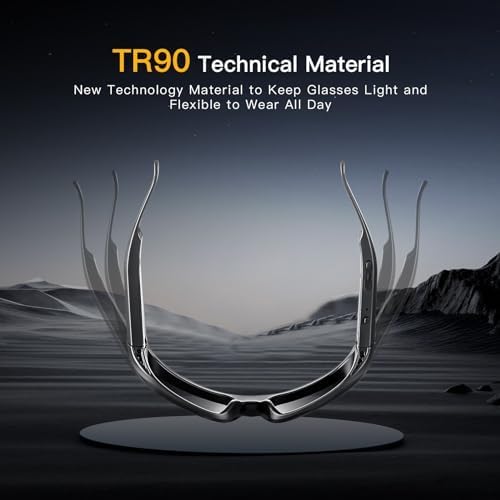
| Rammemateriale | TR90 Technical Material (Light and Flexible) |
| Forbindelse | USB Type-C for charging and data transfer |
| Første ledige dato | 16. januar 2025 |
| Fabrikant | Åh solskin |
8. Garanti og support
OhO sunshine is committed to providing high-quality products. For information regarding product warranty, returns, or technical support, please refer to the documentation included with your purchase or visit the official OhO sunshine store on Amazon.
Additional protection plans may be available for purchase to extend coverage beyond the standard warranty period. Please check the product listing or your purchase details for more information on available protection plans.
For direkte support kan du besøge OhO sunshine-butik på Amazon.


