1. Produktet er slutview
The Ikarao Break X2 is a versatile, all-in-one smart karaoke machine designed for superior audio performance and user convenience. It integrates a high-definition display, wireless microphones, and robust sound capabilities into a portable unit, perfect for various entertainment settings.

Figure 1.1: Ikarao Break X2 Smart Karaoke Machine
Nøglefunktioner:
- Integrated 10.1" Tablet: High-definition display for lyrics, rotatable 180 degrees for optimal viewing.
- To trådløse mikrofoner: Self-charging and stored within the unit, eliminating the need for manual pairing.
- Kraftfuld lydudgang: 300W peak power Bluetooth speaker with dual 4-inch woofers for deep bass.
- Extensive Song Library Access: Connects via Wi-Fi to YouTube and pre-installed karaoke apps for millions of songs.
- Bærbart design: Built-in battery provides up to 8 hours of party time, suitable for indoor and outdoor use.
- Flere tilslutningsmuligheder: HDMI, USB, AUX IN/OUT, TF, SD, and wired microphone inputs.
2. Hvad er der i æsken
Upon unboxing your Ikarao Break X2, please ensure all components listed below are present and in good condition.
- Ikarao Break X2 Smart Karaoke Machine
- 2 trådløse mikrofoner
- Ladekabel
- Skulderrem
- Garantikort
- Hurtig startvejledning
- Brugervejledning (dette dokument)

Figure 2.1: The Ikarao Break X2 offers multiple connection options including WiFi, Bluetooth, and HDMI.
3. Opsætning
Setting up your Ikarao Break X2 is designed to be straightforward, allowing you to start your karaoke experience quickly.
3.1 Første opstart og opladning
- Unpack the karaoke machine and place it on a stable surface.
- Connect the provided charging cable to the machine's power input and a suitable power outlet. The unit can be used while charging.
- Ensure the wireless microphones are placed in their designated charging slots within the unit. They will automatically begin charging.
3.2 Netværksforbindelse (Wi-Fi)
- Power on the Ikarao Break X2 by pressing the power button.
- On the built-in 10.1" tablet, navigate to the settings menu.
- Select 'Wi-Fi' and choose your preferred network from the list. Enter the password if required.
- Once connected, you can access online content such as YouTube and pre-installed karaoke applications.

Figure 3.1: The built-in screen provides direct access to YouTube for endless karaoke content.
3.3 Connecting to an External Display (Optional)
For en større viewing experience, you can connect the Ikarao Break X2 to a TV or external monitor via HDMI.
- Locate the HDMI output port on the back of the karaoke machine.
- Connect an HDMI cable from the machine to an HDMI input on your TV.
- Select the corresponding HDMI input on your TV using its remote control.
- The karaoke machine's display will be mirrored on your external screen.

Figure 3.2: Easily connect your Ikarao Break X2 to a TV for a larger display.
4. Betjeningsvejledning
This section details the operation of your Ikarao Break X2 for an optimal karaoke experience.
4.1 Using the Built-in Tablet
- The 10.1-inch tablet is touch-sensitive and runs on Android 13.
- It can be rotated 180 degrees to adjust the viewing angle for different audiences.
- Pre-installed apps include YouTube and a dedicated karaoke application, providing access to a vast library of songs.
- You can also install other compatible applications from the app store.
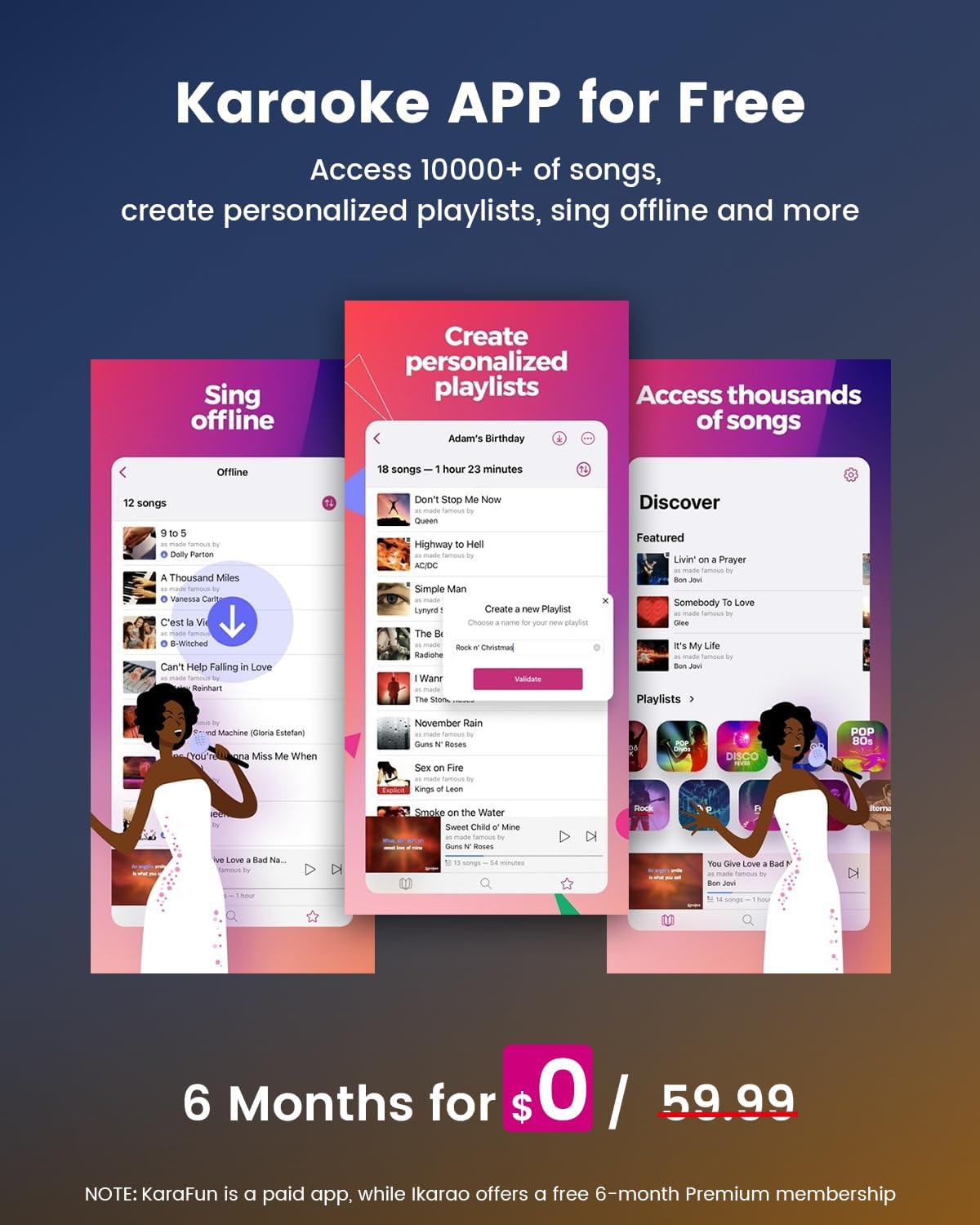
Figure 4.1: The Ikarao app allows for personalized playlists and access to thousands of songs.
4.2 Brug af mikrofon
- The two wireless microphones automatically connect to the machine when removed from their charging slots. No manual pairing is required.
- Adjust microphone volume, echo, treble, and bass using the dedicated knobs on the control panel.
- The microphones feature high-quality sound pickup and adjustable EQ settings to enhance vocal performance.

Figure 4.2: The wireless microphones are designed for high-quality sound and ease of use.
4.3 Audio and Lighting Controls
- Lydstyrkekontrol: Use the main volume knob to adjust the overall sound output.
- Bass Boost: Activate the bass boost function for enhanced low-frequency sound.
- DJ Lights: The machine features 4 DJ lights. Use the dedicated control to cycle through different lighting modes to create an immersive party atmosphere.

Figure 4.3: Dual woofers provide powerful, ultra-deep bass for an immersive audio experience.
5. Vedligeholdelse
Proper maintenance ensures the longevity and optimal performance of your Ikarao Break X2.
- Rensning: Use a soft, dry cloth to wipe down the exterior of the machine and the tablet screen. Avoid abrasive cleaners or solvents.
- Opbevaring: When not in use, store the machine in a cool, dry place away from direct sunlight and extreme temperatures. Ensure microphones are in their charging slots.
- Batteripleje: Ved længerevarende opbevaring skal batteriet oplades til cirka 50% hver par måneder for at opretholde batteriets tilstand.
6. Fejlfinding
If you encounter issues with your Ikarao Break X2, refer to the following common troubleshooting steps.
| Problem | Mulig årsag | Løsning |
|---|---|---|
| Ingen strøm / Enheden tænder ikke | Lavt batteri; Strømkabel ikke tilsluttet; Tænd/sluk-knap ikke trykket korrekt ind. | Connect the charging cable and allow the unit to charge. Ensure the power cable is securely plugged in. Press and hold the power button for a few seconds. |
| Ingen lyd fra højttalerne | Volume too low; Mute activated; Incorrect input source selected; Bluetooth not connected. | Increase volume. Check if the unit is muted. Verify the correct input source (Bluetooth, AUX, etc.). Reconnect Bluetooth device. |
| Microphones not working/charging | Microphones not properly seated in charging slots; Microphone battery low; Microphone power off. | Ensure microphones are fully inserted into their charging slots. Allow time for charging. Power on microphones if they have a separate switch. If issues persist after 4 months, contact customer service for warranty support. |
| Kan ikke oprette forbindelse til Wi-Fi | Forkert adgangskode; Uden for rækkevidde; Netværksproblem. | Double-check Wi-Fi password. Move closer to the Wi-Fi router. Restart the karaoke machine and router. |
| Skærmen reagerer ikke | Midlertidig softwarefejl. | Restart the machine. If the issue persists, perform a factory reset (refer to the Quick Start Guide for instructions). |
7. Specifikationer
| Feature | Detalje |
|---|---|
| Modelnummer | Pause X2 |
| Varens vægt | 13.2 pund |
| Produktdimensioner | 8.3 x 11.8 x 10.58 tommer |
| Vise | 10.1-inch Touch Screen with Android OS |
| Output Wattage | 600 Watts (Peak Power 300W) |
| Talertal | 5 |
| Batteritype | Lithium-ion (1 påkrævet, inkluderet) |
| Forbindelse | HDMI, USB, AUX IN, AUX OUT, TF, SD, Wired Microphone, WiFi 2.4G/5G, Bluetooth 5.3 |
| Inkluderede komponenter | Karaoke Machine, 2 Wireless Microphones, Charging Cable, Shoulder Strap, Warranty Card, Quick Start, User Manual |
8. Garanti og support
Ikarao is committed to user satisfaction. Your Ikarao Break X2 Smart Karaoke Machine comes with a 1-year warranty.
Kundesupport:
If you are dissatisfied with the product or encounter any difficulties in operating it, please contact our customer service team. We are available 24 hours a day to provide support and ensure a satisfactory solution.
- E-mail: Support@ikarao.com
- Officiel Webwebsted: Visit the Ikarao Store on Amazon
For additional resources, including user guides and product information, please visit our official website or refer to the included Quick Start Guide.


