
1. Produktet er slutview
The SONRU Bluetooth 5.3 Transmitter & Receiver is a versatile 2-in-1 audio adapter designed to enhance your audio experience. It allows you to transform non-Bluetooth audio sources into Bluetooth-enabled devices (TX mode) or add Bluetooth receiving capabilities to traditional wired audio systems (RX mode).

Image: The SONRU Bluetooth 5.3 Transmitter & Receiver, a compact white device with a 3.5mm audio jack and control buttons.
Nøglefunktioner:
- 2-i-1 funktionalitet: Skift problemfrit mellem sender- (TX) og modtager- (RX) tilstande.
- Bluetooth 5.3-teknologi: Ensures faster, more stable transmission with reduced power consumption.
- aptX lav latenstid og aptX HD: Provides high-definition, synchronized audio for movies and games, minimizing audio delay.
- Dual Link Support: Connects to two Bluetooth headphones/speakers simultaneously in TX mode, or two smartphones/tablets in RX mode, allowing shared audio experiences.
- Lang batterilevetid: Built-in 300mAh Li-polymer battery offers up to 20 hours in RX mode and 24 hours in TX mode on a single 2-hour charge. Supports charging while in use.
- Kompakt og bærbar: Lightweight design makes it ideal for travel, especially for in-flight entertainment.
2. Pakkens indhold
Kontroller venligst pakken omhyggeligt for at sikre, at alle varer er til stede:
- 1 x SONRU 2-in-1 Wireless Audio Adapter
- 1 x Airplane Audio Connector
- 1 x 3.5mm Female to Female Adapter
- 1 x USB-C opladningskabel
- 1 x RCA lydkabel
- 1 x snor
- 1 x Brugermanual (engelsk)

Image: The SONRU Bluetooth adapter, user manual, USB-C cable, RCA cable, 3.5mm adapter, airplane adapter, and lanyard laid out.
3. Opsætningsvejledning
3.1. Opladning af enheden
Before first use, ensure the device is fully charged. Connect the provided USB-C charging cable to the device's USB-C port and a standard USB power adapter (not included).
- En fuld opladning tager cirka 2 timer.
- Enheden kan bruges under opladning.
- If the product does not function initially, it may have a low battery. Please charge it completely before attempting to use it.

Image: Visual representation of the SONRU adapter's battery life (20H TX, 24H RX), 2-hour fast charging, and 300mAh battery capacity.
3.2. Tænd/sluk
- Tænd: Slide the TX/RX switch to either TX or RX position. The indicator lights will illuminate.
- Sluk: Slide the TX/RX switch to the OFF (middle) position.
3.3. Valg af tilstand (TX/RX)
The device features a slide switch to select between Transmitter (TX) and Receiver (RX) modes:
- TX (sender) tilstand: Used to send audio from non-Bluetooth devices (e.g., TV, PC) to Bluetooth headphones or speakers.
- RX (modtager) tilstand: Used to receive audio from Bluetooth-enabled devices (e.g., smartphone, tablet) and play it through non-Bluetooth speakers or car stereos.

Image: A diagram showing the SONRU device in TX mode connecting to TV, PC, airplane, and gaming devices, transmitting to Bluetooth earbuds, speakers, and headphones. In RX mode, it connects to MP3/MP4, tablet, and phone, receiving audio for yacht, speakers, and car stereo.
4. Betjening
4.1. Sendertilstand (TX)
In TX mode, the SONRU adapter transmits audio from your non-Bluetooth devices to Bluetooth headphones or speakers.
- Tilslut lydkilde: Plug the 3.5mm audio cable from the SONRU adapter into the audio output port (e.g., headphone jack) of your TV, PC, MP3 player, or airplane entertainment system. Use the provided RCA cable if your source requires RCA connections.
- Power On & Select TX Mode: Slide the switch on the SONRU adapter to the "TX" position. The TX indicator light will turn on.
- Parring: The adapter will automatically enter pairing mode (indicator light may flash). Put your Bluetooth headphones or speakers into pairing mode.
- Forbinde: Once paired, the indicator light on the adapter will become solid. Audio from your source device will now be transmitted to your Bluetooth audio device.
Dual Link in TX Mode:
The SONRU adapter can connect to two Bluetooth headphones or speakers simultaneously in TX mode, allowing you to share audio with another person.
- Tilslut den første Bluetooth-enhed som beskrevet ovenfor.
- Once the first device is connected (A indicator solid), press the P/R button on the SONRU adapter to enter pairing mode for the second device. The B indicator will flash.
- Put your second Bluetooth headphones or speakers into pairing mode.
- Once paired, both A and B indicators will be solid, and audio will be transmitted to both devices.
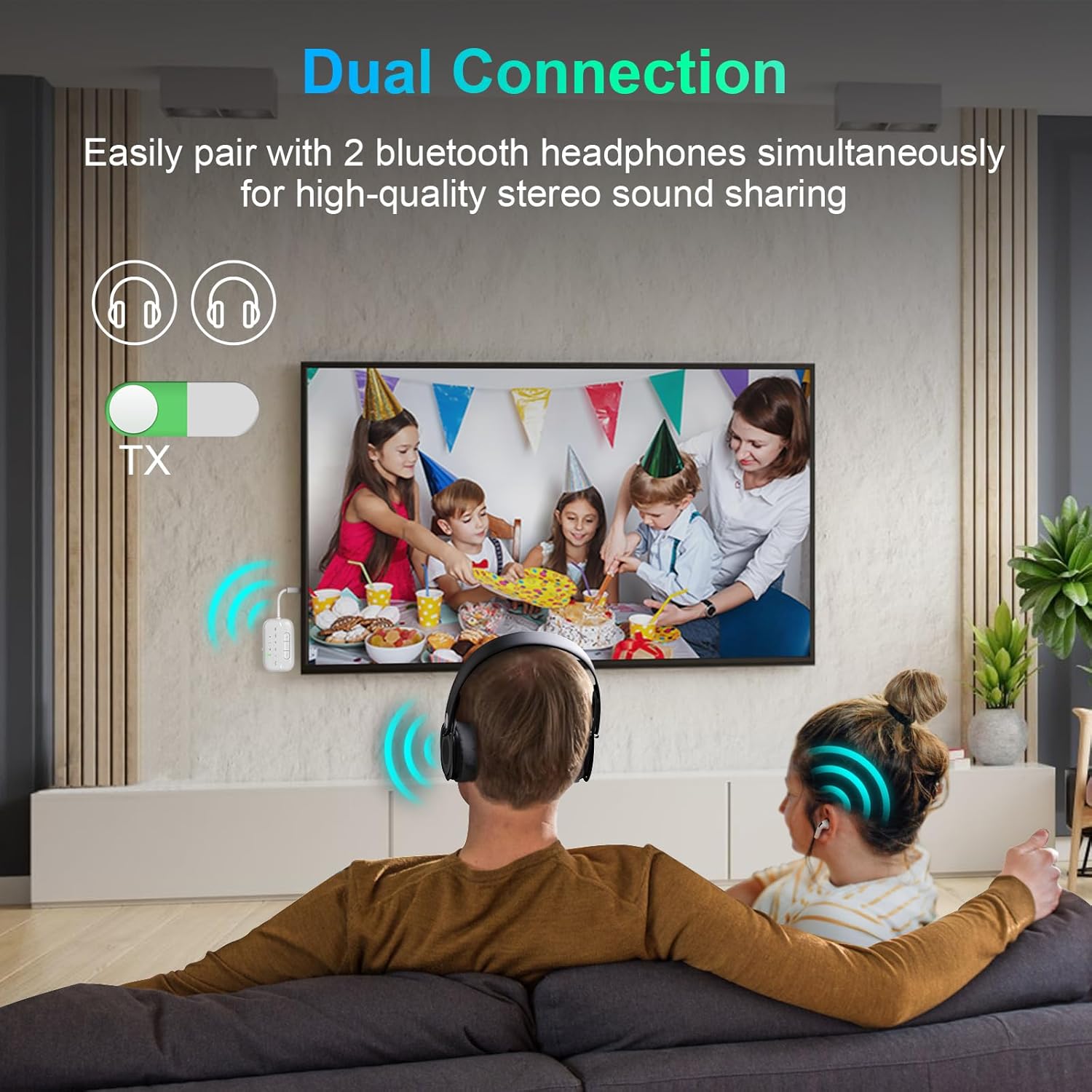
Image: A couple sitting on a couch, watching TV, both wearing Bluetooth headphones connected to the SONRU adapter in TX mode, sharing the audio.

Image: A woman on an airplane, comfortably enjoying entertainment using wireless headphones connected via the SONRU adapter, plugged into the seat's audio jack.
4.2. Modtagertilstand (RX)
In RX mode, the SONRU adapter receives audio from your Bluetooth-enabled devices (e.g., smartphone) and plays it through your wired speakers or car stereo.
- Tilslut lydudgang: Plug the 3.5mm audio cable from the SONRU adapter into the audio input port (e.g., AUX-in) of your wired speakers, car stereo, or home audio system.
- Power On & Select RX Mode: Slide the switch on the SONRU adapter to the "RX" position. The RX indicator light will turn on.
- Parring: The adapter will automatically enter pairing mode. On your smartphone or tablet, enable Bluetooth and search for "SONRU B101" (or similar name) in the list of available devices.
- Forbinde: Select the adapter to pair. Once paired, the indicator light on the adapter will become solid. Audio from your Bluetooth device will now play through your wired audio system.
Dual Link in RX Mode:
The SONRU adapter can connect to two smartphones or tablets simultaneously in RX mode.
- Connect the first smartphone/tablet as described above.
- Once the first device is connected (A indicator solid), press the P/R button on the SONRU adapter to enter pairing mode for the second device. The B indicator will flash.
- On your second smartphone/tablet, enable Bluetooth and search for the adapter.
- Once paired, both A and B indicators will be solid. You can now play music from either connected device (one at a time).

Image: A woman on a boat, smiling, with the SONRU Bluetooth adapter connected to the boat's stereo system, streaming music from her phone.
4.3. Audio Codecs (aptX, LL, HD, AD, AAC, SBC)
The SONRU adapter supports various audio codecs, indicated by LED lights, to optimize sound quality and latency:
- aptX Low Latency (LL): Minimizes audio delay, ideal for watching videos or gaming to ensure audio-visual synchronization. For optimal low latency, your receiving device should also support aptX Low Latency.
- aptX HD (HD): Delivers high-definition, lossless sound quality, superior to CD quality.
- aptX Adaptive (AD): Justerer dynamisk lydkvalitet og latenstid baseret på indhold og miljø.
- CCA: Advanced Audio Coding, commonly used by Apple devices.
- SBC'er: Subband Coding, the basic Bluetooth audio codec, universally supported.

Billede: En detaljeret view of the SONRU adapter's internal components, highlighting the Bluetooth 5.3 chip and emphasizing faster, more stable connection, and noise reduction capabilities.
4.4. Knapfunktioner
| Knap | Function (TX Mode) | Function (RX Mode) |
|---|---|---|
| P/R Button | Press to pair a second device (Dual Link). | Press to pair a second smartphone/tablet (Dual Link). |
| + knap | Volume Up / Next Track (Long Press) | Volume Up / Next Track (Long Press) |
| - Knap | Volume Down / Previous Track (Long Press) | Volume Down / Previous Track (Long Press) |
5. Vedligeholdelse
5.1. Rensning
For at bevare enhedens ydeevne og udseende:
- Tør enheden af med en blød, tør klud.
- Brug ikke flydende rengøringsmidler, aerosoler eller opløsningsmidler.
5.2. Opbevaring
Når den ikke er i brug i længere perioder:
- Opbevar enheden et køligt, tørt sted, væk fra direkte sollys og ekstreme temperaturer.
- Charge the device at least once every three months to preserve battery life.
5.3. Batteripleje
- Undgå at aflade batteriet helt ofte.
- Do not expose the device to temperatures above 60°C (140°F) or below -10°C (14°F).
- Dispose of the battery according to local regulations. Do not dispose of it in household waste.
6. Fejlfinding
| Problem | Mulig årsag | Løsning |
|---|---|---|
| Device does not power on or function. | Lavt batteri. | Oplad enheden helt (ca. 2 timer). |
| Kan ikke parres med en Bluetooth-enhed. | Device not in pairing mode; Bluetooth device too far; interference. | Ensure the adapter is in TX/RX mode and pairing mode (flashing indicator). Move devices closer. Turn off other Bluetooth devices. Restart both devices. |
| Ingen lyd eller dårlig lydkvalitet. | Incorrect cable connection; volume too low; wrong mode selected; codec mismatch. | Check all cable connections are secure. Adjust volume on both the adapter and connected devices. Ensure correct TX/RX mode is selected. For aptX LL/HD, ensure both devices support the codec. |
| Audio delay (latency). | Receiving device does not support aptX Low Latency. | For minimal delay, ensure your receiving device (headphones/speakers) also supports aptX Low Latency. Note: This receiver is not recommended for musical instruments or live music situations due to potential noticeable delay. |
| Dual link not working. | Incorrect pairing sequence. | Ensure the first device is connected, then press the P/R button to pair the second device. |
7. Produktspecifikationer
| Feature | Detalje |
|---|---|
| Mærke | SONRU |
| Modelnummer | B101 |
| Bluetooth version | 5.3 |
| Understøttede codecs | aptX Adaptive, aptX Low Latency, aptX HD, AAC, SBC |
| Batterikapacitet | 300mAh Li-polymer |
| Playtime (TX Mode) | Op til 24 timer |
| Playtime (RX Mode) | Op til 20 timer |
| Opladningstid | Ca. 2 timer |
| Forbindelser | 3.5mm AUX, RCA (via included cable) |
| Kompatible enheder | TV, PC, MP3 players, Airplane audio systems, Headphones, Speakers, Car stereos, Smartphones, Tablets |
| Materiale | Acrylonitril Butadien Styren (ABS) |
| Farve | Hvid |
8. Garanti og support
8.1. Garantioplysninger
SONRU products are designed for reliability and performance. This product comes with a standard manufacturer's warranty against defects in materials and workmanship under normal use. Please refer to the product packaging or your purchase receipt for specific warranty terms and duration.
8.2. Kundesupport
If you encounter any issues with your SONRU Bluetooth 5.3 Transmitter & Receiver, or have questions not covered in this manual, please do not hesitate to contact our customer support team. We are committed to providing a satisfactory solution within 24 hours.
For support, please reach out through the platform where you purchased the product or visit the official SONRU webwebsted for kontaktoplysninger.
Thank you for choosing SONRU.


