Indledning
The Logitech K585 Multi-Device Slim Wireless Keyboard is designed for seamless multi-tasking across various devices. This manual provides comprehensive instructions for setting up, operating, maintaining, and troubleshooting your keyboard to ensure optimal performance and longevity.

The Logitech K585 keyboard, showcasing its slim design and rose color, with a built-in cradle for devices.
Hvad er der i æsken
Bekræft at alle komponenter er til stede i din pakke:
- Logitech K585 Multi-Device Slim Wireless Keyboard
- 2 AAA-batterier (forinstalleret eller separat)
- Logitech Uniting USB-modtager
- Brugerdokumentation (denne manual)

An illustration of the items included in the product packaging: the K585 keyboard and two AAA batteries.
Opsætning
1. Batteriinstallation
The keyboard requires two AAA batteries for operation. If not pre-installed, open the battery compartment located on the top edge of the keyboard, insert the batteries, and close the compartment. The Unifying USB receiver is also stored in this compartment.
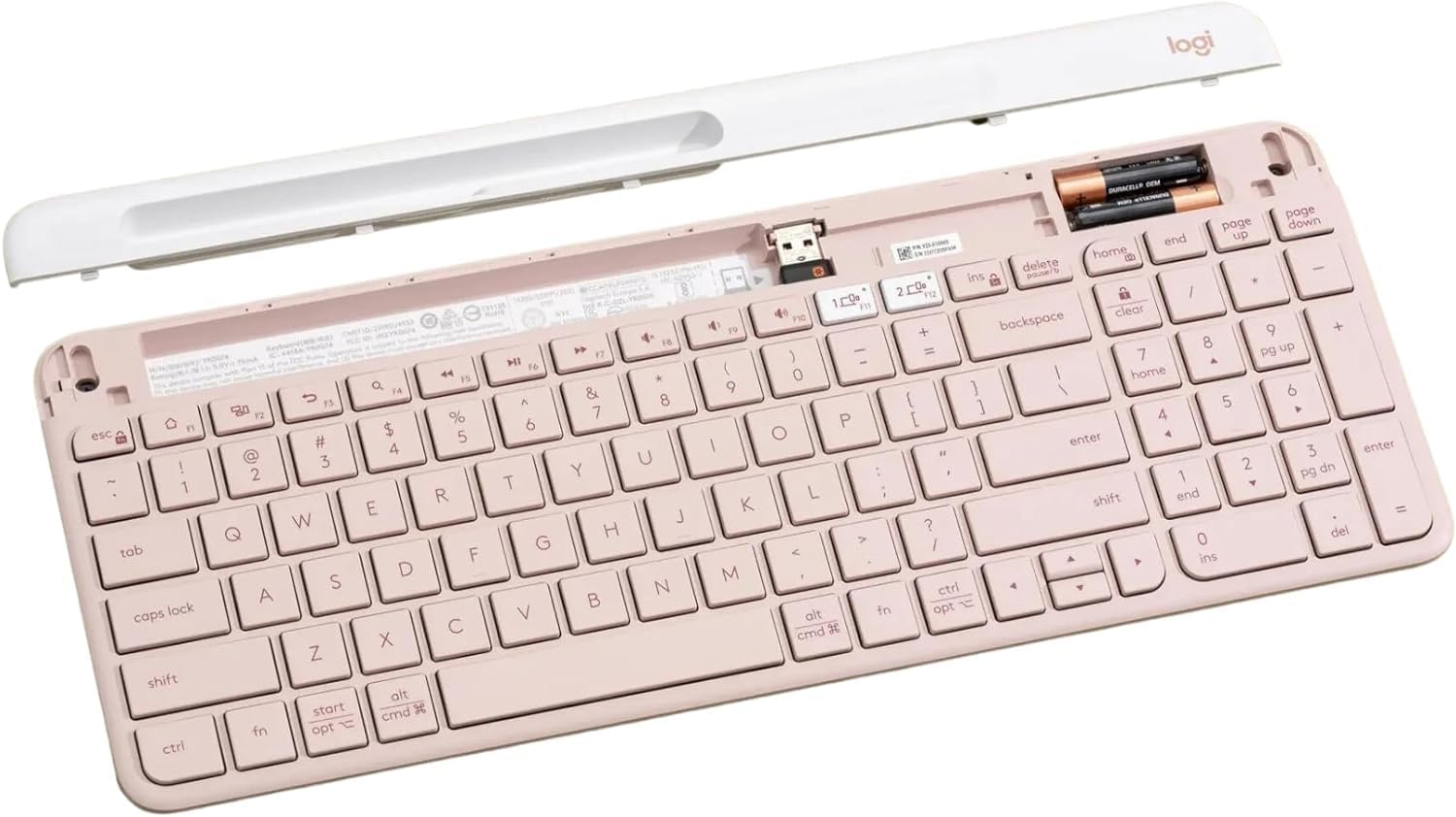
Det indre view of the keyboard, highlighting the battery slots and the dedicated storage for the USB receiver.
2. Connecting via USB Receiver
- Remove the Unifying USB receiver from the battery compartment.
- Sæt USB-modtageren i en ledig USB-port på din computer.
- Tænd tastaturet ved hjælp af tænd/sluk-knappen, der er placeret på højre side.
- Tastaturet burde automatisk oprette forbindelse til din enhed.
3. Tilslutning via Bluetooth
The K585 keyboard supports Bluetooth Low Energy (BLE) for wireless connection.
- Sørg for, at tastaturet er tændt.
- Press and hold one of the Easy-Switch keys (1 or 2) for three seconds until the LED light above the key starts blinking rapidly. This indicates pairing mode.
- On your device (computer, tablet, smartphone), go to Bluetooth settings and select
Relaterede dokumenter - K585 ROSE

Logitech K780 Multi-Device Keyboard: Funktioner, opsætning og tilslutningsvejledning
Explore the Logitech K780 Multi-Device Keyboard. This guide covers its features, how to connect to computers, phones, and tablets via Bluetooth Smart or Unifying receiver, and enhanced functions for various operating systems.
Logitech K480 Multi-Device Bluetooth Keyboard Brugervejledning
A comprehensive guide to setting up, connecting, and troubleshooting the Logitech K480 Multi-Device Bluetooth Keyboard for seamless operation with computers, tablets, and smartphones across various operating systems.
Logitech K780 Multi-Device Keyboard: Funktioner, tilslutningsmuligheder og opsætningsvejledning
Oplev Logitech K780 Multi-Device Keyboard, et alsidigt tastatur designet til problemfri skift mellem computere, smartphones og tablets. Denne guide beskriver dets funktioner, dobbelte tilslutningsmuligheder (Bluetooth Smart og Unifying Receiver), forbedrede funktioner og opsætningsvejledning til forskellige operativsystemer.
Tastiera Logitech K780 Multi-Device: Funzionalità, Connettività og Layout
Fuldstændig vejledning til den lækre Logitech K780 Multi-Device, som fungerer som en funktion, kommer sammen med Bluetooth Smart og Unifying, funktionelt tilpasset og dobbelt layout til forskellige operative system.
Logitech K780 Multi Device Keyboard: Problemfri forbindelse til alle dine enheder
Udforsk Logitech K780 Multi-Device Keyboard. Lær, hvordan du tilslutter og bruger dette alsidige tastatur med din computer, tablet og smartphone via Unifying eller Bluetooth Smart for at forbedre produktiviteten. Opdag dets funktioner, opsætning og parring af flere enheder.
Logitech K780 Multi-Device Keyboard: Funktioner, opsætning og tilslutningsmuligheder
Explore the Logitech K780 Multi-Device Keyboard, a versatile keyboard for computers, phones, and tablets. Learn about its features, dual connectivity options (Bluetooth Smart and Unifying Receiver), enhanced functions, and dual layout for multiple operating systems.