1. Introduktion
This manual provides essential information for the installation, operation, and maintenance of your Qolsys IQ Panel 4. The IQ Panel 4 is an all-in-one touchscreen security and smart home control panel designed for comprehensive connectivity and reliability.
It features a 7-inch HD touchscreen, an 8-megapixel panel camera with Flex-Tilt, and a QuadSound speaker system. The panel supports various wireless technologies including LTE, Wi-Fi, Z-Wave, Bluetooth, PowerG, and legacy security wireless protocols.
2. Sikkerhedsoplysninger
- Strømkilde: Only use the specified power adapter provided with the device. Using an incorrect power source may damage the unit and void the warranty.
- Placering: Install the panel in a dry, indoor location away from direct sunlight, extreme temperatures, and high humidity. Ensure proper ventilation around the device.
- Rensning: Disconnect power before cleaning. Use a soft, dry cloth. Do not use liquid cleaners or aerosol sprays.
- Service: Forsøg ikke selv at servicere dette produkt. Overlad al service til kvalificeret servicepersonale.
- Kamera: The integrated camera is for security and monitoring purposes. Ensure privacy settings are configured according to your preferences.
3. Pakkens indhold
Bekræft at alle varer er til stede i pakken:
- Qolsys IQ Panel 4 (IQP4004)
- Strømforsyning
- Monteringsudstyr (skruer, ankre)
- Quick Guide (if applicable)
4. Opsætning
4.1 Montering af panelet
The IQ Panel 4 can be wall-mounted or placed on a table using the SmartMount installation system. For wall mounting, ensure the chosen location is central and within Wi-Fi range.
- Identify a suitable location for the panel.
- Use the mounting bracket (if included) as a template to mark drill holes.
- Bor forhuller og isæt vægankre om nødvendigt.
- Fastgør monteringsbeslaget til væggen med de medfølgende skruer.
- Carefully attach the IQ Panel 4 to the mounting bracket.
4.2 Tænd
Connect the power supply to the panel's power input port and then plug it into a standard electrical outlet. The panel will automatically power on and begin its boot sequence.
4.3 Indledende konfiguration
Follow the on-screen prompts to complete the initial setup, which typically includes:
- Valg af sprog.
- Opretter forbindelse til et Wi-Fi-netværk.
- Indstilling af dato og klokkeslæt.
- Creating a master user code.
5. Operating the IQ Panel 4
The 7-inch touchscreen provides intuitive control over your security system and smart home devices.
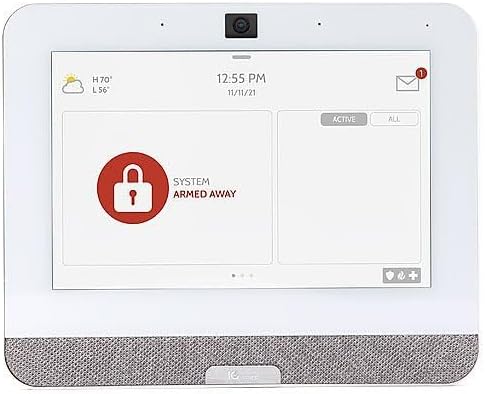
Figure 5.1: The IQ Panel 4 display when the system is armed in 'Away' mode, indicated by a red padlock icon and corresponding text.
5.1 Til- og frakobling
- Armophold: Arms the perimeter sensors while allowing movement inside. Tap the "Arm Stay" icon and enter your code.
- Arm væk: Arms all sensors, including interior motion detectors. Tap the "Arm Away" icon and enter your code.
- Afvæbne: To disarm the system, tap the "Disarm" icon and enter your master code.
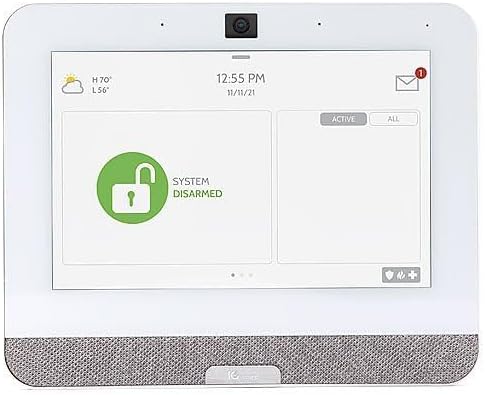
Figure 5.2: The IQ Panel 4 display when the system is disarmed, indicated by a green unlocked padlock icon and corresponding text.
5.2 Kamerafunktioner
The 8-megapixel panel camera supports various functions:
- Disarm Photos: The camera can capture an image when the system is disarmed.
- Peek-in: Allows remote viewing of the panel's camera feed.
- Alarm Videos: Records video clips during alarm events.
- Flex-Tilt: Juster kameravinklen for optimal viewing.
5.3 Smart Home-styring
The IQ Panel 4 integrates with Z-Wave devices, allowing control of lights, locks, thermostats, and more directly from the panel or a connected smartphone app.
5.4 Bluetooth Touchless Disarming
Enable Bluetooth Touchless Disarming in settings to automatically disarm your system when your paired smartphone is detected within range.
6. Vedligeholdelse
- Rengøring af skærm: Brug en blød, fnugfri klud til at rengøre berøringsskærmen. Tør let ved genstridige pletter.ampRengør kluden med vand. Sprøjt ikke rengøringsmidler direkte på skærmen.
- Softwareopdateringer: The IQ Panel 4 receives over-the-air (OTA) software updates. Ensure your panel is connected to Wi-Fi to receive these updates, which provide new features and security enhancements.
- Batteri-sikkerhedskopi: The panel includes a backup battery. Periodically check the battery status in the system settings. If the battery needs replacement, contact qualified service personnel.
7. Fejlfinding
| Problem | Mulig årsag | Løsning |
|---|---|---|
| Panelet tænder ikke | No power from outlet; power supply disconnected or faulty. | Check power outlet; ensure power supply is securely connected to panel and outlet. |
| Kan ikke oprette forbindelse til Wi-Fi | Incorrect Wi-Fi password; out of range; router issue. | Verify password; move panel closer to router; restart router. |
| Systemet aktiveres ikke | Open sensor (door/window); system error. | Check all sensors are closed; review system messages for errors. |
| Touchscreen reagerer ikke | Midlertidig softwarefejl. | Perform a soft reboot (refer to system settings for option) or power cycle the device. |
8. Specifikationer
- Model: IQP4004
- Skærmstørrelse: 7 Inches (HD, Capacitive glass multi-touch)
- Kamera: 8 Megapixel Panel Camera with Flex-Tilt
- Opbevaring: 16 GB NAND Flash
- Lyd: QuadSound 4x front-facing 4W speakers, 85-decibel siren
- Trådløs forbindelse: LTE, Wi-Fi, Z-Wave, Bluetooth, PowerG, 319.5MHz
- Dimensioner (pakke): 12.32 x 7.24 x 2.13 tommer
- Vægt (vare): 1.72 pund
- Farve: Hvid
- Kompatible enheder: Smartphone (for app control)
9. Garanti og support
Qolsys products are covered by a limited warranty. For specific warranty terms and conditions, please refer to the warranty card included with your product or visit the official Qolsys webwebsted.
For technical support, troubleshooting assistance, or service inquiries, please contact your authorized Qolsys dealer or installer. You may also find additional resources, FAQs, and support documentation on the Qolsys official webwebsted.
Note: Unauthorized modifications or repairs to the device will void the warranty.


