1. Produktet er slutview
The I-SHUNFA Wi-Fi Smart E27 LED Bulb offers advanced lighting control for your smart home. Featuring stepless dimming, adjustable color temperature from warm white (2700K) to cool white (6500K), and compatibility with voice assistants like Amazon Alexa, these bulbs provide versatile illumination. Control your lighting remotely via the Smart Life or Tuya Smart app, set schedules, and create custom scenes to enhance your daily life.

Billede: Overview of the I-SHUNFA Smart LED Bulbs, showing their design, app control interface on a smartphone, and an icon indicating voice control capability.
Nøglefunktioner:
- Wi-Fi-forbindelse: Connects directly to your 2.4GHz home Wi-Fi network.
- Dæmpbar: Lysstyrken kan justeres fra 1% til 100%.
- Afstembar hvid: Color temperature adjustable from 2700K (warm white) to 6500K (cool white).
- Stemmestyring: Kompatibel med Amazon Alexa og Google Assistant.
- App kontrol: Remote control via Smart Life or Tuya Smart app.
- Scheduling & Scenes: Set timers, schedules, and pre-defined lighting scenes.
2. Opsætningsvejledning
2.1. Installation
- Sørg for, at strømmen til lysarmaturet er slukket før installation.
- Carefully screw the I-SHUNFA Smart E27 LED Bulb into a standard E27 light socket.
- Turn on the power to the light fixture. The bulb should flash rapidly, indicating it's in pairing mode. If not, turn the bulb off and on 3-5 times until it flashes.
2.2. App-download og parring
To control your smart bulb, you need to download the "Smart Life" or "Tuya Smart" app on your smartphone.
- Download appen "Smart Life" eller "Tuya Smart" fra App Store (iOS) eller Google Play Store (Android).
- Registrer eller log ind på din konto.
- Ensure your smartphone is connected to a 2.4GHz Wi-Fi network. The smart bulb only supports 2.4GHz Wi-Fi.
- I appen skal du trykke på "+"-ikonet (normalt i øverste højre hjørne) for at tilføje en enhed.
- Vælg "Belysning" eller "Lyskilde (Wi-Fi)" fra enhedslisten.
- Confirm that the bulb is flashing rapidly. If it's not, reset it by turning it off and on 3-5 times until it flashes.
- Indtast adgangskode til dit 2.4 GHz Wi-Fi-netværk, når du bliver bedt om det.
- The app will begin pairing with the bulb. Once connected, you can rename the bulb for easier control.

Image: Visual guide to the bulb's features and compatibility, including app logos and Wi-Fi requirements.
3. Betjeningsvejledning
3.1. Appkontrol
Once paired, you can control your I-SHUNFA Smart LED Bulb using the Smart Life or Tuya Smart app from anywhere with an internet connection.
- Til/fra: Tryk på strømikonet ud for pærens navn for at tænde eller slukke den.
- Justering af lysstyrke: Slide the brightness bar (1%-100%) to adjust the light intensity.
- Farvetemperaturjustering: Slide the color temperature bar to switch between warm white (2700K) and cool white (6500K).
- Scener: Select from pre-defined scenes like "Reading," "Working," "Good Night," or "Relax," or create your own custom scenes.
- Timer og tidsplan: Set specific times for the bulb to turn on or off, or to activate certain scenes.

Image: The app interface for adjusting brightness and color temperature, illustrating the range from warm to cool white light.

Image: Setting timers and schedules through the app, allowing automated lighting control for convenience and security.
3.2. Stemmekontrol
The I-SHUNFA Smart LED Bulb is compatible with Amazon Alexa and Google Assistant. To enable voice control, link your Smart Life/Tuya Smart account to your voice assistant app (e.g., Alexa app).
- Tilknytning af konto: Open your Alexa or Google Home app, navigate to "Skills" or "Works with Google," search for "Smart Life" or "Tuya Smart," and enable the skill. Log in with your app account credentials.
- Opdag enheder: After linking, ask your voice assistant to "Discover devices" or manually discover them in the app.
- Stemmekommandoer F.eks.amples:
- "Alexa, tænd lyset i stuen."
- "Hey Google, dæmp soveværelseslyset til 50%."
- "Alexa, indstil køkkenlyset til varm hvid."
- "Hey Google, change the office light to cool white."

Image: Demonstrating voice control functionality with Amazon Alexa, allowing hands-free operation of the smart bulbs.
4. Vedligeholdelse
The I-SHUNFA Smart E27 LED Bulbs are designed for long-term use with minimal maintenance.
- Rensning: Before cleaning, ensure the bulb is off and cool. Wipe the bulb with a soft, dry cloth. Do not use liquid cleaners or abrasive materials.
- Opbevaring: If storing the bulbs, keep them in a cool, dry place away from direct sunlight and extreme temperatures.
- Udskiftning: These LED bulbs have an average lifespan of 30,000 hours. Replacement is only necessary at the end of their operational life.
5. Fejlfinding
If you encounter issues with your I-SHUNFA Smart E27 LED Bulb, please refer to the following common solutions:
| Problem | Mulig årsag | Løsning |
|---|---|---|
| Bulb not pairing/flashing. | Not in pairing mode; power cycle issue. | Turn the bulb off and on 3-5 times until it flashes rapidly. Ensure your Wi-Fi is 2.4GHz. |
| Kan ikke oprette forbindelse til Wi-Fi. | Incorrect Wi-Fi band; weak signal; wrong password. | Ensure your router is broadcasting a 2.4GHz signal. Move the bulb closer to the router. Double-check your Wi-Fi password. |
| Stemmestyring virker ikke. | Account not linked; device not discovered. | Ensure your Smart Life/Tuya Smart account is correctly linked to Alexa/Google Assistant. Ask your voice assistant to "Discover devices." |
| Bulb unresponsive in app. | Loss of Wi-Fi connection; app glitch. | Check your Wi-Fi connection. Restart the app. Power cycle the bulb. |
| Bulb not dimming or changing color. | Not compatible with external dimmer switches. | These bulbs are controlled via the app or voice assistant. Do not use with traditional dimmer switches. |
6. Specifikationer
| Feature | Detalje |
|---|---|
| Modelnummer | WIFI-E27 |
| Base Type | E27 |
| Strømforbrug | 7 watt (svarende til 70W glødelampe) |
| Lysstrøm | 800 lm |
| Farvetemperatur | 2700K - 6500K (varm hvid til kold hvid) |
| Dæmpbarhed | 1% - 100% (via app/voice control only) |
| Voltage | AC 220-240V |
| Wi-Fi-standard | 2.4 GHz (IEEE 802.11 b/g/n) |
| Levetid | 30,000 timer |
| Strålevinkel | 360 grader |
| Dimensioner (L x B x H) | 3 x 3 x 8.45 cm |
| Vægt | 64 gram |
| Certificering | Energieffektiv |
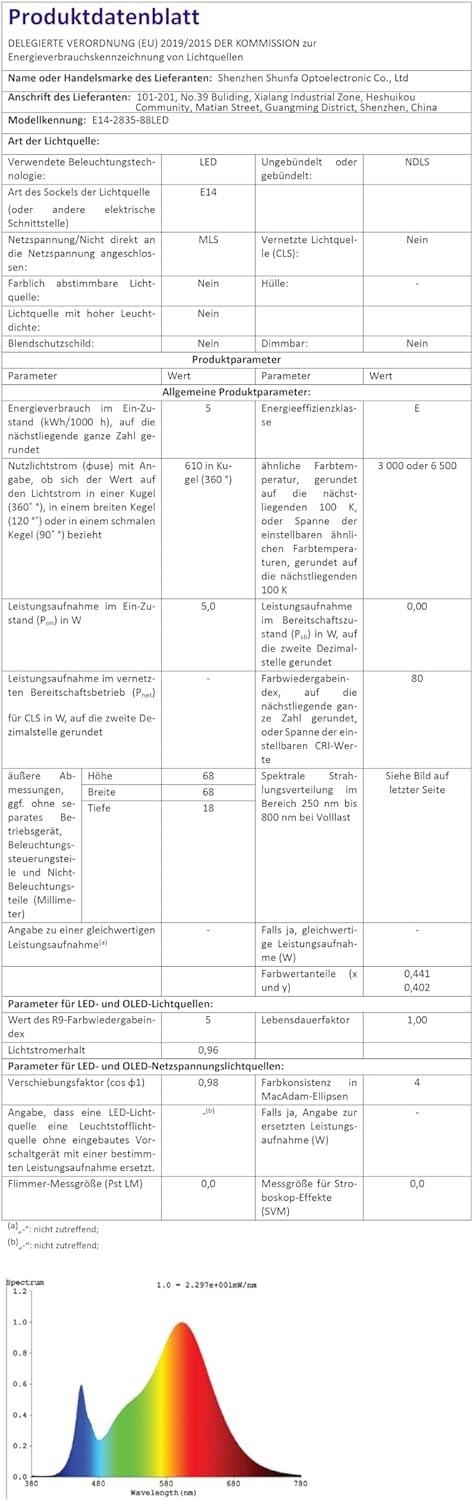
Image: Official product data sheet providing comprehensive technical specifications.
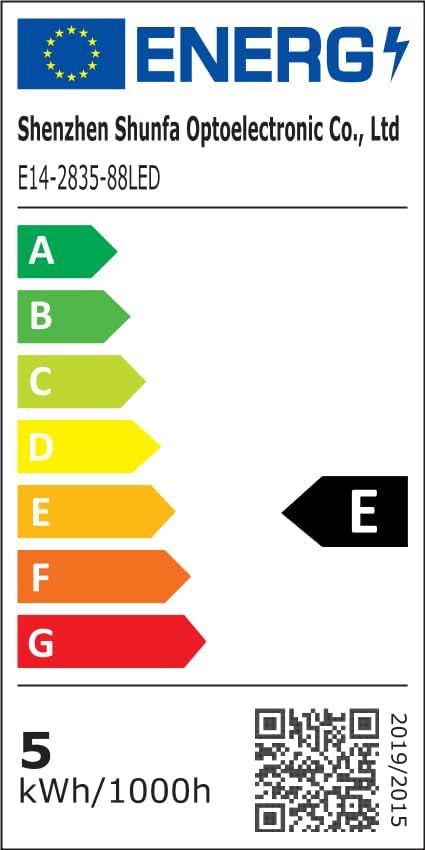
Image: EU Energy Label indicating the bulb's energy efficiency class and consumption. More details can be found via the QR code or by visiting eprel.ec.europa.eu/qr/1250502.
7. Garanti og support
I-SHUNFA is committed to providing high-quality products. For any issues or inquiries regarding your smart LED bulbs, please refer to your purchase documentation or contact our customer support.
- Garanti: Please refer to your purchase documentation or the retailer's policy for specific warranty details.
- Kundesupport: For technical assistance or product support, please visit the I-SHUNFA brand store on Amazon or contact the seller directly.
- Reservedele: Der gives ingen oplysninger om tilgængeligheden af reservedele.

Image: The official I-SHUNFA brand logo.


