1. Introduktion og overview
The Briidea HX-076 Crawl Space Humidistat Controller is designed to manage humidity and temperature levels in various enclosed spaces such as crawl spaces, basements, attics, and garages. By automatically controlling connected ventilation fans or dehumidifiers, this device helps improve indoor air quality, prevent moisture-related issues like mold and wood rot, and contribute to a more comfortable and energy-efficient home environment.

Figure 1: Briidea HX-076 Crawl Space Humidistat Controller
2. Produktfunktioner
- Forbedret indendørs luftkvalitet: Effectively decreases moisture and radon levels, enhancing the overall air quality in your home.
- Dobbelte kontroltilstande: Offers two operational modes: Dehumidistat control and Thermostat + Dehumidistat control, allowing for flexible environmental management.
- Integrated Outlets: Features two plug-in sockets with individual on/off switches for connecting external devices like fans or dehumidifiers.
- Enhanced Home Comfort: Automatically activates ventilation or dehumidification when humidity exceeds set levels, preventing growth and wood rot, and deactivates when levels are optimal.
- Energieffektivitet: Helps reduce energy consumption by preventing continuous operation of dehumidifiers and fans, leading to potential cost savings.
- Holdbar konstruktion: Housed in a heavy metal shell, providing anti-rust and anti-corrosion properties for longevity.
- Bredt anvendelsesområde: Suitable for controlling temperature and humidity in crawl spaces, basements, attics, garages, and greenhouses.
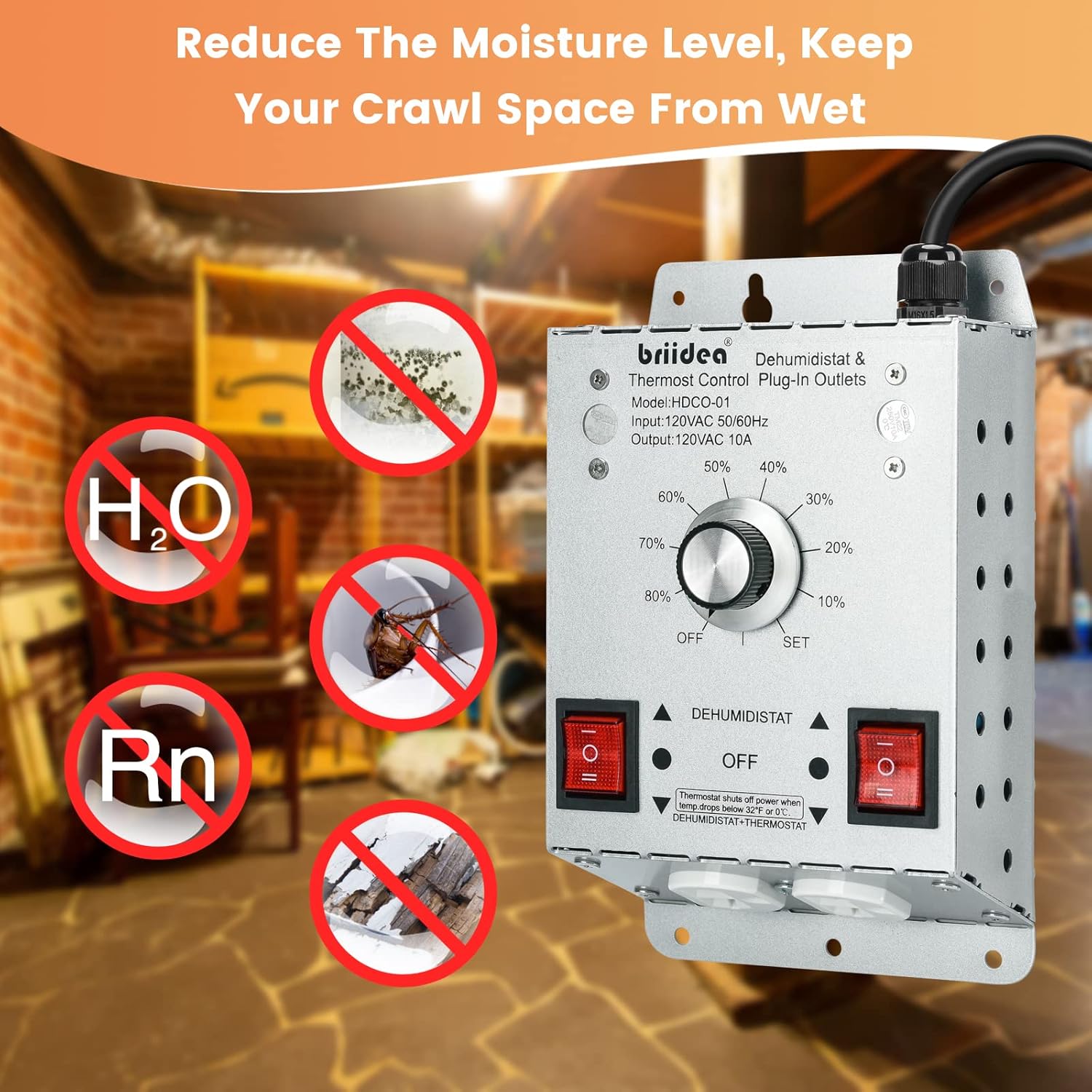
Figure 2: Benefits of the Humidistat Controller
3. Komponenter og indhold i æsken
The Briidea HX-076 controller package typically includes the following items:
- Briidea HX-076 Humidistat Controller Unit
- Integrated Power Cord (6.5 ft length)
- Humidity/Temperature Sensor Probe
- Instruktionsmanual

Figur 3: Detaljeret view of controller components
4. Opsætning og installation
Follow these general steps for setting up your Briidea HX-076 controller. Always ensure power is disconnected before handling electrical components.
- Vælg placering: Select a suitable location in your crawl space, basement, attic, or garage where the controller can be easily accessed and the sensor probe can accurately measure the environment.
- Monter controlleren: Securely mount the controller unit to a wall or sturdy surface using appropriate fasteners. The heavy metal shell is designed for durability in various environments.
- Position the Sensor Probe: Place the humidity/temperature sensor probe in a central location within the area to be monitored, away from direct airflow from fans or heat sources, to ensure accurate readings.
- Tilslut enheder: Plug your ventilation fans, dehumidifiers, or other controlled devices into the two plug-in outlets on the controller. Ensure the individual on/off switches for each outlet are in the desired position.
- Tænd: Plug the controller's power cord into a standard 120VAC outlet.

Figure 4: Controller installed in a crawl space
5. Betjeningsvejledning
The Briidea HX-076 offers straightforward operation with its control knob and mode switches.
- Vælg kontroltilstand: Use the two individual on/off switches to select your desired control mode:
- Dehumidistat Mode: Activates connected devices based solely on humidity levels.
- Thermostat + Dehumidistat Mode: Activates connected devices based on both temperature and humidity levels.
- Indstil fugtighedsniveau: Rotate the central knob to set your desired humidity level (ranging from 10% to 80%). The controller will automatically activate connected devices when the ambient humidity rises above this set point and deactivate them when it falls below.
- Frostbeskyttelse: The unit is equipped with a freeze protection thermostat. If the outdoor temperature drops below 32°F (0°C), the fan will stop working to protect the unit and prolong its service life.
For a visual guide on setting humidity levels, you may refer to the following video:
Video 1: VIVOSUN 1200W Humidity Controller Operation (demonstrates setting humidity, similar to Briidea controller)
6. Vedligeholdelse
To ensure optimal performance and longevity of your Briidea HX-076 controller, regular maintenance is recommended:
- Rensning: Periodically wipe the controller unit and sensor probe with a soft, dry cloth to remove dust and debris. Do not use abrasive cleaners or immerse the unit in water.
- Tilslutningskontrol: Regularly inspect all electrical connections, including the power cord and device plugs, to ensure they are secure and free from damage.
- Miljøtjek: Ensure the sensor probe remains unobstructed and is not exposed to extreme conditions that could affect its accuracy.
7. Fejlfinding
If you encounter issues with your Briidea HX-076 controller, consider the following troubleshooting steps:
- Ingen strøm: Check if the power cord is securely plugged into a live outlet. Verify the outlet is functioning by plugging in another device.
- Devices Not Activating:
- Ensure the individual on/off switches for the outlets are in the 'on' position.
- Verify that the set humidity/temperature levels are appropriate for activation.
- Check if the connected devices are powered on and functioning correctly when plugged directly into a wall outlet.
- Upræcise læsninger: Ensure the sensor probe is clean, undamaged, and positioned correctly away from direct drafts or heat sources.
- Freeze Protection Active: If the unit is not operating and the temperature is near or below freezing, the freeze protection feature may be active. Operation will resume when temperatures rise.
Hvis problemerne fortsætter efter at have forsøgt disse trin, bedes du kontakte kundesupport.
8. Specifikationer
| Feature | Specifikation |
|---|---|
| Mærke | briidea |
| Modelnavn | HX-076 |
| Farve | Sølv |
| Produktdimensioner | 2.6" D x 2" B x 2.8" H |
| Varens vægt | 2.53 pund |
| Materiale | Metal |
| Driftstilstand | Automatisk |
| Anbefalede anvendelser | Ventilation |
| Inkluderede komponenter | Snor |
| Speciel funktion | LED lys |

Figur 5: Produktmål
9. Sikkerhedsoplysninger
Please read and understand all safety warnings before operating this device. Failure to follow these instructions may result in electric shock, fire, or serious injury.
- Elektrisk sikkerhed: Always ensure the power supply is disconnected before installation or maintenance. Do not operate with wet hands or in standing water.
- Kun indendørs brug: This device is intended for indoor use in dry locations. Avoid exposure to direct water spray or submersion.
- Korrekt jording: The power cord is UL listed and includes a grounded plug. Ensure it is plugged into a properly grounded outlet.
- Overbelastningsbeskyttelse: Do not exceed the maximum electrical load capacity of the outlets.
- Børn og kæledyr: Keep the device and its cords out of reach of children and pets.
10. Garanti og support
For warranty information and customer support, please refer to the documentation included with your product or visit the briidea official webwebsted. Gem din købskvittering for garantikrav.


