1. Introduktion
Welcome to the user manual for your MAXCOM FW67 Titan Pro Smartwatch. This device is designed to enhance your daily life by providing convenient access to notifications, health monitoring, and fitness tracking features directly from your wrist. Please read this manual carefully to ensure proper use and to fully understand the capabilities of your new smartwatch.
2. Sikkerhedsoplysninger
- Forsøg ikke at skille ad, reparere eller ændre enheden. Dette kan ugyldiggøre garantien og forårsage skade.
- Hold enheden væk fra ekstreme temperaturer, direkte sollys og åben ild.
- Undgå at udsætte enheden for kraftige stød eller vibrationer.
- This device is water-resistant (IP69K rating), suitable for splashes and swimming. However, avoid hot water, steam, or prolonged submersion in deep water.
- Consult a medical professional before starting any new exercise regimen or if you have any health concerns. The health data provided by the smartwatch is for reference only and should not be used for medical diagnosis or treatment.
- Brug kun det medfølgende opladningskabel og en kompatibel strømadapter.
3. Pakkens indhold
Tjek venligst pakken for følgende varer:
- MAXCOM FW67 Titan Pro Smartwatch (Orange)
- Ladekabel
- Brugermanual
4. Enhed overview
Familiarize yourself with the main components of your smartwatch.

Figur 4.1: Front view of the MAXCOM FW67 Titan Pro Smartwatch, displaying the main watch face with time, date, weather, battery level, and activity metrics like calories burned and step count.

Figur 4.2: Side view of the smartwatch, highlighting the 'POWER' button at the top and the 'BACK' button below it, both located on the right side of the watch casing.
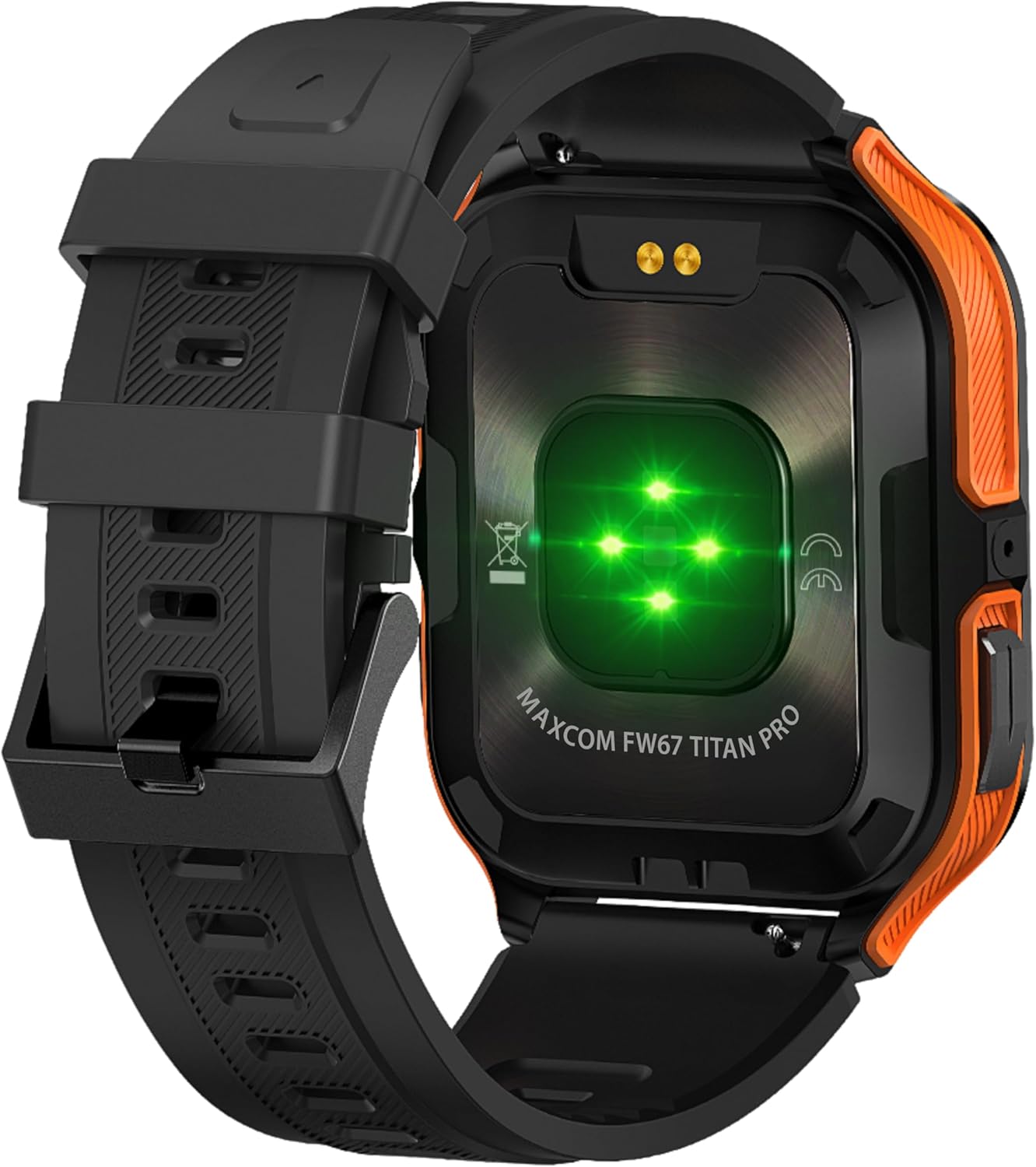
Figur 4.3: Bag view of the smartwatch, showing the optical heart rate sensors (glowing green) and the magnetic charging pins. The model name 'MAXCOM FW67 TITAN PRO' is also visible.
5. Opsætning
5.1. Første opladning
Oplad dit smartwatch helt før første brug.
- Connect the charging cable to the magnetic charging pins on the back of the smartwatch. Ensure the pins align correctly.
- Plug the USB end of the charging cable into a compatible USB power adapter (e.g., 5V/1A) or a computer's USB port.
- The watch display will indicate charging status. A full charge typically takes approximately 2-3 hours.
5.2. Appinstallation og parring
To unlock the full potential of your smartwatch, you need to pair it with your smartphone via the dedicated companion application.
- Download appen: Søg efter the official MAXCOM smartwatch application (e.g., 'GloryFit' or similar, refer to packaging for exact app name) on the Google Play Store (for Android) or Apple App Store (for iOS). Install the app on your smartphone.
- Aktiver Bluetooth: Sørg for, at Bluetooth er aktiveret på din smartphone.
- Åbn appen: Launch the installed app and follow the on-screen instructions to create an account or log in.
- Tilføj enhed: Within the app, navigate to the 'Device' or 'Add Device' section. The app will search for available smartwatches.
- Select Your Smartwatch: Select 'FW67 Titan Pro' from the list of discovered devices.
- Bekræft parring: Der kan blive vist en parringsanmodning på både din telefon og dit smartwatch. Bekræft parringen på begge enheder.
- Komplet opsætning: Follow any remaining prompts in the app to set up your profile, permissions, and preferences.
6. Betjening af dit smartwatch
6.1. Grundlæggende navigation
- Power knap: Press and hold to power on/off. Short press to wake the screen or return to the main watch face.
- Tilbage knap: Short press to go back to the previous screen or exit a function.
- Berøringsskærmbevægelser:
- Stryg op: Access quick settings/control center.
- Stryg ned: View meddelelser.
- Stryg til venstre/højre: Navigate through widgets (e.g., activity, heart rate, weather).
- Tryk på: Vælg et element, eller gå ind i en menu.
6.2. Nøglefunktioner

Figur 6.1: The smartwatch display showcasing various health metrics including steps taken, calories burned, heart rate, blood oxygen saturation (SpO2), and blood pressure, along with battery status.
- Heart Rate Monitoring: The watch continuously monitors your heart rate. Access this feature from the main menu or by swiping to the heart rate widget.
- Aktivitetssporing: Tracks steps, distance, and calories burned throughout the day. Set daily goals in the companion app.
- Søvnovervågning: Sporer automatisk dine søvnmønstre, herunder dyb søvn, let søvn og vågnetider. View detaljeret analyse i appen.
- Sportstilstande: Select from various sports modes (e.g., running, walking, cycling) to track specific workout data. Start a workout from the 'Sport' menu.
- Meddelelser: Receive call, message, and app notifications directly on your wrist. Ensure notification permissions are granted in the companion app.
- Blood Oxygen (SpO2) & Blood Pressure: The watch can measure SpO2 and blood pressure. These measurements are for reference only and not for medical use.
- Vejr: View current weather conditions after syncing with the app and granting location permissions.
- Musik kontrol: Styr musikafspilningen på din smartphone direkte fra uret.
7. Vedligeholdelse
- Rensning: Regularly clean your smartwatch and strap with a soft, dry, lint-free cloth. If necessary, use a slightly damp cloth with mild soap, then rinse and dry thoroughly.
- Undgå kemikalier: Do not use harsh chemicals, cleaning solvents, or strong detergents, as these can damage the watch's finish and seals.
- Opladningsport: Keep the charging pins clean and dry to ensure proper charging.
- Opbevaring: Når smartwatchet ikke er i brug i længere perioder, skal det opbevares et køligt og tørt sted.
- Vandtæthed: While the watch is IP69K water-resistant, it is not recommended for diving or high-pressure water activities. Always dry the watch thoroughly after exposure to water.
8. Fejlfinding
Hvis du støder på problemer med dit smartwatch, kan du se følgende almindelige problemer og løsninger:
| Problem | Løsning |
|---|---|
| Smartwatch won't turn on | Sørg for, at uret er fuldt opladet. Tilslut det til opladeren i mindst 30 minutter. |
| Kan ikke parres med smartphone | 1. Ensure Bluetooth is enabled on your phone. 2. Make sure the smartwatch is within range. 3. Restart both the smartwatch and your phone. 4. Clear Bluetooth cache on your phone. 5. Try pairing through the app, not directly via phone's Bluetooth settings. |
| Notifications are not received | 1. Check if the smartwatch is connected to the app. 2. Ensure notification permissions are granted for the app on your phone. 3. Verify that app notifications are enabled within the smartwatch app settings. 4. Disable 'Do Not Disturb' mode on both the watch and phone. |
| Unøjagtige sundhedsdata | 1. Ensure the watch is worn snugly on your wrist, not too loose or too tight. 2. Clean the sensors on the back of the watch. 3. Avoid excessive movement during measurements. 4. Remember that data is for reference and not medical diagnosis. |
| Kort batterilevetid | 1. Reduce screen brightness. 2. Limit continuous heart rate monitoring if not needed. 3. Turn off unnecessary notifications. 4. Ensure the watch is fully charged each time. |
9. Specifikationer
Key technical specifications for the MAXCOM FW67 Titan Pro Smartwatch:
| Feature | Specifikation |
|---|---|
| Mærke | MAXCOM |
| Model | FW67 Titan Pro |
| Farve | Orange |
| Operativsystem | Proprietary OS (compatible with Android/iOS) |
| Skærmstørrelse | 1.85 tommer |
| Forbindelse | Bluetooth |
| Særlige funktioner | Heart Rate Monitor, Notifications, SpO2, Blood Pressure, Activity Tracking |
| Kompatible enheder | Smartphone |
| Batterisammensætning | Lithium-ion |
| Batterikapacitet | 380 mAh |
| GPS | GPS via smartphone |
| Form | Rektangulær |
10. Garanti og support
Your MAXCOM FW67 Titan Pro Smartwatch comes with a standard manufacturer's warranty. Please refer to the warranty card included in your package for specific terms and conditions, including warranty duration and coverage details. For technical support, troubleshooting assistance beyond this manual, or warranty claims, please contact MAXCOM customer service through their official webwebstedet eller de kontaktoplysninger, der følger med din produktdokumentation.


