1. Introduktion
Thank you for choosing the Cherub WST-645 Rechargeable Clip-on Guitar Tuner. This advanced tuner features an innovative auto-on design, a vibrant color LCD, and high-sensitivity piezo sensors for precise tuning. It supports multiple tuning modes and is powered by a long-lasting rechargeable Li-ion battery with a convenient USB-C port. This manual provides detailed instructions to help you get the most out of your WST-645 tuner.
Nøglefunktioner:
- USB Rechargeable Clip-on Tuner.
- Auto-on Design: Simply flip the tuner up to power it on, and push it down to turn it off.
- 5 Tuning Modes: Chromatic, Guitar (Standard), Guitar (Compensated), Bass, and Ukulele.
- Rechargeable Li-ion Battery with USB-C port, offering up to 6 hours of continuous use.
- High-sensitivity piezo sensors ensure ±1 cent high degree of accuracy.
- Large Colored LCD Display for clear visibility.
2. Pakkens indhold
Kontroller venligst pakkens indhold for at sikre, at alle varer er til stede:
- Cherub WST-645 Clip-on Tuner
- USB-C ladekabel
- Brugervejledning (dette dokument)
3. Produktet er slutview
Familiarize yourself with the components of your Cherub WST-645 tuner.

Figur 3.1: Forside view of the WST-645 tuner, highlighting the large color LCD display and the Cherub logo.

Figur 3.2: Vinklet view of the tuner, illustrating the robust clip mechanism designed for secure attachment to instruments.

Figur 3.3: Side view of the tuner, clearly showing the USB-C charging port for convenient recharging.
4. Opsætning
4.1 Charging the Tuner
The Cherub WST-645 comes with a built-in rechargeable Li-ion battery. Before first use, it is recommended to fully charge the tuner.
- Connect the supplied USB-C charging cable to the USB-C port on the side of the tuner.
- Sæt den anden ende af kablet i en standard USB-strømadapter (medfølger ikke) eller en computers USB-port.
- The battery indicator on the display will show charging status. A full charge typically takes a short amount of time (around 15 minutes for a half-depleted battery, as per user reviews).

Figure 4.1: Connecting the USB-C charging cable to the tuner.
4.2 Attaching to Your Instrument
The WST-645 features a sturdy clip designed to attach securely to the headstock of your guitar, bass, or ukulele. The clip has rubber pads to protect your instrument's finish.
- Åbn klipsen ved at trykke på håndtagene.
- Attach the tuner firmly to the headstock of your instrument, ensuring good contact for vibration detection.
- Juster visningsvinklen for optimal viewing.
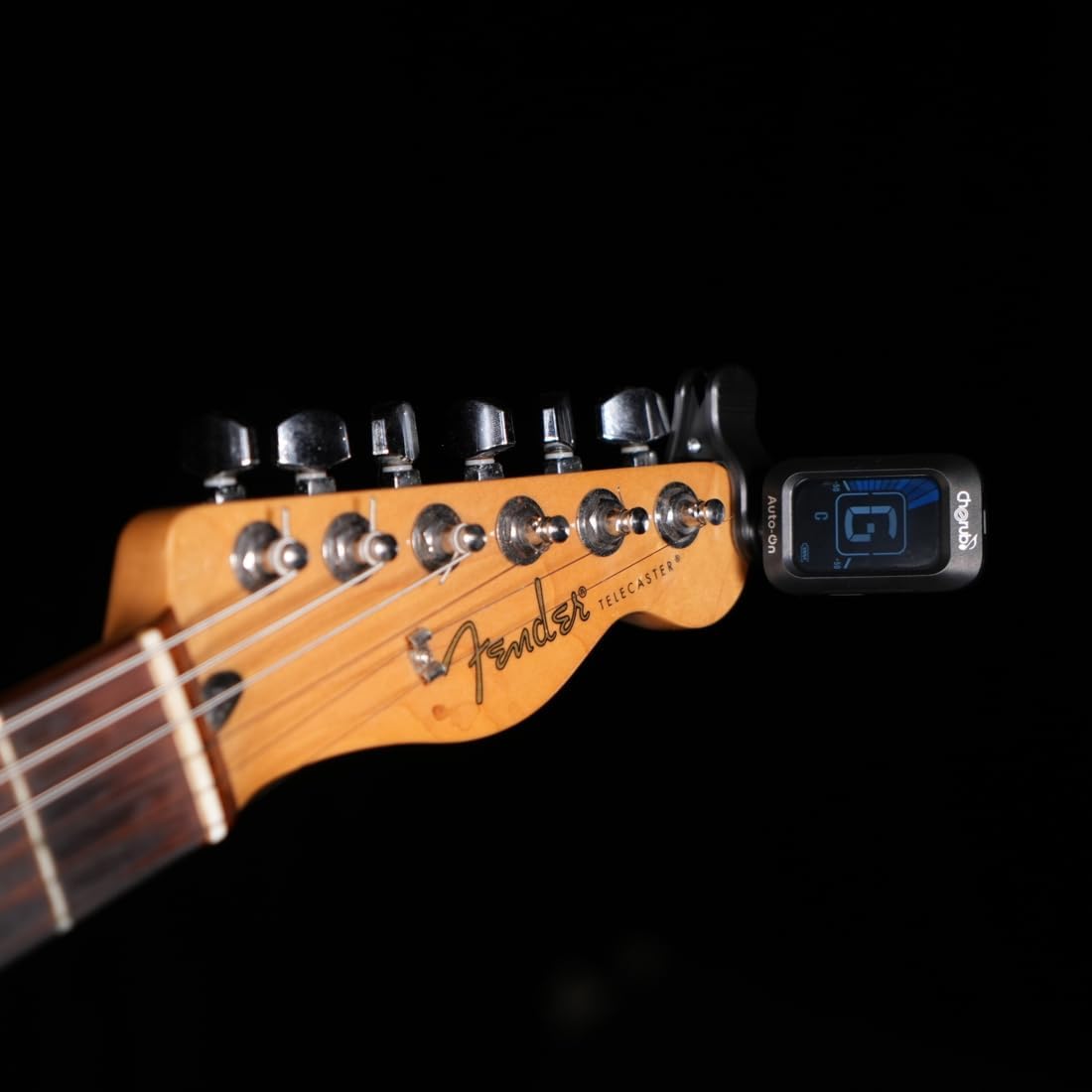
Figure 4.2: Tuner attached to a guitar headstock.
Vigtig bemærkning: For instruments with a nitrocellulose finish, it is recommended to remove the tuner after each use. The rubber pads on clip-on tuners can potentially react with and damage nitrocellulose finishes over extended periods. This is not an issue for instruments with polyurethane finishes.
5. Betjeningsvejledning
5.1 Tænd/sluk
The WST-645 features an intuitive auto-on/off mechanism:
- To power on, simply flip the tuner's display unit upwards from its folded position.
- To power off, fold the display unit back down into its compact position.

Figure 5.1: Auto-on/off mechanism by flipping the display.
5.2 Selecting Tuning Modes
The WST-645 supports 5 tuning modes: Chromatic, Guitar (Standard), Guitar (Compensated), Bass, and Ukulele. The tuner is designed to automatically detect the instrument type and switch to the appropriate mode. If manual selection is needed, refer to the small button on the side of the tuner (if present, not explicitly mentioned in data, but common for tuners) to cycle through modes.
The "Guitar (Compensated)" mode is specifically designed for improved intonation on guitars, adjusting for slight pitch discrepancies across the fretboard. Refer to the table below for compensated tuning values:

Figure 5.2: Compensated Tuning Values for Guitar.
5.3 Stemning af dit instrument
Once the tuner is attached and powered on, pluck a single string on your instrument. The tuner will detect the note and display it on the screen. The large color LCD provides clear visual feedback:
- Flad: If the pitch is flat, the left side of the display will illuminate in blue, and the needle will point to the left. Adjust your string upwards until the display indicates "in tune".
- I harmoni: When the note is in tune, the center of the display will illuminate green, and the needle will be centered.
- Skarp: If the pitch is sharp, the right side of the display will illuminate in red, and the needle will point to the right. Adjust your string downwards until the display indicates "in tune".

Figure 5.3: Display indications for flat, in tune, and sharp pitches.
The high-sensitivity piezo sensors ensure accurate readings even in noisy environments, providing ±1 cent accuracy.
6. Vedligeholdelse
Proper care will extend the life of your Cherub WST-645 tuner.
- Rensning: Use a soft, dry cloth to clean the tuner's body and display. Do not use abrasive cleaners or solvents.
- Batteripleje: To maintain battery health, avoid fully discharging the battery frequently. Recharge the tuner when the battery indicator is low. If storing for a long period, charge the battery to about 50% every few months.
- Opbevaring: Opbevar tuneren et køligt, tørt sted væk fra direkte sollys og ekstreme temperaturer.
- Håndtering: Avoid dropping the tuner or subjecting it to strong impacts, as this can damage the internal components or the display.
7. Fejlfinding
If you encounter issues with your WST-645 tuner, please refer to the following common problems and solutions:
| Problem | Mulig årsag | Løsning |
|---|---|---|
| Tuneren tænder ikke. | Batteriet er afladet. | Charge the tuner using the USB-C cable. |
| Unøjagtige aflæsninger. | Tuner not securely clipped; external noise; incorrect mode. | Ensure the tuner is firmly clipped to the headstock. Tune in a quiet environment. Verify the correct tuning mode is selected. |
| Skærmen er svag eller flimrer. | Lavt batteri. | Recharge the tuner. |
| Tuner does not respond to instrument vibrations. | Poor contact with instrument; faulty sensor. | Re-position the tuner for better contact. If problem persists, contact customer support. |
8. Specifikationer
| Feature | Detalje |
|---|---|
| Modelnummer | WST-645 |
| Tuning tilstande | Chromatic, Guitar (Standard), Guitar (Compensated), Bass, Ukulele |
| Nøjagtighed | ± 1 cent |
| Strømkilde | Genopladeligt litium-ion-batteri (inkluderet) |
| Opladningsport | USB-C |
| Batterilevetid | Op til 6 timer (omtrentlig) |
| Varens vægt | 2.47 ounces (ca. 70 g) |
| Pakkedimensioner | 3.86 x 2.99 x 1.5 tommer (ca. 9.8 x 7.6 x 3.8 cm) |
| Dato først tilgængelig | 5. december 2023 |
9. Garanti og support
For detailed warranty information, please refer to the warranty card included with your product or visit the official Cherub website. Cherub provides customer support for product inquiries, technical assistance, and warranty claims.
Online support: Visit the official Cherub webwebsted for ofte stillede spørgsmål, produktregistrering og kontaktoplysninger.
Kontakte: For direct assistance, please use the contact methods provided on the Cherub webwebsted.


