1. Introduktion
Thank you for choosing the VSON Indoor Air Quality Monitor, Model WP6932. This device is designed to provide accurate, real-time measurements of various indoor air quality parameters, including Formaldehyde (HCHO), Total Volatile Organic Compounds (TVOC), Particulate Matter (PM2.5, PM1.0, PM10), Temperature, and Humidity. By monitoring these factors, you can ensure a healthier living or working environment. Please read this manual thoroughly before using the device to ensure proper operation and to maximize its lifespan.
2. Produktet er slutview og funktioner
The VSON Indoor Air Quality Monitor is a portable, multi-functional device equipped with advanced sensor technology for precise air quality assessment.
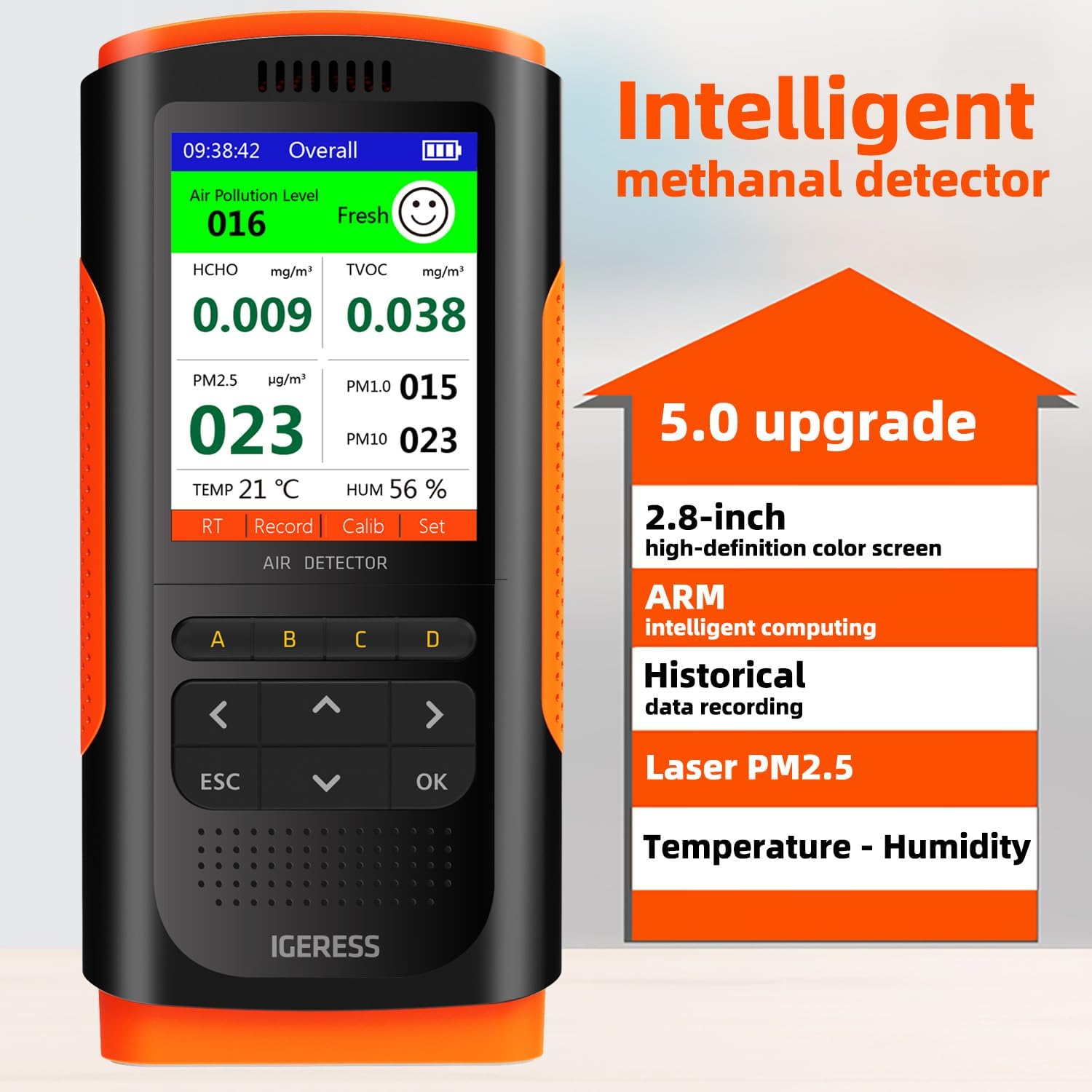
Figur 2.1: Front view of the VSON Indoor Air Quality Monitor displaying its 2.8-inch color screen with real-time readings for air pollution level, HCHO, TVOC, PM2.5, PM1.0, PM10, temperature, and humidity. The image highlights key features like ARM intelligent computing and historical data recording.
Nøglefunktioner:
- Multifunktionel detektion: Accurately measures HCHO, TVOC, PM2.5, PM1.0, PM10, Temperature, and Humidity.
- Avanceret sensorteknologi: Incorporates an electrochemical methanal sensor, laser PM2.5 sensor, temperature sensor, and humidity sensor for reliable data.
- Overvågning i realtid: Provides instant readings and historical data tracking for comprehensive air quality analysis.
- Bærbart design: Lightweight (170g) with a built-in rechargeable lithium battery (6-8 hours standby) and USB charging for convenient use at home, in the car, or during travel.
- Smart Reminder System: Features an audible alarm and a color-changing interface (red for high risk) to alert users when pollutant levels exceed safe thresholds.
- High-Definition Display: 2.8-inch digital color LCD screen for clear visibility of all information.
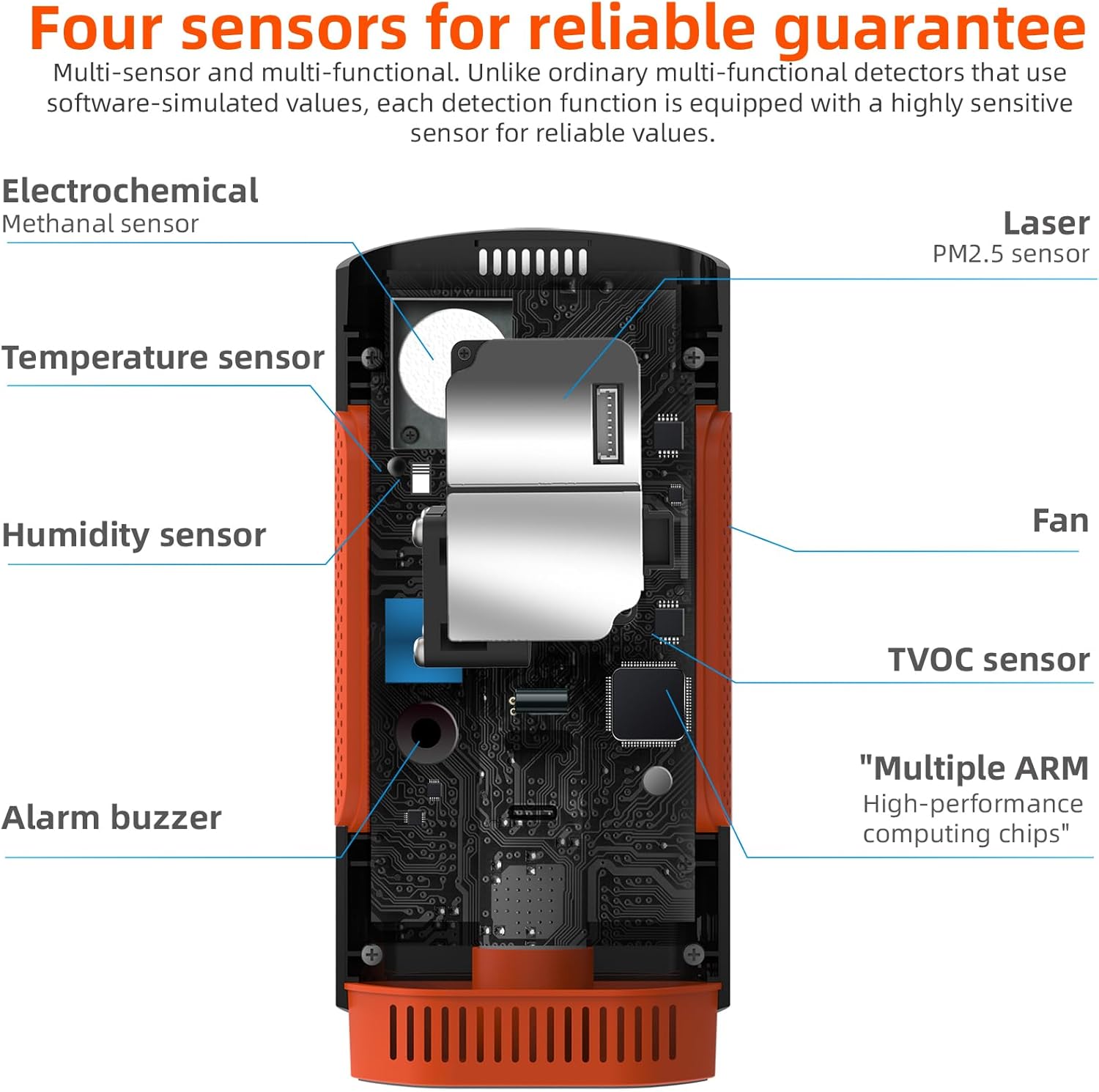
Figur 2.2: Internal diagram of the VSON Indoor Air Quality Monitor, illustrating the placement of its four main sensors: Electrochemical Methanal sensor, Laser PM2.5 sensor, Temperature sensor, and Humidity sensor. Also shown are the internal fan, TVOC sensor, alarm buzzer, and high-performance computing chips.
3. Opsætning
3.1 Indledende opladning
Before first use, fully charge the device using the provided USB cable. Connect the USB cable to the device's charging port and a compatible USB power adapter (not included). The charging indicator will show the charging status.
3.2 First-Time Calibration
For optimal accuracy, it is crucial to perform an initial calibration. Place the monitor in an area with fresh, clean air (e.g., outdoors or near an open window) for 30 to 50 minutes. Turn on the device and allow it to stabilize and self-calibrate during this period. This process helps the sensors adjust to baseline environmental conditions.
4. Betjeningsvejledning
4.1 Tænd/sluk
- For at tænde skal du trykke på og holde nede Til/Fra knappen, indtil skærmen lyser.
- For at slukke, skal du trykke på og holde nede Til/Fra knappen, indtil skærmen slukker.
4.2 Realtidsovervågning
Once powered on, the device will automatically begin measuring air quality parameters and display them on the 2.8-inch LCD screen. The display shows:
- Overall Air Pollution Level: An indicator of general air quality.
- HCHO (formaldehyd): Concentration in mg/m³.
- TVOC (Total Volatile Organic Compounds): Concentration in mg/m³.
- PM2.5, PM1.0, PM10: Partikelkoncentrationer i µg/m³.
- TEMP (Temperature): Aktuel omgivelsestemperatur.
- HUM (Humidity): Aktuel omgivende luftfugtighed.

Figur 4.1: The VSON Indoor Air Quality Monitor displaying real-time data monitoring with a graph showing HCHO readings over time. The graph illustrates value increase, stability, and decrease, indicating changes in indoor air quality.
4.3 Smart Reminder and Alarm
The monitor analyzes detected data and provides a risk assessment. If any measured value exceeds the normal or safe range, the device will:
- Emit an audible alarm.
- Change the interface color to red to visually indicate a high-risk situation.
4.4 Historical Data Recording
The device records historical data, allowing you to track air quality trends over time. Use the navigation buttons (usually labeled with arrows or 'Week'/'Month' on screen) to view past readings.

Figur 4.2: The VSON Indoor Air Quality Monitor screen showing historical data for HCHO readings, with options to view data by week or month. The display indicates a specific date (2023-05-19) and HCHO value (0.011).
5. Kalibrering
The VSON monitor features advanced temperature difference compensation calibration technology. This system automatically adjusts detection results based on environmental temperature data to maintain accuracy.

Figur 5.1: Diagram explaining the Temperature Difference Compensation Calibration Technology. It shows how the sensor transmits data, undergoes mutual calibration, and significantly enhances detection reliability by judging environmental temperature data and automatically calibrating results.
Beyond the initial calibration (Section 3.2), if you suspect inaccurate readings or after prolonged storage, you may perform a manual recalibration by placing the device in a fresh air environment for 30-50 minutes.
6. Vedligeholdelse
6.1 Rengøring
To clean the device, gently wipe the exterior with a soft, dry cloth. Do not use abrasive cleaners, solvents, or immerse the device in water. Ensure the air inlets and outlets are free from dust and obstructions.
6.2 Pleje af batterier
Recharge the built-in lithium battery when the battery indicator shows low power. Use only the provided USB cable for charging. Avoid overcharging or completely draining the battery for extended periods to prolong its lifespan.
7. Fejlfinding
- Enheden tænder ikke: Sørg for, at batteriet er opladet. Tilslut til en USB-strømkilde, og prøv igen.
- Readings appear inaccurate or stuck: Perform a recalibration by placing the device in fresh air for 30-50 minutes. Ensure the air inlets are not blocked.
- Alarmen lyder ofte: Check the displayed pollutant levels. If levels are high, ventilate the area. If levels are normal and the alarm persists, try recalibrating the device.
- Skærmen er tom eller reagerer ikke: Try restarting the device. If the issue persists, ensure it is fully charged.
- Opladningsproblemer: Sørg for, at USB-kablet er korrekt tilsluttet til både enheden og strømkilden. Prøv en anden USB-port eller adapter.
8. Specifikationer
| Parameter | Værdi |
|---|---|
| Mærke | VSON |
| Modelnummer | WP6932 |
| Dimensioner (L x B x H) | 15 x 6.75 x 3.74 cm |
| Vægt | 170 gram |
| Materiale | ABS |
| Strømkilde | Built-in Rechargeable Lithium Battery (USB powered) |
| Batterilevetid (Standby) | 6-8 timer |
| Alarmtype | Hørbar |
| Sensortyper | Electrochemical (HCHO, TVOC), Laser (PM2.5), Temperature, Humidity |
| Vise | 2.8-inch Digital Color LCD |
| UPC | 739210350338 |
9. Garanti og support
Information regarding product warranty and customer support is not available in the provided product data. Please refer to the product packaging or the retailer's website for specific warranty terms and contact details for support.