1. Introduktion
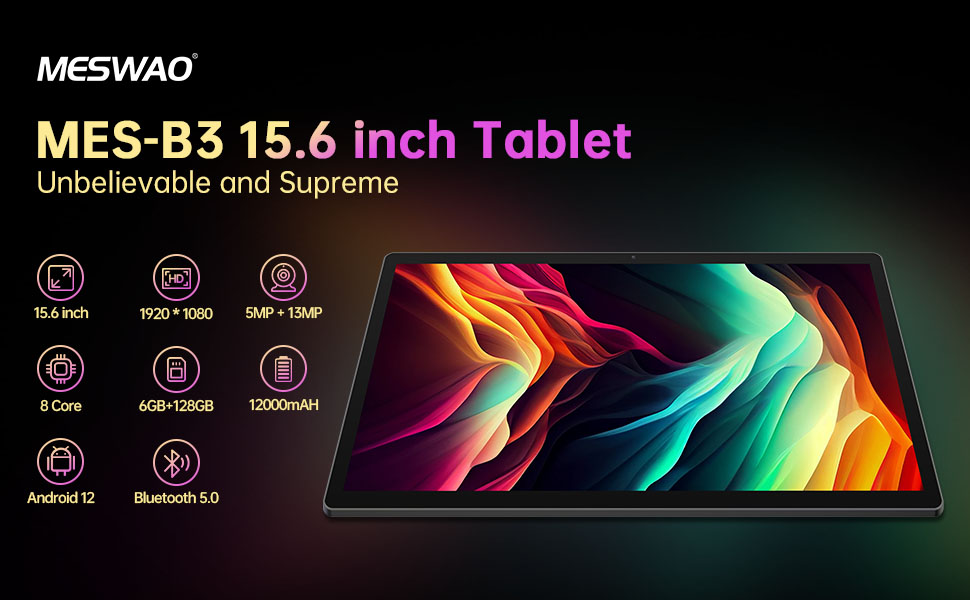
Welcome to the user manual for your MESWAO MES-B3 15.6-inch Android 13 Tablet. This document provides essential information for setting up, operating, maintaining, and troubleshooting your device. The MES-B3 tablet features a large 15.6-inch IPS HD display, an Octa-Core processor, 6GB RAM, 128GB internal storage (expandable), and a 12000mAh battery, designed for a versatile user experience.

Figure 1: MESWAO MES-B3 Tablet Overview
2. Sikkerhedsoplysninger
Please read all safety instructions carefully before using your tablet to prevent injury or damage to the device. Keep this manual for future reference.
- Batterisikkerhed: Do not attempt to replace the battery yourself. Do not expose the tablet to extreme temperatures, direct sunlight, or fire. Do not puncture, drop, or disassemble the battery.
- Vand og fugt: This tablet is not waterproof. Avoid exposing it to water, rain, or high humidity.
- Rensning: Use a soft, dry cloth to clean the tablet. Do not use liquid cleaners or aerosols.
- Håndtering: Avoid dropping the tablet or subjecting it to strong impacts.
- Høreværn: When using headphones, set the volume to a moderate level to avoid hearing damage.
3. Pakkens indhold
Bekræft at alle varer er til stede i pakken:
- MESWAO MES-B3 15.6-inch Android 13 Tablet
- Strømadapter
- USB-C kabel
- Brugervejledning (dette dokument)
4. Enhed overview
Familiarize yourself with the physical components of your MESWAO MES-B3 tablet.

Figure 2: Buttons and Connectors
- Power knap: Press and hold to turn the tablet on or off. Press briefly to turn the screen on or off.
- Lydstyrkeknapper: Juster lydstyrken.
- Forreste kamera: Til videoopkald og selfies (5MP).
- Bakkamera med lommelygte: Til optagelse af billeder og videoer (13MP).
- Type-C port: Til opladning af tabletten og tilslutning til en computer.
- TF-kortslot: Insert a MicroSD card to expand storage.
- Stereo højtalere: Giv lydudgang.
5. Opsætning
5.1 Opladning af tabletten
Before first use, fully charge your tablet. Connect the USB-C cable to the tablet's Type-C port and the other end to the power adapter. Plug the adapter into a wall outlet. The battery indicator on the screen will show charging status.
5.2 Tænd/sluk
- For at tænde: Press and hold the Power Button until the MESWAO logo appears.
- For at slukke: Press and hold the Power Button until the power options appear, then select 'Power off'.
- For at genstarte: Press and hold the Power Button until the power options appear, then select 'Restart'.
5.3 Guide til indledende opsætning
Når tabletten tændes første gang, vil den guide dig gennem en indledende opsætningsproces:
- Vælg dit foretrukne sprog.
- Opret forbindelse til et Wi-Fi-netværk.
- Log ind med din Google-konto, eller opret en ny.
- Review og accepterer vilkårene og betingelserne.
- Konfigurer skærmlås (pinkode, mønster, adgangskode).
5.4 Indsættelse af et MicroSD-kort
To expand the tablet's storage, you can insert a MicroSD card (up to 256GB, as per some product information, though 1TB is also mentioned in images, please verify with product packaging for exact maximum). Locate the TF card slot on the side of the tablet. Gently insert the MicroSD card with the gold contacts facing down until it clicks into place.

Figure 3: Storage Expansion with MicroSD Card
6. Betjening af din tablet
6.1 Grundlæggende navigation
The MESWAO MES-B3 runs on Android 13, offering an intuitive touch interface.
- Tryk på: Vælg et element, eller åbn en app.
- Stryg: Naviger gennem skærme, rul i lister eller afvis notifikationer.
- Knib-for-at-zoome: Forstør eller formindsk indholdet på skærmen.
- Startskærm: Access your apps and widgets. Swipe down from the top for notifications and quick settings.
Figur 4: Android 13-grænseflade
6.2 Wi-Fi-forbindelse
- Gå til Indstillinger > Netværk og internet > Internettet.
- Slå Wi-Fi til.
- Vælg det ønskede netværk fra listen, og indtast adgangskoden, hvis du bliver bedt om det.
6.3 Bluetooth -parring
The tablet supports Bluetooth 5.0 for connecting wireless accessories.
- Gå til Indstillinger > Tilsluttede enheder > Forbindelsespræferencer > Bluetooth.
- Slå Bluetooth til.
- Sørg for, at din Bluetooth-enhed er i parringstilstand.
- Select your device from the 'Available devices' list and follow on-screen prompts to pair.
6.4 App-administration
- Installer apps: Åbn Google Play Butik-appen, søg efter den ønskede app, og tryk på 'Installer'.
- Afinstaller apps: Press and hold an app icon on the home screen or app drawer, then drag it to 'Uninstall' or select 'App info' and choose 'Uninstall'.
- Administrer apps: Gå til Indstillinger > Apps til view, force stop, or clear data for installed applications.
6.5 Skærmindstillinger
Tilpas din viewoplevelse:
- Gå til Indstillinger > Vise.
- Tilpasse Lysstyrkeniveau.
- Sæt Skærm timeout (sleep duration).
- Forandring Skriftstørrelse og Skærmstørrelse.
- Aktiver Mørkt tema for reduced eye strain.
6.6 Batteristyring
The MES-B3 features a 12000mAh battery for extended use.

Figur 5: Forlænget batterilevetid
- Gå til Indstillinger > Batteri til view usage and optimize settings.
- Aktiver Batterisparer tilstand for at forlænge batterilevetiden, når det er nødvendigt.
- Luk ubrugte apps, der kører i baggrunden.
- Reducer skærmens lysstyrke.
7. Vedligeholdelse
7.1 Rengøring
- Brug en blød, fnugfri klud til forsigtigt at tørre skærmen og kabinettet af.
- Til genstridige pletter, let dampRengør kluden med vand eller en skærmrens, der er specielt designet til elektronik.
- Avoid using abrasive materials, alcohol, or chemical solvents.
7.2 Opbevaring
- Opbevar tabletten et køligt, tørt sted væk fra direkte sollys og ekstreme temperaturer.
- If storing for an extended period, ensure the battery is charged to about 50% to prolong its lifespan.
7.3 Softwareopdateringer
Tjek regelmæssigt for softwareopdateringer for at sikre optimal ydeevne og sikkerhed.
- Gå til Indstillinger > System > Systemopdatering.
- The tablet will check for available updates. Follow the on-screen instructions to download and install any updates.
8. Fejlfinding
Her er løsninger på almindelige problemer, du kan støde på:
| Problem | Løsning |
|---|---|
| Tabletten tænder ikke | Sørg for, at tabletten er opladet. Tilslut den til opladeren i mindst 30 minutter, og prøv derefter at tænde den igen. |
| Problemer med Wi-Fi-forbindelse | Restart your Wi-Fi router and the tablet. Go to Settings > Network & internet > Internet, forget the network, and reconnect. |
| Langsom ydeevne | Close unused apps. Clear cache for frequently used apps (Settings > Apps > [App Name] > Storage & cache > Clear cache). Restart the tablet. |
| Batteriet aflades hurtigt | Reduce screen brightness. Disable Wi-Fi/Bluetooth when not in use. Close background apps. Check battery usage in Settings > Battery to identify power-hungry apps. |
| Apps går ned eller fryser | Force stop the app (Settings > Apps > [App Name] > Force stop). Clear the app's cache. If the problem persists, uninstall and reinstall the app. |
9. Specifikationer
Detailed technical specifications for the MESWAO MES-B3 tablet:

Figur 6: Nøglefunktioner og specifikationer
| Feature | Specifikation |
|---|---|
| Mærke | MESWAO |
| Modelnummer | MES-B3 |
| Operativsystem | Android 13 |
| Processor | MediaTek Octa-Core (MTK6789) |
| VÆDDER | 6 GB |
| Intern opbevaring | 128 GB |
| Udvidelig opbevaring | Up to 256 GB (via TF/MicroSD card) |
| Skærmstørrelse | 15.6 tommer |
| Skærmopløsning | 1920 x 1080 pixels (IPS HD) |
| Forreste kamera | 5 MP |
| Bagkamera | 13 MP |
| Batterikapacitet | 12000 mAh |
| Batterilevetid | Cirka 10 timer (afhængig af brug) |
| Forbindelse | Bluetooth 5.0, Wi-Fi (802.11ac, 2.4G/5G) |
| Havne | USB Type-C, TF Card Slot |
| Farve | Grå |
| Dimensioner (L x B x H) | 36.85 x 22.25 x 0.93 cm |
| Vægt | 1.1 kilo |
10. Garanti og support
Your MESWAO MES-B3 tablet is covered by a standard manufacturer's warranty. Please refer to the warranty card included in your package for specific terms and conditions, including warranty duration and coverage details.
For technical support, troubleshooting assistance beyond this manual, or warranty claims, please contact MESWAO customer service through the retailer where you purchased the product or visit the official MESWAO webwebsted for kontaktoplysninger.


