Beghelli Salvalavita Phone SLV19 User Manual
Emergency GSM Mobile Phone with SOS Function
1. Introduktion
This manual provides detailed instructions for the proper use and maintenance of your Beghelli Salvalavita Phone SLV19. Please read this manual carefully before using the device to ensure safe and optimal performance. Keep this manual for future reference.
2. Pakkens indhold
Bekræft at alle varer er til stede i pakken:
- Beghelli Salvalavita Phone SLV19
- Batteri
- Oplader
- Brugervejledning (dette dokument)

Billedbeskrivelse: A black power adapter with a European two-pin plug and an attached black USB-A to Micro-USB charging cable. The charger has "Beghelli" branding.
3. Enhed overview
The Beghelli Salvalavita Phone SLV19 is a user-friendly flip phone designed for clear communication and emergency assistance. It features large keys, a bright display, and a dedicated SOS button.
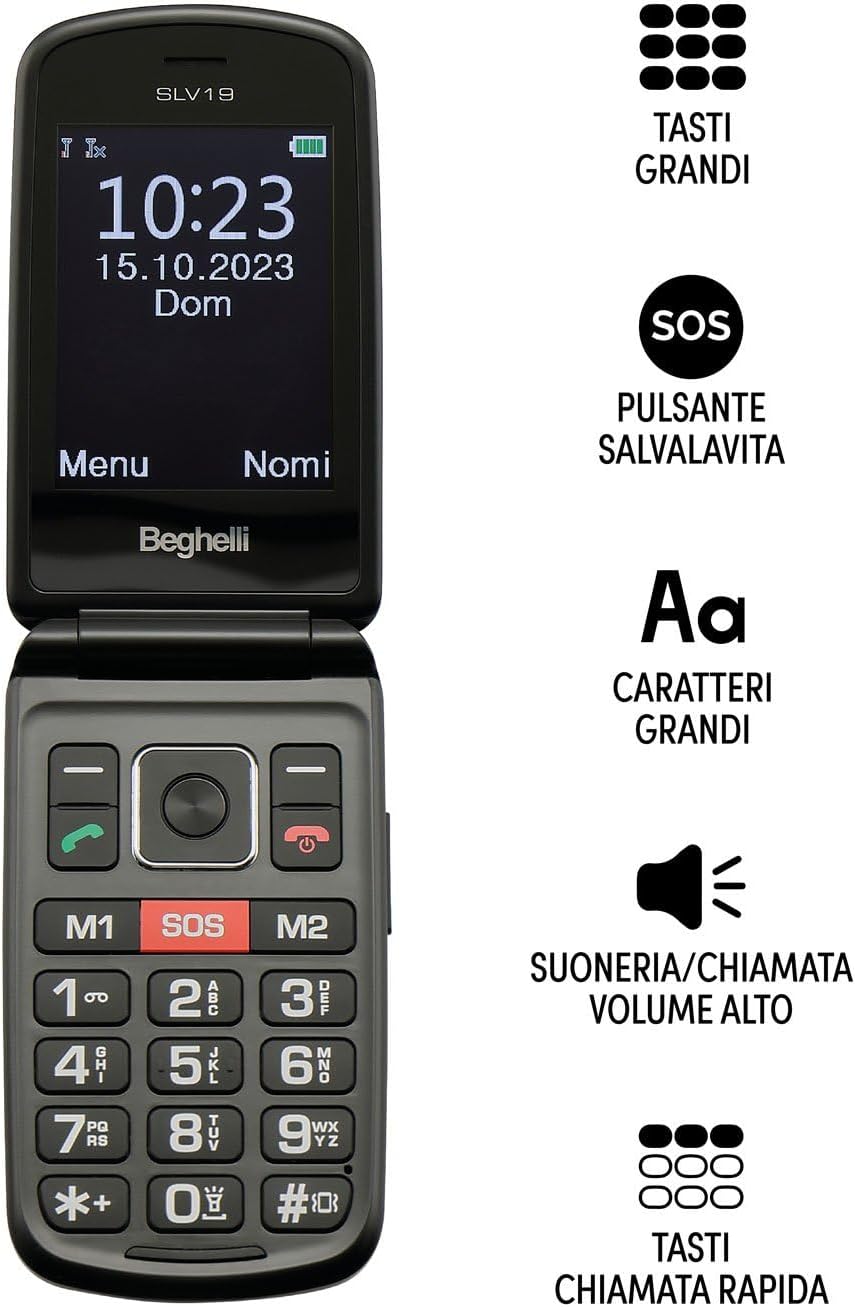
Billedbeskrivelse: The Beghelli Salvalavita Phone SLV19 shown open, displaying the screen and keypad. Key features are highlighted: large keys, SOS button, large characters on screen, high volume ringer, and quick dial keys.

Billedbeskrivelse: The Beghelli Salvalavita Phone SLV19 shown open, revealing its 2.8-inch color display and large, backlit keypad with clearly labeled buttons.

Billedbeskrivelse: The Beghelli Salvalavita Phone SLV19 in its closed, compact flip phone form factor, showing the front casing.

Billedbeskrivelse: En side view of the Beghelli Salvalavita Phone SLV19 when closed, highlighting its slim profile and side buttons/ports.

Billedbeskrivelse: Bagsiden view of the Beghelli Salvalavita Phone SLV19 when closed, featuring the Beghelli logo and a smooth finish.

Billedbeskrivelse: A composite image showing both the front and back of the Beghelli Salvalavita Phone SLV19 in its closed state, providing a complete view of the device's exterior.
4. Opsætning
4.1. Isætning af SIM-kortet
The Beghelli Salvalavita Phone SLV19 requires a Nano SIM card (not included). Ensure the SIM card has voice and SMS traffic enabled.
- Åbn telefonens bagdæksel.
- Remove the battery if it is already inserted.
- Carefully insert the Nano SIM card into the designated slot, ensuring correct orientation.
- Reinsert the battery and close the back cover.
Note: A Nano SIM card with active voice and SMS services is required for phone functionality. The SIM card is not included in the package.
4.2. Isætning af batteriet
- Fjern bagcoveret på telefonen.
- Align the battery contacts with the phone's terminals and gently press the battery into place.
- Sæt bagdækslet på igen, og sørg for, at det klikker ordentligt.
4.3. Opladning af telefonen
Oplad telefonens batteri helt før første brug.
- Connect the Micro-USB end of the charging cable to the charging port on the phone.
- Sæt strømadapteren i en stikkontakt.
- The charging indicator on the phone will illuminate. Once fully charged, the indicator may change color or turn off.
- Afbryd opladeren, når opladningen er fuldført.
5. Betjeningsvejledning
5.1. Tænd/sluk
- For at tænde: Tryk og hold nede Red Call End/Power knappen, indtil skærmen lyser.
- For at slukke: Tryk og hold nede Red Call End/Power button until the power-off options appear, then confirm.
5.2. Foretage og modtage opkald
- Sådan foretager du et opkald: Dial the number using the keypad and press the Grønt opkald knap.
- Sådan modtager du et opkald: Tryk på Grønt opkald knappen, når telefonen ringer.
- Sådan afslutter du et opkald: Tryk på Red Call End/Power knap.
5.3. SOS-nødfunktion
The Salvalavita Phone SLV19 features a dedicated SOS button for emergencies. You can set up to 10 emergency numbers.
- Setting Emergency Numbers: Access the phone's settings menu to configure the emergency contact list. Refer to the "Contacts" section for detailed steps on adding and managing numbers.
- Aktivering af SOS: I en nødsituation skal du trykke på og holde SOS knap (typically located on the back or front of the phone, clearly marked) for 2 seconds.
- The phone will automatically dial the emergency numbers in sequence until one is answered. It will also send an emergency SMS to these contacts.
Optional: Beghelli Salvalavita Center Connection
This device can be connected to the Beghelli Salvalavita Center, a 24/7 monitoring service. Activation of this service requires a separate subscription.
Note: For details on activating and subscribing to the Beghelli Salvalavita Center service, please refer to the information provided with your device or visit the official Beghelli webwebsted.
5.4. Contacts (Phonebook)
Store frequently called numbers in the phonebook for easy access.
- Navigate to the "Contacts" or "Phonebook" menu option.
- Select "Add New Contact" and enter the name and phone number.
- Gem kontakten.
- You can assign quick dial numbers (M1, M2) to important contacts for one-touch dialing.
5.5. Multimediefunktioner
The phone includes basic multimedia features. A TF memory card (up to 32GB, not included) is required for storing media files.
- Kamera: Access the camera from the main menu to take photos.
- Videoafspiller: Play MP4/AVI/3GP video files gemt på hukommelseskortet.
- FM-radio: Stil ind på FM-radiostationer. Hovedtelefoner kan være nødvendige som antenne.
- Lommelygte: Activate the built-in flashlight from the shortcuts or menu.
- Lommeregner: Use the basic calculator function for arithmetic operations.
6. Vedligeholdelse
- Rensning: Brug en blød, tør klud til at rengøre telefonens yderside. Undgå flydende rengøringsmidler.
- Batteripleje: Do not expose the battery to extreme temperatures. If the phone will not be used for an extended period, charge it periodically to maintain battery health.
- Opbevaring: Opbevar telefonen et køligt, tørt sted væk fra direkte sollys og fugt.
7. Fejlfinding
| Problem | Mulig årsag | Løsning |
|---|---|---|
| Telefonen tænder ikke | Batteriet er afladet eller ikke isat korrekt. | Oplad batteriet. Sørg for, at batteriet er korrekt isat. |
| Kan ikke foretage eller modtage opkald | No SIM card, SIM card not inserted correctly, or no network signal. | Ensure SIM card is inserted correctly and activated. Check for network coverage. |
| SOS-funktionen virker ikke | Emergency numbers not set, or no credit/signal. | Verify emergency numbers are configured. Ensure phone has network signal and sufficient credit. |
| Dårlig lydkvalitet | Low volume setting, obstruction of speaker/microphone, or weak signal. | Adjust volume. Clear any obstructions. Move to an area with better signal. |
8. Specifikationer
| Feature | Detalje |
|---|---|
| Modelnavn | Salvalavita Phone SLV19 |
| Mærke | Beghelli |
| Operativsystem | Proprietær |
| Cellulær teknologi | 2G (GSM Quadri Band) |
| SIM-korttype | Nano SIM (understøttelse af dobbelt SIM) |
| Skærmstørrelse | 2.8 tommer |
| Skærmopløsning | 320 x 240 |
| Understøttelse af hukommelseskort | TF Card, up to 32 GB (not included) |
| Kamera | Yes (1.3 MP with flash) |
| Batterikapacitet | 1000 mAh litiumbatteri |
| Dimensioner (lukket) | 108 x 59 x 19 mm |
| Vægt | 106 g |
| Yderligere funktioner | Large backlit keys, High volume, Vibration, Flashlight, FM Radio, Calculator, Video Player (MP4/AVI/3GP) |

Billedbeskrivelse: The product packaging for the Beghelli Salvalavita Phone SLV19, displaying various features and technical specifications in Italian, including GSM Quadri Band, 2.8-inch display, 1.3 MP camera, 1000mAh battery, and dimensions.
9. Garanti og support
For warranty information and technical support, please refer to the official Beghelli webwebstedet eller kontakt deres kundeservice. Gem din købsbevis til garantikrav.
Beghelli Customer Service: Besøg venligst www.beghelli.it for kontaktoplysninger og yderligere assistance.


