1. Introduktion
Tak for købetasing the TANLANIN CD-001 Portable Rechargeable CD Player. This device offers multiple audio playback options, including CD, Bluetooth input/output, USB, and AUX. This manual provides detailed instructions for setup, operation, maintenance, and troubleshooting to ensure optimal performance and longevity of your device.

Figur 1.1: The TANLANIN CD-001 Portable CD Player and included remote control.
2. Produktet er slutview
2.1 Pakkens indhold
Tjek venligst pakken for følgende varer:
- 1x TANLANIN CD-001 Vintage CD Player
- 1x Brugermanual (dette dokument)
- 1x fjernbetjening
- 1x Type-C ladekabel
- 1x garantikort
2.2 Device Features and Controls
Familiarize yourself with the various parts and controls of your CD player.

Figur 2.1: For og bag view of the CD player, highlighting controls and ports. Key features include the CD play arm, control buttons (Stop, Next, Previous, Play/Pause, Bluetooth Transmit/Repeat), Volume Knob, Headphone Jack (AUX Out), Power Switch, USB Input Port, AUX Input Port, and Type-C Charging Port.

Figur 2.2: The LED display indicates the current operating mode: Bluetooth Input Mode (bE), USB Mode (USb), CD Mode (Cd), Line/AUX Mode (LINE), and Bluetooth Output Mode (-bE-).
3. Opsætning
3.1 Indledende opladning
Before first use, fully charge the CD player. Connect the provided Type-C charging cable to the charging port on the device and the other end to a compatible USB power source (e.g., wall adapter, power bank, computer USB port). The LED indicator will show charging status.
3.2 Tænd/sluk
To power on the device, locate the power switch on the rear of the unit and slide it to the 'ON' position. To power off, slide the switch to the 'OFF' position.
4. Betjeningsvejledning
4.1 CD-afspilning
- Åbn topdækslet på cd-afspilleren.
- Carefully place a CD (CD, CD-R, CD-RW, MP3, WMA formats supported) onto the spindle, pressing gently until it clicks into place.
- Luk topdækslet.
- Swing the play arm over the CD. The device will automatically detect the CD and begin playback.
- Use the control buttons (Play/Pause, Next Song, Previous Song, Stop) on the device or remote control to manage playback. Adjust volume using the Volume Knob.
4.2 Bluetooth Input Mode (Speaker Function)
This mode allows you to use the CD player as a Bluetooth speaker for your mobile phone or tablet.
- Power on the CD player.
- The LED display will show 'bE' indicating Bluetooth Input Mode. If not, press the 'Mode' button on the remote or the 'Bluetooth Transmit/Repeat' button on the unit until 'bE' is displayed.
- On your mobile device, enable Bluetooth and search for available devices. Select 'TANLANIN CD-001' to pair.
- Once paired, you can play audio from your mobile device through the CD player's speakers.
4.3 Bluetooth Output Mode (Transmitter Function)
This mode allows the CD player to transmit audio to external Bluetooth headphones or speakers.

Figur 4.1: The CD player can wirelessly connect to Bluetooth headphones or speakers for audio output.
- Ensure your external Bluetooth headphones or speaker are in pairing mode.
- Power on the CD player and select the desired audio source (CD, USB, or AUX).
- Press and hold the 'Bluetooth Transmit/Repeat' button on the unit or the dedicated Bluetooth output button on the remote until '-bE-' appears on the LED display and starts flashing. This indicates Bluetooth Output Mode and pairing search.
- The CD player will automatically search for and connect to nearby Bluetooth audio devices. Once connected, '-bE-' will stop flashing.
- Audio from the selected source will now play through your connected Bluetooth headphones or speaker.
4.4 USB-afspilning
Afspil lyd files direkte fra et USB-flashdrev.
- Insert a USB flash drive into the USB Input Port on the rear of the device.
- Press the 'Mode' button on the remote or the 'Bluetooth Transmit/Repeat' button on the unit until 'USb' is displayed.
- The device will automatically begin playing audio files fra USB-drevet.
- Use the control buttons (Play/Pause, Next Song, Previous Song, Stop) on the device or remote control to manage playback.
4.5 AUX-indgang
Connect external audio devices (e.g., MP3 players, non-Bluetooth phones) using a 3.5mm audio cable.
- Connect one end of a 3.5mm audio cable to the AUX Input Port on the rear of the CD player.
- Tilslut den anden ende til hovedtelefonstikket eller lydudgangen på din eksterne enhed.
- Press the 'Mode' button on the remote or the 'Bluetooth Transmit/Repeat' button on the unit until 'LINE' is displayed.
- Play audio from your external device. The sound will be output through the CD player's speakers.
4.6 Fjernbetjeningsfunktioner
The included remote control provides convenient access to all playback and mode functions. Refer to the remote control diagram for specific button layouts and functions.
5. Opladning
The TANLANIN CD-001 features a built-in 2000mAh rechargeable Lithium Ion battery, providing 5-8 hours of playtime on a full charge. When the battery is low, the device will indicate this on the LED display or through an audible alert.
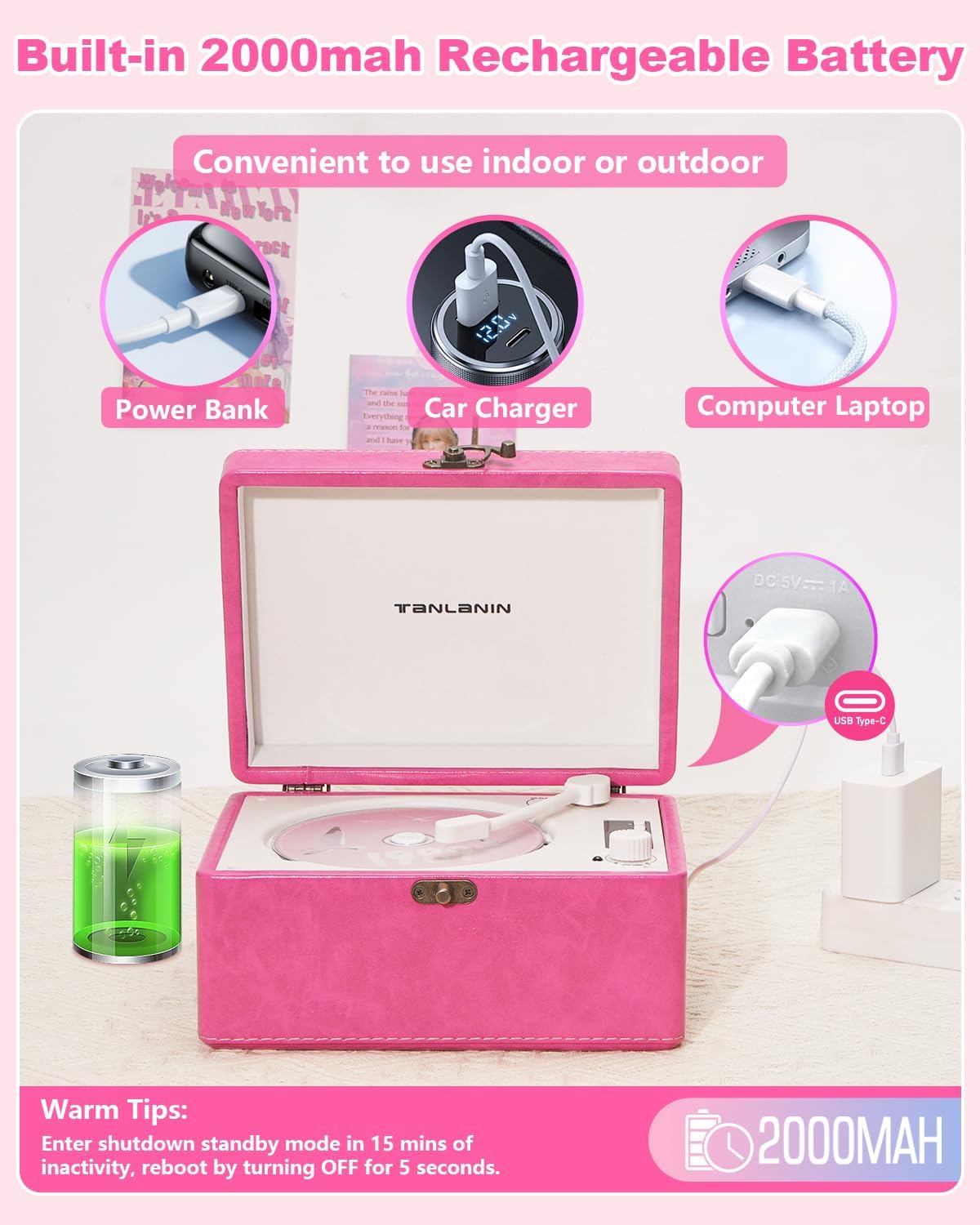
Figur 5.1: The CD player can be charged using various USB power sources, including power banks, car chargers, and computer laptops, via the Type-C port.
Sådan oplader du enheden:
- Connect the provided Type-C charging cable to the Type-C Charging Port on the rear of the CD player.
- Connect the other end of the cable to a 5V/1A USB power adapter (not included), a power bank, or a computer's USB port.
- The charging indicator will illuminate during charging and turn off or change color when fully charged.
Varmt tip:
The device will enter shutdown standby mode after 15 minutes of inactivity to conserve battery. To reactivate, turn the power switch OFF for 5 seconds, then turn it back ON.
6. Vedligeholdelse
6.1 Rengøring
- Sluk altid for enheden og tag stikket ud af stikkontakten inden rengøring.
- Tør ydersiden af med en blød, tør klud. Brug ikke slibende rengøringsmidler, voks eller opløsningsmidler.
- For the CD lens, use a specialized CD lens cleaning kit. Do not touch the lens directly.
6.2 Opbevaring
- Opbevar enheden et køligt, tørt sted væk fra direkte sollys og ekstreme temperaturer.
- Avoid placing heavy objects on top of the player.
- Hvis batteriet opbevares i længere tid, skal det oplades med jævne mellemrum for at bevare dets tilstand.
7. Fejlfinding
| Problem | Mulig årsag | Løsning |
|---|---|---|
| Enheden tænder ikke. | Batteriet er fladt; tænd/sluk-knappen er slukket. | Charge the device; Ensure power switch is in 'ON' position. |
| CD'en afspiller ikke eller springer over. | CD is dirty, scratched, or inserted incorrectly; Unsupported CD format. | Clean the CD; Reinsert correctly; Ensure CD is a supported format (CD, CD-R, CD-RW, MP3, WMA). |
| Bluetooth device cannot connect (Input Mode). | CD player not in Bluetooth Input Mode; Device too far; Bluetooth not enabled on external device. | Ensure 'bE' is displayed; Move devices closer; Enable Bluetooth on your phone/tablet. |
| No sound from external Bluetooth speaker/headphones (Output Mode). | CD player not in Bluetooth Output Mode; External device not in pairing mode or too far. | Ensure '-bE-' is displayed and flashing during pairing; Put external device in pairing mode; Move devices closer. |
| USB drive not recognized or playing. | CD player not in USB Mode; USB drive not formatted correctly; Unsupported file typer. | Ensure 'USb' is displayed; Use FAT32 formatted USB drives; Ensure audio files are MP3 or WMA. |
| Ingen lyd fra AUX-indgangen. | CD player not in AUX Mode; Cable not fully inserted; Volume too low on external device. | Ensure 'LINE' is displayed; Check cable connections; Increase volume on external device. |
8. Specifikationer
- Produktdimensioner: 8.07 x 6.1 x 4.13 tommer
- Varens vægt: 3.2 pund
- Modelnummer: CD-001
- Batteri: 1 lithium-ion batteri (medfølger)
- Forbindelse teknologi: 3.5mm AUX input & output, Bluetooth input & output, USB
- Supported CD Formats: CD, CD-R, CD-RW, MP3, WMA
- Særlige funktioner: Anti-Skip Protection, Battery Level Indicator, Portable, Rechargeable
- Fabrikant: TANLANIN
9. Garanti og support
This TANLANIN CD-001 CD Player comes with a 1 års produktgarantiDerudover en 30-day replacement policy is offered for any manufacturing defects.
For technical support, warranty claims, or any questions regarding your product, please contact TANLANIN customer service through the retailer where the product was purchased.


