Indledning
The LUMENA FAN STAND 3Z is a wireless tabletop fan designed for optimal airflow and convenience. Featuring a quiet BLDC motor, up to 20 hours of wireless operation, and 120-degree rotation, this fan provides a gentle yet powerful breeze. Its award-winning design and easy-to-clean structure make it a perfect addition to any space.

Image: The LUMENA FAN STAND 3Z fan shown alongside its retail packaging and USB-C charging cable. The fan is in Satin Beige color.
Pakkens indhold
- LUMENA FAN STAND 3Z Wireless Tabletop Fan
- USB-C ladekabel
- Brugervejledning (dette dokument)
Opsætning
Follow these steps to set up your LUMENA FAN STAND 3Z for first use:
- Unboxing: Tag forsigtigt ventilatoren og alt tilbehør ud af emballagen.
- Indledende opkrævning: Before first use, fully charge the fan. Connect the provided USB-C cable to the charging port on the fan's base and the other end to a compatible USB power adapter (not included). The charging indicator light will show the charging status.
- Placering: Place the fan on a stable, flat surface. Ensure there is adequate space around the fan for optimal airflow and rotation.
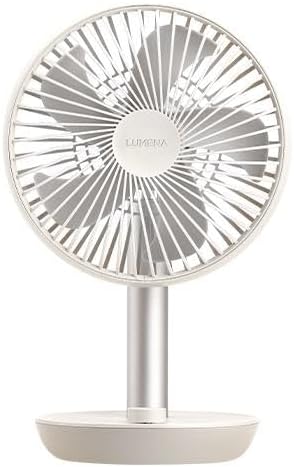
Billede: En direkte front view of the LUMENA FAN STAND 3Z, highlighting its five-vane blade and protective mesh.
Betjeningsvejledning
The LUMENA FAN STAND 3Z features an intuitive jog dial for easy control.
- Tænd/sluk: Press the jog dial once to turn the fan on. Press it again to turn the fan off.
- Justering af vindhastighed: Rotate the jog dial clockwise to increase the wind speed. Rotate it counter-clockwise to decrease the wind speed. The fan has multiple speed settings.
- 120-graders rotation: To activate the 120-degree horizontal oscillation, press and hold the jog dial for approximately two seconds. The fan head will begin to rotate from side to side, providing wider air distribution. To stop the oscillation, press and hold the jog dial again for two seconds. When oscillation is stopped, the fan head will return to its front-facing position.
- Batteriindikator: The fan's base includes an LED indicator that shows the current battery level. Refer to the indicator for charging reminders.

Image: The LUMENA FAN STAND 3Z positioned on a table, providing airflow to individuals seated nearby, demonstrating its use in a social setting.

Image: The LUMENA FAN STAND 3Z placed on a round table in a room bathed in natural sunlight, showcasing its aesthetic integration into a living space.
Vedligeholdelse og rengøring
Regular cleaning ensures optimal performance and longevity of your LUMENA FAN STAND 3Z.
- Sluk: Always ensure the fan is turned off and unplugged from the power source before cleaning.
- Udvendig rengøring: Tør ventilatorens yderflader af med en blød, tør klud.amp klud. Brug ikke slibende rengøringsmidler, opløsningsmidler eller stærke kemikalier, da disse kan beskadige overfladen.
- Rengøring af knive: The fan's design allows for easy cleaning of the blades. Carefully remove the front safety mesh (refer to specific instructions if provided in a physical manual for mesh removal, otherwise, clean through the mesh). Use a soft brush or a vacuum cleaner with a brush attachment to remove dust from the blades and inside the mesh.
- Opbevaring: Når ventilatoren ikke er i brug i længere perioder, skal den opbevares køligt og tørt, væk fra direkte sollys og ekstreme temperaturer.

Billede: En sideprofile view of the LUMENA FAN STAND 3Z on a table, highlighting its slim design and the jog dial control on the base.
Fejlfinding
| Problem | Mulig årsag | Løsning |
|---|---|---|
| Ventilatoren tænder ikke. | Batteriet er afladet. | Oplad ventilatoren med det medfølgende USB-C-kabel. |
| Fan rotation is not working. | Rotation function not activated. | Press and hold the jog dial for two seconds to activate 120-degree rotation. |
| Svag luftstrøm. | Low speed setting or dirty blades. | Increase the wind speed using the jog dial. Clean the fan blades and mesh. |
| Usædvanlig støj under drift. | Obstruction or loose part. | Turn off the fan and check for any obstructions in the blades or mesh. Ensure the fan is on a stable surface. If the issue persists, contact customer support. |
Specifikationer
- Model: LUMENA FAN STAND 3Z
- Dimensioner: 165 x 268 x 131mm (6.5D x 10.55W x 5.16H inches)
- Vægt: 460 g (1.01 lbs)
- Batterikapacitet: 4,000mAh
- Maximum Usage Time: Op til 20 timer (på laveste indstilling)
- Maximum Wind Power: 6W
- Wind Reach: Op til 10m
- Vandret rotation: 120 grader
- Low-noise Technology: Så lavt som 13dB
- Materiale: Aluminum (stand), Matte body
- Opladningsport: USB-C
- Farve: Satin Beige

Image: A display of multiple LUMENA FAN STAND 3Z fans, including the Satin Beige model, showcasing the product's design and available color variations.
Garanti og support
LUMENA products are manufactured with high-quality standards. For warranty information, technical support, or service inquiries, please refer to the warranty card included with your product or visit the official LUMENA website. You may also find additional resources and FAQs at the following link: LUMENA Official Support.
Gem venligst dit købsbevis for garantikrav.


