1. Introduktion
This manual provides detailed instructions for the installation, operation, and maintenance of your Tenveo TEVO-VHD630A PTZ Camera. Please read this manual thoroughly before using the product to ensure proper functionality and to prevent damage.
The Tenveo TEVO-VHD630A is a professional-grade PTZ (Pan-Tilt-Zoom) camera designed for high-quality live streaming and video production. It features AI auto-tracking, a powerful 30X optical zoom, and multiple output interfaces, making it suitable for various applications.
2. Produktet er slutview
The Tenveo TEVO-VHD630A PTZ Camera delivers Full HD 1080P video at 60 frames per second, equipped with a 1/2.8" CMOS sensor. Its advanced optical system includes 30X optical zoom and 8X digital zoom, providing clear imagery even at significant distances. Integrated 2D and 3D Digital Noise Reduction technology ensures a sharp and crystal-clear video output.
Nøglefunktioner omfatter:
- Video i høj opløsning: 1080P 60FPS output for professional quality.
- Kraftig zoom: 30X optical zoom combined with 8X digital zoom.
- AI Auto-Tracking: Human shape tracking with face recognition for automatic framing.
- Vidvinkelobjektiv: 69.5° felt af View.
- Fleksibel tilslutning: SDI, HDMI, USB3.0, RJ45 (PoE supported) interfaces.
- Smooth PTZ Movement: Pan 350° (±175°) and Tilt 180° (±90°) with silent operation.
- Universal kompatibilitet: Works with popular streaming software like Zoom, YouTube, OBS, and more.

Image: Tenveo TEVO-VHD630A PTZ Camera showing its various input/output ports on the rear base.

Billede: Overview of camera features including 30X optical zoom, PoE support, 69.5° wide FOV, IR remote, OSD menu, auto/manual focus, live streaming capability, AI tracking & auto framing, 1080P 60FPS, and various video outputs.
3. Pakkens indhold
Bekræft at alle varer er til stede i pakken:
- Tenveo AI Auto Tracking PTZ Camera (TEVO-VHD630A)
- IR fjernbetjening
- DC12V strømadapter
- USB 3.0 kabel
- Vægmonteringsbeslag
- Monteringsskruer
- Brugervejledning (dette dokument)
4. Opsætning
4.1 Monteringsmuligheder
Kameraet understøtter forskellige monteringskonfigurationer:
- Desktopplacering: Placer kameraet på en stabil, flad overflade.
- Montering af skærm: Securely attach to the top of a monitor using appropriate accessories (not included unless specified).
- Vægmontering: Use the provided wall mount bracket and screws to fix the camera to a wall. Ensure the wall can support the camera's weight.
- Loftsmontering: Utilize the wall mount bracket for ceiling installation. The camera features a built-in gravity sensor that automatically flips the image vertically when ceiling mounted.
4.2 Strømtilslutning
Connect the camera to power using one of the following methods:
- DC12V Power Adapter: Connect the included DC12V power adapter to the camera's DC-12V port and then to a power outlet.
- Power over Ethernet (PoE): If using a PoE-enabled network switch, connect an Ethernet cable from the switch to the camera's RJ45 port. This will provide both power and network connectivity.
4.3 Video and Control Connections
The TEVO-VHD630A offers multiple interfaces for video output and control:
- USB3.0: Connect the camera to a computer using the supplied USB3.0 cable for direct video and control.
- HDMI: Connect an HDMI cable to a display or video switcher for high-definition video output.
- SDI: Connect an SDI cable for professional long-distance video transmission to compatible equipment.
- RJ45 (LAN): Connect an Ethernet cable for IP streaming, PoE power, and network control.
- RS232/RS485: Use these ports for professional control via a PTZ joystick controller or other serial control devices.
- LINE IN/OUT: Connect external audio devices for integrated audio streaming (audio device not included).

Image: Illustration of various connectivity options for the camera, including USB, Ethernet, HDMI, and SDI for live streaming applications.
5. Betjeningsvejledning
5.1 Tænd/sluk
After connecting power, the camera will automatically power on. To power off, disconnect the power source.
5.2 Pan, Tilt, and Zoom Control
The camera offers smooth and silent pan, tilt, and zoom movements:
- Pan -rækkevidde: ±175° (350° total horizontal rotation).
- Hældningsområde: ±90° (180° total vertical movement).
- Zoom: 30X optical zoom + 8X digital zoom.
Control methods include:
- IR fjernbetjening: Use the included IR remote for basic pan, tilt, zoom, and preset recall.
- RS232/RS485: Connect to a dedicated PTZ joystick controller for precise control and advanced preset management (up to 255 presets).
- Web Browser: Få adgang til kameraets web interface via its IP address for network-based control and configuration.

Image: Illustration of the camera's pan (±175°) and tilt (±90°) movement capabilities.

Billede: Overview of control options: RS232/RS485 for PTZ controllers, IR remote, and RJ45 for web browser kontrol.
5.3 AI automatisk sporing
The AI auto-tracking feature allows the camera to automatically follow a presenter or subject. Based on advanced AI algorithms and face recognition, the camera can accurately determine the location of people, track them, and automatically frame them within the shot. This feature is ideal for dynamic presentations, lectures, or events where a single subject needs to be continuously monitored.

Billede: Eksample of AI Tracking and Auto Framing in a classroom environment, highlighting a presenter.
5.4 forudindstillinger
The camera supports setting and recalling preset positions:
- IR fjernbetjening: Up to 10 presets can be configured and recalled using the IR remote.
- RS232/RS485-styring: Up to 255 presets can be set and managed via professional control systems.
5.5 Video Quality and Zoom
The camera provides FHD 1080P 60FPS video output. The 30X optical zoom allows for detailed close-ups from a distance. For example, a subject at 100 feet (30 meters) can be clearly viewed with the optical zoom.
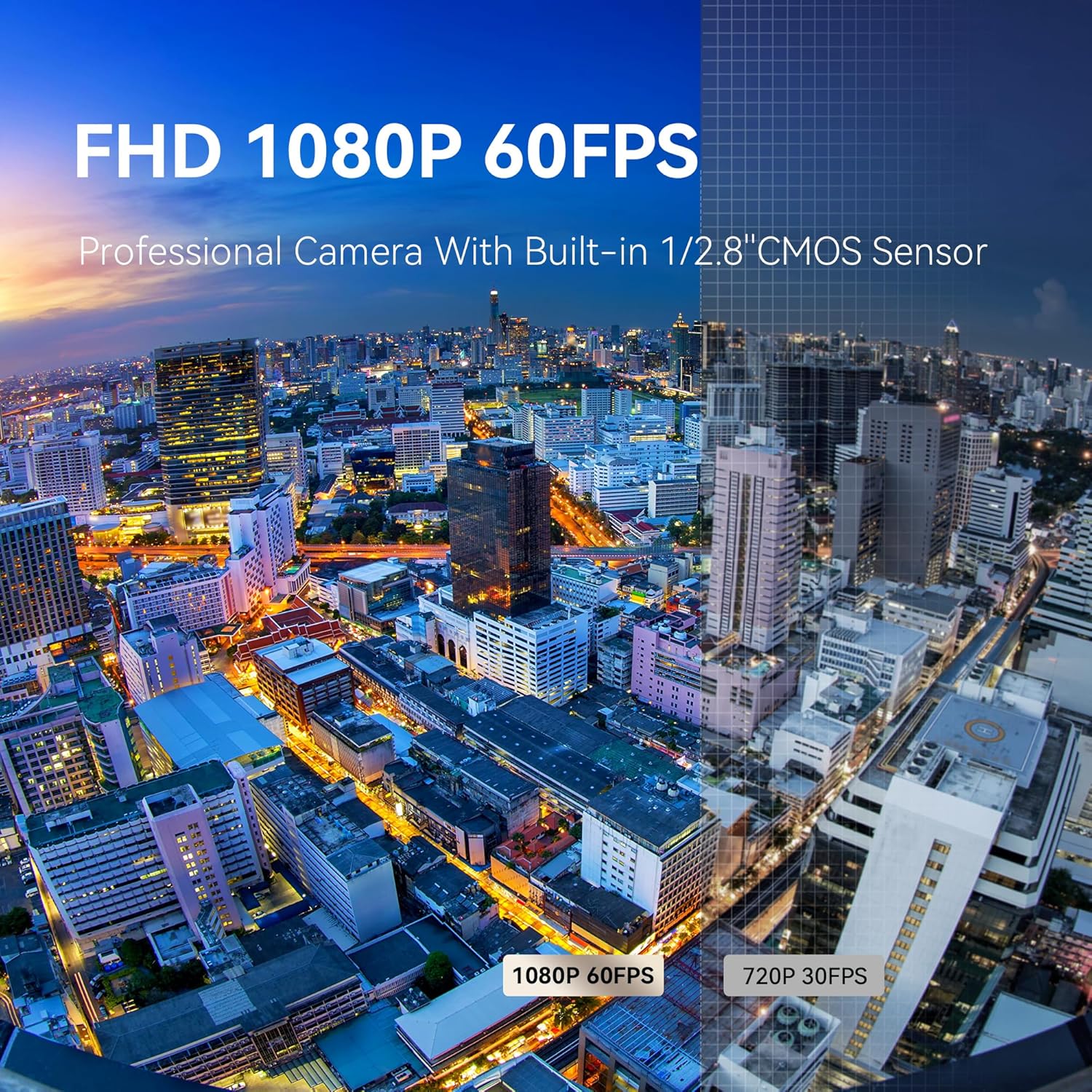
Image: Comparison of 1080P 60FPS video quality versus 720P 30FPS, demonstrating superior clarity.

Image: Visual representation of the 30X optical zoom, showing clarity at distances up to 100 meters (330 feet).
6. Vedligeholdelse
For at sikre dit Tenveo PTZ-kameras levetid og optimale ydeevne skal du følge disse vedligeholdelsesretningslinjer:
- Rensning: Use a soft, dry cloth to clean the camera body. For the lens, use a specialized lens cleaning cloth and solution. Avoid harsh chemicals or abrasive materials.
- Miljø: Brug og opbevar kameraet i et rent, tørt miljø, væk fra ekstreme temperaturer, fugtighed og direkte sollys.
- Håndtering: Handle the camera with care. Avoid sudden impacts or excessive force on the pan/tilt mechanism.
- Firmwareopdateringer: Tjek periodisk Tenveo-embedsmanden webwebstedet for tilgængelige firmwareopdateringer for at forbedre ydeevnen og tilføje nye funktioner.
7. Fejlfinding
Hvis du støder på problemer med dit kamera, kan du se følgende almindelige fejlfindingstrin:
- Ingen strøm: Ensure the DC12V power adapter is securely connected and plugged into a working outlet, or that the PoE connection is active and functioning correctly.
- Ingen videoudgang: Verify all video cables (HDMI, SDI, USB) are correctly connected to both the camera and the receiving device. Check the input selection on your display or switcher.
- No Control: For IR remote, ensure line of sight and fresh batteries. For RS232/RS485, check cable connections and communication settings (baud rate, protocol). For IP control, verify network connectivity and the camera's IP address.
- Image Quality Issues (Blurry/Grainy): Check focus settings (auto/manual). Ensure sufficient lighting in the environment. Verify that the lens is clean.
- AI-sporing virker ikke: Ensure the feature is enabled in the camera settings (via OSD menu or web interface). Provide clear visibility of the subject for face recognition.
- Image Flipped: If the image is upside down, check if the camera is ceiling mounted. The built-in gravity sensor should automatically correct this. If not, check the OSD menu for image flip settings.
For further assistance, please contact Tenveo customer support.
8. Specifikationer
| Feature | Detalje |
|---|---|
| Mærke | Tenveo |
| Modelnummer | TEVO-VHD630A |
| Varens vægt | 3.01 pund |
| Produktdimensioner | 5.98 x 9.72 x 6.69 tommer |
| Fotosensorteknologi | CMOS (1/2.8") |
| Videooptagelsesopløsning | 1080p (FHD) |
| Billedhastighed | 60 FPS |
| Optisk zoom | 30X |
| Digital Zoom | 8X |
| Maksimal brændvidde | 138 millimeter |
| Maksimal blænde | 1.8 f |
| Forbindelsesteknologi | USB, HDMI, SDI, RJ45 (PoE) |
| Videooptagelsesformat | H.264/H.265/MJPG |
| Understøttet lydformat | AAC |
| Panorering | ±175° |
| Tilt Rotation | ±90° |
| Særlige funktioner | AI Auto-Tracking, 2D&3D Digital Noise Reduction, PoE Support |
9. Garanti og support
Tenveo provides comprehensive support for the TEVO-VHD630A PTZ Camera:
- Standard garanti: 3 år.
- Teknisk support: Lifetime technical support service, including firmware upgrades. Remote assistance for setup is available upon request.
- Penge-tilbage-garanti: 30-Day No-Questions-Asked Money-Back Guarantee.
Ved spørgsmål eller supportbehov bedes du kontakte Tenveo kundeservice via e-mail på tenveo_amazon@tenveo.com. Our team aims to reply within 12 hours and provide a satisfactory solution.


