1. Produktet er slutview
The Wilxisum WX-AYEX-6 is an HDMI eARC/ARC Audio Extractor designed to convert audio signals from your TV's HDMI eARC/ARC port into various analog and digital audio formats. This device allows you to connect modern TVs to older audio systems that may not support HDMI eARC/ARC directly.

Image 1.1: The Wilxisum WX-AYEX-6 HDMI eARC/ARC Audio Extractor, showing its compact design and various ports.
2. Pakkens indhold
Markér venligst feltet for følgende elementer:
- Wilxisum WX-AYEX-6 HDMI eARC/ARC Audio Extractor
- Power Cable (DC 5V)
- Brugervejledning (dette dokument)

Image 2.1: Contents of the product package, including the audio extractor, power cable, and user manual.
3. Vigtige bemærkninger før installation
- Ensure your TV has an HDMI eARC/ARC interface. This device connects specifically to this port.
- The product does not support Bluetooth connectivity.
- The HDMI output on this device transmits audio signals only; it does not transmit video.
- For RCA and 3.5mm outputs, the TV's audio output must be set to PCM stereo.
- For 5.1 channel audio (DTS, AC3) via HDMI or Optical, RCA and 3.5mm outputs will not have audio.
- RCA and 3.5mm headphone output volume can be controlled by your TV remote control (CEC function). The optical and HDMI interfaces' volume cannot be controlled by the TV remote.

Image 3.1: Illustration emphasizing the requirement for a TV with an HDMI eARC/ARC interface for proper device function.
4. Device Connections and Interface Description
Familiarize yourself with the ports and indicators on the audio extractor:

Image 4.1: Detailed diagram of the audio extractor's front and rear panels, labeling all input/output ports and indicator lights.
- OFF/ON kontakt: Tænd/sluk-knap til enheden.
- DC 5V strømindgang: Tilslut det medfølgende strømkabel her.
- eARC IN: HDMI input port for connecting to your TV's HDMI eARC/ARC port.
- 2.0 / 5.1 / HD5.1/7.1 Indicators: Lights indicating the current audio format being processed.
- EDID Change Key: Button to fix "no sound" issues, especially with Fire TV. Press with a one-minute interval between presses.
- Audio ONLY (HDMI Output): HDMI output for audio signals only. Does not support connecting a soundbar for video passthrough.
- SPDIF (Optical Output): Optisk digital lydudgang.
- RCA Audio Output (R/L): Analog stereo audio output (Red for Right, White for Left).
- 3.5 mm stereoudgang: Analog stereo audio output for headphones or other devices.
5. Opsætningsvejledning
Follow these steps to set up your Wilxisum WX-AYEX-6 audio extractor:
- Connect the TV: Connect an HDMI cable from your TV's HDMI eARC/ARC port to the "eARC IN" port on the audio extractor.
- Tilslut lydudgang: Connect your desired audio system (e.g., stereo amplifier, headphones, home theater receiver) to one of the audio output ports on the extractor (HDMI Audio ONLY, SPDIF, RCA, or 3.5mm).
- Tænd: Connect the provided DC 5V power cable to the extractor and plug it into a power source. Turn the device ON using the OFF/ON switch.
- Configure TV Audio Settings:
- Enable the eARC/ARC function on your TV. Refer to your TV's user manual for specific instructions.
- Set the TV's audio output format based on your playback content and desired output. (See Section 6 for detailed audio mode configurations).
- If using RCA or 3.5mm outputs, ensure your TV's digital audio output format is set to PCM.
- If using HDMI or Optical for 5.1 or higher audio, ensure your TV's digital audio output format is set to Bitstream (DTS/AC3) or Gennemløb.
- If you wish to control RCA/3.5mm volume with your TV remote, enable CEC (Consumer Electronics Control) on your TV.

Image 5.1: General setup steps, showing connections from TV to extractor and then to audio devices, along with TV audio settings menu.
6. Operating Instructions: Audio Modes
The audio extractor supports various audio formats. The indicator lights (2.0, 5.1, HD5.1/7.1) on the device will illuminate to show the current audio format being processed.
6.1. 2.0 Channel (PCM Stereo) Audio Output
When the audio signal from your TV is 2.0 channel (PCM stereo), the "2.0" indicator light on the extractor will be on.
- TV Audio Setting: Set your TV's digital audio output to PCM.
- Udgange: All output interfaces (HDMI Audio ONLY, SPDIF, RCA, 3.5mm) will output stereo audio.
- Lydstyrkekontrol: RCA and 3.5mm output volume can be controlled by your TV remote (if CEC is enabled). HDMI and SPDIF output volume cannot.

Image 6.1: Diagram illustrating the setup for 2.0 channel audio output, showing TV settings and connections to various stereo audio devices.
6.2. 5.1 Channel (DTS, AC3) Audio Output
When the audio signal from your TV is 5.1 channels (such as DTS or AC3), the "5.1" indicator light on the extractor will be on.
- TV Audio Setting: Set your TV's digital audio output to Bitstream (DTS/AC3) or Gennemløb.
- Udgange: The HDMI Audio ONLY and SPDIF (Optical) interfaces will output 5.1 channel audio. The RCA and 3.5mm interfaces will have no audio output in this mode.
- Note: The audio system connected to HDMI or SPDIF must support AC3 and DTS decoding.

Image 6.2: Diagram illustrating the setup for 5.1 channel audio output, showing TV settings and connections to a 5.1 power amplivligere.
6.3. HD5.1/7.1 Channel (DD+, DTS-HD Master, Dolby True HD) Audio Output
When the audio signal from your TV is HD5.1/7.1 channels (such as DD+, DTS-HD Master audio, or Dolby True HD), the "HD5.1/7.1" indicator light on the extractor will be on.
- TV Audio Setting: Set your TV's digital audio output to Bitstream (DD+, DTS-HD Master, Dolby True HD) or Gennemløb.
- HDMI-kabel: A high-quality HDMI cable (version 2.1 or above, 20 cores) is required for HD5.1/7.1 audio. Below this version, it may downgrade to ARC and not support 7.1 audio.
- Udgange: Only the HDMI Audio ONLY interface will output HD5.1/7.1 channel audio. The RCA, 3.5mm, and SPDIF interfaces will have no audio output in this mode.
- Note: The audio system connected to the HDMI Audio ONLY output must support DD+, DTS-HD Master audio, and Dolby True HD decoding.
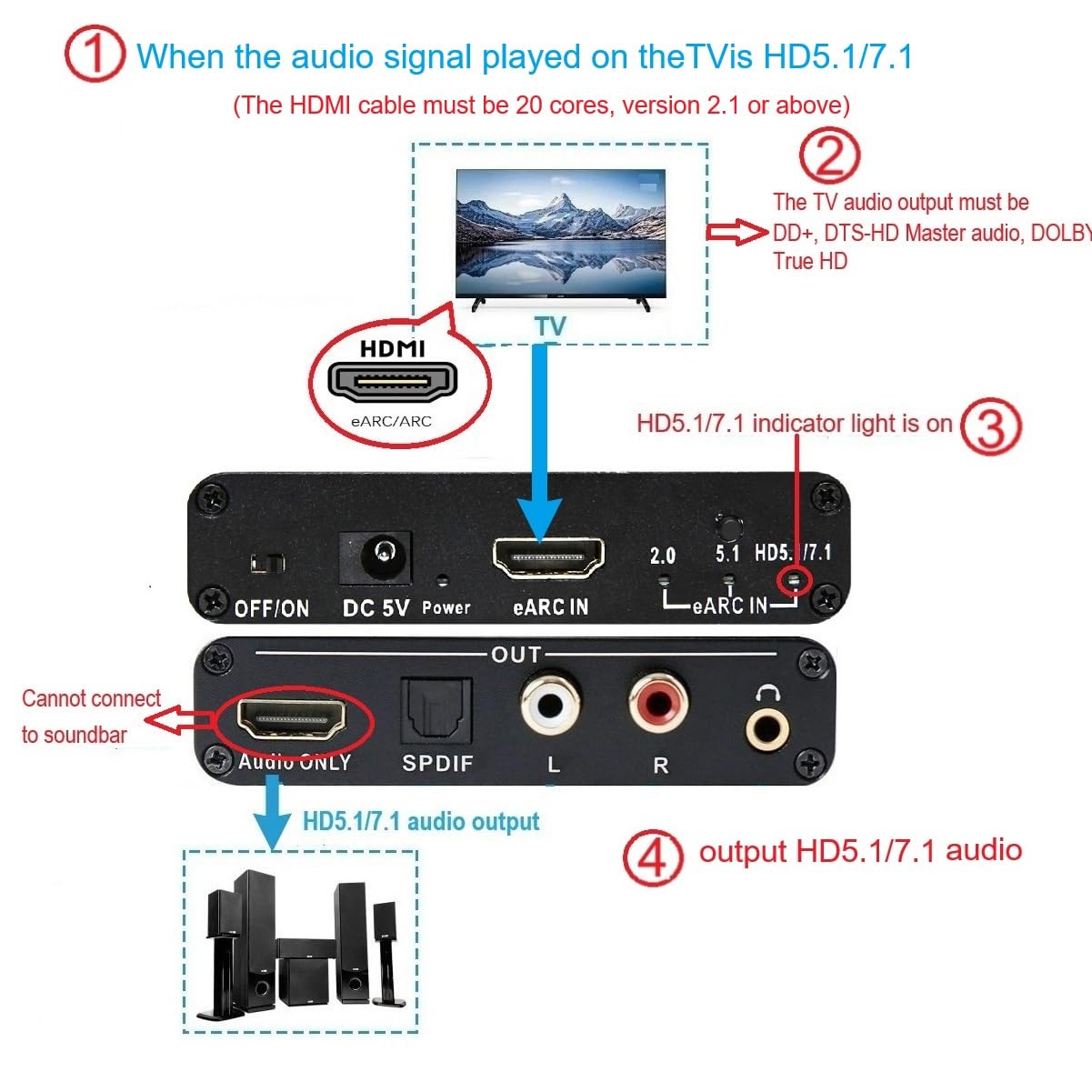
Image 6.3: Diagram illustrating the setup for HD5.1/7.1 channel audio output, showing TV settings and connections to an HD5.1/7.1 audio system.
7. Vedligeholdelse
To ensure the longevity and optimal performance of your Wilxisum WX-AYEX-6 audio extractor, please follow these general maintenance guidelines:
- Rensning: Brug en blød, tør klud til at rengøre enheden. Brug ikke flydende rengøringsmidler eller aerosolspray.
- Miljø: Opbevar enheden et køligt, tørt sted, væk fra direkte sollys, varmekilder og overdreven fugtighed.
- Ventilation: Ensure proper ventilation around the device to prevent overheating. Do not block any vents.
- Håndtering: Håndter enheden forsigtigt. Undgå at tabe den eller udsætte den for hårde stød.
- Magt: Always use the provided DC 5V power cable. Disconnect power during electrical storms or when unused for long periods.
8. Fejlfinding
If you encounter issues with your audio extractor, please refer to the following table for common problems and solutions:
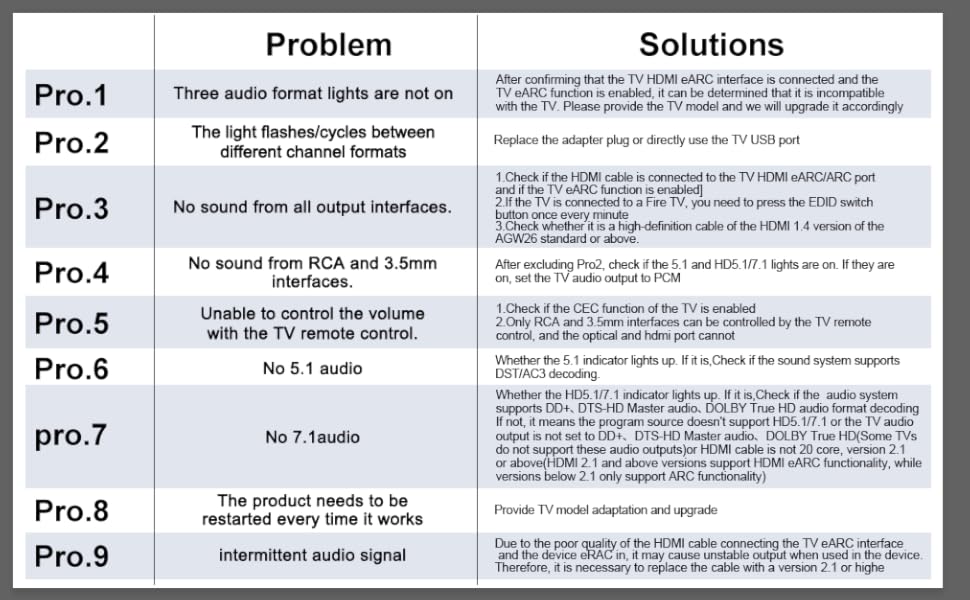
Image 8.1: Troubleshooting table detailing common problems and their corresponding solutions.
| Problem | Løsning |
|---|---|
| Pro.1: Three audio format lights are not on. | After confirming that the TV HDMI eARC interface is connected and the TV eARC function is enabled, it can be determined that it is incompatible with the TV. Please provide the TV model and we will upgrade it accordingly. |
| Pro.2: The light flashes/cycles between different channel formats. | Replace the adapter plug or directly use the TV USB port for power. |
| Pro.3: No sound from all output interfaces. |
|
| Pro.4: No sound from RCA and 3.5mm interfaces. | After excluding Pro.2, check if the 5.1 and HD5.1/7.1 lights are on. If they are on, set the TV audio output to PCM. |
| Pro.5: Unable to control the volume with the TV remote control. |
|
| Pro.6: No 5.1 audio decoding. | Check whether the 5.1 indicator light is up. Check if the sound system supports DST/AC3 decoding. |
| Pro.7: Ingen 7.1 lyd. | Check whether the HD5.1/7.1 indicator light is up. Check if the audio system supports DD+, DTS-HD Master audio, DOLBY True HD audio format decoding. If not, it means the program source doesn't support HD5.1/7.1 or the TV audio output is not set to DD+, DTS-HD Master audio, DOLBY True HD. (Some TVs do not support these audio outputs or HDMI cable is not 20 core, version 2.1 or above). HDMI 2.1 and above versions support HDMI eARC functionality, while versions below 2.1 only support ARC functionality. |
| Pro.8: The product needs to be restarted every time it works. | Provide TV model adaptation and upgrade. |
| Pro.9: Intermittent audio signal. | Due to the poor quality of the HDMI cable connecting the TV eARC interface and the device eRAC in, it may cause unstable output when used in the device. Therefore, it is necessary to replace the cable with a version 2.1 or higher. |
9. Specifikationer
| Feature | Detalje |
|---|---|
| Modelnummer | WX-AYEX-6 |
| Mærke | Wilxisum |
| Produktdimensioner | 3.54 x 2.56 x 0.83 tommer |
| Vægt | 4.94 ounce |
| Input | HDMI eARC/ARC |
| Udgange | HDMI (Audio ONLY), Optical (SPDIF), RCA (R/L), 3.5mm |
| Understøttede lydformater | PCM 2.0, DTS 5.1, AC3 5.1, DD+ 5.1/7.1, DTS-HD Master Audio 5.1/7.1, Dolby True HD 5.1/7.1 |
| Strømforsyning | DC 5V (Min 5V, Max 5.5V) |
| Driftstemperatur | Op til 55 grader Celsius |
10. Garanti og support
For warranty information or technical support, please contact Wilxisum customer service through the retailer where you purchased the product or visit the official Wilxisum website. Please have your model number (WX-AYEX-6) and purchase details ready when contacting support.
The manufacturer, Wilxisum, is committed to providing quality products and support.


