1. Introduktion
This manual provides essential instructions for setting up, operating, maintaining, and troubleshooting your C idea P1250 10.1-inch Android 12 Tablet. Please read this guide thoroughly to ensure optimal performance and longevity of your device.

Billede 1.1: C idea P1250 tablet front view displaying key features like T606 Octa Core CPU, WiFi 5, FHD 10.1 inch screen, 8GB RAM, 128GB ROM, Face Unlock, and GMS certification. The rear of the tablet is partially visible behind it.
2. Enhedslayout
Familiarize yourself with the physical components of your C idea P1250 tablet.

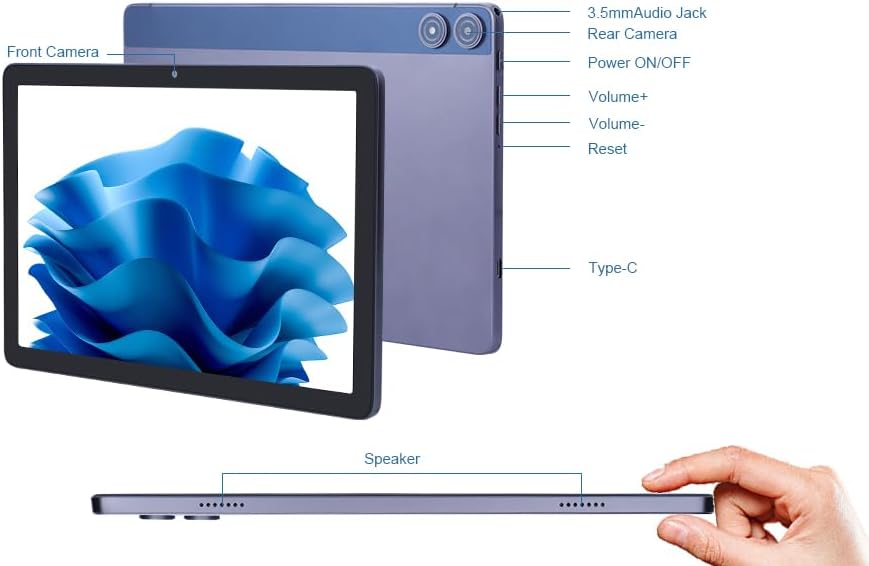
Billede 2.1: Dette diagram giver et tydeligt overblikview of the tablet's external components, labeling the front and rear cameras, 3.5mm audio jack, power button, volume controls, reset button, Type-C charging port, speakers, and the TF card slot for expandable storage.
- Forreste kamera: Placeret over skærmen, bruges til videoopkald og selfies.
- Bagkamera: Located on the back, used for capturing photos and videos.
- 3.5 mm lydstik: Til tilslutning af hovedtelefoner eller eksterne højttalere.
- Tænd/sluk -knap: Press and hold to power on/off or restart. Press briefly to wake/sleep the screen.
- Lydstyrkeknapper (+/-): Juster enhedens lydstyrke.
- Nulstil knap: En lille nålehulsknap til at tvinge enheden til at genstarte den, hvis den ikke reagerer.
- Type-C port: Til opladning af tabletten og tilslutning til en computer.
- Højttaler: Lydudgang.
- TF-kortslot: Til indsættelse af et Micro SD-kort for at udvide lagerpladsen.
3. Opsætning
3.1 Første opstart og grundlæggende konfiguration
- Oplad tabletten: Before first use, ensure the tablet is fully charged using the provided Type-C cable and power adapter.
- Tænd: Press and hold the Power ON/OFF button until the C idea logo appears on the screen.
- Sprogvalg: Følg vejledningen på skærmen for at vælge dit foretrukne sprog.
- Wi-Fi-forbindelse: Select your Wi-Fi network from the list and enter the password. The tablet supports both 2.4GHz and 5GHz bands for optimal connectivity.
- Google-kontoopsætning: Log ind med din Google-konto, eller opret en ny. Dette er nødvendigt for at få adgang til Google Play Butik og andre Google-tjenester.
- Dato og tid: Bekræft dato- og tidsindstillingerne.
- Skærm lås: Set up a screen lock method (PIN, pattern, password, or Face Unlock) for security.
3.2 Expanding Storage with a Micro SD Card
The tablet supports storage expansion up to 1TB using a Micro SD card.
- Locate the TF Card Slot on the side of the tablet (refer to Image 2.1).
- Indsæt forsigtigt Micro SD-kortet i åbningen, indtil det klikker på plads.
- Tabletten vil registrere den nye lagerplads. Du bliver muligvis bedt om at formatere kortet for optimal brug med enheden.
4. Betjeningsvejledning
4.1 Grundlæggende navigation
- Berøringsskærm: Tryk for at vælge, swipe for at rulle, knib for at zoome.
- Startskærm: Få adgang til dine apps og widgets.
- Meddelelsespanel: Stryg ned fra toppen af skærmen til view notifikationer og hurtigindstillinger.
- App Skuffe: Stryg opad fra bunden af skærmen for at få adgang til alle installerede apps.
4.2 Applikationsstyring

Billede 4.1: This image illustrates the tablet's memory capabilities, showing multiple applications open and icons for 8GB RAM, 128GB ROM, and 1TB expandable storage.
- Download af apps: Open the Google Play Store, search for your desired app, and tap 'Install'.
- Afinstallation af apps: Gå til Indstillinger > Apps > Se alle apps, select the app, and tap 'Uninstall'. Alternatively, long-press an app icon on the home screen and drag it to 'Uninstall'.
- Multitasking: The Android 12 system and Octa-core processor allow for smooth switching between applications.
4.3 Kamerabrug

Billede 4.2: This image demonstrates the tablet's camera capabilities, featuring a 5MP front camera suitable for video calls and selfies, and a 13MP rear camera for capturing photos.
Tabletten er udstyret med et 5MP frontkamera og et 13MP bagkamera.
- Åbn programmet Kamera.
- Skift mellem for- og bagkamera ved hjælp af kameraikonet.
- Tryk på udløserknappen for at tage et billede eller starte/stoppe videooptagelse.
4.4 Forbindelse

Billede 4.3: This diagram visually compares the performance of 2.4GHz and 5GHz Wi-Fi bands, showing the tablet connected to a dual-band router, indicating faster speeds with 5GHz for improved downloading and streaming.
- Wi-Fi: Connect to 2.4G or 5G Wi-Fi networks via Indstillinger > Netværk og internet > Wi-Fi.
- Bluetooth: Par med Bluetooth-enheder (hovedtelefoner, højttalere) via Indstillinger > Forbundne enheder > Bluetooth.
- FM-radio: Access the built-in FM radio feature.
4.5 Batteristyring

Billede 4.4: The image shows the C idea P1250 tablet being charged via its Type-C port, highlighting its 6000mAh battery, which provides 6-10 hours of usage.
- 6000mAh-batteriet giver længere brugstid.
- Charge the tablet using the Type-C port and the included charger.
- To optimize battery life, adjust screen brightness, close unused apps, and enable battery saver mode in Indstillinger > Batteri.
4.6 Security and Parental Controls
The tablet features GMS certification and includes options for child protection and parental management.
- Ansigtslås: Set up facial recognition for convenient and secure unlocking via Indstillinger > Sikkerhed > Ansigtslåsning.
- Digital velvære og forældrekontrol: Manage screen time, app timers, and content filters via Indstillinger > Digitalt velvære og forældrekontrol.
5. Vedligeholdelse
- Rensning: Brug en blød, fnugfri klud til at rengøre skærmen og kabinettet. Undgå slibende materialer eller barske kemikalier.
- Softwareopdateringer: Tjek regelmæssigt for systemopdateringer via Indstillinger > System > Systemopdatering to ensure your tablet has the latest features and security patches.
- Batteripleje: Undgå ekstreme temperaturer. Lad ikke batteriet aflades helt for ofte.
- Lagerstyring: Ryd cachen og unødvendige filer regelmæssigt files for at opretholde ydeevnen.
6. Fejlfinding
Hvis du støder på problemer med din tablet, kan du bruge følgende almindelige løsninger:
- Tabletten reagerer ikke: Press and hold the Power ON/OFF button for 10-15 seconds to force a restart. If this does not work, use a thin object (like a paperclip) to press the Reset button (refer to Image 2.1).
- Problemer med Wi-Fi-forbindelse:
- Sørg for, at Wi-Fi er aktiveret i indstillingerne.
- Restart your router and the tablet.
- Glem netværket og genopret forbindelsen.
- Langsom ydeevne:
- Luk ubrugte applikationer.
- Clear app caches.
- Sørg for tilstrækkelig ledig opbevaringsplads.
- Batteriet aflades hurtigt:
- Reducer skærmens lysstyrke.
- Deaktiver Wi-Fi, Bluetooth eller GPS, når de ikke er i brug.
- Tjek batteriforbruget i Indstillinger > Batteri til at identificere strømkrævende apps.
- Apps der går ned:
- Ryd appens cache og data (Indstillinger > Apps > [Appnavn] > Lagerplads og cache).
- Afinstaller og geninstaller appen.
- Sørg for, at appen er opdateret til den seneste version.
7. Specifikationer

Billede 7.1: C idea P1250 tablet screen displaying vibrant colors, with icons indicating 10.1 inch, 1920x1200 resolution, pixel density, eye protection, adjustable brightness, and DCI-P3 wide color gamut.
| Model | P1250 |
| Operativsystem | Android 12 |
| Processor | Unisoc T606 Octa-core, 2 GHz |
| Vise | 10.1-inch Full HD (1920 x 1200 pixels), IPS Technology |
| VÆDDER | 8GB (4GB + 4GB expanded memory) |
| Intern opbevaring | 128 GB ROM |
| Udvidelig opbevaring | Op til 1 TB via Micro SD-kort |
| Bagkamera | 13 MP |
| Forreste kamera | 5 MP |
| Batteri | 6000mAh Lithium Polymer |
| Forbindelse | 2.4G/5G Dual-band Wi-Fi (802.11ac), Bluetooth 5.0, FM, G-sensors |
| Havne | Type-C, 3.5 mm lydstik |
| Dimensioner (LxBxH) | 9.49 x 6.3 x 0.31 tommer |
| Vægt | 1.76 pund |
8. Garanti og support
For warranty information, please refer to the documentation included with your purchase or contact the manufacturer directly. For technical support or inquiries, please use the contact information below.
Billede 8.1: This image provides essential contact details for the EU Representative (SUCCESS COURIER SL) and the Manufacturer (Shenzhen Huikun Technology Co., Ltd.), including addresses and email. It also includes a critical safety warning in multiple languages regarding the danger of plastic bags, advising to keep them away from children.
Producentkontakt
- Navn: Shenzhen Huikun Technology Co., Ltd.
- Adresse: Floor 3, Building 3, Saitu Digital Industrial Factory, 137 Bulan Road, Gankeng Community, Jihua Street, Longgang District, Shenzhen, Guangdong, China
- E-mail: service@cideatablet.com
EU Representative Contact
- Navn: SUCCES COURIER SL
- Adresse: CALLE RIO TORMES NUM. 1, PLANTA 1, DERECHA, OFICINA 3, Fuenlabrada, Madrid, 28947 Spanien
- E-mail: successservice2@hotmail.com
Sikkerhedsadvarsel
Plastic bags can be dangerous. To avoid the danger of suffocation, do not leave these bags within the reach of babies or children.