Indledning
Thank you for choosing the Hbada Ergonomic Office Chair. This manual provides detailed instructions for assembly, operation, maintenance, and troubleshooting to ensure you get the most comfortable and productive experience from your new chair. Designed for optimal support and adjustability, this chair features 3D adjustable armrests, adjustable lumbar support, a high back, and a breathable mesh seat cushion, making it ideal for long hours of computer work or home office use.
Sikkerhedsoplysninger
- Sørg for, at alle komponenter er forsvarligt fastgjort før brug.
- Stå ikke på stolen, og brug den ikke som skammel.
- Avoid placing heavy objects on the chair that exceed its maximum weight recommendation (150 kg / 330 lbs).
- Hold hænder og fingre væk fra bevægelige dele under justering.
- Brug stolen på en flad, stabil overflade for at forhindre den i at vælte.
- Regularly inspect the chair for loose screws or damaged parts and address them promptly.
Pakkens indhold
Before assembly, please verify that all parts are present and undamaged. The package should contain:
- Stol Ryglæn
- Sædehynde med mekanisme
- Armlæn (2)
- Nakkestøtte
- Base (Stjernebase)
- Hjul (5)
- Gas Lift cylinder
- Footrest (if included with specific model variant)
- Hardware-sæt (skruer, unbrakonøgle)
- Instruktionsmanual (dette dokument)
Opsætning og montering
Assembly typically takes about 30 minutes and requires only the included Allen wrench. All screws and pieces are clearly labeled for ease of installation.
- Saml basen: Start by attaching the legs to the central hub of the chair base.

Image: The chair's five-star base with casters being attached to each leg.
- Fastgør hjul: Insert the five casters (wheels) into the designated holes at the end of each leg of the base.
- Indsæt gasløftecylinder: Place the air pneumatic cylinder into the center hole of the assembled base.
- Install Footrest (if applicable): If your model includes a footrest, it can be easily attached and slides under the seat cushion.
- Fastgør armlæn: Screw both armrests securely to the underside of the seat cushion.

Image: Underside of the chair seat showing attachment points for armrests.
- Tilslut ryglænet til sædet: Screw the backrest support onto the back of the chair seat. Then, connect the entire backrest and seat assembly together.

Image: The chair's backrest being connected to the seat assembly.
- Saml stolen: Placer forsigtigt det samlede sæde og ryglæn på gasløftcylinderen, og sørg for, at det sidder godt fast.
- Fastgør nakkestøtten: Slide the headrest onto the top of the backrest until it clicks into place.

Image: The headrest being slid into position on top of the chair's backrest.
Betjeningsvejledning
Your Hbada Ergonomic Office Chair offers multiple adjustment features to customize your seating experience for maximum comfort and support.
1. Justering af stolens højde
To adjust the chair's height, locate the lever on the right side, beneath the seat. Pull the lever upwards while seated to lower the chair, or stand up and pull the lever upwards to raise the chair. Release the lever at your desired height.
2. Ryglænets tilbagelæning og låsning
The chair features a 135° reclining function. To recline, pull the lever on the left side, beneath the seat, outwards. Lean back to your desired angle. To lock the recline, push the lever inwards. To return to an upright position, pull the lever outwards again and lean forward.

Image: Visual representation of the chair's recline angles, from 90° to 135°.
3. Adjustable Backrest (Lumbar Support)
The ergonomic backrest can be adjusted vertically by 4.5 cm with 3 levels of adjustment to better fit your waist and back. To adjust the lumbar support, gently lift the backrest upwards. You will hear clicking sounds as it moves through the gears. To reset to the lowest gear, simply lift the backrest to its highest position, then allow it to drop down. Repeat the lifting process to select your desired gear.

Image: Diagram illustrating the four adjustable gears for the backrest's vertical movement.
4. 3D Adjustable Armrests
The armrests offer three-dimensional adjustment for optimal elbow pressure relief and comfort:
- Højdejustering: Press the button on the side of the armrest to move it up and down by 2.95 inches.
- Justering frem/tilbage: Slide the armrest pad forward or backward by 1.97 inches.
- Rotation: Rotate the armrest pad up to 45 degrees left or right.
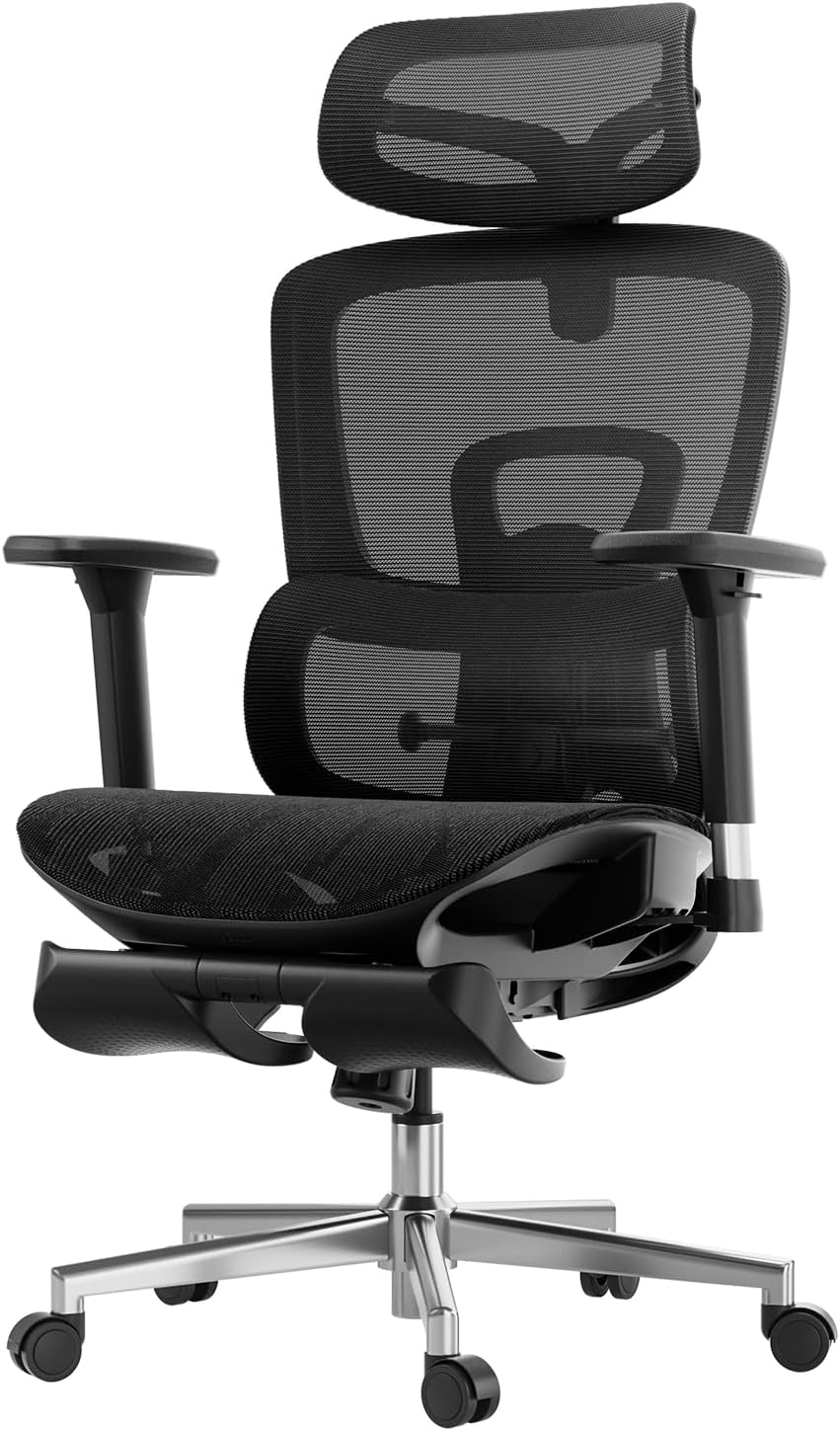
Billede: Detaljeret view of the armrests highlighting their 3D adjustment capabilities.
5. 2D Adjustable Headrest
The headrest provides precise neck support and can be adjusted in two ways:
- Højdejustering: Adjust up and down by 3.93 inches.
- Vinkeljustering: Rotate back and forth by 38 degrees.
Image: Diagram illustrating the headrest's adjustable height and rotation.
6. Footrest Operation (if applicable)
If your chair model includes a footrest, pull it out from beneath the seat. You can then flip it over to position it for leg support when reclining. Push it back under the seat when not in use.
Opretholdelse
Regular maintenance will extend the life and appearance of your Hbada office chair.
- Rensning: For the mesh and plastic components, wipe with a soft, damp klud. Undgå slibende rengøringsmidler eller stærke kemikalier.
- Inspektion: Kontrollér regelmæssigt alle skruer og bolte for at sikre, at de er spændte. Spænd dem igen om nødvendigt.
- Hjul: Rengør hjulene regelmæssigt for at fjerne støv og snavs, der kan hindre jævn bevægelse.
- Gaslift: Forsøg ikke at adskille gasløftecylinderen.
Fejlfinding
Hvis du støder på problemer med din stol, kan du se følgende almindelige problemer og løsninger:
| Problem | Mulig årsag | Løsning |
|---|---|---|
| Stolen kan ikke justeres i højden. | Fejl på gasløftecylinder, eller håndtaget er ikke aktiveret. | Ensure the height adjustment lever is fully pulled. If the issue persists, contact customer service for gas lift replacement. |
| Stolen vakler eller føles ustabil. | Løse skruer eller ujævnt gulv. | Kontrollér og spænd alle monteringsskruer. Sørg for, at stolen står på en plan overflade. |
| Hjulene ruller ikke jævnt. | Affald sidder fast i hjulene eller er beskadigede hjul. | Clean any hair or debris from the casters. If damaged, casters may need replacement. |
| Backrest recline mechanism is stuck. | Recline lock engaged or mechanism obstruction. | Ensure the recline lock lever is disengaged. Check for any obstructions around the mechanism. |
Specifikationer
| Mærke | Hbada |
| Modelnavn | Hbada E208 |
| Varemodelnummer | E208BMA/CB |
| Farve | Sort |
| Produktdimensioner | 23.74" D x 17.52" B x 22.64" H |
| Varens vægt | 49.6 pund |
| Maksimal vægtanbefaling | 150 kilogram (ca. 330 lbs) |
| Rygstil | Solid Ryg |
| Speciel funktion | Justerbar lænde |
| Stil | Moderne |
| Finish Type | Nylon |
| Anbefalede anvendelser | Kontor |
| Sædehøjde | 18.25 tommer |
| Vipning | Ja |
Garanti og support
Hbada is committed to providing high-quality products and excellent customer service.
- Garanti: Your Hbada E2 Ergonomic Office Chair comes with a worry-free 3-year warranty.
- Returnerer: Nyd en 30-dages gratis returret.
- Prismatch: Der tilbydes 15 dages prismatchgaranti.
- Beskadiget ved ankomst: Repair and replacement are guaranteed for items damaged upon arrival.
- Kundeservice: For any questions, concerns, or warranty claims, please contact Hbada customer service. Refer to the contact information provided with your purchase or visit the official Hbada webwebsted.
For more information and support, you may also refer to the official Installationsmanual (PDF).


