Indledning
The Homedics Smart Air Purifier C500 is designed to improve indoor air quality in extra-large rooms. It features a comprehensive 4-in-1 filtration system, including True HEPA filtration, UV-C technology, an activated carbon odor filter, and a prefilter. This manual provides essential information for setting up, operating, and maintaining your air purifier.

Image: The Homedics Smart Air Purifier C500, a white rectangular unit with wooden legs, shown next to a smartphone displaying its control app.
Nøglefunktioner:
- 4-in-1 Purification: True HEPA filtration captures up to 99.97% of airborne allergens as small as 0.3 microns.
- Total Clean: UV-C technology reduces bacteria, mold, fungus, and viruses. An activated carbon filter minimizes odors and VOCs, while a prefilter captures larger particles.
- Smart kontrol: Digital particle sensor provides real-time numerical and color-coded indoor air quality status. Features a replace filter indicator.
- Forbindelse: Wi-Fi enabled for control via the Homedics app and voice commands with Amazon Alexa or Google Assistant-enabled devices.
- Rumdækning: Ideal for extra-large rooms, purifying air in a 553 sq. ft. room every 12.5 minutes or a 2679 sq. ft. room once per hour.

Image: A visual representation of the air purifier's effectiveness in removing various airborne allergens and particles.
Opsætning
Udpakning og filterinstallation
Before first use, ensure all packaging materials are removed from the filters inside the unit. The Homedics Smart Air Purifier C500 comes with two True HEPA filters that include a built-in prefilter and activated carbon odor filter.
- Carefully remove the back cover of the air purifier.
- Locate the filters inside the unit.
- Remove any plastic packaging from the filters.
- Insert the filters back into their designated slots.
- Sæt bagdækslet sikkert på igen.
Video: A demonstration of how to set up the air purifier, including removing and installing the filters.
Strømtilslutning
Sæt netledningen i en almindelig stikkontakt. Enheden er nu klar til brug.
App Connection (Wi-Fi)
To unlock smart features and remote control, connect your air purifier to the Homedics app.
- Download the Homedics app from your smartphone's app store.
- Åbn appen, og følg instruktionerne på skærmen for at tilføje en ny enhed.
- Ensure your air purifier is powered on and in pairing mode (refer to the app for specific instructions on activating pairing mode).
- Connect the air purifier to your home Wi-Fi network.
Video: Instructions on how to link the air purifier to the CleanForce app for smart control.
Betjeningsvejledning
Kontrolpanel overview
The control panel on top of the unit allows for manual operation. It features buttons for power, fan speed, and mode selection.
Video: En overview of the Homedics Smart Air Purifier, highlighting its 4-in-1 features and controls.
Tilstande og indstillinger
- Tænd/sluk: Tryk på tænd/sluk-knappen for at tænde eller slukke for enheden.
- Blæserhastighed: Cycle through multiple fan speeds (e.g., Low, Medium, High) to adjust purification intensity.
- Automatisk tilstand: The air purifier automatically adjusts fan speed based on real-time air quality readings from the digital particle sensor.
- Sove mode: Activates a quiet operation mode with dimmed display lights for undisturbed rest.
- Timer: Set a timer for the unit to operate for a specific duration before automatically turning off.
- Stemmestyring: Use Amazon Alexa or Google Assistant-enabled devices to control the air purifier with voice commands.
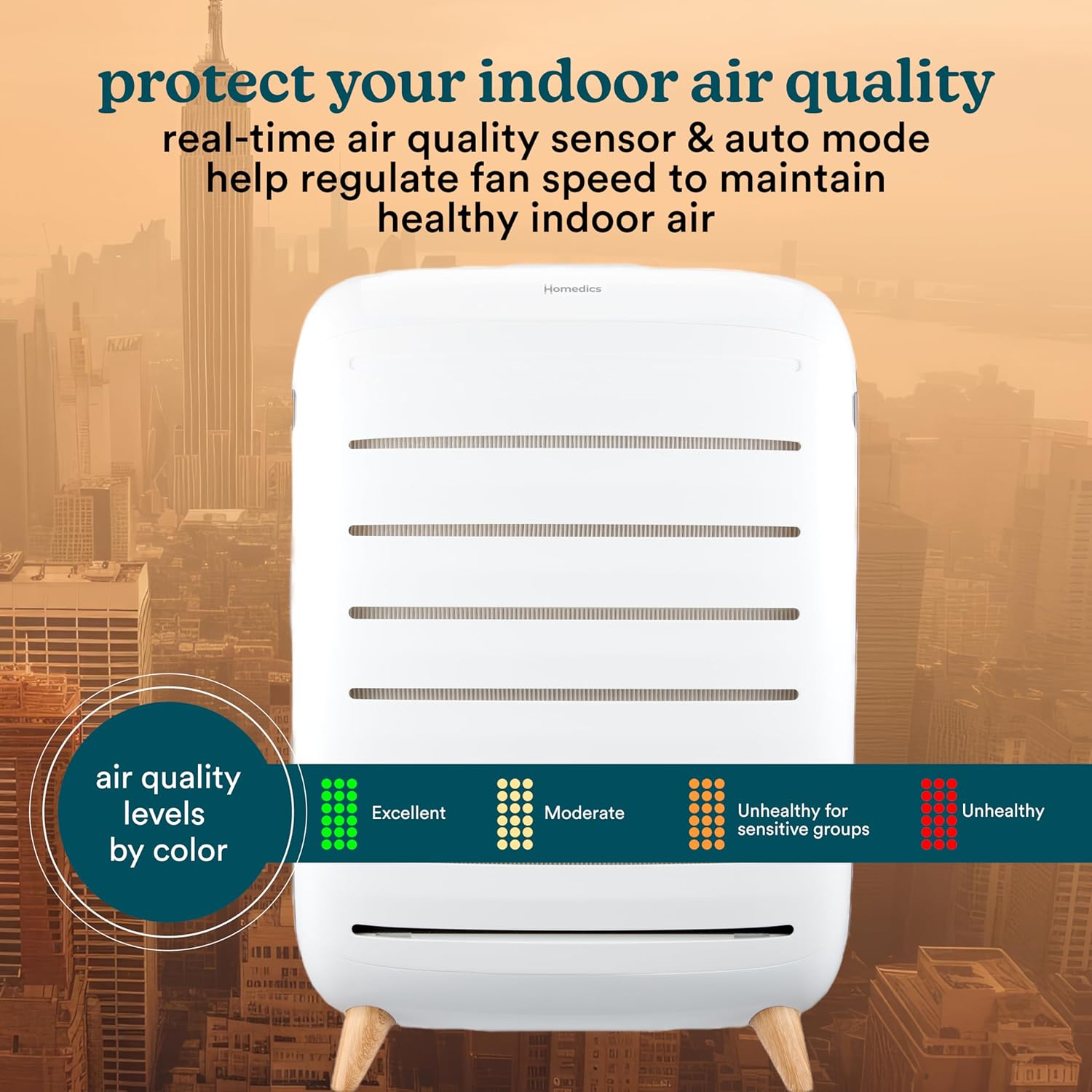
Image: The air purifier's display showing different air quality levels indicated by color codes.
Bakke til æterisk olie
The air purifier includes an essential oil pad tray. Add a few drops of your favorite essential oil to the pad to diffuse fragrance into the air during operation.
Opretholdelse
Udskiftning af filter
The air purifier features a filter replacement indicator that will alert you when it's time to change the filters. Replacement filters (AP-C500FL) are sold separately. Filters are designed to last approximately 12 months based on 12 hours per day of use.
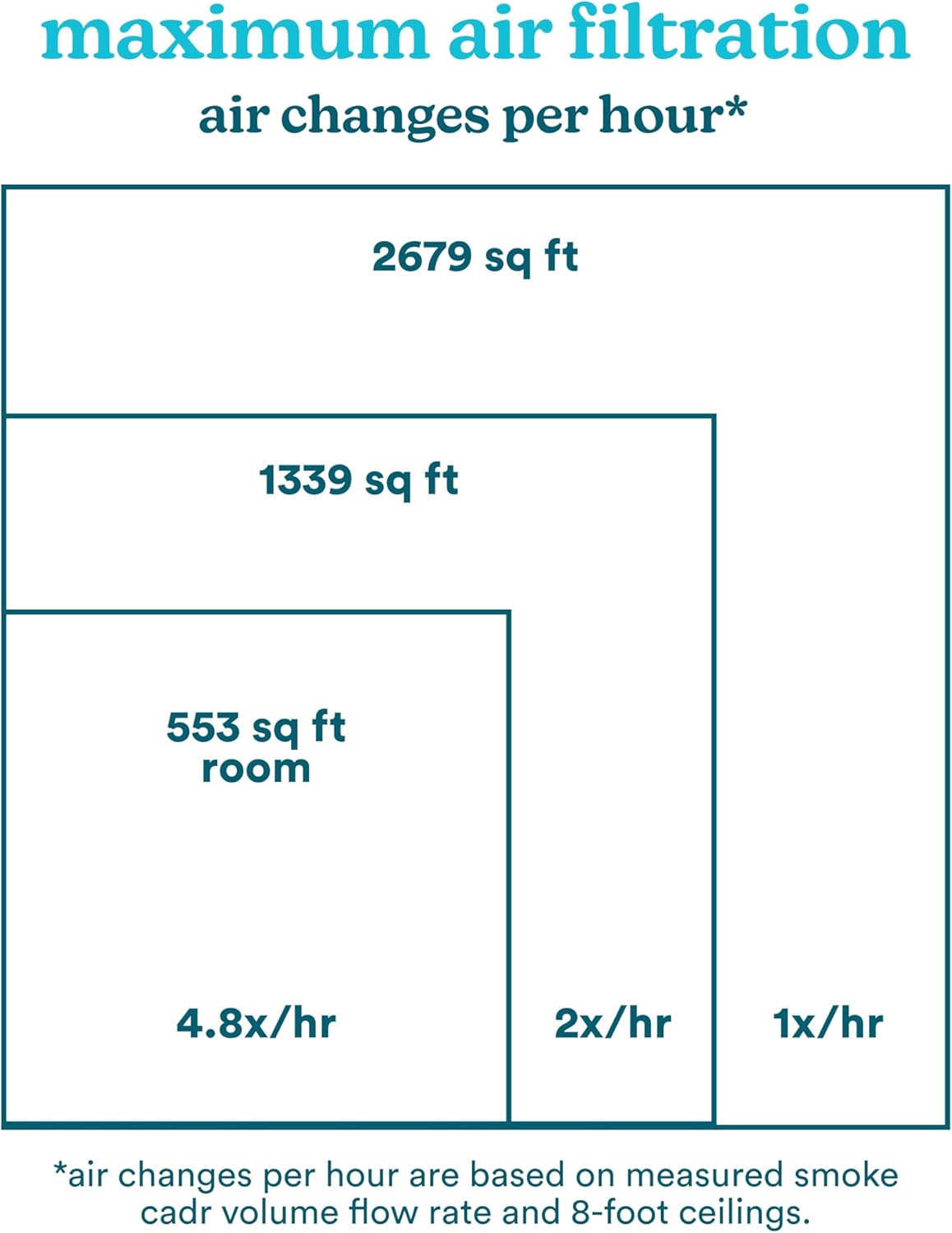
Image: Two True HEPA filters, highlighting their 12-month lifespan and the option to reorder via the app.
- Sluk og tag stikket ud af luftrenseren.
- Fjern bagdækslet.
- Carefully remove the old filters.
- Insert new AP-C500FL replacement filters, ensuring they are free of plastic packaging.
- Sæt bagdækslet på igen.
- Reset the filter indicator (refer to app or control panel instructions).
Fejlfinding
If you encounter any issues with your Homedics Smart Air Purifier C500, please refer to the following common troubleshooting steps:
- Enheden tænder ikke: Sørg for, at netledningen er sat korrekt i en fungerende stikkontakt. Kontroller, om der er trykket på tænd/sluk-knappen.
- Dårlig luftrensning: Verify that the filters are correctly installed and free of plastic packaging. Check the filter replacement indicator; if lit, replace the filters. Ensure the unit is placed in an open area, not obstructed.
- Problemer med Wi-Fi-forbindelse: Confirm your home Wi-Fi network is active and the password is correct. Ensure the air purifier is within range of your Wi-Fi router. Try restarting both the air purifier and your router.
- Usædvanlig støj: Check for any obstructions in the air intake or exhaust vents. Ensure filters are properly seated.
For further assistance, please contact Homedics customer support.
Specifikationer
| Mærke | Homedics |
| Modelnummer | AP-C500 |
| Produktdimensioner | 11.25" D x 28.5" B x 19.88" H |
| Dækning af gulvareal | 2679 Square Feet (1 air change per hour) |
| Filterklasse | Ægte HEPA |
| Speciel funktion | Programmable, Wi-Fi, Voice Control, UV-C Technology |
| Controller type | Google Assistant, Amazon Alexa |
| Varens vægt | 21.5 pund |
| Inkluderede komponenter | (1) Homedics Smart Air Purifier C500, (2) True HEPA Filters with Built-in Prefilter and Activated Carbon Odor Filter, (3) Essential Oil Pads |
Garanti og support
This product is covered by a manufacturer's warranty. For specific details regarding your warranty coverage, please refer to the documentation included with your purchase or visit the official Homedics website. For technical support, troubleshooting, or to order replacement parts, please contact Homedics customer service.
Optional protection plans are available for purchase, including 3-Year and 4-Year Protection Plans, and a Complete Protect monthly plan.
Vigtige sikkerhedsoplysninger
- Always unplug the air purifier before cleaning or replacing filters.
- Betjen ikke enheden med en beskadiget ledning eller stik.
- Keep the air purifier away from water or wet surfaces.
- Sørg for ordentlig ventilation omkring enheden; bloker ikke luftindtag eller -udtag.
- Dette apparat er ikke beregnet til brug af personer (inklusive børn) med nedsatte fysiske, sensoriske eller mentale evner, eller mangel på erfaring og viden, medmindre de har fået opsyn eller instruktion i brugen af apparatet af en person, der er ansvarlig for deres sikkerhed.


