1. Introduktion
The DonosHome DH300 is an innovative, multi-function OBD2 code reader designed to be one of the most accurate and economical vehicle diagnostic tools available. It helps users easily determine the cause of the Check Engine Light (MIL) and provides comprehensive information on vehicle health and performance. This manual provides detailed instructions for the proper use and maintenance of your DH300 scanner.

Figure 1.1: DonosHome DH300 OBD2 Scanner and its retail packaging, highlighting key features.
2. Sikkerhedsforanstaltninger
Please read this user manual carefully and follow the warnings and precautions below before use, to avoid the possibility of personal injury or damage to the vehicle and/or the device:
- Do not smoke, light matches, or cause sparks near the vehicle during operation.
- Do not come into contact with hot engine parts to avoid severe burns, especially when the engine is running.
- Do not use this tool while driving.
- Always wear appropriate eye protection when working on vehicles.
- Ensure the vehicle is in a well-ventilated area when running the engine.
3. Pakkens indhold
Når du åbner pakken, bedes du kontrollere, at alle nedenstående varer er inkluderet og i god stand:
- 1 x DonosHome DH300 OBD2-scanner
- 1 x Brugermanual (dette dokument)
- 1 x Pakkeæske

Figure 3.1: The package includes the OBD2 scanner, user manual, and package box.
4. Produktfunktioner
The DonosHome DH300 OBD2 scanner is equipped with a variety of features designed for comprehensive vehicle diagnostics:
- Check Engine Light (MIL) Management: Easily determine the cause, turn off the light, clear codes, and reset monitors.
- DTC-definitioner: Displays Diagnostic Trouble Code definitions directly on the screen.
- Frys rammedata: View a snapshot of vehicle conditions when a fault code was set.
- I/M-parathedsstatus: Check monitor and I/M readiness status for emissions testing.
- Afventende koder: Identify codes that have not yet triggered the MIL.
- Real-time PCM Data Stream: Read live data from the Powertrain Control Module.
- O2 Sensor Test Data: Display real-time O2 sensor test results.
- Data Graphing: Visualize live data for easier analysis.
- Dataafspilning: Read, store, and playback real-time sensor data, DTC data, and freeze frame data.
- Test Modules: Perform present test modules.
- Hentning af køretøjsoplysninger: Retrieve VIN (Vehicle Identification Number), CIN (Calibration Identification Number), and CVN (Calibration Verification Number).
- Protokol support: Understøtter CAN (Controller Area Network) og alle andre aktuelle OBD2-protokoller.
- Indbygget DTC-bibliotek: Integrated OBD2 DTC lookup library for quick reference.
- Voltmeter Function: Test batteri voltage og ladesystem.
- Waveform Graphing: Starting waveform graph and real-time waveform graph.
- Flersproget support: 10 built-in languages (English, German, Spanish, French, Italian, Dutch, Finnish, Polish, Portuguese, Russian).
- Ergonomisk design: Color screen, plug-and-play operation, powered directly by the vehicle.
- Fejlindikatorer: Red, yellow, and green LED indicators for quick fault status.

Figure 4.1: Key diagnostic functions of the DonosHome DH300.

Figure 4.2: Innovative design with LED indicators and multilingual support.

Figure 4.3: Multilingual interface and broad vehicle compatibility.
5. Opsætning og tilslutning
The DH300 scanner is designed for simple plug-and-play operation. Follow these steps to connect the device to your vehicle:
- Find OBD2-porten: The OBD2 port is typically located under the dashboard on the driver's side, often near the steering column. Refer to your vehicle's owner's manual if you cannot find it.
- Connect the OBD2 Plug: Firmly insert the DH300's OBD2 connector into the vehicle's OBD2 port. The device will power on automatically.
- Start motoren: Turn the vehicle's ignition to the "ON" position or start the engine. The scanner will establish communication with the vehicle's ECU.
- Start diagnostik: Once connected and powered, the scanner is ready for use.
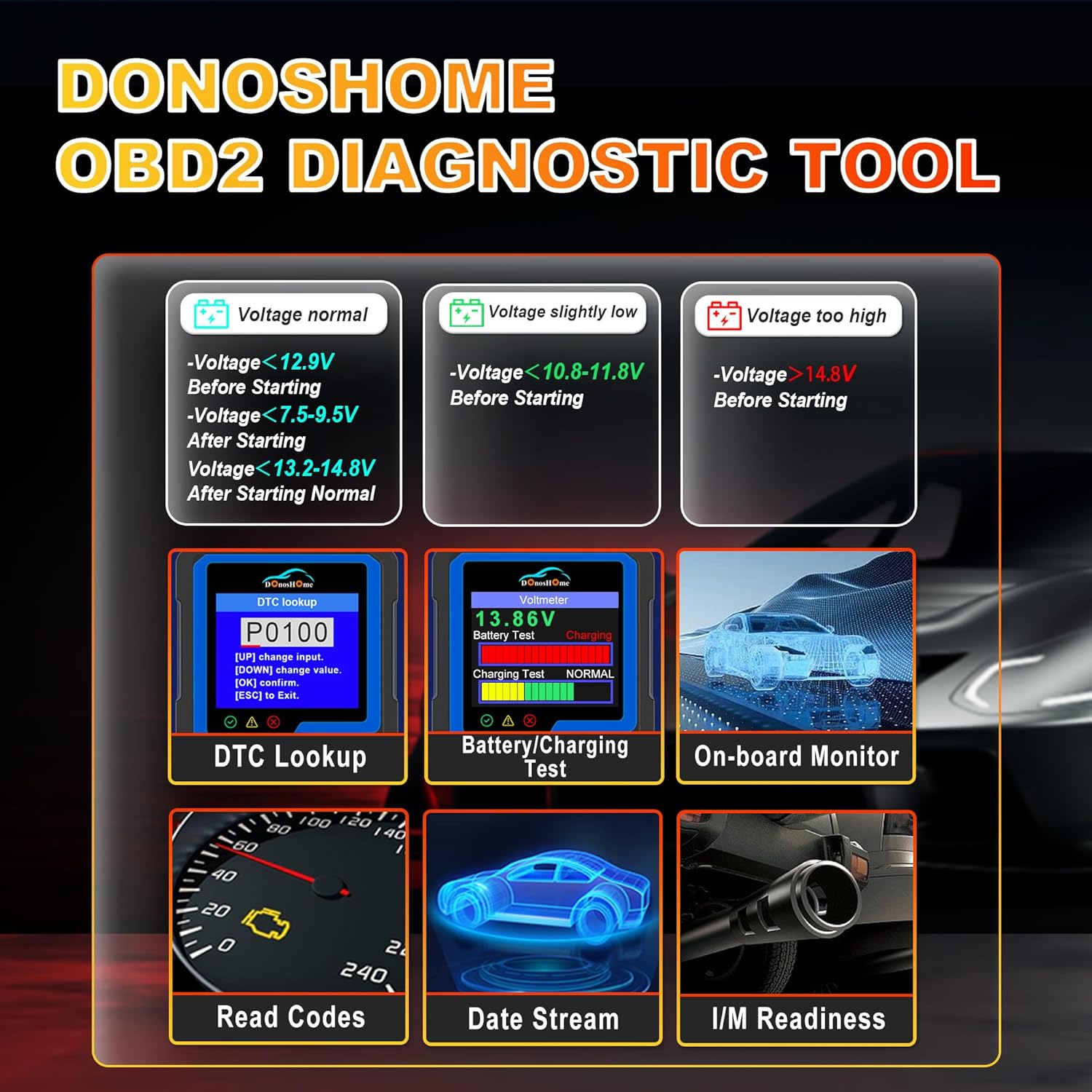
Figure 5.1: Simple plug-and-play connection process.
6. Betjeningsvejledning
The DH300 features a user-friendly interface with a color screen and five buttons: Up, Down, OK, ESC, and I/M. Navigate through menus using the Up/Down buttons, confirm selections with OK, and go back with ESC. The I/M button provides quick access to readiness status.
6.1. Reading and Clearing Trouble Codes (DTCs)
To read and clear Diagnostic Trouble Codes:
- From the main menu, select "Diagnose" and press OK.
- Navigate to "Read Codes" and press OK. The scanner will display any stored, pending, or permanent codes.
- To clear codes, select "Erase Codes" from the diagnostic menu and press OK. Confirm the action when prompted. This will turn off the Check Engine Light.

Figure 6.1: DTC Lookup function and examples of error codes.
6.2. I/M Readiness Quick Start
The I/M Readiness function allows you to quickly check the status of emission-related monitors, which is crucial for smog tests.
- Tryk på den dedikerede JEG ER button on the scanner for a quick check.
- Alternatively, navigate to "I/M Readiness" from the main menu.
- The screen will display the status of various monitors (e.g., MIL, MIS, FUE, CCM, CAT, HCAT, O2S, EVAP, AIR, HRT, EGR) indicating whether they are "OK" (completed), "X" (not completed), or "N/A" (not applicable).

Figure 6.2: I/M Readiness Quick Start screen.
6.3. Voltmeter and Battery Test
The DH300 includes a voltmeter function to test your vehicle's battery and charging system.
- From the main menu, select "Voltmeter" and press OK.
- The screen will display the current battery voltage and charging status (e.g., Normal, Charging).
- Interpret the results based on the provided guidelines:
- Voltage normal: >12.9V Before Starting, >13.2-14.8V After Starting.
- Voltage slightly low: <12.9V Before Starting, <13.2V After Starting.
- Voltage for lavt: <10.8-11.8V Before Starting.
- Voltage for høj: >14.8V After Starting.

Figure 6.3: Voltmeter and Battery Test interface.
6.4. Live-datastrøm
View real-time sensor data from your vehicle's engine. This can help diagnose intermittent problems or verify repairs.
- From the main menu, select "Diagnose" and then "Live Data".
- The scanner will display various parameters such as engine RPM, vehicle speed, coolant temperature, O2 sensor readings, etc.
- Use the Up/Down buttons to scroll through the data. Some parameters can be graphed for better visualization.
6.5. Andre diagnostiske funktioner
The DH300 offers additional diagnostic capabilities:
- O2-sensortest: Access results of the oxygen sensor monitor tests.
- Test af fordampningssystem: Initiate a test of the Evaporative Emission Control System.
- Test af indbygget skærm: View results of on-board diagnostic monitoring tests for specific components/systems.
- Retrieve VIN: Get vehicle information including VIN, CIN, and CVN.
- Review Historie: Access previously stored diagnostic data.
7. Vedligeholdelse
To ensure the longevity and optimal performance of your DonosHome DH300 scanner:
- Rensning: Use a soft, dry cloth to clean the scanner's exterior. Do not use abrasive cleaners or solvents.
- Opbevaring: Store the device in a clean, dry environment, away from extreme temperatures and direct sunlight.
- Kabelpleje: Avoid bending or crimping the OBD2 cable excessively. Always grasp the connector, not the cable, when plugging or unplugging.
- Softwareopdateringer: Tjek producentens website periodically for any available software updates to ensure compatibility with newer vehicles and improved functionality.
8. Fejlfinding
If you encounter issues while using your DH300 scanner, refer to the following common problems and solutions:
| Problem | Mulig årsag | Løsning |
|---|---|---|
| Scanneren tænder ikke. |
|
|
| Meddelelsen "Linkfejl" eller "Kommunikationsfejl". |
|
|
| Kan ikke slette koder. |
|
|
9. Specifikationer
| Attribut | Detalje |
|---|---|
| Mærke | DonosHjem |
| Model | DH-300 |
| Varens vægt | 191 g |
| Produktmål (L x B x H) | 8 x 5 x 15 cm |
| Strømkilde | Corded Electric (Vehicle OBD2 port) |
| Skærmstørrelse | 3.2 tommer |
| Skærmopløsning | 320x240 |
| Understøttede protokoller | CAN and all other current OBD2 protocols |
| Understøttede sprog | English, German, Spanish, French, Italian, Dutch, Finnish, Polish, Portuguese, Russian |
| Kompatibilitet | American vehicles after 1996, European vehicles after 2003, Asian vehicles after 2008 |
10. Garanti og support
DonosHome provides excellent after-sales service, including a 2 års garanti and professional technical support for the DH300 OBD2 Auto Diagnostic Scanner.
For technical assistance, warranty claims, or any other inquiries, please contact DonosHome customer service. Refer to the contact information provided with your purchase or on the official DonosHome webwebsted.


