Brugermanual
AXIS M5000-G 5 Megapixel Network Camera
Model: M5000-G | Brand: AXIS
1. Introduktion
This manual provides comprehensive instructions for the installation, operation, and maintenance of the AXIS M5000-G 5 Megapixel Network Camera. Please read this manual thoroughly before using the product to ensure proper functionality and safety.
The AXIS M5000-G is a high-performance network camera designed for surveillance applications, offering 5-megapixel resolution and PTZ capabilities for enhanced monitoring.
2. Sikkerhedsoplysninger
Overhold følgende sikkerhedsforanstaltninger for at forhindre skader på produktet eller personskade:
- Sørg for, at strømkilden passer til kameraets krav.
- Do not expose the camera to extreme temperatures or humidity.
- Avoid direct exposure to strong light sources, which may damage the image sensor.
- Installationen skal udføres af kvalificeret personale i overensstemmelse med lokale el-forskrifter.
- Afbryd strømmen før rengøring eller servicering.
3. Pakkens indhold
Bekræft at alle varer er til stede i pakken:
- AXIS M5000-G Network Camera Unit
- Mounting Kit (screws, anchors)
- Installation Guide (Quick Start)
- Strømadapter (hvis inkluderet)
Note: Specific components may vary based on region or package version.
4. Produktet er slutview
The AXIS M5000-G is a dome-style network camera designed for discreet and effective surveillance. It features a robust housing suitable for outdoor use and a PTZ (Pan-Tilt-Zoom) mechanism for flexible viewing vinkler.

Figur 4.1: Front view of the AXIS M5000-G Network Camera. This image shows the camera's dome shape, with the lens visible through the dark transparent cover. The main body is white.
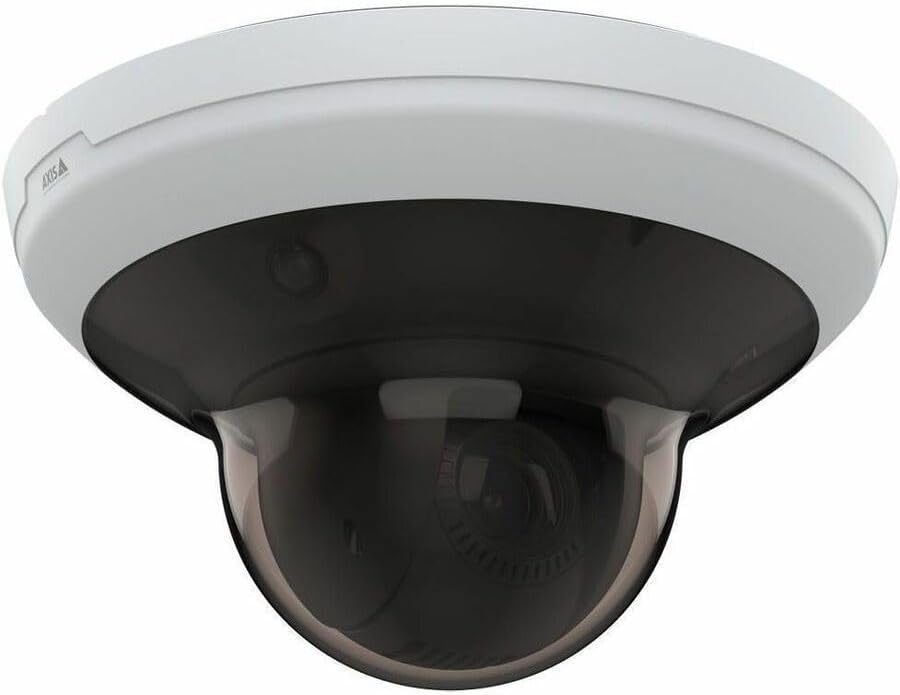
Figur 4.2: Vinklet view of the AXIS M5000-G Network Camera. This perspective highlights the camera's compact design and the subtle AXIS logo on the side of the white base.

Figur 4.3: En anden vinklet view of the AXIS M5000-G Network Camera. Similar to Figure 4.2, this image provides a slightly different angle, emphasizing the smooth contours of the camera's housing.
5. Opsætning og installation
The AXIS M5000-G is designed for wall mount installation and requires a wired connection for network and power.
5.1 Montering af kameraet
- Vælg en placering: Select an outdoor location that provides the desired field of view and is within reach of a power source and network connection. Ensure the mounting surface is sturdy enough to support the camera's weight (approximately 5.7 pounds).
- Markér borepunkter: Use the provided mounting template (if applicable) or the camera base to mark the drilling points on the wall.
- Bore huller: Bor forboringshuller på de markerede punkter. Indsæt vægankre om nødvendigt.
- Fastgør basen: Attach the camera's mounting base to the wall using the provided screws.
- Tilslut kameraenhed: Secure the main camera unit to the mounted base, ensuring it clicks into place or is fastened according to the quick start guide.
5.2 Tilslutning af strøm og netværk
- Strømtilslutning: Connect the provided power adapter to the camera's power input and then to a suitable electrical outlet. The camera operates on corded electric power.
- Netværks forbindelse: Connect an Ethernet cable from your network router or switch to the camera's network port. The camera uses wired connectivity technology.
- Første opstart: Allow the camera a few minutes to power on and establish a network connection.
6. Betjening af kameraet
The AXIS M5000-G camera is controlled primarily through a dedicated application or network video recorder (NVR) software.
6.1 Indledende konfiguration
- Opdag kamera: Use the AXIS IP Utility or your network's device discovery tools to find the camera's IP address on your network.
- Adgang Web Interface: Åbn a web browseren og indtast kameraets IP-adresse for at få adgang til dens web interface.
- Login: Enter the default username and password (refer to the quick start guide or manufacturer's documentation for default credentials). Change default credentials immediately for security.
- Netværksindstillinger: Configure network settings (e.g., static IP, DHCP) as required by your network environment.
- Dato og tid: Set the correct date and time for accurate video timestamps.
6.2 Live View og PTZ-styring
- Levende View: Få adgang til live-videofeedet via web interface or a compatible surveillance application. The camera provides 1080p video capture resolution and 5 MP effective still resolution.
- Pan, Tilt, Zoom (PTZ): Utilize the PTZ controls within the application to adjust the camera's viewing angle and zoom level. This feature allows for dynamic monitoring of large areas.
- Forudindstillede positioner: Configure and save specific PTZ positions for quick navigation to frequently monitored areas.
6.3 Bevægelsesdetektion og advarsler
- Motion Only Alert Type: Configure motion detection zones and sensitivity settings within the camera's interface.
- Alert Actions: Set up actions to be triggered upon motion detection, such as recording video, sending email notifications, or uploading images to an FTP server.
7. Vedligeholdelse
Regular maintenance ensures optimal performance and longevity of your AXIS M5000-G camera.
- Rengøring af linsen: Gently wipe the camera lens and dome cover with a soft, clean, lint-free cloth. For stubborn dirt, use a mild lens cleaning solution applied to the cloth, not directly to the lens.
- Firmwareopdateringer: Periodically check the AXIS website for firmware updates. Keeping the firmware updated ensures access to the latest features and security patches.
- Kabelinspektion: Regularly inspect all cables (power and network) for any signs of wear, damage, or corrosion, especially in outdoor installations.
- Miljøtjek: Sørg for, at kameraets miljø forbliver inden for dets angivne driftstemperatur- og luftfugtighedsområder.
8. Fejlfinding
This section addresses common issues you might encounter with the AXIS M5000-G camera.
| Problem | Mulig årsag | Løsning |
|---|---|---|
| Intet video-feed | Strøm afbrudt, netværksproblem, forkert IP-adresse. | Check power connection. Verify network cable is securely connected. Confirm camera's IP address and network settings. Restart camera. |
| Dårlig billedkvalitet | Dirty lens, low light, incorrect resolution settings. | Clean the lens. Ensure adequate lighting. Adjust video resolution settings in the camera's web interface. |
| PTZ-kontroller reagerer ikke | Network latency, software issue, camera malfunction. | Check network connection stability. Restart the camera and the control application. If issue persists, contact support. |
| Bevægelsesdetektion virker ikke | Forkerte følsomhedsindstillinger, detektionszoner ikke konfigureret. | Review and adjust motion detection sensitivity. Ensure detection zones are properly defined in the camera's settings. |
9. Specifikationer
| Feature | Detalje |
|---|---|
| Modelnavn | M5000-G Network Camera |
| Mærke | AKSE |
| Indendørs/Udendørs brug | Udendørs |
| Strømkilde | Elektrisk med ledning |
| Forbindelsesteknologi | Kablet |
| Videooptagelsesopløsning | 1080p |
| Effektiv stillopløsning | 5 MP |
| Monteringstype | Vægmontering |
| Alert Type | Kun bevægelse |
| Varedimensioner (L x B x H) | 11.9 x 12 x 8.4 tommer |
| Varens vægt | 5.7 pund |
| Fabrikant | AXIS COMMUNICATION INC |
10. Garanti og support
For warranty information, please refer to the documentation included with your purchase or visit the official AXIS website. AXIS provides support resources, including FAQs, troubleshooting guides, and contact information for technical assistance.
You can typically find more information and support on the AXIS Store on Amazon eller producentens officielle webwebsted.


