Produkt overview
The UNITOPSCI 10.1 Inch Android Car Stereo is specifically designed for Honda Accord models from 2003 to 2007. This advanced head unit features a quad-core Android 13.0 system with 2GB RAM and 32GB ROM, ensuring fast and smooth operation. It boasts a 10.1-inch HD capacitive touchscreen with 1024*600 resolution, supporting 1080p video playback and delivering a clear visual experience.
Key features include built-in Wireless Apple CarPlay and Android Auto for seamless smartphone integration, Mirror Link functionality for both Android and iOS devices, and integrated GPS navigation with support for online and offline maps. The unit also offers Bluetooth 4.2 for hands-free calling and audio streaming, FM/RDS radio, and support for steering wheel controls. A backup camera is included for enhanced safety during reversing maneuvers.

Figure 1: UNITOPSCI 10.1 Inch Android Car Stereo Main Unit
Opsætning og installation
This car stereo is designed for plug-and-play installation with the appropriate wire harness for your Honda Accord 2003-2007. It is recommended to confirm your car's specific model and year, and provide photos of your car's center console and original radio's rear CD connectors to ensure compatibility and the correct wire harness is used.
Pakkeindhold:
- Android Car Stereo Unit
- AHD-bakkamera
- Strømkabel
- Installationsværktøj
- GPS antenne
- RCA-kabel
- 2 USB kabler
- Mikrofon
- Brugermanual
- Accessories (Mounting brackets, etc.)

Figure 2: Package Contents and Unit Dimensions
Installationstrin (generelt):
- Fjern forsigtigt den originale bilradioenhed fra instrumentbrættet.
- Connect the provided power cable, RCA cables, USB cables, GPS antenna, and microphone to the new Android car stereo unit.
- If installing the backup camera, route the camera cable to the rear of the vehicle and connect it to the designated camera input on the stereo.
- Secure the new stereo unit into the dashboard using the provided accessories and installation tools.
- Test alle funktioner, før du samler instrumentbrættets beklædning helt igen.

Figur 3: Før og efter installation View
Betjeningsvejledning
Trådløs Apple CarPlay og Android Auto:
The unit supports both wireless and wired connections for Apple CarPlay and Android Auto. This allows you to access phone contacts, GPS navigation, music, and other apps directly from the stereo's display. Activate Siri or Google Assistant for voice control.
- Til trådløs CarPlay: Enable Bluetooth on your iPhone and pair it with the car radio. Then, open the 'ZLink 5' app on the car stereo.
- Til trådløs Android Auto: Ensure the Android Auto app is installed on your phone. Connect your phone via Bluetooth or the original USB cable. Open the 'ZLink 5' app on the car stereo. Note: Android Auto may not be compatible with some Samsung phones.
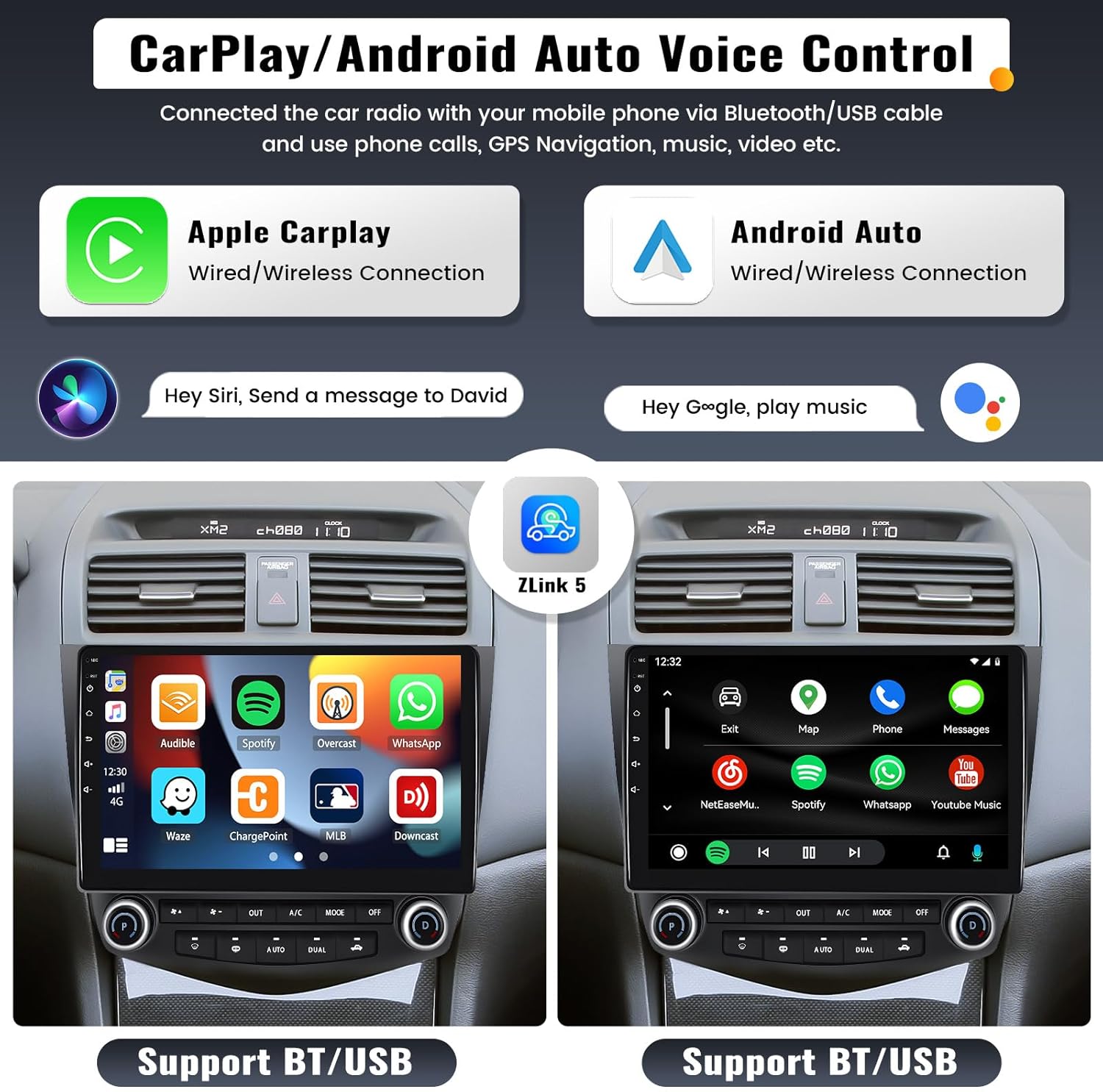
Figur 4: CarPlay og Android Auto-grænseflade
Mirror Link funktion:
The Mirror Link function projects your smartphone screen onto the car stereo display, allowing you to view maps, videos, and games. For iOS phones, screen mirroring is via WiFi. For Android phones, it can be via WiFi or USB cable. Note: This function may not work with some Samsung phones.
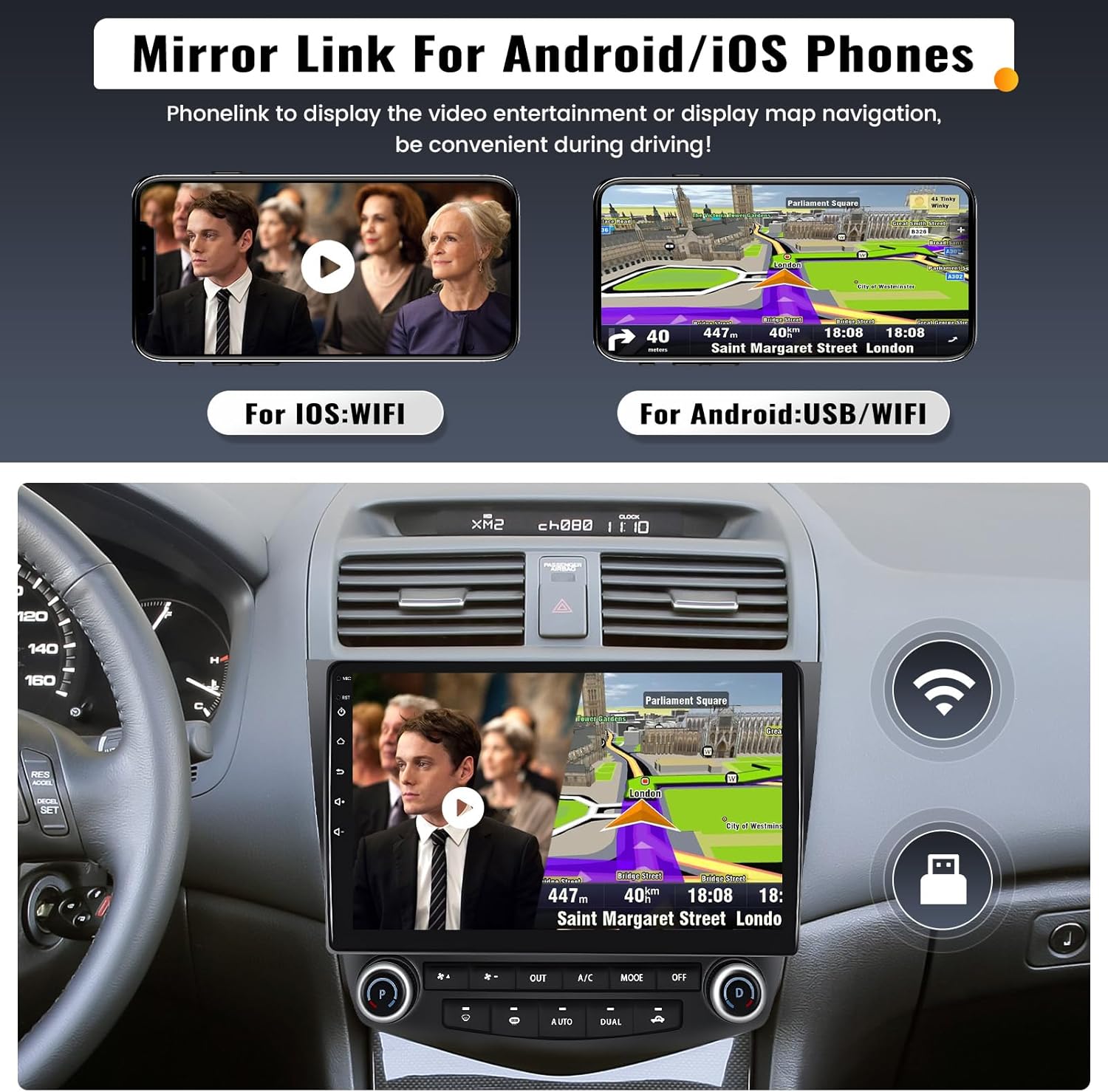
Figur 5: Funktionalitet for spejllink
Bluetooth & Voice Control Assistant:
Built-in Bluetooth 4.2 with A2DP allows for stable hands-free calling and audio streaming. You can also download your phone book to the unit. The integrated voice control assistant helps manage calls and music while driving.

Figure 6: Bluetooth and Voice Control Features
GPS-navigation og WiFi:
The unit includes a built-in GPS receiver and WiFi module. It supports both online and offline navigation. Offline maps (e.g., HERE WEGO) can be downloaded via WiFi. Connect to a WiFi hotspot from your smartphone to access online functions like video streaming, music, and app downloads.

Figur 7: GPS-navigation og WiFi-forbindelse
Steering Wheel Control (SWC) & Backup Camera:
The stereo supports your vehicle's existing steering wheel controls, allowing you to conveniently adjust volume, change songs, and manage calls without taking your hands off the wheel. An AHD backup camera is included, providing a clear reversing image that automatically displays on the screen when the car is put into reverse gear, enhancing parking safety.

Figure 8: Steering Wheel Control and Backup Camera Display
Andre funktioner:
- FM/RDS-radio: Tune into your favorite FM stations with 18 preset options.
- EQ Audio Setting: Customize your audio experience with various equalizer settings (Classic, Pop, Rock, Jazz, Flat) and audio balance adjustments.
- Delt skærmvisning: Kør to applikationer samtidigt på skærmen, f.eks. navigation og musikafspilning.
- DVR-indgang: Connect an optional car driving recorder (DVR) to capture driving footage.
Opretholdelse
For at sikre din UNITOPSCI bilstereos levetid og optimale ydeevne, skal du følge disse vedligeholdelsesretningslinjer:
- Rengøring af skærm: Brug en blød, fnugfri klud til forsigtigt at tørre berøringsskærmen af. Ved genstridige pletter, tør let afampRengør kluden med vand eller et skærmsikkert rengøringsmiddel. Undgå slibende materialer eller barske kemikalier.
- Temperaturkontrol: Avoid exposing the unit to extreme temperatures (very hot or very cold) for extended periods, as this can affect electronic components and the display.
- Softwareopdateringer: Periodically check for software updates from UNITOPSCI to ensure your system has the latest features and bug fixes. Updates can often improve performance and compatibility.
- Tilslutningstjek: Occasionally check all cable connections to ensure they are secure, especially after any vehicle maintenance or modifications.
Fejlfinding
Hvis du støder på problemer med din bilstereo, kan du se følgende almindelige fejlfindingstrin:
- Ingen strøm:
- Kontroller alle strømkabelforbindelser.
- Kontroller, at bilens sikring til radioen er intakt.
- Sørg for, at bilbatteriet har tilstrækkelig opladning.
- Ingen lyd:
- Kontroller højttalerledningernes forbindelser.
- Sørg for, at lydstyrken ikke er slået fra eller indstillet for lavt.
- Verify audio output settings in the stereo's menu.
- GPS-signal svagt/tabt:
- Sørg for, at GPS-antennen er korrekt tilsluttet og placeret et uhindret sted (f.eks. på instrumentbrættet med en fri skærm) view af himlen).
- Prøv at genstarte enheden.
- Problemer med Bluetooth-forbindelse:
- Sørg for, at Bluetooth er aktiveret på både stereoanlægget og din telefon.
- Slet tidligere parringer på begge enheder, og prøv at parre igen.
- Flyt din telefon tættere på stereoanlægget.
- Touchskærm reagerer ikke:
- Perform a soft reset by pressing the reset button (if available) or turning the car ignition off and on.
- Sørg for, at skærmen er ren og fri for snavs.
If these steps do not resolve the issue, please contact UNITOPSCI customer support for further assistance.
Specifikationer
| Feature | Detalje |
|---|---|
| Model | 2G+32G |
| Operativsystem | Android 13.0 |
| VÆDDER | 2 GB |
| ROM | 32 GB |
| Skærmstørrelse | 10.1 tommer |
| Skærmopløsning | 1024*600 |
| Videoafspilning | 1080p support |
| Strømudgang | 4*45W |
| Bluetooth version | 4.2 |
| Radio Band | FM/RDS (87.5-108.0MHZ) |
| Forbindelse | Bluetooth, WiFi |
| Inkluderede komponenter | Android Car Stereo, Backup Camera |
| Varens vægt | 4.26 pund |
| Produktdimensioner | 0.39 x 0.39 x 0.39 tommer |
Garanti og support
Your UNITOPSCI car stereo comes with a 2 års producentgaranti fra købsdatoen. Denne garanti dækker fejl i materialer og udførelse ved normal brug.
For technical support, troubleshooting assistance, or warranty claims, please contact UNITOPSCI customer service:
- E-mail: UNITOPSCI@126.com
- Online support: Refer to the contact information provided with your purchase or visit the official UNITOPSCI store page on Amazon.
UNITOPSCI is committed to providing high-quality products and satisfactory services. Lifetime after-sales consultation and technical support are available.


