Indledning
The Strich BT-FP2 is a wireless page turner pedal designed to enhance your musical performance or presentation by providing hands-free control over digital content. This device allows musicians, presenters, and other users to effortlessly navigate through sheet music, lyrics, chords, or presentation slides on their mobile phones, tablets, or computers via Bluetooth connectivity. By eliminating the need to use your hands for page turning, you can maintain focus on your instrument or presentation, ensuring a smooth and uninterrupted experience.
Opsætning
Pakkens indhold
Før du begynder, skal du sørge for, at alle varer er til stede i pakken:
- Strich BT-FP2 Wireless Page Turner Pedal
- Ladekabel
Opladning af enheden
The BT-FP2 pedal features a built-in rechargeable Lithium-ion battery. For optimal performance, fully charge the device before its first use.
- Connect the provided charging cable to the charging port on the pedal.
- Connect the other end of the charging cable to a standard USB power adapter (not included) or a computer's USB port.
- Opladningsindikatorlampen lyser. Når den er fuldt opladet, kan lampen skifte farve eller slukke, afhængigt af modellen.
- En fuld opladning giver op til 20 timers kontinuerlig brug.
Parring med din enhed
The Strich BT-FP2 uses Bluetooth for wireless connectivity with your mobile phone, tablet, or computer. It is compatible with both Apple iOS and Android platforms.
- Ensure the BT-FP2 pedal is charged and powered on. The power switch is typically located on the central unit.
- On your mobile device or computer, navigate to the Bluetooth settings.
- Aktiver Bluetooth og søg efter tilgængelige enheder.
- Select "BT-FP2" from the list of discovered devices to initiate the pairing process.
- Once paired, the device's Bluetooth indicator light will confirm a successful connection. The operating range is up to 10 meters (33 feet).

Figur 1: Front view of the Strich BT-FP2 pedal, showing the two foot pedals and the central control panel with various buttons and indicator lights. This view is useful for identifying the power switch and pairing buttons.
Betjeningsvejledning
Grundlæggende funktioner
The BT-FP2 pedal features two foot pedals, allowing for intuitive control of your digital content.
- Venstre pedal: Typically used for moving backward (e.g., previous page, previous slide).
- Højre pedal: Typically used for moving forward (e.g., next page, next slide).
- Mode knapper: The central control panel includes buttons to switch between different operating modes, which may emulate various keyboard commands (e.g., page up/down, left/right arrow keys). Refer to your application's settings for optimal configuration.
Applikationskompatibilitet
The pedal is compatible with a wide range of applications that support external keyboard or Bluetooth input for navigation. Supported software includes, but is not limited to, GarageBand and CAKEWALK. For other applications, check their settings for options to assign keyboard shortcuts to page turning or navigation functions.

Figur 2: The Strich BT-FP2 pedal shown in a usage scenario, connected to a device via a red cable (likely for charging or wired connection, though primarily wireless). This image illustrates the pedal's compact design and how it might appear during use.

Figur 3: Et nærbillede view of a foot pressing one of the pedals on the Strich BT-FP2. This demonstrates the hands-free operation and the ergonomic design for foot control, highlighting its practical application during a performance.
Opretholdelse
Proper care and maintenance will extend the life of your Strich BT-FP2 pedal.
- Rensning: Use a soft, dry cloth to clean the surface of the pedal. Avoid using abrasive cleaners or solvents, as they may damage the finish.
- Opbevaring: Opbevar pedalen et køligt, tørt sted væk fra direkte sollys og ekstreme temperaturer.
- Batteripleje: To maintain battery health, avoid fully discharging the battery frequently. If storing for an extended period, charge the battery to approximately 50% every few months.
- Vandeksponering: This device is not waterproof. Avoid exposure to liquids to prevent damage.
Fejlfinding
If you encounter issues with your Strich BT-FP2 pedal, refer to the following common problems and solutions:
- Enheden tænder ikke:
- Ensure the battery is charged. Connect the charging cable and allow it to charge for at least 30 minutes.
- Kontroller, at tænd/sluk-knappen er i 'ON'-positionen.
- Kan ikke parres via Bluetooth:
- Make sure the pedal is powered on and within the 10-meter range of your device.
- Turn off and on Bluetooth on your mobile device or computer.
- Glem enheden fra dine Bluetooth-indstillinger, og prøv at parre igen.
- Ensure no other devices are actively connected to the pedal.
- Pedal not responding in application:
- Check if the pedal is successfully paired with your device.
- Verify the application settings to ensure it supports external input or keyboard shortcuts for navigation.
- Try switching the operating mode on the pedal using the central buttons to see if a different mode is compatible with your application.
- Restart the application and/or your mobile device.
- Kort batterilevetid:
- Sørg for, at enheden er fuldt opladet før brug.
- Battery life can vary based on usage and environmental conditions.
- If the issue persists, the battery may need replacement (contact support).
Specifikationer
Detailed technical specifications for the Strich BT-FP2 Wireless Page Turner Pedal:
| Feature | Detalje |
|---|---|
| Modelnummer | BT-FP2 |
| Forbindelsesteknologi | Bluetooth |
| Kompatible enheder | PC, bærbar computer, smartphone, tablet |
| Understøttet software | GarageBand, CAKEWALK (and others supporting keyboard input) |
| Antal taster/pedaler | 2 |
| Batteritype | 1 litium-ion-batteri (inkluderet) |
| Batterilevetid | Op til 20 timer |
| Wireless Range | Op til 10 meter |
| Varens vægt | 420 g |
| Pakkedimensioner | 21.3 x 19.2 x 4.2 cm |
| Speciel funktion | Kompakt, bærbar |
| Fabrikant | Strich |
| Oprindelsesland | Kina |
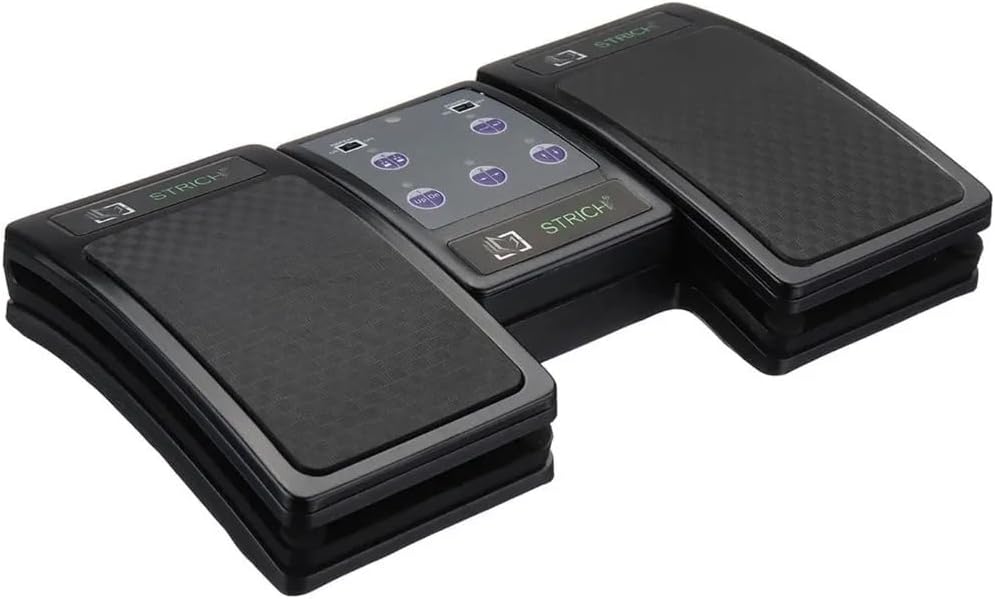
Figur 4: An angled top-down view of the Strich BT-FP2 pedal, showcasing its overall design and footprint. This image provides a comprehensive look at the product's physical characteristics.
Garanti og support
For garantioplysninger eller teknisk support henvises til den dokumentation, der fulgte med dit køb, eller kontakt forhandleren/producenten direkte. Gem din købsbevis til eventuelle garantikrav.


