Indledning
Tak for købetasing the Baseus S-09 Pro Series Car FM Transmitter. This device allows you to stream audio from your smartphone or other devices to your car's FM radio, and also provides fast charging capabilities. Please read this manual carefully before use to ensure proper operation and to maximize the product's lifespan.
Produkt overview
The Baseus S-09 Pro Series Car FM Transmitter is designed to enhance your in-car audio experience and provide convenient charging. Key features include:
- FM Transmitter Functionality: Broadcasts audio to your car's FM radio.
- Bluetooth 5.3-forbindelse: For stable wireless audio streaming from compatible devices.
- Flash Drive Playback: Supports audio playback directly from a flash drive (up to 512GB).
- Hurtig opladning: Equipped with a USB-C port supporting PD 18W (Max) fast charging.
- Dual-Mic System: Provides premium sound quality and clear calls.
- Large LED Screen with Dual Display: Shows frequency band and battery voltage alternately.
- Triple Charging Ports: Offers multiple charging options.
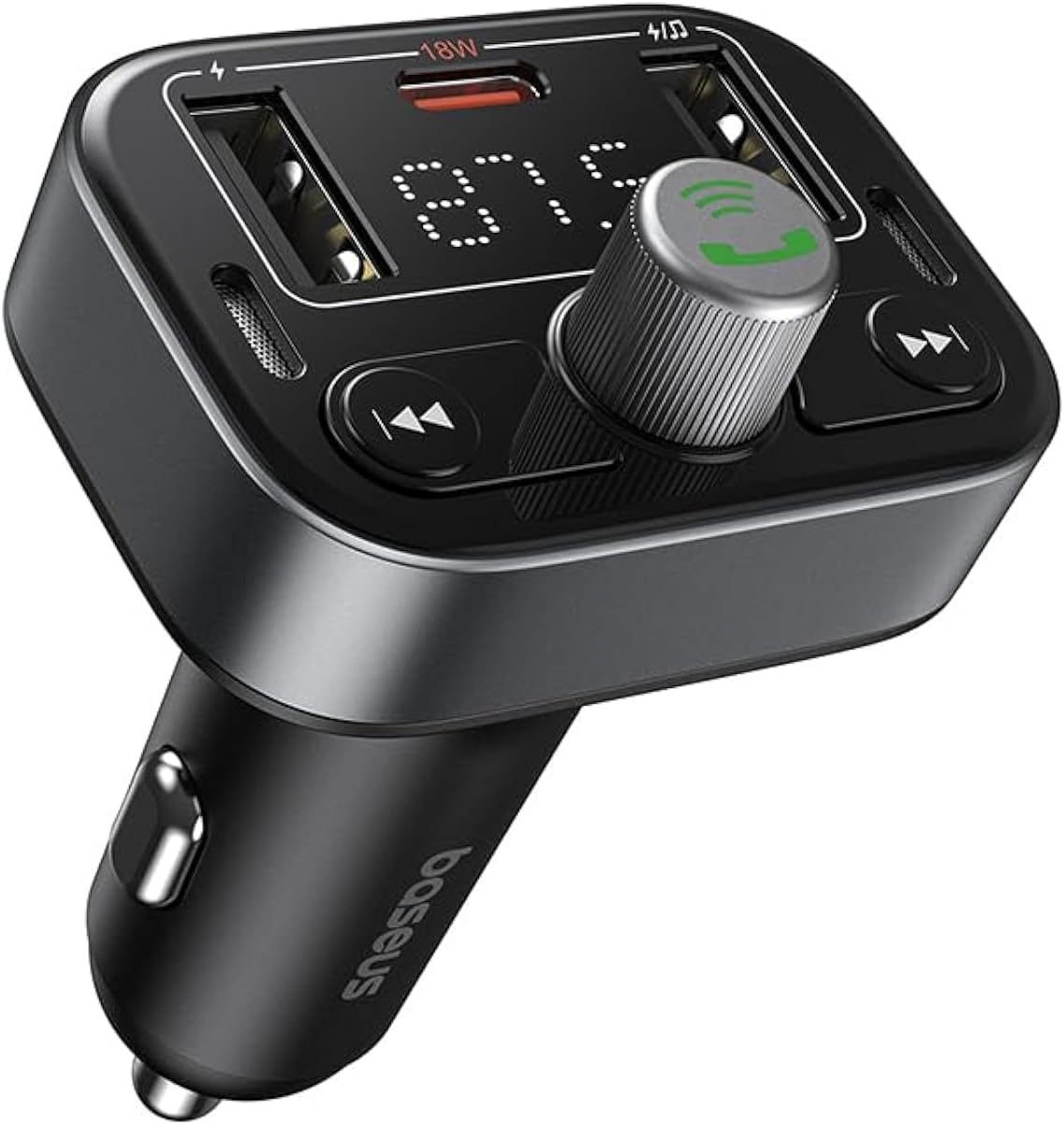
Figur 1: Forside view of the Baseus S-09 Pro Series Car FM Transmitter, showing the display, control knob, and USB ports.
Pakkens indhold
Tjek venligst pakken for følgende varer:
- Baseus S-09 Pro Series Car FM Transmitter
- Instruktionsmanual (dette dokument)

Figure 2: The Baseus S-09 Pro Series Car FM Transmitter shown in its retail packaging.
Opsætning
- Insert into Car Cigarette Lighter Socket: Plug the Baseus S-09 Pro Series Car FM Transmitter firmly into your car's 12V/24V cigarette lighter socket. The device will power on automatically, and the LED display will light up.
- Tune FM Frequency:
- On the FM Transmitter, press and hold the multi-function knob (the large central knob) until the FM frequency on the LED display starts flashing.
- Rotate the multi-function knob left or right to adjust the frequency. Choose an empty FM frequency (one with no radio station broadcasting) to minimize interference.
- On your car's FM radio, tune to the exact same empty frequency you selected on the transmitter.
- Once matched, the transmitter is ready to broadcast audio to your car stereo.
- Bluetooth-parring:
- After the device powers on, it will automatically enter Bluetooth pairing mode. The Bluetooth icon on the display may flash.
- On your smartphone or Bluetooth-enabled device, open the Bluetooth settings and search for available devices.
- Select "Baseus S-09 Pro" (or similar name) from the list to connect. Once connected, the Bluetooth icon on the transmitter's display will stop flashing and remain solid.

Figure 3: Illustration showing connection options: via flash drive and Bluetooth 5.3 pairing with a smartphone.
Betjeningsvejledning
Lydafspilning
- Bluetooth lyd: Once paired, play music or audio from your smartphone. The audio will be transmitted to your car's FM radio.
- Flash Drive Audio: Insert a USB flash drive (up to 512GB, formatted to FAT32) containing MP3 audio files into the designated USB port on the transmitter. The device will automatically detect and play the audio files.
- Kontrolknapper:
- Multifunktionsknap: Rotate to adjust volume. Press once to play/pause.
- Previous Track Button (◀◀): Tryk for at gå til det forrige nummer.
- Next Track Button (▶▶): Tryk for at gå til det næste nummer.
Håndfri opkald
- Besvar/afslut opkald: Press the multi-function knob once to answer an incoming call or end an ongoing call.
- Afvis opkald: Press and hold the multi-function knob for 2 seconds to reject an incoming call.
- Genopkald sidste nummer: Double-press the multi-function knob to redial the last dialed number.
- Skift opkald til telefon: During a call, press and hold the multi-function knob for 2 seconds to switch the call between the transmitter and your phone.

Figure 4: The device highlighting its dual-mic system for premium sound quality during calls and music playback.
Opladningsenheder
- The transmitter features multiple USB ports for charging your devices.
- USB-C-port: Supports Power Delivery (PD) 18W (Max) fast charging. Use a compatible USB-C to USB-C or USB-C to Lightning cable for fast charging supported devices.
- USB-A porte: Provide standard charging for various devices.

Figure 5: The transmitter connected via its USB-C port to an iPhone for fast charging.
Vis information
- The large LED screen alternately displays the current FM frequency and the car battery voltage.
- FM -frekvens: Indicates the frequency the transmitter is broadcasting on.
- Batteri Voltage: Viser real-time voltage of your car's battery, allowing you to monitor its health.

Figure 6: The LED screen displaying both the FM frequency (87.5) and the car battery voltage (12.5V).
Opretholdelse
- Hold enheden tør. Udsæt den ikke for fugt eller ekstreme temperaturer.
- Rengør enheden med en blød, tør klud. Brug ikke skrappe kemikalier eller slibende rengøringsmidler.
- Undgå at tabe eller udsætte enheden for kraftige stød.
- Opbevares på et køligt, tørt sted, når det ikke er i brug.
Fejlfinding
| Problem | Mulig årsag | Løsning |
|---|---|---|
| Ingen strøm/skærm slukket | Not properly inserted into cigarette lighter; Car socket fuse blown. | Ensure firm connection. Check car's fuse box. |
| Statisk/dårlig lydkvalitet | FM frequency interference; Volume too low. | Change to a different, empty FM frequency. Increase volume on both transmitter and car stereo. |
| Kan ikke parre Bluetooth | Device not in pairing mode; Bluetooth disabled on phone. | Ensure transmitter is in pairing mode. Enable Bluetooth on your phone and search again. |
| Hurtig opladning virker ikke | Cable not compatible; Device does not support fast charging. | Use a certified fast-charging cable. Ensure your device supports PD 18W. |
Specifikationer
- Modelnavn: S-09 Pro Series
- Modelnummer: C10762200113-00
- Hardwaregrænseflade: Bluetooth
- Kompatible enheder: Car Stereo System, Smartphone, Tablet
- Særlige funktioner: FM-sender
- Lydindgang: 3.5 mm AUX
- Lydudgangstilstand: Stereoanlæg
- Lydudgangstype: FM-radio, Bluetooth
- Voltage: 12 volt (DC)
- Strømkilde: Elektrisk med ledning
- Trådløs type: Bluetooth
- Bluetooth version: 5.3
- Understøttede medietyper: MP3 (from flash drive)
- Pakkedimensioner: 17 x 11.6 x 3.9 cm
- Varens vægt: 80 gram
- Farve: Sort
Garanti og support
Baseus products typically come with a standard manufacturer's warranty. Please refer to the warranty card included in your product packaging or visit the official Baseus webhjemmeside for detaljerede garantivilkår.
For technical support, troubleshooting assistance, or warranty claims, please contact Baseus customer service through their official channels or the retailer from whom you purchased the product.
Du kan finde mere information og support på Baseus-butik på Amazon.


