1. Introduktion
Thank you for choosing the Baseus Bowie E5x True Wireless Stereo (TWS) Earphones. These earphones are designed to provide a high-quality audio experience with convenient wireless connectivity. This manual will guide you through the setup, operation, and maintenance of your new earphones.

Figure 1: Baseus Bowie E5x TWS Earphones and Charging Case with Retail Packaging
2. Pakkens indhold
Kontroller venligst pakkens indhold for at sikre, at alle varer er til stede:
- Baseus Bowie E5x TWS Earphones (Left and Right)
- Opladningsetui
- USB-C ladekabel
- Brugervejledning (dette dokument)

Figure 2: Baseus Bowie E5x Charging Case and USB-C Charging Cable
3. Produktet er slutview
Familiarize yourself with the components of your Baseus Bowie E5x earphones:
- høretelefoner Venstre (L) og højre (R) ørepropper med berøringsbetjeningsområder og opladningskontakter.
- Opladningsetui: Used for charging the earbuds and for storage. Features a USB-C charging port and LED indicators.
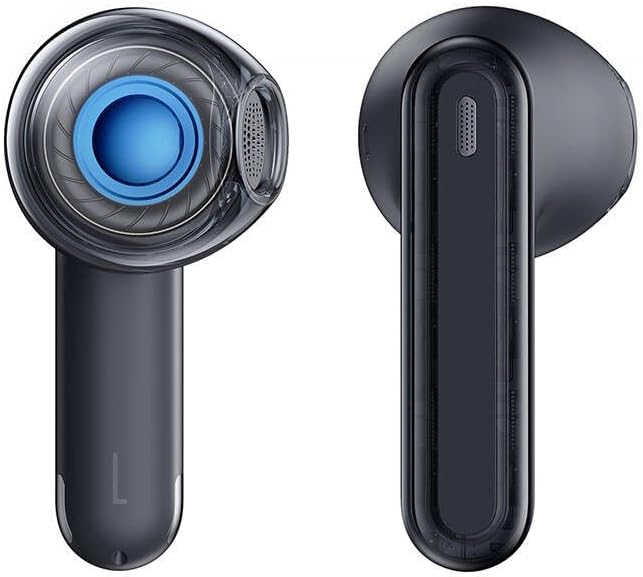
Figure 3: Left and Right Baseus Bowie E5x Earbuds
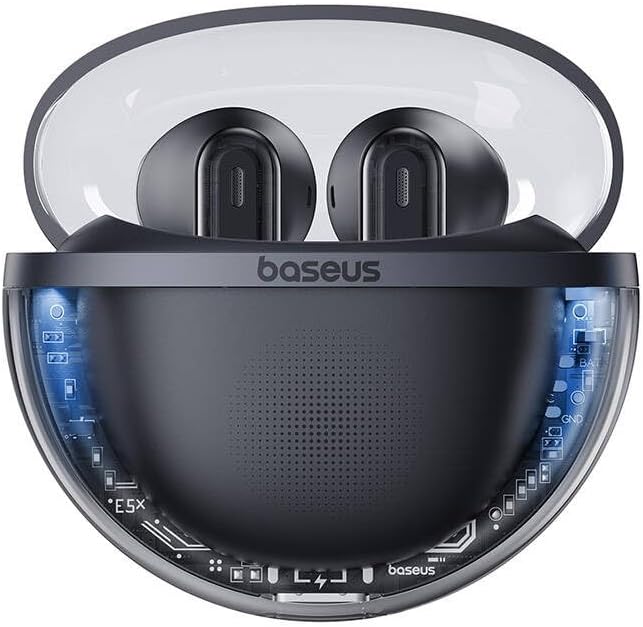
Figure 4: Baseus Bowie E5x Charging Case with Earbuds Inserted
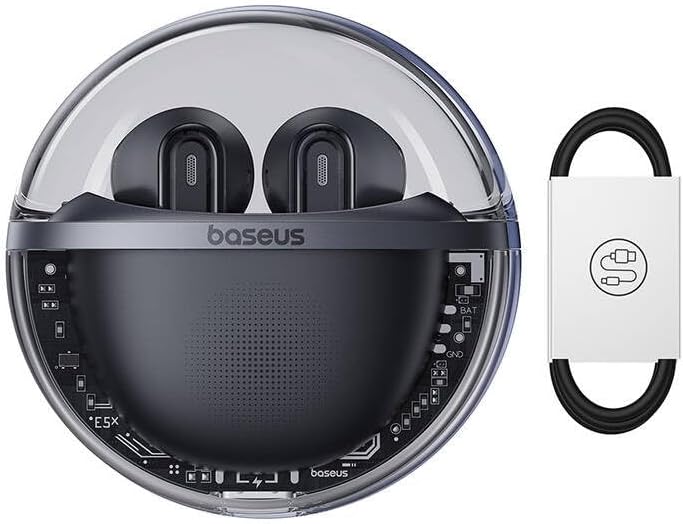
Figure 5: Close-up of an Earbud's Speaker
4. Opsætning
4.1 Opladning af øretelefoner og etuiet
- Indledende opkrævning: Before first use, fully charge the charging case and earbuds. Place the earbuds into the charging case.
- Opladning af etuiet: Connect the provided USB-C cable to the charging port on the case and the other end to a USB power adapter (not included). The LED indicator on the case will show charging status.
- Opladning af øretelefoner: When placed in the charging case, the earbuds will automatically begin charging. The case's indicator lights will show the charging status of the earbuds.
4.2 Bluetooth -parring
- Tænd: Open the charging case. The earbuds will automatically power on and enter pairing mode (indicated by flashing LED lights on the earbuds).
- Aktiver Bluetooth: Aktiver Bluetooth på din enhed (smartphone, tablet, computer).
- Vælg enhed: In your device's Bluetooth settings, search for available devices and select "Baseus Bowie E5x".
- Forbinde: Once selected, the earbuds will connect to your device. A voice prompt or steady LED light will confirm successful pairing.
- Tilslut igen: After initial pairing, the earbuds will automatically connect to the last paired device when taken out of the case, provided Bluetooth is enabled on the device.
5. Betjeningsvejledning
The Baseus Bowie E5x earphones feature intuitive touch controls:
| Fungere | Handling (venstre/højre øreprop) |
|---|---|
| Tænd | Open charging case / Long press touch area (if off) |
| Sluk | Place earbuds into charging case and close lid / Disconnect Bluetooth and wait |
| Afspil/pause | Double tap touch area |
| Næste spor | Dobbelt tryk på højre øreprop |
| Forrige spor | Dobbelt tryk på venstre øreprop |
| Besvar/afslut opkald | Double tap touch area |
| Afvis opkald | Tryk længe på berøringsområdet i 2 sekunder |
| Aktiver Voice Assistant | Tryk længe på berøringsområdet i 3 sekunder |
| Switch to Gaming Mode (Low Latency) | Specific gesture (refer to product packaging or Baseus app for exact control) |
Note: Specific touch controls for features like volume adjustment or gaming mode may vary. Refer to the official Baseus app or product packaging for the most accurate and customizable controls.
6. Vedligeholdelse
To ensure the longevity and optimal performance of your earphones, follow these maintenance tips:
- Rensning: Rengør regelmæssigt ørepropperne og opladningsetuiet med en blød, tør og fnugfri klud. Brug ikke skrappe kemikalier eller slibende materialer.
- Opladningskontakter: Sørg for, at opladningskontakterne på både ørepropperne og indersiden af etuiet er rene og fri for snavs for at sikre korrekt opladning.
- Opbevaring: Når de ikke er i brug, skal øretelefonerne opbevares i deres opladningsetui for at beskytte dem mod støv og skader.
- Undgå ekstreme forhold: Do not expose the earphones to extreme temperatures, humidity, or liquids.
7. Fejlfinding
If you encounter issues with your Baseus Bowie E5x earphones, try the following solutions:
- Ingen lyd:
- Sørg for, at ørepropperne er opladet.
- Check if Bluetooth is enabled on your device and connected to "Baseus Bowie E5x".
- Juster lydstyrken på både din enhed og øretelefonerne.
- Prøv at parre ørepropperne med din enhed igen.
- Earbuds Not Pairing with Each Other:
- Placer begge ørepropper tilbage i opladningsetuiet, luk låget, vent et par sekunder, og åbn derefter låget igen.
- Sørg for, at begge ørepropper har tilstrækkelig opladning.
- Opladningsproblemer:
- Kontroller USB-C-kablet og strømadapteren.
- Rengør opladningskontakterne på ørepropperne og inde i etuiet.
- Sørg for, at selve opladningsetuiet er opladet.
- Forbindelse afbrydes/ustabil:
- Flyt tættere på din tilsluttede enhed.
- Undgå miljøer med stærk elektromagnetisk interferens.
- Afbryd og tilslut Bluetooth-forbindelsen igen.
If the issue persists, consult the Baseus official website or customer support for further assistance.
8. Specifikationer
| Feature | Detalje |
|---|---|
| Mærke | Baseus |
| Model | Bowie E5x |
| Farve | Sort |
| Komponenter inkluderet | 1 package (Earphones, Charging Case, USB-C Cable, Manual) |
| Forbindelse | True Wireless Stereo (TWS) |
| Opladningsport | USB-C |
Bemærk: Specifikationerne kan ændres uden forudgående varsel.
9. Garanti og support
Baseus products come with a manufacturer's warranty. Please refer to the warranty card included in your package or visit the official Baseus webwebstedet for detaljerede garantivilkår og -betingelser, der er specifikke for din region.
For technical support, troubleshooting, or service inquiries, please contact Baseus customer support through their official webwebstedet eller kontaktoplysningerne på din produktemballage.
Officiel Webwebsted: www.baseus.com


