1. Introduktion
The Radioddity GM-30 is a professional-grade GMRS handheld radio designed for reliable long-range communication. This device offers extensive channel capabilities, repeater functionality, and a range of features suitable for various outdoor and professional applications. This manual provides essential information for setting up, operating, maintaining, and troubleshooting your GM-30 radio.
2. Hvad er der i æsken
Upon unboxing your Radioddity GM-30 GMRS Radio, you should find the following components:
- 2 x GM-30 Radio Units
- 2 x 15.5" High-gain Antennas
- 2 x Original Antennas
- 2 x Speaker Mics
- 1 x programmeringskabel
- 2 x litium-ion-batterier
- 2 x bælteclips
- 2 x håndledsstropper
- 2 x ørestykker
- 2 x USB-C Cables with Adapters
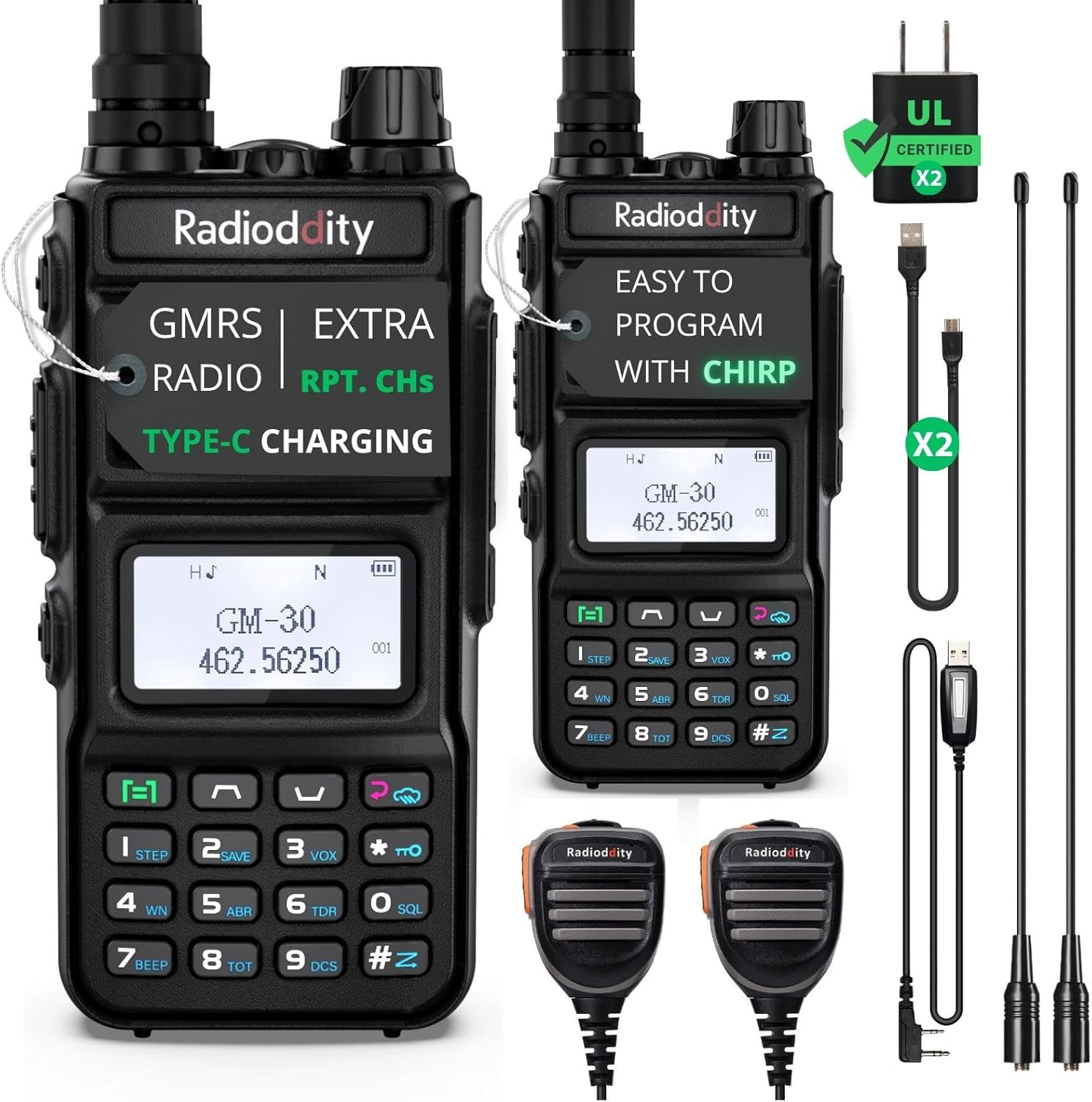
Figure 1: All components included with the Radioddity GM-30 GMRS Radio.
3. Opsætning
3.1 Batteriinstallation
- Juster batteripakken med rillerne på bagsiden af radioen.
- Skub batteripakken opad, indtil den klikker på plads.
- Ensure the battery is securely attached before use.
3.2 Antennetilslutning
- Screw the desired antenna (original or 15.5" high-gain) clockwise onto the antenna connector on top of the radio.
- Tighten gently until secure. Do not overtighten.
3.3 Opladning af batteriet
The GM-30 radio features an upgraded USB Type-C charging port for convenient charging. It also includes a UL-certified plug for safety.
- Connect the USB-C cable to the charging port on the radio or directly to the battery.
- Plug the USB-C adapter into a power source (e.g., wall outlet, car charger, power bank).
- The LED indicator on the radio will show charging status (e.g., red for charging, green for fully charged).
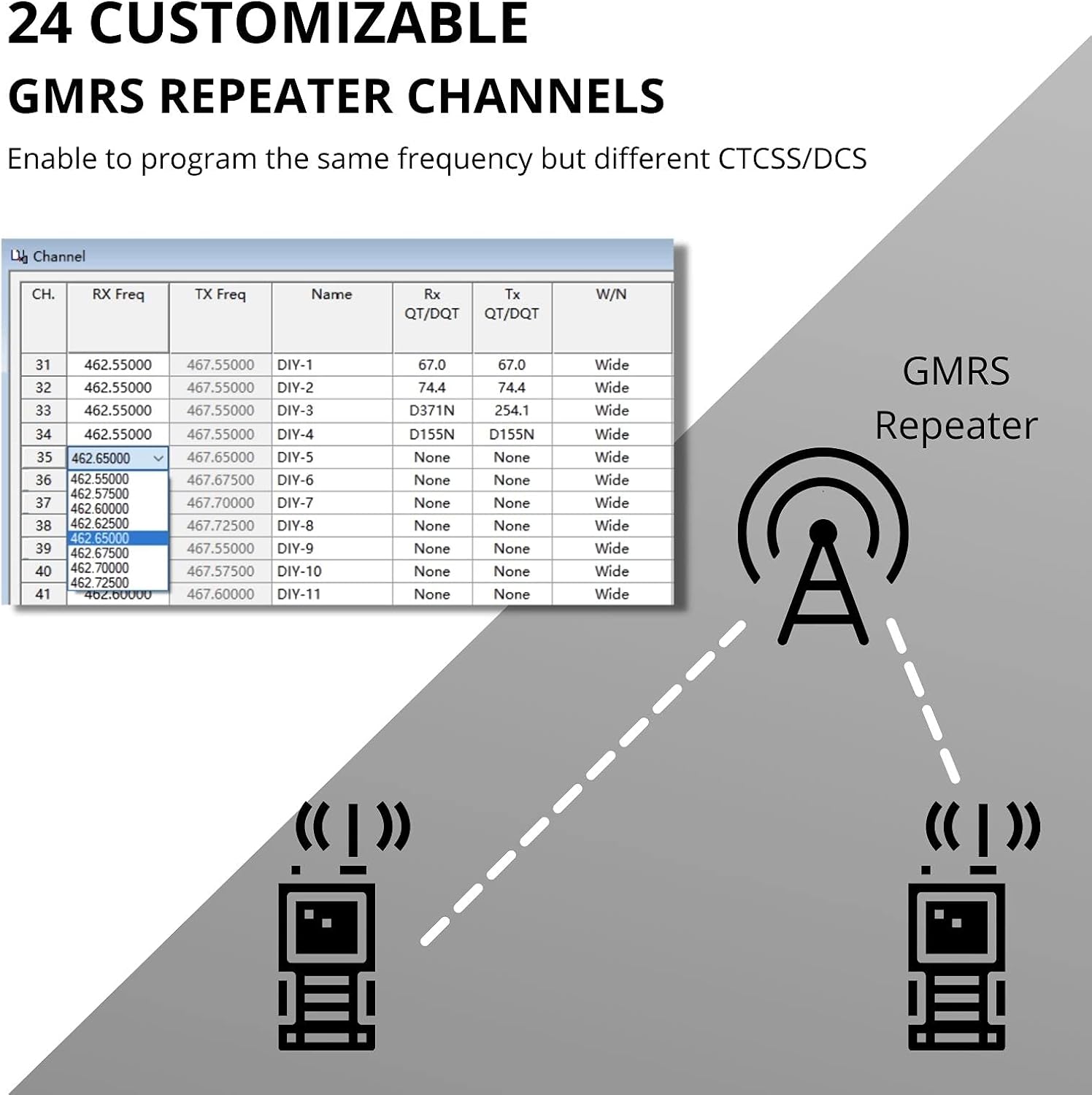
Figure 2: USB-C charging port on the Radioddity GM-30.

Figure 3: USB 3.0 Type-C charging compatibility with laptop, wall charger, car charger, and power bank.
4. Betjening af radioen
4.1 Tænd/sluk og lydstyrkekontrol
To power on the radio, rotate the top knob clockwise until you hear a click. Continue rotating to adjust the volume. To power off, rotate the knob counter-clockwise until you hear a click.
4.2 Kanalvalg
The GM-30 supports up to 250 channels, including 30 default channels (22 GMRS, 8 repeaters) and an additional 24 GMRS repeater channels. Use the up/down arrow keys on the keypad to navigate through channels.
4.3 Tryk-og-tal (PTT)
Press and hold the PTT button on the side of the radio to transmit. Release the button to receive. Ensure you are on the correct channel before transmitting.
4.4 Display Sync
The radio features a Display Sync function, which allows you to view the channel name, channel number, and frequency simultaneously on the screen for enhanced clarity.
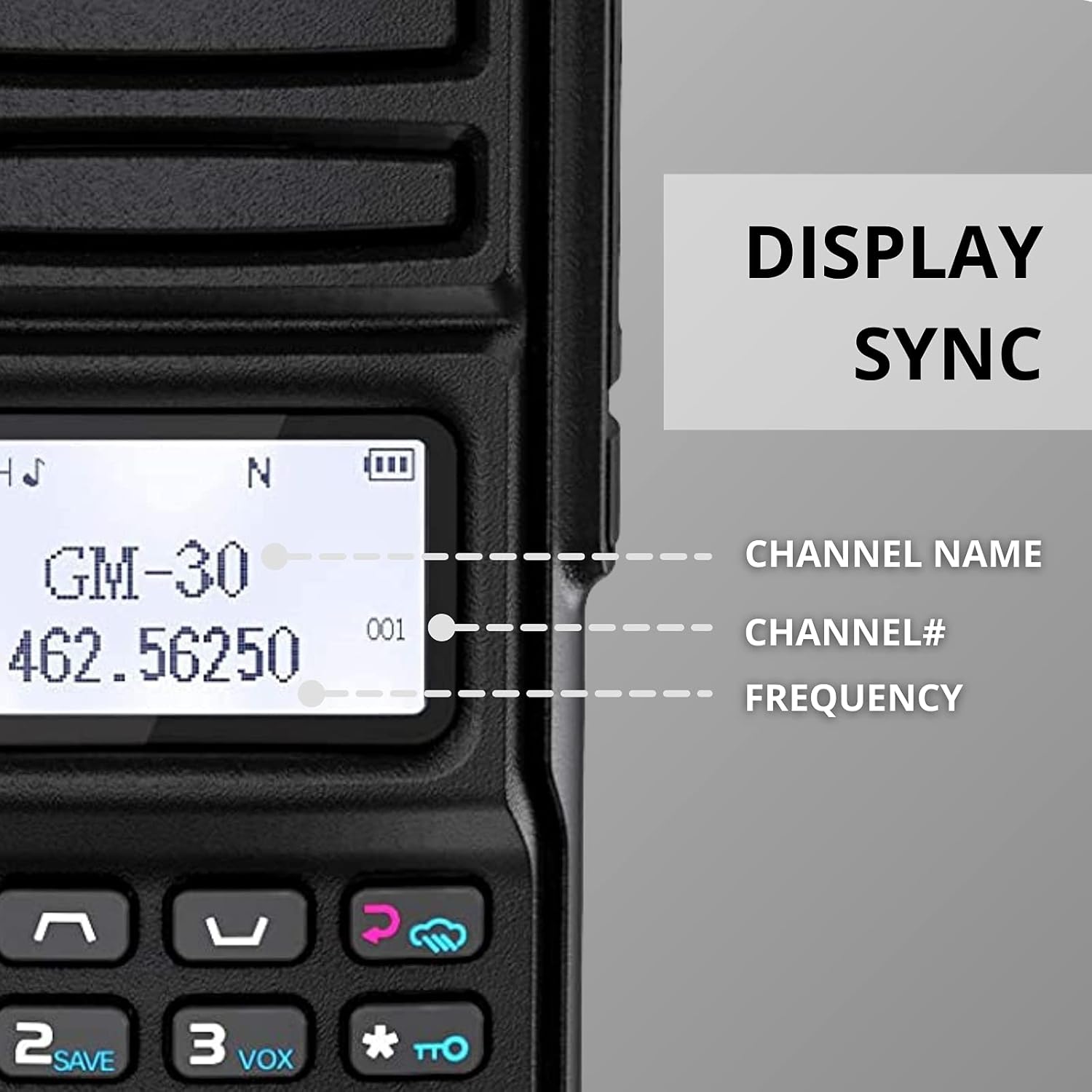
Figure 4: Display Sync feature on the Radioddity GM-30.

Figur 5: Detaljeret view of the Display Sync feature.
5. Avancerede funktioner
5.1 Dual-Band Scanning & Receiving
The GM-30 supports UHF & VHF monitoring in CH/VFO mode. You can set precise frequency ranges for channels and perform CTCSS/DCS scanning. The scan list is editable for customized monitoring.

Figure 6: UHF/VHF Scanner and NOAA Weather Broadcast capabilities.

Figure 7: Radio display during scanning operation.
5.2 GMRS Repeater Channels
The GM-30 includes 24 extra GMRS repeater channels, allowing you to program the same frequency with different CTCSS/DCS codes for flexible repeater use.

Figure 8: Customizable GMRS Repeater Channels setup.
5.3 NOAA Weather Receiver & FM Radio
Stay informed with the built-in NOAA weather receiver and scanner. The radio also includes an FM radio function for entertainment.

Figure 9: NOAA Weather functionality.
5.4 Yderligere funktioner
The GM-30 includes an SOS alarm, a built-in flashlight, squelch control, VOX (Voice Operated Exchange), TOT (Time Out Timer), Squelch Tail Elimination, 6 frequency steps, and 2 power levels (0.5W/5W).

Figur 10: Nærbillede view of radio features.
6. Programmering
The Radioddity GM-30 can be programmed via PC software (Chirp compatible) or directly through the keypad. For advanced customization, PC programming is recommended.

Figure 11: Easy programming with CHIRP software.
Video 1: Radioddity GM-30 CPS DIY Repeater Channels - Backcountry radio. This video demonstrates how to program repeater channels using the CPS software.
6.1 Saving and Deleting Channels
The radio allows you to save and delete stored channels. Refer to the user manual for specific instructions on how to perform these operations via the keypad or programming software.

Figure 12: Saving a new channel.

Figure 13: Deleting a stored channel.
7. Vedligeholdelse
7.1 Generel pleje
- Hold radioen tør. Regnvand eller damp conditions can corrode electronic circuits.
- Do not store the radio in dusty or dirty areas.
- Rengør radioen med en blød kludamp cloth. Avoid harsh chemicals or cleaning agents.
7.2 Pleje af batterier
- Use only the supplied UL-certified charger.
- Undgå at udsætte batteriet for ekstreme temperaturer.
- Kortslut ikke batteripolerne.
- If the battery appears to diffuse peculiar smell or smoke, shut off its power immediately and take off the charger.
8. Fejlfinding
If you encounter issues with your Radioddity GM-30, refer to the following common troubleshooting tips:
- Ingen strøm: Sørg for, at batteriet er fuldt opladet og korrekt installeret. Kontroller tænd/sluk-knappen.
- Dårlig modtagelse/transmission: Verify the antenna is securely attached. Check for obstructions. Ensure you are within the effective communication range (up to 5 miles, extendable with high-gain antenna).
- Ingen lyd: Adjust the volume. Check earpiece/speaker mic connections.
- Programmeringsproblemer: Ensure the programming cable is correctly connected. Verify software settings (e.g., CTCSS/DCS codes, frequency offsets).
For further assistance, please contact Radioddity customer support.
9. Specifikationer
| Feature | Specifikation |
|---|---|
| Mærke | Radiodity |
| Modelnummer | GM-30 |
| Antal kanaler | 250 (30 default, 24 extra GMRS repeater) |
| Frekvensområde (RX) | 65-108MHz, 136-174MHz, 400-470MHz |
| Frekvensområde (TX) | 462.5625-467.7125 MHz |
| Maksimal talerækkevidde | 5 Mil |
| Effektniveauer | 0.5W / 5W |
| Batteritype | 2 lithium-ion-batterier (medfølger) |
| Voltage | 7.4 volt |
| Opladning | USB Type-C, UL-certified plug |
| Særlige funktioner | Display Sync, Extra 24 DIY GMRS RPT. Channels, NOAA Weather Receiver & Scanner, FM Radio, SOS Alarm, Flashlight, Squelch, VOX, TOT, Squelch Tail Elimination, 6 Frequency Steps |
| Varens vægt | 2.51 pund |
| Pakkedimensioner | 12.48 x 8.58 x 4.06 tommer |
10. Garanti og support
The Radioddity GM-30 GMRS Radio comes with an 18-month warranty. Additionally, Radioddity offers a 30-day worry-free return policy.
For product support, troubleshooting, or warranty claims, please visit the official Radioddity website or contact their customer service team. Radioddity has over 11 years of experience and provides 5-star customer service.


