1. Introduktion
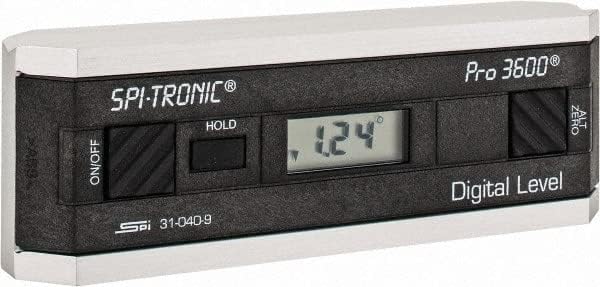
The SPI 31-040-9 Digital Protractor PRO3600 is a revolutionary tool designed to provide immediate digital indications of level, plumb, and angles. It features a light, rigid, and ultra-precise platform, utilizing a state-of-the-art sensor and microprocessor circuit for accurate readings. This instrument is built for durability, precision, and reliability, making it an essential tool for various metalworking and laboratory applications.
Nøglefunktioner:
- Floating zero provides zero selection anywhere within its 360° range.
- PRO 3600 features SPC output and excellent accuracy.
- Instant LCD Display with resolution of 0.1° up to +/-10°.
- Deviation from the true plane is measurable through full 360° (4x90°).
- Supplied in a protective plastic case.
- Top plate has a V-groove for accurate registration on curved or cylindrical surfaces.

2. Produktet er slutview
Familiarize yourself with the main components and controls of your SPI PRO3600 Digital Protractor.


3. Opsætning
3.1 Batteriinstallation
The SPI PRO3600 is battery powered. To install or replace batteries:
- Locate the battery compartment cover, typically on the underside or side of the unit.
- Open the cover using a small screwdriver or coin if necessary.
- Insert the required batteries (refer to the battery type indicated inside the compartment, usually AAA or button cell) ensuring correct polarity (+/-).
- Luk batterirummets dæksel forsvarligt.
3.2 Indledende tænding
Efter isætning af batterier skal du trykke på ON/OFF button to power on the device. The LCD display should illuminate and show a reading.
4. Betjeningsvejledning
4.1 Tænd/sluk
- For at dreje enheden ON, tryk på ON/OFF knap.
- For at dreje enheden SLUKKET, tryk på ON/OFF knappen igen.
- The unit will automatically shut off after 6 minutes of non-use to conserve battery life.
4.2 Zeroing (ALT ZERO)
The floating zero feature allows you to set a reference point anywhere within the 360° range.
- Place the unit on your chosen reference surface.
- Wait approximately 5 seconds for the reading to stabilize.
- Tryk på ALT ZERO button. The display will reset to 0.0°, establishing this as your new reference.
- To return to the original absolute reference (factory zero), press the ALT ZERO knappen igen.
4.3 Holding a Reading
Sådan fryser du den aktuelle aflæsning på displayet:
- Tryk på HOLDE button. The displayed reading will be frozen.
- To unfreeze the display and resume live readings, press the HOLDE knappen igen.
4.4 SPC Output
The PRO3600 features an SPC (Statistical Process Control) output port. This allows for data transfer to external devices for analysis. Refer to the manual for your specific SPC data collection system for connection and usage instructions.
4.5 Måling af vinkler
Place the base of the protractor firmly on the surface you wish to measure. The digital display will show the angle relative to the last set zero point. For absolute measurements, ensure the unit is zeroed on a true horizontal surface.
4.6 Using the V-Groove
The top plate of the protractor features a V-groove. This design allows for accurate registration and measurement on curved or cylindrical surfaces, such as pipes or shafts. Simply align the V-groove with the cylindrical object to obtain a stable and accurate reading.
5. Vedligeholdelse
5.1 Rengøring
- Tør enheden af med en blød, tør klud.
- Til genstridigt snavs, en let damp en klud med mild sæbe kan bruges, efterfulgt af øjeblikkelig tørring.
- Do not use abrasive cleaners, solvents, or immerse the unit in water.
5.2 Opbevaring
- Store the protractor in its supplied plastic case when not in use to protect it from dust, dirt, and physical damage.
- Store in a dry environment, away from extreme temperatures and direct sunlight.
- Hvis produktet opbevares i længere perioder, skal batterierne fjernes for at forhindre lækage.
6. Fejlfinding
- Enheden tændes ikke: Kontroller batteriinstallationen, og sørg for, at batterierne ikke er afladede. Udskift om nødvendigt.
- Unøjagtige aflæsninger: Ensure the measurement surface is clean and stable. Perform an ALT ZERO calibration on a known true reference surface.
- Enheden slukker uventet: The unit has an automatic shut-off feature after 6 minutes of non-use. This is normal operation. If it shuts off during active use, check battery levels.
- Displayet er svagt eller flimrende: Batterierne er muligvis lave. Udskift dem.
7. Specifikationer
| Attribut | Værdi |
|---|---|
| Fabrikant | MSC Industrial |
| Varenummer | 03883782 |
| Varens vægt | 6.5 pund |
| Produktdimensioner | 6 x 1.2 x 2.3 tommer |
| Varemodelnummer | 31-040-9 |
| Størrelse | One Size |
| Farve | Sort |
| Materiale | Komposit |
| Strømkilde | Batteridrevet |
| Vare Pakke Antal | 1 |
| Inkluderede komponenter | Fitted Case |
8. Garanti og support
8.1 Garantioplysninger
SPI measuring instruments are backed by an industry-leading 2-Year warranty, ensuring their durability, precision, and reliability. Please retain your proof of purchase for warranty claims.
8.2 Kundesupport
For technical assistance, warranty service, or inquiries regarding your SPI PRO3600 Digital Protractor, please contact SPI customer support through their official webwebstedet eller den forhandler, hvorfra du købte produktet.


