1. Introduktion
This manual provides detailed instructions for the safe and effective operation of your Owon OWM5500 Digital Smart Anemometer. This device is a versatile handheld instrument designed for precise measurement of various environmental parameters, including wind speed, air volume, temperature, and humidity. Please read this manual thoroughly before using the device to ensure optimal performance and longevity.

Figure 1: Owon OWM5500 Digital Smart Anemometer (Front View)
This image displays the front of the Owon OWM5500 anemometer, highlighting its digital screen which shows wind speed, maximum, average, and minimum readings, along with battery status. Below the screen are navigation and function buttons, and the wind impeller is visible at the top.
2. Sikkerhedsoplysninger
To ensure safe operation and to prevent damage to the device, please observe the following safety precautions:
- Forsøg ikke at åbne enheden casing or replace the battery without first powering off the unit.
- Hold enheden væk fra vand og overdreven fugt.
- Undgå at udsætte enheden for ekstreme temperaturer eller direkte sollys i længere perioder.
- Handle the wind impeller carefully to prevent damage.
- Brug kun det specificerede opladningskabel og strømkilde.
- Store the device in a clean, dry environment when not in use.

Figure 2: Owon OWM5500 Digital Smart Anemometer (Back View)
This image shows the back of the Owon OWM5500 anemometer. A warning label is visible, advising to power off the device before replacing the battery or opening the case. The battery compartment and regulatory marks (UKCA, CE) are also displayed.
3. Pakkens indhold
Ved udpakning skal du kontrollere, at alle nedenstående varer er til stede og i god stand:
- Owon OWM5500 Anemometer
- Brugermanual
- USB Type-C opladerkabel
- Snor
- Pakkeboks
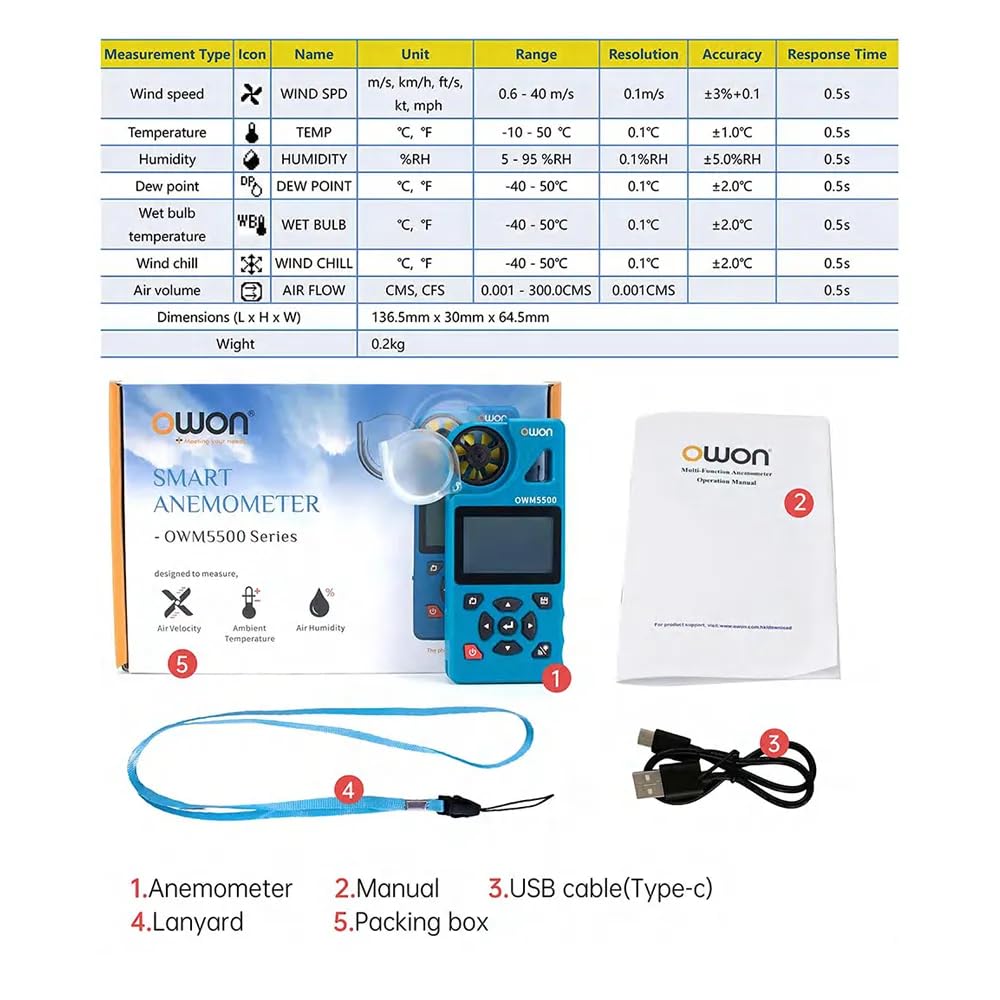
Figur 3: Pakkens indhold
This image illustrates the items included in the Owon OWM5500 package. It shows the anemometer itself, a printed user manual, a USB Type-C charging cable, and a lanyard, all laid out next to the product's packaging.
4. Produktet er slutview og funktioner
The Owon OWM5500 is designed for comprehensive environmental monitoring with a range of advanced features:
- Multi-Measurement Capability: Measures 7 types of parameters: wind speed, air volume, temperature, humidity, dew point, wet bulb temperature, and wind chill. Supports Beaufort scale wind rating.
- Datavisualisering: Features a charts display mode for analyzing trends and performing statistical analysis on collected data.
- Omfattende datalagring: Built-in memory for 8000 sets of data, supporting both automatic and manual storage, with a one-click data clearing function.
- Strømstyring: Multi-gear setting for automatic power-off to conserve energy.
- Genopladeligt batteri: Integrated lithium battery, rechargeable via USB Type-C interface for extended use.
- Smart tilslutning: Supports remote control via a dedicated mobile application (APP).
- PC-softwaresupport: Data graph mode allows for exporting data for further analysis using PC software.
- High Precision Design: Features a 7-blade airfoil fan for accurate data collection and a replaceable airfoil wheel for long-term accuracy.
- Brugervenlig skærm: Allows for simultaneous display of up to three measurement values on one screen for quick data interpretation.
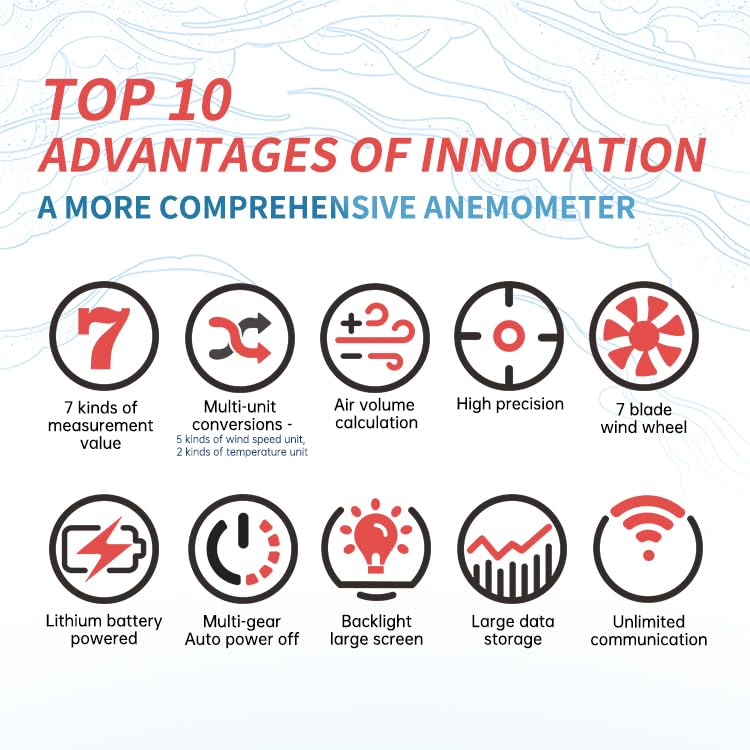
Figur 4: Nøglefunktioner ovenforview
This infographic visually summarizes the key advantages of the Owon OWM5500 anemometer. Icons represent features such as 7 measurement types, multi-unit conversions, air volume calculation, high precision, a 7-blade wind wheel, lithium battery power, multi-gear auto power off, a backlit large screen, large data storage, and unlimited communication capabilities.
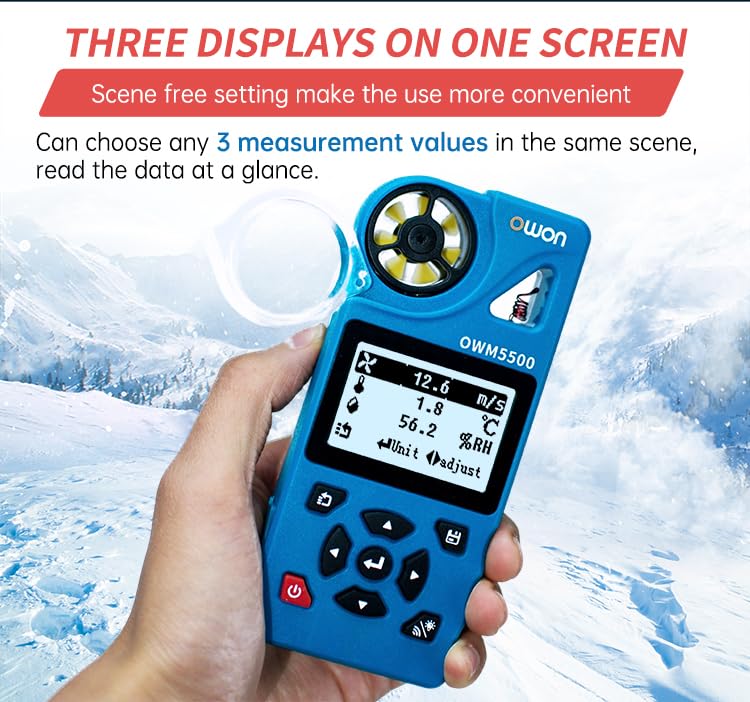
Figure 5: Three Displays on One Screen
This image shows the Owon OWM5500 anemometer held in a hand, with its screen displaying three different measurement values concurrently: wind speed (12.6 m/s), temperature (1.8 °C), and relative humidity (56.2 %RH). This illustrates the device's ability to present multiple data points at a glance.

Figure 6: 7-Blade Airfoil Fan Design
Dette billede giver en detaljeret view of the Owon OWM5500's 7-blade airfoil fan, designed for accurate data collection. It also shows a separate, replaceable fan wheel, emphasizing the device's maintainability and long-term measurement accuracy.
5. Opsætning
5.1 Opladning af batteriet
The OWM5500 comes with a built-in rechargeable lithium battery. Before first use, or when the battery indicator shows low power, charge the device using the provided USB Type-C cable.
- Tilslut USB Type-C-kablet til opladningsporten på enheden.
- Tilslut den anden ende af USB-kablet til en standard USB-strømadapter (medfølger ikke) eller en computers USB-port.
- The charging indicator on the device will show the charging status. Once fully charged, disconnect the cable.
5.2 Fastgørelse af snoren
For secure handling and to prevent accidental drops, attach the provided lanyard to the designated loop on the anemometer.
6. Betjeningsvejledning
6.1 Tænd/sluk
- Tænd: Tryk og hold tænd/sluk-knappen (⑂) i et par sekunder, indtil skærmen lyser op.
- Sluk: Tryk og hold tænd/sluk-knappen (⑂) again until the screen turns off. The device also features an automatic power-off function, which can be configured in the settings.
6.2 Måletilstande
The OWM5500 supports various measurement types. Use the navigation buttons to cycle through and select the desired measurement mode.

Figure 7: Full Functional Measurement Displays
This image presents a collage of screenshots from the Owon OWM5500's display, showcasing its full range of measurement capabilities. It includes readings for Wind Speed (with Beaufort scale), Wind Volume (Air Flow), Temperature, Humidity, Wet Bulb Temperature, Dew Point, Wind Chill Temperature, and the Date/Time setting interface. Each display shows the unit of measurement and current value.
- Vindhastighed: Measures current wind velocity. Units include m/s, km/h, ft/s, kt, mph.
- Air Volume (Air Flow): Measures the volume of air passing through. Units include CMS, CFS. Requires input of area.
- Temperatur: Measures ambient temperature. Units include °C, °F.
- Fugtighed: Measures relative humidity. Unit: %RH.
- Dugpunkt: Calculates the dew point temperature. Units include °C, °F.
- Våd pæretemperatur: Calculates the wet bulb temperature. Units include °C, °F.
- Wind Chill Temperature: Calculates the wind chill factor. Units include °C, °F.
To change units within a measurement mode, refer to the on-screen prompts or the detailed instructions in the full user manual.
6.3 Datalogning og -lagring
The OWM5500 can store up to 8000 sets of measurement data.
- Automatisk lagring: Configure the logging rate (e.g., every 2 seconds to 12 hours) in the settings menu to enable automatic data recording.
- Manuel opbevaring: Press the designated button (refer to device interface) to manually save the current measurement data.
- Data vedrview: Access stored data through the device's menu.
- Dataeksport: Connect the device to a PC via the USB Type-C cable and use the dedicated PC software to export data for further analysis and charting.
- Datarydning: The device supports one-click data zero clearing. Exercise caution when using this function as it will permanently delete all stored data.

Figure 8: Built-in Mass Data Storage
This image illustrates the data storage capabilities of the Owon OWM5500. The device's screen shows settings for data logging, including 'Log Num' (log number), 'Log Rate' (logging interval), and 'Auto Log On/Off'. Below, a graphical representation of historical data trends is displayed, demonstrating the device's ability to store and visualize extensive measurement data.
6.4 APP-fjernbetjening
The OWM5500 supports remote control via a mobile application. Download the official Owon APP from your smartphone's app store. Follow the in-app instructions to pair your device and access remote monitoring and control features.
7. Vedligeholdelse
7.1 Rengøring
Wipe the device with a soft, dry cloth. Do not use abrasive cleaners or solvents. Ensure the wind impeller is free from dust and debris for accurate readings.
7.2 Pleje af batterier
To prolong battery life, avoid fully discharging the battery frequently. Recharge the device regularly, especially if it will be stored for an extended period.
7.3 Impeller Replacement
If the wind impeller becomes damaged or its accuracy degrades over time, it can be replaced. Refer to Figure 6 for an illustration of the replaceable impeller. Contact Owon customer support for replacement parts and detailed instructions.
7.4 Opbevaring
Store the anemometer in a cool, dry place, away from direct sunlight and extreme temperatures. Use the original packing box or a protective case for storage.
8. Fejlfinding
If you encounter issues with your OWM5500, refer to the following common problems and solutions:
| Problem | Mulig årsag | Løsning |
|---|---|---|
| Enheden tænder ikke. | Lavt batteri; enhedfejl. | Oplad batteriet helt. Hvis problemet fortsætter, skal du kontakte kundesupport. |
| Upræcise aflæsninger. | Blocked impeller; sensor dirty; incorrect unit setting. | Ensure impeller is clear and spinning freely. Clean sensors. Verify unit settings. |
| Kan ikke oprette forbindelse til APP'en. | Bluetooth/wireless off; APP not updated; device not in pairing mode. | Ensure device and phone Bluetooth are on. Update APP. Refer to APP instructions for pairing. |
| Data not saving. | Storage full; auto-log off; manual save not performed. | Clear old data. Check auto-log settings. Ensure manual save button is pressed correctly. |
9. Specifikationer
| Parameter | Værdi |
|---|---|
| Modelnummer | OWM5500 |
| Mærke | Owon |
| Batterier | 1 lithium-ion batteri (medfølger) |
| Produktmål (L x B x H) | 22 x 15 x 12 cm (8.66 x 5.91 x 4.72 tommer) |
| Varens vægt | 0.5 kilo (1.1 lbs) |
| Oprindelsesland | Kina |
| Datalagring | 8000 sæt |
| Forbindelse | USB Type-C, APP Remote Control |
| EU-reservedels tilgængelighedsvarighed | 1 år |
Bemærk: Specifikationerne kan ændres uden forudgående varsel.
10. Garanti og support
Owon products are manufactured to high-quality standards. For warranty information and technical support, please refer to the warranty card included with your product or visit the official Owon webwebsted. Behold din købskvittering som købsbevis i tilfælde af garantikrav.
For assistance, please contact Owon customer service through their official channels.


