Indledning
Thank you for choosing the Xiaomi Robot Vacuum E12. This intelligent robotic vacuum cleaner is designed to provide efficient and thorough cleaning for your home, featuring powerful suction, smart navigation, and app control. This manual provides essential information for the safe and effective operation, maintenance, and troubleshooting of your device. Please read this manual carefully before use and retain it for future reference.
Produkt overview
Nøglefunktioner
- Kraftig sugning: Up to 4000 Pa suction power for effective cleaning on various surfaces.
- App kontrol: Manage and schedule cleaning tasks conveniently via the Xiaomi Home app.
- Efficient Cleaning Route: Intelligent navigation system ensures organized and comprehensive cleaning coverage.
- Intelligent Water Tank: Automatically dispenses water for effective mopping.
- Omfattende sensorer: Equipped with multiple sensors for obstacle avoidance and complete area coverage.
Komponenter
Familiarize yourself with the main components of your Xiaomi Robot Vacuum E12.

Figur 1: Øverst view of the Xiaomi Robot Vacuum E12, showing the main unit and an included mop pad.

Figur 2: Forside view of the robot vacuum, highlighting the bumper and sensor area.
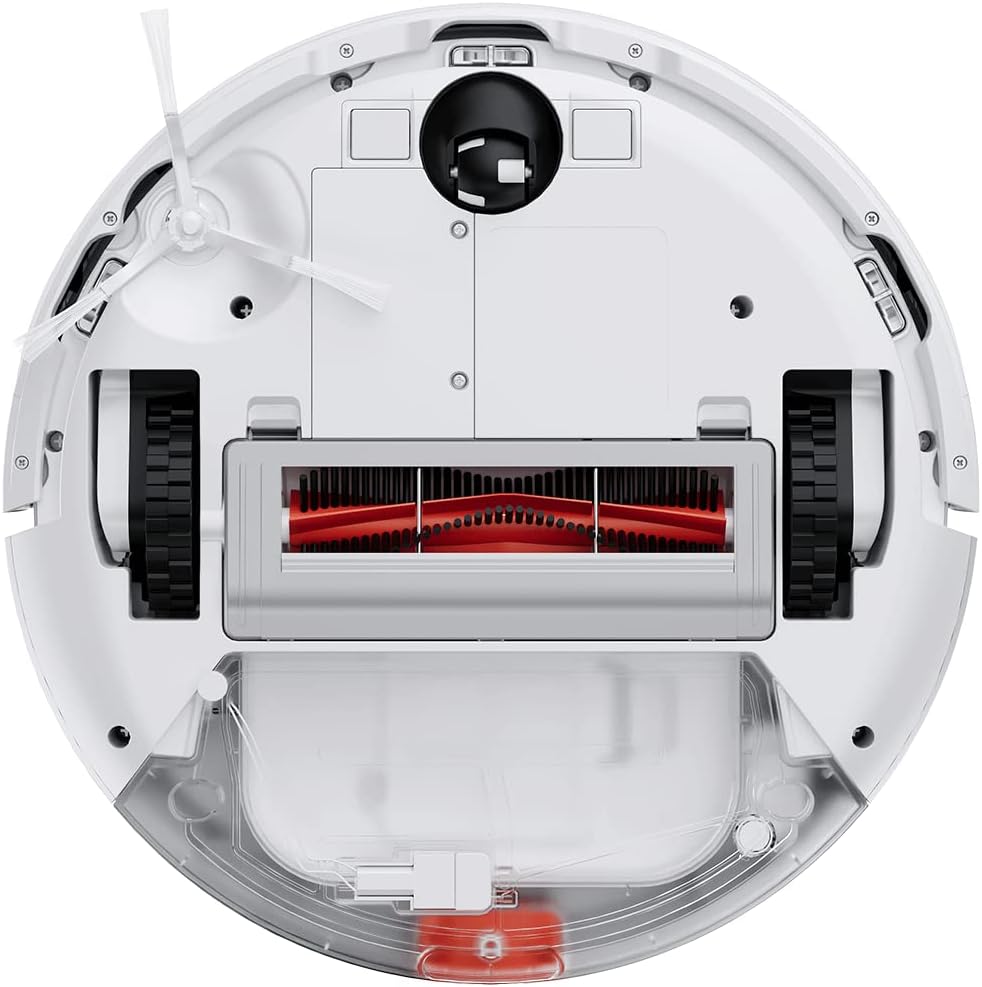
Figure 3: Underside of the robot vacuum, showing the main brush, side brushes, wheels, and dustbin/water tank compartment.

Figure 4: The robot vacuum with the mop attachment installed, ready for wet cleaning.
Opsætning
1. Udpakning
- Fjern forsigtigt alle komponenter fra emballagen.
- Remove all protective films and packaging materials from the robot and charging dock.
- Sørg for, at alt tilbehør, der er anført på pakkelisten, er til stede.
2. Placering af ladestation
- Placer opladningsdokken mod en væg på en hård, plan overflade.
- Sørg for, at der er mindst 0.5 meter (1.6 fod) fri plads på begge sider af docken og 1.5 meter (4.9 fod) foran den.
- Tilslut strømadapteren til ladestationen, og sæt den i en stikkontakt.
- Ensure the power cable is neatly tucked away to prevent entanglement.
3. Oprindelig opkrævning
- Place the robot vacuum onto the charging dock, ensuring the charging contacts align.
- The robot will automatically power on and begin charging. Allow it to fully charge before first use (approximately 4-6 hours).
- Indikatorlampen på robotten viser opladningsstatus.
4. Xiaomi Home App Connection
- Download the "Xiaomi Home" app from your mobile device's app store (Google Play Store or Apple App Store).
- Open the app and create a Xiaomi account or log in if you already have one.
- Tryk på "+"-ikonet i øverste højre hjørne for at tilføje en enhed.
- Follow the on-screen instructions to connect your robot vacuum to the app. This typically involves resetting the Wi-Fi on the robot and connecting your phone to the robot's temporary Wi-Fi network.
- Når den er forbundet, kan du styre robotten, view cleaning maps, set schedules, and access additional features.
Betjeningsvejledning
Start af en rengøringscyklus
- Via robotknapper: Press the Power button once to start a general cleaning cycle. Press it again to pause. Press and hold to send the robot back to the charging dock.
- Via Xiaomi Home App: Open the app, select your robot vacuum, and tap the "Clean" button. You can also select specific cleaning modes (e.g., Spot Clean, Edge Clean) or adjust suction power.

Figure 5: Illustration of the robot vacuum following an efficient, organized cleaning path to cover the entire floor area.
Brug af moppefunktionen
- Fyld vandtanken med rent vand. Brug ikke rengøringsmidler eller ætsende væsker.
- Attach the mop pad securely to the water tank module.
- Install the water tank module into the robot vacuum according to the instructions.
- Start a cleaning cycle. The robot will automatically dispense water for mopping.
- Note: The mopping function is best suited for hard floors. Avoid using it on carpets or rugs.
Planlægning af rengøring
Use the Xiaomi Home app to set up cleaning schedules. You can specify cleaning times, days of the week, and even cleaning modes for automated cleaning.

Figure 6: The robot vacuum's low profile allows it to clean effectively under beds and other furniture.
Opretholdelse
Regular maintenance ensures optimal performance and extends the lifespan of your robot vacuum. Always power off the robot before performing any maintenance.
1. Tømning af skraldespanden
- Tryk på udløserknappen til støvbeholderen, og træk støvbeholderen ud.
- Åbn låget til skraldespanden, og tøm indholdet i en skraldespand.
- Skyl støvbeholderen med vand om nødvendigt, og sørg for, at den er helt tør, inden den sættes på plads igen.
2. Rengøring af filteret
- Fjern filteret fra støvbeholderen.
- Tap the filter gently to remove dust. You can also rinse it under running water.
- Allow the filter to air dry completely for at least 24 hours before re-installing. Do not use a dryer or direct sunlight.
- Udskift filteret hver 3-6 måneder, afhængigt af brugen.
3. Rengøring af hovedbørsten
- Flip the robot over and remove the main brush cover.
- Løft hovedbørsten ud.
- Brug rengøringsværktøjet (hvis det medfølger) eller en saks til at klippe og fjerne hår eller snavs, der har viklet sig ind omkring børsten.
- Sæt hovedbørsten og dækslet på igen.
4. Rengøring af sidebørsten
- Træk forsigtigt i sidebørsten for at fjerne den.
- Fjern eventuelt hår eller snavs.
- Re-attach the side brush, ensuring it clicks into place.
5. Rengøring af sensorer og opladningskontakter
- Wipe the cliff sensors (located on the bottom of the robot) and wall sensors (on the side bumper) with a clean, dry cloth.
- Clean the charging contacts on both the robot and the charging dock with a dry cloth.

Figure 7: Diagram illustrating the function of the cliff sensors, which prevent the robot from falling down stairs or off ledges.
Fejlfinding
If your robot vacuum encounters an issue, refer to the following common problems and solutions.
| Problem | Mulig årsag | Løsning |
|---|---|---|
| Robotten tænder ikke. | Lavt batteri; ikke korrekt opladet. | Placer robotten på opladningsstationen, og sørg for, at den er fuldt opladet. |
| Robotten kan ikke vende tilbage til ladestationen. | Charging dock is obstructed or out of reach; low battery. | Ensure the charging dock is in an open area. Manually place the robot on the dock if needed. |
| Dårlig rengøringsevne. | Støvbeholder fuld; børster sammenfiltrede; filter tilstoppet. | Empty dustbin, clean main brush and side brushes, clean or replace filter. |
| Robotten sidder ofte fast. | Obstacles (cables, rugs); dirty sensors. | Clear the cleaning area of obstacles. Clean all sensors. |
| Moppefunktionen virker ikke. | Vandtanken er tom; moppepuden er ikke korrekt fastgjort. | Fill the water tank. Ensure the mop pad is securely attached. |
| Problemer med app-forbindelse. | Incorrect Wi-Fi password; robot too far from router; temporary network glitch. | Ensure correct Wi-Fi details. Move robot closer to router. Restart robot and router. Try re-pairing via the app. |
For persistent issues not covered here, please refer to the Xiaomi Home app's help section or contact Xiaomi customer support.
Specifikationer
| Feature | Detalje |
|---|---|
| Mærke | XIAOMI |
| Modelnummer | BHR7331EU |
| Produktdimensioner | 12.6 cm L x 3.15 cm B x 12.6 cm H |
| Varens vægt | 10.14 pund |
| Sugekraft | Op til 4000 Pa |
| Strømkilde | Batteridrevet (1 lithium-ion-batteri inkluderet) |
| Kontrolmetode | App (Xiaomi Home) |
| Speciel funktion | Programmerbar |
| Inkluderede komponenter | Robot Vacuum, Charging Dock, Power Adapter, Water Tank, Mop Pad, Side Brush, Cleaning Tool |
Sikkerhedsoplysninger
Læs og følg venligst alle sikkerhedsinstruktioner for at forhindre skader eller skader.
- Dette apparat kan bruges af børn i alderen 8 år og derover og personer med nedsatte fysiske, sensoriske eller mentale evner eller mangel på erfaring og viden, hvis de har fået opsyn eller instruktion i brugen af apparatet på en sikker måde og forstår de involverede farer. .
- Børn må ikke lege med apparatet. Rengøring og brugervedligeholdelse må ikke udføres af børn uden opsyn.
- Brug ikke robotstøvsugeren på våde overflader eller i områder med stillestående vand.
- Brug ikke robotten til at opsamle store genstande, skarpe genstande eller brændende/rygende materialer.
- Hold hår, løstsiddende tøj, fingre og alle dele af kroppen væk fra åbninger og bevægelige dele.
- Ensure the charging dock is placed in a stable location to prevent tipping.
- Only use the original power adapter and charging dock provided with the product.
- Udsæt ikke robotten for direkte sollys eller ekstreme temperaturer.
- The product contains batteries that are only replaceable by skilled persons.
- Vigtig bemærkning: This robot vacuum is primarily designed for hard floors. It is not recommended for cleaning carpets, especially thick pile carpets, as stated in some product information.
Garanti og support
For garantioplysninger henvises til garantikortet, der følger med dit produkt, eller besøg den officielle Xiaomi-side. webwebsted.
If you require technical support or have questions regarding your Xiaomi Robot Vacuum E12, please contact Xiaomi customer service through their official website or the Xiaomi Home app. Provide your model number (BHR7331EU) and purchase details when contacting support.
Xiaomi Officiel Webwebsted: www.mi.com


