Indledning
The Linkind Smart Solar Lights Outdoor SL5 are advanced landscape lighting solutions designed to enhance your outdoor environment with customizable illumination. Featuring motion sensing, app control, and color-changing capabilities, these IP65-rated lights are suitable for various outdoor applications, including yards, gardens, and pathways. This manual provides detailed instructions for setup, operation, maintenance, and troubleshooting to ensure optimal performance and longevity of your solar lights.

Billede: Overview of Linkind Smart Solar Lights Outdoor SL5 highlighting key features like motion detection, app control, IP65 waterproof rating, scene presets, music sync, no wire installation, and security alarm.
Opsætning
1. Udpakning og komponenter
Før installationen påbegyndes, skal du sørge for, at alle komponenter er til stede:
- Solar outdoor lights (6 units)
- stangforlængelser
- Vægmonteringsskruer
- Brugervejledning
2. Første opladning
For optimal performance, turn off the solar lights and charge them under direct sunlight for approximately 48 hours before the first use. This ensures the internal batteries are fully charged.
3. Installationsmuligheder
Your Linkind Smart Solar Lights offer two primary installation methods:
Ground Insert

Attach the pole extension to the light unit and firmly insert it into soft ground in a location that receives ampdirekte sollys.
Vægmontering

Use the provided wall mounting screws to secure the light unit to a vertical surface. Ensure the solar panel is positioned to receive direct sunlight.
4. Download og tilslutning af appen
Control your Linkind Smart Solar Lights using the AiDot app:
- Download AiDot-appen: Scan the QR code in the User Manual or search for "AiDot" in the App Store (iOS) or Google Play (Android).
- Log ind eller opret konto: Open the app and sign in or create a new account.
- Aktiver Bluetooth: Ensure Bluetooth is enabled on your phone. Keep your phone within 38 feet (in an open area) of the lights for connection.
- Tilføj enhed: Long-press the red button on the light for 5 seconds until the light cycles between cool/warm light. Tap the "+" button in the app, then "Add Device", and select "Nearby" to add the device.
- Begynd at bruge: Once added successfully, you can begin controlling your lights.

Image: Visual guide for downloading the AiDot app, signing in, adding a device, and successful connection.
Betjeningsvejledning
1. Belysningstilstande
The Linkind Smart Solar Lights offer three distinct lighting modes:
Motion Detection Mode (Mode 1)

Lights turn on with motion detected. Lights off or keep dim light without motion. Adjustable brightness and lighting time.
Luminance Detection Mode (Mode 2)

Lights charge during the day and automatically turn on at night. Flexible lighting time can be set.
Light Mode (Mode 3)

Save energy by setting brightness, effective time, and runtime periods. Not affected by motion and luminance.
2. Color Changing and Preset Scenes
Personalize your outdoor lighting with 16 million color options and tunable white light (Cool/Warm White). The AiDot app provides 43 preset scenes to match any mood or occasion.
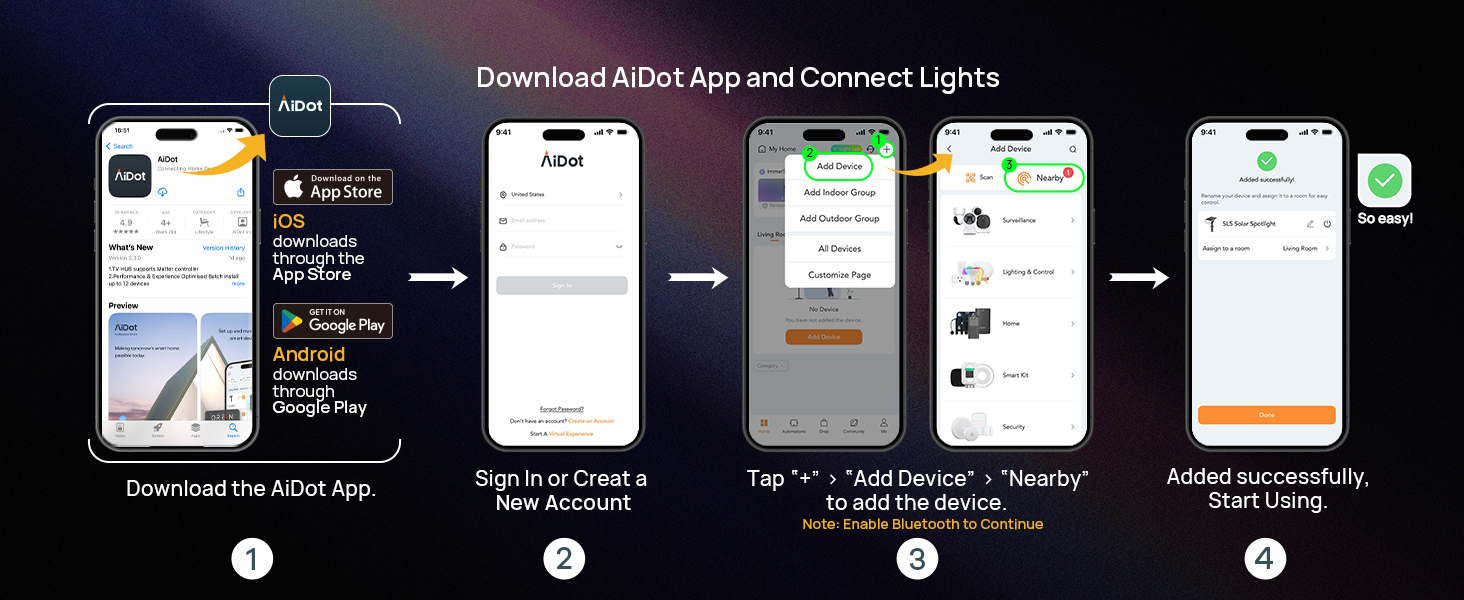
Image: Screenshot of the AiDot app showing various preset scenes and color selection options.
3. Dynamic Light Shows
Enhance your outdoor ambiance with vivid color-changing light shows. Choose from a range of preset effects like Running Water, Rainbow, Water Droplets, Gradient, Strobe, and Breathe, or create your own DIY light shows.

Image: Step-by-step guide within the AiDot app to create and set up dynamic light shows, including selecting effects and play time.
4. Gruppekontrol
Connect multiple solar spot lights into groups for uniform lighting across your outdoor spaces. The AiDot app supports up to 32 lights in light groups, and you can create up to 8 groups.

Image: Diagram showing how multiple Linkind lights can be organized into different groups for synchronized control.
5. Musiksynkronisering
With music sync functionality, your landscape lights will change colors and pulse to the beat of your favorite tunes, adding an exciting element to your garden or outdoor events.

Image: An outdoor scene with people enjoying music, illuminated by Linkind Smart Solar Lights synchronized to the rhythm.
6. Stemmestyring (valgfrit)
While the AiDot app communicates directly with the lights without additional hardware, a BLE Mesh Hub is required for Alexa or Google Home voice control. This extends the control range up to 131 feet between lights and the hub.

Image: Diagram illustrating how Linkind lights can be controlled via voice commands using Alexa or Google Assistant with a BLE Mesh Hub.
Opretholdelse
1. Rensning
Regularly wipe the solar panel and light surface with a soft, damp cloth to remove dust, dirt, or debris. This ensures maximum sunlight absorption and light output.
2. Batteripleje
The lights are solar-powered and include rechargeable C batteries. Ensure the solar panel is exposed to direct sunlight for optimal charging. Avoid placing lights in shaded areas.

Image: Illustration showing the high conversion rate of the solar panel, leading to longer lighting time and enhanced luminance compared to other products.
3. Vejrbestandighed
The Linkind Smart Solar Lights are IP65 water-resistant, frost-proof, and heat-proof, designed to withstand harsh weather conditions. While durable, avoid submerging the lights in water.

Image: A Linkind solar light being splashed with water, illustrating its IP65 waterproof, frostproof, and heatproof capabilities.
Fejlfinding
Se følgende almindelige problemer og deres løsninger:

Image: A list of usage tips covering common issues and solutions for Linkind Smart Solar Lights.
- Lights Turn Off After a Few Seconds: This usually indicates a low battery state. Recharge under direct sunlight for an extended period. The default setting is to turn off after 30 seconds; adjust in AiDot: "Settings" > "Lighting Duration."
- Lights Do Not Turn On: Check for any external light source interfering with the solar sensor. Ensure the solar panel is clean and receiving direct sunlight. Verify you hear a "click" sound when pressing the button, indicating proper activation.
- Some Lights Turn Off or Fail to Sync in a Group: Devices may be in different modes (Motion Detection/Luminance Detection/Light Mode). It is recommended to switch all devices to Light Mode to ensure the group remains continuously lit and synchronized.
- Power Off Completely: To completely power off a light, hold the red button for 1.5-5 seconds until the lights dim. Release to shut down. Lights remain off until manually reactivated.
- Standardtilstand: The light automatically activates in Motion Detection Mode (default 30s illumination). You can set motion-triggered lighting duration (10s-300s) in "Delay Time" via the app. Choose from Motion Detection, Luminance Detection, or Light Mode and customize durations as needed.
- Music Sync Issues: Ensure Bluetooth permissions are enabled for the AiDot app on your phone and that your phone's Bluetooth is turned on.
Specifikationer
| Feature | Specifikation |
|---|---|
| Mærke | Linkind |
| Modelnavn | SP001A |
| Varemodelnummer | LL18001144 |
| Farve | Flerfarvet |
| Materiale | Høj-slagfast ABS-plast og 1.55 W monokrystallinsk silicium PET-lamineret panel |
| Lysarmatur Form | Spotlight |
| Strømkilde | Solcelledrevet |
| Installationstype | Ground Insert, Wall Mounted |
| Særlige funktioner | 3 Lighting Modes, APP Control, Energy Efficient, Motion Sensor, Sync with Music |
| Kontrolmetode | App |
| Lyskildetype | LED |
| Voltage | 3.7 volt |
| Wattage | 3 watt |
| Antal genstande | 6 (for 6 pack variant) |
| Vandmodstandsniveau | Vandtæt (IP65) |
| Produktdimensioner | 12.9 cm L x 6.85 cm B x 4.6 cm H |
| Varens vægt | 3.89 pund |
| Batterier | 6 C-batterier kræves (medfølger) |
| Farvetemperatur | 6500 Kelvin |
Garanti og support
Linkind is committed to providing high-quality products and excellent customer service.
Garantioplysninger
Linkind team provides a 45-day full refund policy and a 12-month after-sale warranty. For any further questions or support, please contact us.
Kundesupport
For technical support or inquiries, you can reach Linkind customer service:
- Telefon: 1-877-770-5727
- Timer: Mon-Fri, 9 AM–5 PM PST

Image: Information regarding Linkind's 12-month unconditional replacement, lifetime service & technical support, and live customer support contact details.


