1. Introduktion
The Qolsys IQ Lock-PG Push Button Deadbolt provides enhanced security and convenient access to your property. This smart motorized deadbolt integrates PowerG wireless communication for reliable and stable connectivity, compatible with IQ Panel 4, IQ4 Hub, and IQ4 NS systems. It offers multiple access methods, including a pushbutton keypad, traditional key, thumb-turn, and remote control via the Alarm.com app.
Designed for durability, the IQ Lock-PG meets ANSI Grade 2 certifications and features an attractive oil-rubbed bronze finish to complement various door styles.
2. Nøglefunktioner
- Motoriseret dødbolt: Push button operation with an attractive finish.
- Flere adgangsmetoder: Lock/unlock via PowerG wireless communication (App and Panel), user code, thumb-turn, or physical key.
- User Code Capacity: Supports up to 250 user codes (4 to 8 digits) for family, friends, or temporary guests.
- Fjernstyring: Create or remove individual codes remotely via the Alarm.com app.
- Nem installation: Battery-powered (AA batteries, not included), requiring no complex wiring.
- Holdbar konstruktion: ANSI/BHMA Grade 2 certified for strong, reliable security.
3. Pakkens indhold
Kontroller, at alle dele er til stede i pakken, før installationen påbegyndes:
- Qolsys IQ Lock-PG Deadbolt Assembly
- (2) Nøglefærdige løsninger
- Monteringshardware
- Instruktionsmanual (dette dokument)
4. Opsætning og installation
The Qolsys IQ Lock-PG motorized deadbolt is designed for straightforward installation. All necessary hardware and detailed instructions are included. Please read these instructions carefully before proceeding.
4.1 Compatibility and Requirements
- Dørtykkelse: Installs on standard doors measuring 1-3/8 inches to 2-1/4 inches (35-58mm) thick.
- backset: Adjustable latch fits existing backsets of either 2-3/8 inches or 2-3/4 inches (60/70mm).
- Dørhåndtering: Suitable for both right-handed and left-handed door operations.
- Systemintegration: Requires an IQ Panel 4, IQ4 Hub, or IQ4 NS (sold separately) and an active Internet connection for smart features.
- Magt: Requires four (4) AA alkaline batteries (not included).
4.2 Installationstrin (Overview)
While detailed steps are provided in the included physical manual, here is a general overview:
- Prepare the door: Ensure the door bore holes and backset are compatible with the lock.
- Installer låsen og slutbleget.
- Installer det udvendige tastaturaggregat.
- Installer den indvendige monteringsplade.
- Tilslut kablet fra den udvendige enhed til den indvendige enhed.
- Installer den indvendige enhed.
- Insert four (4) AA alkaline batteries into the battery compartment.
- Udfør dørhåndteringsprocessen (automatisk justering).
- Test the lock's functionality with the keypad and thumb-turn.
- Pair the lock with your IQ Panel system and Alarm.com app for smart features.

Figur 4.1: Forside view of the Qolsys IQ Lock-PG Deadbolt, showcasing the keypad and keyhole.
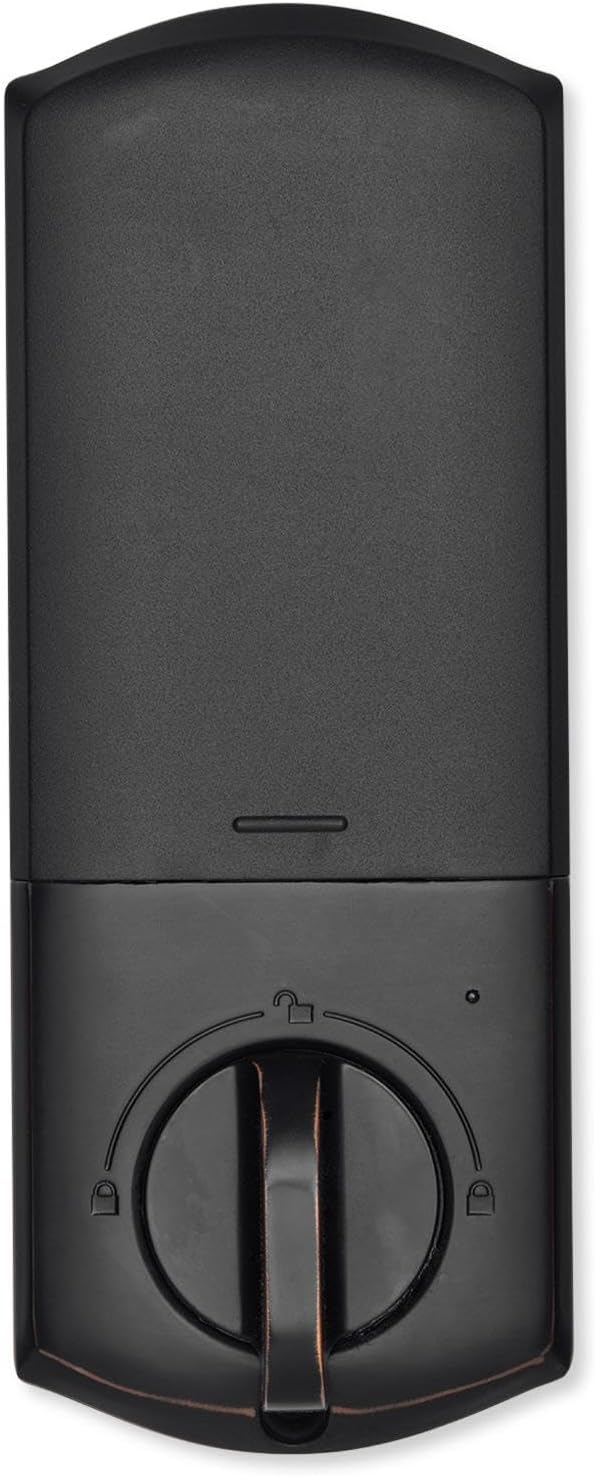
Figur 4.2: Interiør view of the Qolsys IQ Lock-PG Deadbolt, highlighting the thumb-turn and battery cover.

Figure 4.3: Qolsys IQ Lock-PG Deadbolt installed on a door, illustrating its appearance in a real-world setting.
5. Betjeningsvejledning
Qolsys IQ Lock-PG tilbyder flere bekvemme måder at låse og oplåse din dør på.
5.1 Access Methods
- Pushbutton Keypad: Enter a valid 4-to-8 digit user code on the exterior keypad to unlock the deadbolt. The lock will automatically engage when closed.
- Fysisk nøgle: Use one of the provided turnkeys in the exterior key cylinder for manual unlocking and locking.
- Thumb-Turn: From the interior, rotate the thumb-turn to manually lock or unlock the deadbolt.
- PowerG Wireless Communication (Alarm.com App/Panel):
The Alarm.com mobile app allows for remote monitoring and control of your Qolsys devices. Once paired with your IQ Panel, you can:
- Lock or unlock your smart doors from anywhere.
- Create, modify, or delete up to 250 individual user codes. User codes are managed through the Alarm.com app and sent to the lock.
- Receive notifications regarding lock status and activity.
The Alarm.com app is available for Android, iOS, Windows, and Blackberry devices.
6. Vedligeholdelse
Regular maintenance ensures the longevity and optimal performance of your Qolsys IQ Lock-PG deadbolt.
6.1 Udskiftning af batteri
The deadbolt is powered by four (4) AA alkaline batteries. Battery life is approximately 12 months, based on typical usage (6 user code unlock events and 10 locking/unlocking cycles per day). The lock features a low battery alarm to notify you when replacement is needed.
- When the low battery alarm sounds or is indicated, replace all four AA batteries simultaneously.
- Remove the interior cover to access the battery compartment.
- Fjern gamle batterier, og bortskaf dem i henhold til lokale regler.
- Isæt nye AA alkaline-batterier, og sørg for at polariteten vender korrekt.
- Udskift det indvendige dæksel.
6.2 Rengøring
Rengør låsens udvendige og indvendige overflader med en blød, tør klud.amp klud. Undgå at bruge slibende rengøringsmidler eller opløsningsmidler, da disse kan beskadige overfladen.
7. Fejlfinding
This section addresses common issues you might encounter with your Qolsys IQ Lock-PG deadbolt.
7.1 Tastaturlås
If 10 consecutive invalid user codes are entered, the keypad will enter a lockout mode for 3 minutes. During this time, no codes can be entered. Wait for the lockout period to expire before attempting to enter a valid code again.
7.2 Låsen reagerer ikke
- Check the batteries: Ensure they are correctly installed and not depleted. Replace all four AA batteries if necessary.
- Verify connection to IQ Panel: Ensure the lock is properly paired with your IQ Panel 4, IQ4 Hub, or IQ4 NS. Check the panel's status for the lock.
- Check door alignment: Ensure the door and frame are properly aligned and there is no obstruction preventing the deadbolt from extending or retracting smoothly.
7.3 Issues with Alarm.com App Control
- Ensure your IQ Panel has an active Internet connection.
- Verify your smartphone or tablet has a stable internet connection.
- Log out and log back into the Alarm.com app.
- Ensure the lock is properly enrolled in your Alarm.com account.
8. Tekniske specifikationer
| Feature | Specifikation |
|---|---|
| Producent del # | IQ Lock-PGK-ORB |
| UPC | 7290109986104 |
| Slutte | Olie-gnidet bronze |
| Selvhåndterende | Understøttet |
| Bolt Type | Motoriseret/Standard dødbolt |
| backset | 2-3/8" / 2-3/4" justerbar (60/70 mm) |
| Dørforberedelse | 1-1/2" / 2-1/8" (38/54mm) |
| Dørtykkelse | 1-3/8" til 2-1/4" (35-58 mm) automatisk justering |
| Oplåsningsmetode | PowerG wireless communication (App and Panel), Button keypad, key, thumb-turn |
| Kodekapacitet | Brugerkode x 250 |
| Kodens længde | 4-8 cifre |
| Tilsidesæt nøglecylinder | Ja |
| Cylinder | KW1 kilegang |
| Working Voltage | DC 6V |
| Batteri (medfølger ikke) | AA x 4 |
| Arbejdstemperatur Udvendig | -31°F til 150°F (-35°C til 65°C) |
| Arbejdstemperatur indvendig | 32°F til 140°F (0°C til 60°C) |
| IP-klassificering Udvendig montering | IP54 |
| Lockout-tilstand (forkert indgangsgrænse) | Tastaturspærring i 3 minutter efter 10 indtastninger af ugyldig brugerkode |
| Alarm for lavt batteriniveau | Ja |
| Batterilevetid | Min. 12 måneder (6 oplåsningshændelser med brugerkode og 10 oplåsnings- og låsningscyklusser pr. dag) |
| Certificeringer | FCC, IC, ANSI BHMA A156.36 Grad 2, UL10C (20 min. brandklassificering) |
| IoT-forbindelse | PowerG |
| Produktets vægt | 1.6KG (3.6 LB) |
| Driftsfugtighed Udvendig | 100% kondenserende |
| Driftsfugtighed Indvendig | 20 % ~ 95 % ikke-kondenserende |
9. Garanti og support
9.1 Garantioplysninger
The Qolsys IQ Lock-PG Push Button Deadbolt comes with a warranty of Twelve months from the date of purchaseGem venligst din købsbevis i tilfælde af garantikrav.
9.2 Kundesupport
For technical assistance, troubleshooting beyond this manual, or warranty inquiries, please contact Qolsys customer support. Refer to the Qolsys official webwebstedet eller din produktemballage for at få de mest aktuelle kontaktoplysninger.


