1. Introduktion
Tak for købetasing the ODK 120cm Computer Desk. This desk is designed to provide a practical and organized workspace for various activities, including office work, studying, and gaming. It features a spacious desktop, an ergonomic monitor stand, a convenient keyboard slider, and two fabric drawers for efficient storage. Please read this manual carefully before assembly and use to ensure proper setup and long-term enjoyment of your new desk.

Figure 1.1: The ODK 120cm Computer Desk in a typical setup, showcasing its multi-functional design with dual monitors, a keyboard, mouse, and various desk accessories.
2. Produktfunktioner
- Spacious 3-Tier Design: Tilbud ample surface area for multiple monitors, laptops, and other equipment, enhancing work efficiency.
- Ergonomisk skærmstativ: Positioned approximately 11.2 cm above the main desktop, this stand helps maintain correct posture, reducing strain on the neck and shoulders. It also creates additional storage space underneath.
- Smooth Keyboard Slider: A dedicated pull-out tray for your keyboard and mouse, designed for comfortable typing and gaming. It includes a rear baffle to prevent items from falling and allows for neat cable routing. The height from the floor to the slider is approximately 67 cm.
- Two Fabric Storage Drawers: Two durable fabric drawers are included, capable of holding A4-sized files and various small items. These drawers resist deformation even when storing heavier objects, helping to keep your desk tidy and organized.
- Holdbar konstruktion: Built with a high-strength and durable steel frame, ensuring stability and a solid user experience.
- Kabelstyringsgennemføring: Integrated into the desktop for organized cable routing.
- Justerbare fødder: Equipped with adjustable foot pads to ensure stability on uneven floors and protect your flooring.

Figur 2.1: Overview of the desk's storage and organizational features, highlighting the monitor stand, keyboard tray, and two fabric drawers.

Figure 2.2: An illustration detailing the ergonomic design and key dimensions of the desk, including the monitor stand height and legroom.
3. Specifikationer
| Attribut | Detalje |
|---|---|
| Mærke | ODK |
| Model | 120*48*78.7 cm |
| Overordnede mål (B x D x H) | 120 cm x 48 cm x 89.9 cm |
| Desktop Height (from floor) | 78.7 cm |
| Monitor Stand Height (above desktop) | 11.2 cm |
| Keyboard Slider Height (from floor) | Ca. 67 cm |
| Farve | Vintage Brun |
| Materiale | Engineered Wood, Steel Frame |
| Antal skuffer | 2 (Stof) |
| Produktets vægt | 14.9 kg |
| Pakkevægt | 16.7 kg |
| Pakkedimensioner | 133 x 58 x 8.5 cm |
| Montering påkrævet | Yes (Wrench included) |
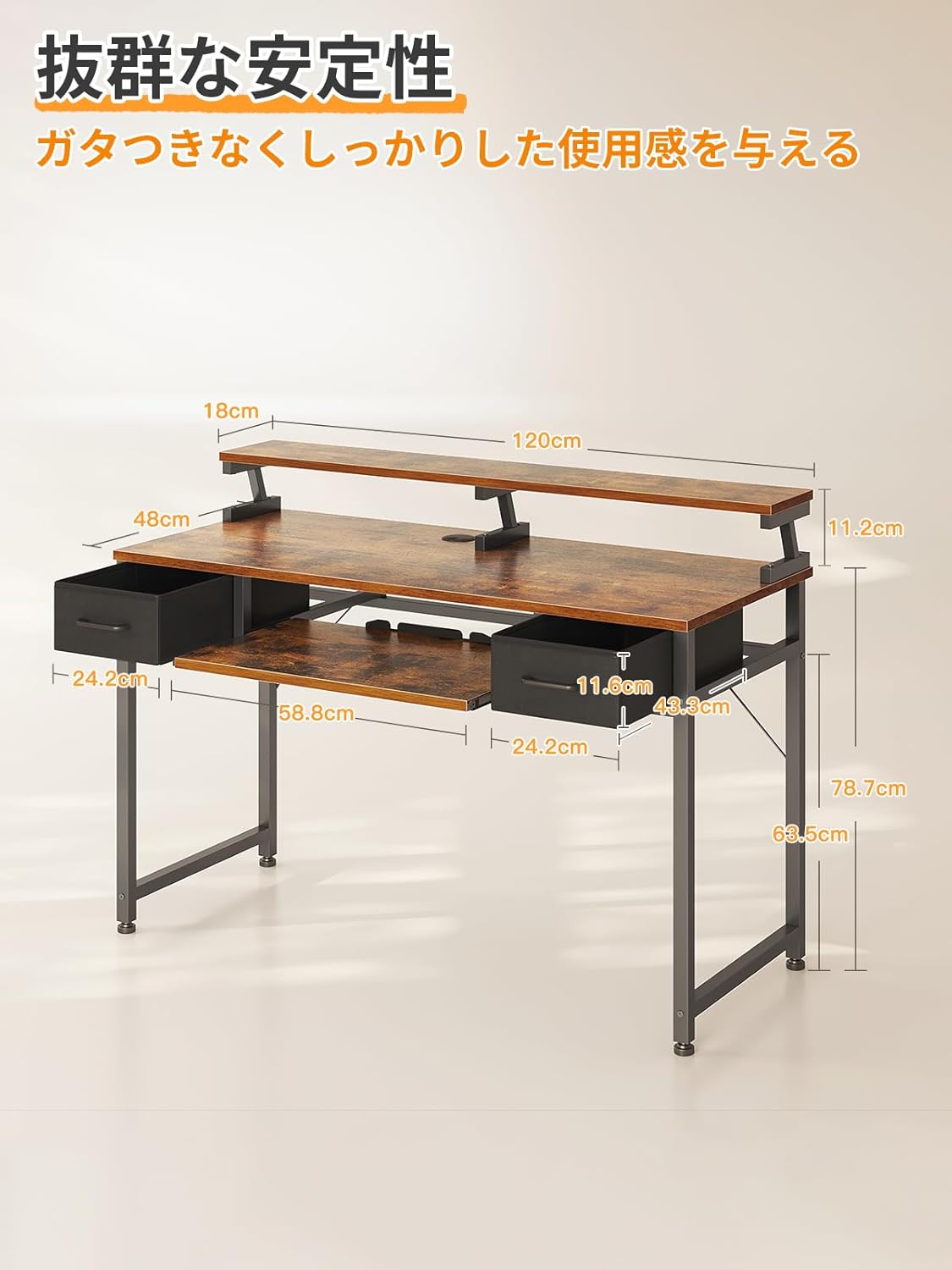
Figure 3.1: Comprehensive dimensional drawing of the ODK computer desk, indicating all major measurements for planning your space.
4. Opsætning og montering
This desk requires assembly. A detailed Japanese instruction manual and the necessary wrench are included in the package. Please follow the steps below for a smooth assembly process.
4.1. Før du begynder
- Tjek pakkens indhold: Verify all parts and hardware listed in the included instruction manual are present.
- Ryd arbejdsområde: Ensure you have a clean, spacious area for assembly to prevent damage to parts or your floor.
- Værktøjer: The necessary wrench is provided. No additional tools are required.
4.2. Samlingstrin (generel vejledning)
- Saml rammen: Attach the steel frame components according to the diagrams in the manual. Ensure all screws are finger-tightened initially.
- Fastgør skrivebordspaneler: Secure the main desktop and the monitor stand panel to the assembled frame.
- Install Keyboard Slider Rails: Mount the rails for the keyboard slider to the underside of the main desktop.
- Insert Keyboard Slider: Slide the keyboard tray onto its rails.
- Saml og indsæt skuffer: Assemble the fabric drawers and place them into their designated slots.
- Endelig stramning: Once all components are in place, systematically tighten all screws with the provided wrench. Do not overtighten.
- Juster fødder: Juster nivelleringsfødderne nederst på skrivebordets ben for at sikre, at skrivebordet er stabilt og i vater på gulvet.
For detailed, step-by-step instructions and diagrams, please refer to the assembly manual included in your product packaging.
5. Betjeningsvejledning
The ODK computer desk is designed for versatile use. Here are some guidelines for optimal operation:
5.1. Workspace Organization
- Monitorplacering: Utilize the elevated monitor stand for your display(s) to achieve an ergonomic viewing height. This helps reduce neck and eye strain.
- Tastatur og mus: Use the pull-out keyboard slider for your keyboard and mouse. This frees up main desktop space and allows for a more comfortable arm position.
- Opbevaringsskuffer: Store documents, office supplies, or personal items in the two fabric drawers to keep your main desktop clear and organized.
- Kabelstyring: Route power and data cables through the integrated cable grommet on the desktop to maintain a tidy appearance and prevent tangles.

Figure 5.1: The ODK desk demonstrating its adaptability for both a gaming setup with a large curved monitor and a professional office workspace with dual flat monitors.
5.2. Ergonomic Use
Proper posture is crucial for comfort and health during extended periods of desk use. The monitor stand is designed to help you achieve this.
- Skærmhøjde: Adjust your monitor(s) so the top of the screen is at or slightly below eye level. The monitor stand helps achieve this.
- Keyboard Position: Keep your keyboard and mouse close to your body on the slider, allowing your elbows to remain at a 90-degree angle.
- Chair Adjustment: Use an adjustable office chair to support your back and ensure your feet are flat on the floor or a footrest.

Figure 5.2: An illustration demonstrating the ideal ergonomic sitting posture at the desk, emphasizing monitor height and keyboard placement to reduce strain.
6. Vedligeholdelse
Regular maintenance will help preserve the appearance and functionality of your ODK computer desk.
- Rensning: Tør overflader af med en blød, damp klud. Undgå skrappe kemikalier eller slibende rengøringsmidler, som kan beskadige overfladen.
- Spild: Immediately wipe up any spills to prevent staining or damage to the wood surface.
- Hardwarekontrol: Kontrollér regelmæssigt alle skruer og fastgørelseselementer for at sikre, at de er stramme. Spænd dem efter om nødvendigt, men overspænd dem ikke.
- Skuffepleje: The fabric drawers can be spot cleaned with a mild detergent if needed. Ensure they are completely dry before placing items back inside.
- Undgå overdreven vægt: Do not place excessively heavy items on the keyboard slider or drawers to prevent damage or deformation.
7. Fejlfinding
If you encounter any issues with your ODK computer desk, please refer to the following common troubleshooting tips:
7.1. Desk is Wobbly
- Check Leveling Feet: Ensure all adjustable feet at the bottom of the desk legs are properly adjusted to compensate for uneven flooring.
- Spænd skruer: Verify that all assembly screws are securely tightened. Loose connections can cause instability.

Figure 7.1: An adjustable foot, used to stabilize the desk on uneven surfaces.
7.2. Keyboard Slider Not Moving Smoothly
- Tjek for forhindringer: Ensure there are no objects blocking the slider rails.
- Rens skinner: Dust or debris in the rails can impede movement. Clean the rails with a dry cloth.
- Smøring: If necessary, apply a small amount of silicone-based lubricant to the slider mechanisms.
7.3. Drawers Not Fitting Properly
- Reassemble Drawers: Ensure the fabric drawers are assembled correctly and their bases are fully inserted.
- Check Desk Frame: Verify that the desk frame itself is assembled squarely and not warped, which could affect drawer fit.
8. Garanti og support
ODK is committed to providing high-quality products. If you experience any initial defects with your purchased product, please do not hesitate to contact us. Our customer support team will assist you with any issues or questions you may have.
For support, please contact the seller directly through your purchase platform or visit the official ODK brand store for more information:


