1. Introduktion
This manual provides detailed instructions for the JSAUX HB1101 11-in-1 USB-C Laptop Docking Station. This device expands the connectivity of your USB-C enabled laptop, tablet, or gaming console, offering a comprehensive solution for various peripheral connections, display outputs, and power delivery.

Image 1.1: The JSAUX HB1101 USB-C Laptop Docking Station with its included USB-C to USB-C cable.
2. Produktet er slutview
The JSAUX HB1101 docking station is an 11-in-1 solution designed to enhance your device's connectivity. It includes a USB-C to USB-C 3.2 cable for connection to your host device.
2.1 Port Layout and Functions
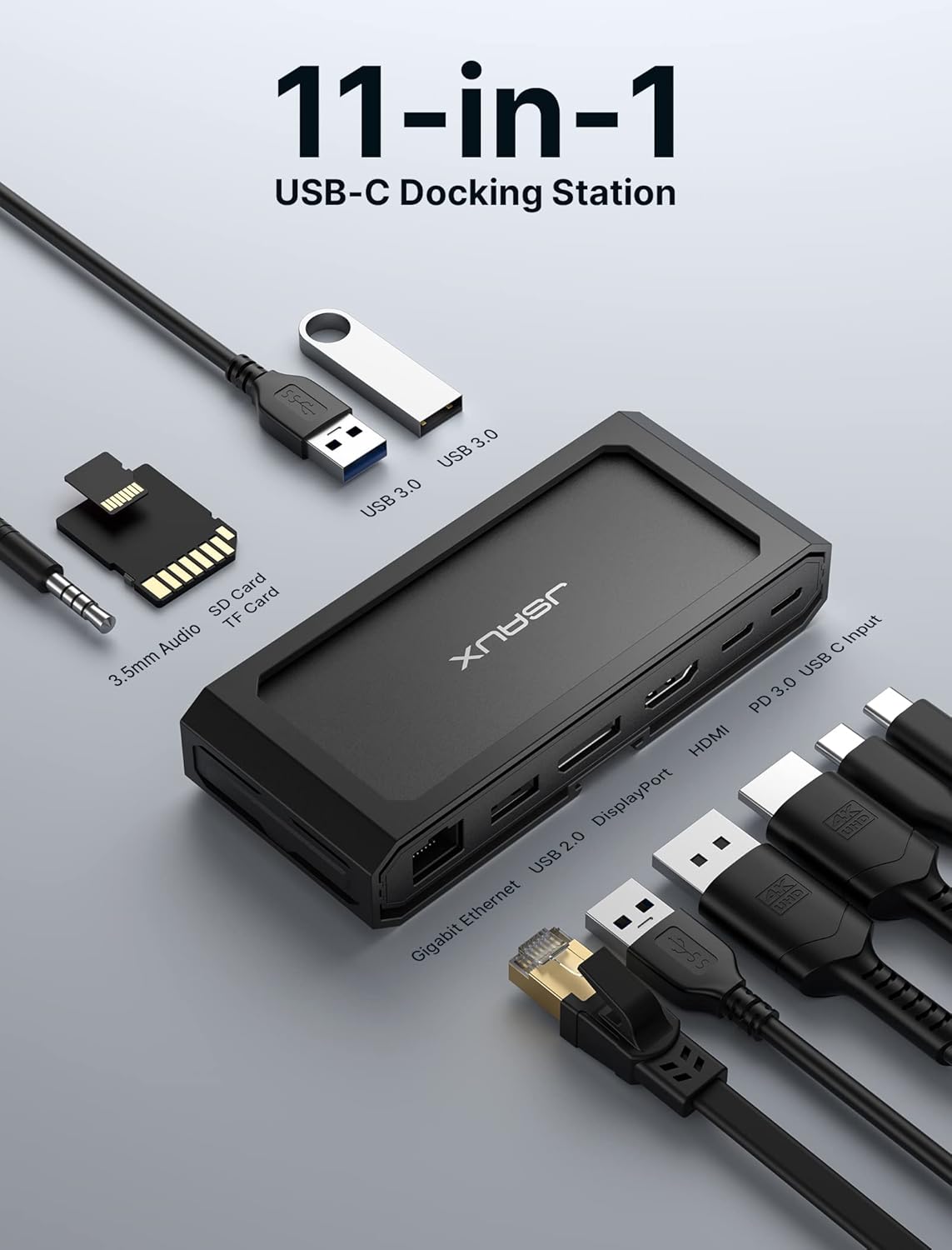
Billede 2.1: En overhead view of the JSAUX HB1101 docking station, highlighting each of its 11 ports and their labels.
- Gigabit Ethernet-port: Provides high-speed wired network connectivity (up to 1000 Mbps).
- DisplayPort (DP): Supports video output up to 8K@30Hz or 4K@120Hz (single display).
- HDMI-port: Supports video output up to 8K@30Hz or 4K@120Hz (single display).
- USB-C PD 3.0 Input Port: For connecting a power adapter to provide up to 100W Power Delivery to the docking station and connected host device.
- USB-C dataport: For connecting USB-C peripherals, offering data transfer speeds up to 5 Gbps.
- 2 x USB 3.0-porte: For connecting USB-A peripherals, offering data transfer speeds up to 5 Gbps.
- USB 2.0-port: For connecting USB-A peripherals, offering data transfer speeds up to 480 Mbps. Ideal for keyboards, mice, or other low-bandwidth devices.
- SD-kortlæser: Supports SD, SDHC, SDXC cards with transfer speeds up to 104 MB/s.
- TF Card Reader (Micro SD): Supports Micro SD, Micro SDHC, Micro SDXC cards with transfer speeds up to 104 MB/s.
- 3.5mm Mic/Audio Jack: Til tilslutning af hovedtelefoner, højttalere eller mikrofoner.
3. Opsætningsvejledning
Follow these steps to set up your JSAUX HB1101 docking station:
- Opret forbindelse til værtsenhed: Use the included USB-C to USB-C 3.2 cable to connect the docking station to the USB-C port on your laptop, tablet, or gaming console. Ensure the USB-C port on your host device supports video output (DisplayPort Alternate Mode) and Power Delivery for full functionality.
- Tilslut strømadapter (valgfrit, men anbefalet): For optimal performance, especially when using multiple peripherals or charging your host device, connect a compatible USB-C power adapter (up to 100W) to the USB-C PD 3.0 input port on the docking station.
- Tilslut eksterne skærme: Connect your monitor(s) to the HDMI and/or DisplayPort outputs on the docking station using appropriate cables.
- Tilslut USB-tilbehør: Plug in your USB devices such as keyboards, mice, external hard drives, or flash drives into the available USB-A (3.0 or 2.0) or USB-C data ports.
- Tilslut Ethernet-kabel: For a stable wired network connection, plug an Ethernet cable into the Gigabit Ethernet port.
- Tilslut lydenheder: If desired, connect headphones, speakers, or a microphone to the 3.5mm audio jack.

Image 3.1: A Steam Deck connected to the JSAUX HB1101 docking station, which is further connected to an external monitor and a power source, illustrating a typical setup.
4. Betjeningsvejledning
4.1 Skærmkonfiguration
Dockingstationen understøtter forskellige skærmkonfigurationer:
- Single Monitor Output: Connect one monitor to either the HDMI or DisplayPort for resolutions up to 8K@30Hz or 4K@120Hz.
- Dobbelt skærmudgang: Connect two monitors (one to HDMI, one to DisplayPort) for resolutions up to 4K@60Hz on each display.

Image 4.1: A table detailing the maximum supported resolutions for single and dual monitor setups using the DisplayPort and HDMI outputs.
4.1.1 Flere visningstilstande
The docking station supports various display modes depending on your operating system:

Image 4.2: Visual representation of mirror and extended display modes for both Mac OS and Windows operating systems when using the docking station.
- MirrorMode: Displays the same content on all connected screens.
- Udvidet tilstand: Udvider dit skrivebord på tværs af flere skærme, hvilket giver mere arbejdsplads.
Note for Mac OS Users:
Mac OS does not support Multi-Stream Transport (MST) for extended displays. When using two external monitors with a Mac OS device, both external monitors will mirror each other, or one will mirror the laptop screen while the other extends it. For Windows, extended mode allows for three independent displays (laptop screen + two external monitors).
4.2 Dataoverførsel
The docking station provides multiple USB ports and card readers for efficient data transfer:
- USB 3.0-porte: Two USB-A 3.0 ports and one USB-C data port offer high-speed data transfer up to 5 Gbps. These are suitable for external hard drives, SSDs, and high-speed flash drives.
- USB 2.0-port: One USB-A 2.0 port provides data transfer up to 480 Mbps, ideal for connecting keyboards, mice, or other low-bandwidth devices.
- SD/TF-kortlæsere: Integrated SD and TF (Micro SD) card readers support speeds up to 104 MB/s, allowing for quick transfer of photos and videos.

Image 4.3: A visual comparison of USB 3.0 data transfer speeds (5120 Mbps) versus USB 2.0 (480 Mbps), highlighting the faster performance of USB 3.0.
5. Strømforsyning
The USB-C PD 3.0 input port supports up to 100W Power Delivery, allowing you to charge your host device while using the docking station.

Image 5.1: A laptop connected to the JSAUX HB1101 docking station, which is simultaneously receiving and delivering 100W of power from a wall adapter.
- Dampdæk: The maximum charging speed for Steam Deck through this dock is 45W.
- ROG Ally: 30W Turbo Mode is not guaranteed with this dock. It may require a power supply over 65W, but activation depends on your specific charger and system configuration.
6. Gigabit Ethernet
The integrated Gigabit Ethernet port provides a stable and fast wired internet connection, supporting speeds up to 1000 Mbps. This is beneficial for online gaming, large file downloads, and streaming, offering a more reliable connection than Wi-Fi.

Image 6.1: A laptop connected to the JSAUX HB1101 docking station, demonstrating a Gigabit Ethernet connection with a speed of 1000 Mbps.
7. Kompatibilitet
The JSAUX HB1101 docking station offers broad compatibility with various devices and operating systems:
- Operativsystemer: Supports Windows, Android, macOS, and Linux systems.
- Kompatible enheder: Works with most USB-C enabled laptops, tablets, and gaming consoles that support DisplayPort Alternate Mode and Power Delivery. This includes devices like MacBook, Surface, Dell, XPS, Thinkpad, iPad, Steam Deck, ROG Ally, and other USB-C phones and devices.

Image 7.1: A comprehensive compatibility chart illustrating the wide range of USB-C devices and operating systems that are supported by the JSAUX HB1101 docking station.
8. Specifikationer
| Feature | Specifikation |
|---|---|
| Produktdimensioner | 10 x 9 x 0.7 tommer (10" L x 9" B x 0.7" H) |
| Varens vægt | 7.8 ounce |
| Modelnummer | HB1101 |
| Mærke | JSAUX |
| Farve | Grå |
| Hardware-interface | USB 3.0 Type A, USB-C, HDMI, DisplayPort, Ethernet, 3.5mm Audio, SD/TF |
| Samlet USB-porte | 3 (2x USB-A 3.0, 1x USB-A 2.0) + 1x USB-C Data |
| Antal havne | 11 |
| Total HDMI-porte | 1 |
| Wattage (Strømforsyning) | 100W Maks |
| Video output | 8K@30Hz (Single), 4K@60Hz (Dual) |
| Ethernet hastighed | 1000 Mbps (Gigabit) |
| SD/TF-korthastighed | Op til 104 MB/s |
9. Fejlfinding
If you encounter issues with your JSAUX HB1101 docking station, please refer to the following common solutions:
- Ingen skærmoutput:
- Sørg for, at din værtsenheds USB-C-port understøtter DisplayPort Alternative Mode.
- Verify that all display cables (HDMI/DP) are securely connected to both the docking station and the monitor.
- Check your computer's display settings to ensure the external monitor is detected and configured correctly (e.g., extended, mirrored).
- Try connecting only one monitor to isolate if the issue is with a specific port or cable.
- Ingen strømforsyning/opladning:
- Ensure a compatible USB-C power adapter is connected to the PD input port on the docking station.
- Verify the power adapter's wattage meets or exceeds the requirements of your host device and the docking station (e.g., 65W or 100W).
- Note the specific power limitations for Steam Deck (45W max) and ROG Ally (30W Turbo Mode not guaranteed).
- USB-enheder genkendes ikke eller har langsom dataoverførsel:
- Ensure USB devices are securely plugged into the correct ports.
- For high-speed devices, use the USB 3.0 ports (blue interior) or the USB-C data port.
- Try connecting the device directly to your host computer to rule out the docking station as the cause.
- Ingen lydoutput:
- Check that your audio device is properly connected to the 3.5mm audio jack.
- Verify your computer's audio output settings are configured to use the docking station's audio output.
- Intermitterende forbindelser:
- Ensure all cables, especially the main USB-C connection to the host device, are firmly seated.
- Avoid excessive bending or strain on the cables.
10. Vedligeholdelse
To ensure the longevity and optimal performance of your JSAUX HB1101 docking station, follow these maintenance guidelines:
- Rensning: Use a soft, dry, anti-static cloth to clean the exterior of the docking station. Avoid using liquid cleaners or abrasive materials.
- Opbevaring: Opbevar dockingstationen et køligt, tørt sted væk fra direkte sollys og ekstreme temperaturer.
- Håndtering: Håndter enheden forsigtigt. Undgå at tabe den eller udsætte den for hårde stød.
- Kabelstyring: Do not excessively bend or pull on connected cables. Ensure cables are not tangled or under strain.
11. Garanti og support
For warranty information, technical support, or further assistance, please refer to the official JSAUX webwebstedet eller kontakt deres kundeservice direkte. Gem din købskvittering til garantikrav.
Video 11.1: An official JSAUX video demonstrating the features and usage of the HB1101 USB-C Laptop Docking Station.


