Indledning
This manual provides detailed instructions for the safe and efficient operation of your boAt Partypal 390 Bluetooth Speaker. Please read this manual thoroughly before using the product and retain it for future reference. The Partypal 390 is a powerful portable speaker designed for various audio needs, featuring 160W boAt Signature Sound, multiple connectivity options, and integrated LED lighting.
Sikkerhedsoplysninger
- Udsæt ikke højttaleren for ekstreme temperaturer, direkte sollys eller høj luftfugtighed.
- Undgå at tabe eller udsætte højttaleren for kraftige stød.
- Forsøg ikke selv at skille ad, reparere eller modificere højttaleren. Kontakt kvalificeret servicepersonale for at få hjælp.
- Keep the speaker away from water and other liquids. Although it is waterproof, prolonged submersion or exposure to high-pressure water jets should be avoided.
- Brug kun det medfølgende opladningskabel eller et tilsvarende certificeret kabel.
- Sørg for ordentlig ventilation, når du bruger højttaleren.
- Rengør højttaleren med en blød, tør klud. Brug ikke slibende rengøringsmidler eller opløsningsmidler.
Pakkens indhold
Bekræft, at alle nedenstående varer er til stede i din pakke:
- boAt Partypal 390 Speaker
- Ladekabel
- Brugermanual
- Garantikort
Produkt overview
The boAt Partypal 390 is a versatile Bluetooth speaker featuring powerful audio output and dynamic LED lighting. Below are key visual references and descriptions of its components.
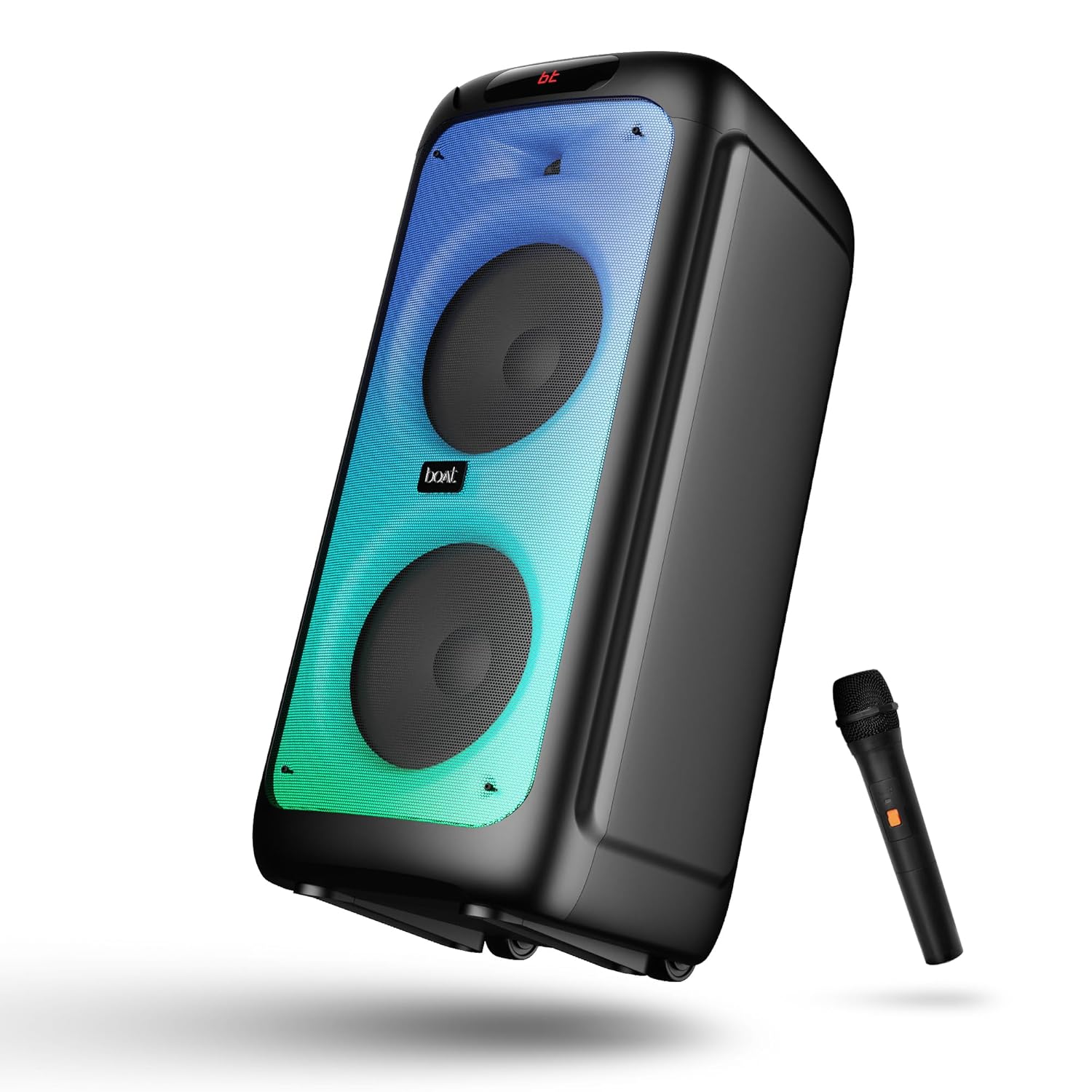
Figur 1: Front view of the boAt Partypal 390 speaker, showcasing its dual speaker design, integrated flame LEDs, and the included wired microphone.

Figur 2: Top panel of the speaker displaying the control buttons and various input ports including USB, AUX, Guitar In, Mic 1, Mic 2, and the USB Type-C charging port. Also shown are dedicated controls for Bass/Treble, LED modes, and volume.
Nøglefunktioner:
- 160W boAt Signaturlyd: Leverer kraftfuld og klar lyd.
- Flame LEDs: Dynamic lighting effects to enhance the listening experience.
- Flere tilslutningsmuligheder: Bluetooth v5.3, AUX, USB, and TF card support.
- Karaoke funktionalitet: Two microphone input ports for vocal performances.
- Guitar input: Dedicated port for connecting a guitar.
- EQ-tilstande: Pre-set sound modes (Normal, Party, Pop, Rock, Jazz) for different audio preferences.
- TWS-tilstand: Allows wireless connection of two Partypal speakers for stereo sound.
- Bas og diskant kontrol: Adjustable audio settings for personalized sound.
- Lang afspilning: Op til 6 timers batterilevetid.
Opsætning
1. Opladning af højttaleren
Before first use, fully charge the speaker. Connect the provided USB Type-C charging cable to the speaker's charging port and the other end to a compatible USB power adapter (not included). The charging indicator will show the charging status. A full charge provides up to 6 hours of playback.

Figur 3: The speaker in an outdoor setting, illustrating its portability and battery life.
2. Tænd/sluk
- To power on, press and hold the Power button located on the control panel until the display illuminates.
- For at slukke skal du trykke på tænd/sluk-knappen igen, indtil skærmen slukker.
3. Indledende Bluetooth-parring
- Ensure the speaker is powered on and in Bluetooth mode. The display will show "bt" and the Bluetooth indicator will flash, indicating it's ready for pairing.
- Aktiver Bluetooth på din mobilenhed, og søg efter tilgængelige enheder.
- Select "boAt Partypal 390" from the list of devices.
- Once paired, the speaker will emit a confirmation sound, and the Bluetooth indicator will stop flashing.
Betjeningsvejledning
1. Valg af tilstand
Press the "Mode" button on the control panel to cycle through available input modes: Bluetooth, AUX, USB, and TF Card.
2. Bluetooth-tilstand
- Efter vellykket parring afspilles lyd fra din tilsluttede enhed gennem højttaleren.
- Use the volume knob on the speaker or your connected device to adjust the volume.
- Brug knapperne Forrige/Næste til at springe numre over.
- Tryk på Afspil/Pause-knappen for at styre afspilningen.
3. AUX-tilstand
- Connect an audio device to the AUX input port using a 3.5mm audio cable.
- Switch the speaker to AUX mode using the "Mode" button.
- Styr afspilning og lydstyrke fra din tilsluttede enhed.
4. USB/TF-korttilstand
- Indsæt et USB-flashdrev i USB-porten eller et TF-kort i TF-kortstikket.
- Højttaleren skifter automatisk til USB- eller TF-korttilstand og begynder at afspille lyd files. If not, switch manually using the "Mode" button.
- Brug knapperne Forrige/Næste til at navigere i numre og Afspil/Pause til at styre afspilningen.
5. Karaoke Function (Microphone Input)
- Connect up to two wired microphones to the "MIC 1" and "MIC 2" input ports.
- Adjust microphone volume using the dedicated MIC VOL knob.
- Adjust microphone echo effect using the ECHO knob.
6. Guitar input
- Connect a guitar to the "GUITAR IN" port.
- Adjust guitar volume using the dedicated GUITAR VOL knob.
7. EQ-tilstande
The speaker offers several pre-set equalizer modes to optimize audio for different content types. Press the "EQ" button to cycle through:
- Normal
- Parti
- Pop
- Klippe
- Jazz

Figur 4: Visual representation of the available EQ modes for sound customization.
8. TWS-tilstand (ægte trådløs stereo)
To connect two Partypal 390 speakers for a stereo audio experience:
- Sørg for, at begge højttalere er tændt og i Bluetooth-tilstand, men endnu ikke er parret med nogen enhed.
- On one speaker (this will be the primary speaker), press and hold the TWS button. The speaker will emit a sound indicating it's searching for another speaker.
- De to højttalere vil automatisk oprette forbindelse til hinanden. En bekræftelseslyd vil indikere vellykket TWS-parring.
- Now, pair your mobile device to the primary speaker via Bluetooth as described in the "Initial Bluetooth Pairing" section. Audio will play in stereo through both speakers.

Figur 5: Two Partypal 390 speakers wirelessly connected, demonstrating the TWS feature.
9. LED kontrol
Press the "LED Mode" button to cycle through different flame LED lighting effects or to turn them off.
10. Bass and Treble Controls
Use the dedicated Bass and Treble knobs on the control panel to adjust the low and high frequencies of the audio output according to your preference.
Opretholdelse
- Rensning: Use a soft, dry, lint-free cloth to clean the speaker's exterior. Do not use liquid cleaners, aerosols, or solvents.
- Opbevaring: Når højttaleren ikke er i brug i længere perioder, skal den opbevares køligt og tørt, væk fra direkte sollys og ekstreme temperaturer.
- Batteripleje: For at forlænge batteriets levetid bør du undgå at aflade højttaleren helt ofte. Oplad den regelmæssigt, selvom den ikke er i brug.
Fejlfinding
| Problem | Mulig årsag | Løsning |
|---|---|---|
| Højttaleren tænder ikke. | Lavt batteri; Tænd/sluk-knappen er ikke trykket korrekt ind. | Oplad højttaleren helt. Tryk på tænd/sluk-knappen og hold den nede i et par sekunder. |
| Ingen lyd. | Lydstyrken er for lav; Forkert inputtilstand; Enheden er ikke tilsluttet. | Increase speaker and device volume. Ensure correct mode is selected (Bluetooth, AUX, USB, TF). Re-pair Bluetooth device or check cable connections. |
| Bluetooth-parring mislykkes. | Højttaler ikke i parringstilstand; Enhed for langt væk; Interferens. | Ensure speaker is in Bluetooth pairing mode (flashing "bt"). Move device closer to speaker. Turn off other Bluetooth devices. Forget "boAt Partypal 390" on your device and try pairing again. |
| Mikrofon virker ikke. | Mikrofonen er ikke tilsluttet korrekt; MIC VOL for lav. | Ensure microphone is securely plugged into MIC 1 or MIC 2 port. Increase the MIC VOL knob. |
| TWS-forbindelsen mislykkes. | Højttalere er allerede parret med en enhed; Højttalerne er for langt fra hinanden. | Ensure both speakers are not connected to any Bluetooth device. Place speakers within close proximity. Repeat TWS pairing steps. |
Specifikationer
Below are the technical specifications for the boAt Partypal 390 speaker:
| Modelnavn | Partypal 390 |
| Højttaler type | Multimedie, Gulvstående |
| Lydudgangseffekt | 160 watt |
| Forbindelsesteknologi | Bluetooth v5.3, AUX, USB, TF-kort |
| Bluetooth rækkevidde | Op til 10 meter |
| Batterilevetid | Op til 6 timer |
| Batterikapacitet | 7500 mAh (Lead Acid) |
| Produktmål (D x B x H) | 70D x 32B x 32H Centimeter |
| Varens vægt | 10.8 kg |
| Vandmodstandsniveau | Vandtæt |
| Inkluderede komponenter | Speaker, Charging Cable, User Manual, Warranty Card |

Figur 6: Diagram illustrating the physical dimensions of the Partypal 390 speaker.
Garanti og support
Your boAt Partypal 390 speaker comes with a limited warranty. Please refer to the included Warranty Card for specific terms and conditions, including the warranty period and coverage details. For technical support, service, or warranty claims, please contact boAt customer service through their official webwebstedet eller kontaktoplysningerne på dit garantikort.
For more information, visit the official boAt store: boAt-butik på Amazon


