Indledning
The Teltonika RUT241098000 is a robust industrial 4G LTE cellular router designed for reliable and continuous internet connectivity in various IoT and M2M solutions. It features a built-in LTE CAT4 modem, Wi-Fi capabilities, and two Ethernet ports, ensuring uninterrupted connection continuity with automatic failover. This manual provides essential information for setting up, operating, maintaining, and troubleshooting your RUT241098000 router.

Image: The Teltonika RUT241098000 router shown with its two mobile antennas and one Wi-Fi antenna.
Pakkens indhold
Før du begynder, skal du kontrollere, at alle varer er til stede i din pakke:
- 1 x RUT241 Router
- 1 x 9W PSU (Power Supply Unit)
- 2 x 4G LTE Antennas (SWIVEL, SMA, Male)
- 1 x WiFi Antenna (SWIVEL, RP-SMA, Male)
- 1 x Ethernet Cable (1.5 M)
- 1 x SIM Adapter Kit
- 1 x brugermanual

Image: A visual representation of the router, power supply, antennas, Ethernet cable, SIM adapter kit, and user manual included in the product package.
Opsætning
Follow these steps to set up your Teltonika RUT241098000 router for the first time:
- Indsæt SIM-kort: Locate the SIM slot on the router. Insert your activated 3G/4G LTE SIM card into the slot until it clicks into place. Ensure the SIM card is correctly oriented.
- Vedhæft antenner: Connect the two 4G LTE antennas to the 'MOBILE' connectors and the Wi-Fi antenna to the 'WIFI' connector on the router. Hand-tighten them securely.
- Tilslut strøm: Plug the 9W PSU into the router's power socket and then into a power outlet. The Power LED will illuminate.
- Første netværksforbindelse:
- For wired connection: Connect an Ethernet cable from the router's 'LAN' port to your computer's Ethernet port.
- For wireless connection: Connect to the router's default Wi-Fi network using the SSID and password provided on the device label or in the user manual.
- Adgang Web Interface: Åbn a web browser and navigate to the default IP address (usually 192.168.1.1). Log in using the default username and password (typically admin/admin01).
- Konfigurer indstillinger: Follow the on-screen wizard to configure your network settings, including APN settings for your cellular provider, Wi-Fi SSID, and password.

Billede: Detaljeret view of the router's panel, highlighting the Power Socket, Power LED, SIM Slot, Mobile Signal Strength Indication LEDs, LAN Port, WAN Port, Reset Button, Wi-Fi Antenna Connector, and Mobile AUX Antenna Connectors.
Betjeningsvejledning
The Teltonika RUT241098000 is designed for seamless operation and reliable connectivity.
4G LTE and Wi-Fi Connectivity
The router utilizes a built-in LTE CAT4 modem for high-speed 4G LTE cellular connectivity, offering up to 150 Mbps download and 50 Mbps uplink speeds. It is certified by major US carriers including Verizon, AT&T, and T-Mobile, ensuring broad compatibility. The Wi-Fi module complies with 802.11b/g/n standards, supporting both Access Point (AP) and Station (STA) modes for flexible wireless networking.

Image: Certification logos for Verizon, AT&T, and T-Mobile, confirming the router's compatibility with these major cellular networks.
Automatic Failover
One of the key features of the RUT241098000 is its automatic failover capability. In the event of a primary internet connection failure (e.g., wired WAN), the router will automatically switch to the 4G LTE cellular connection, providing uninterrupted network access. This ensures continuous operation for critical applications.
Advanced Features (VPN & RMS)
The router supports advanced features such as VPN (Virtual Private Network) for secure remote access and data transmission. It is also compatible with the Networks Remote Management System (RMS), allowing for centralized monitoring, configuration, and maintenance of multiple devices from a single platform.

Image: A computer screen displaying the interface of a Remote Management System, illustrating its capabilities for remote management, access, and VPN services.
Opretholdelse
The Teltonika RUT241098000 is designed for industrial environments and requires minimal maintenance. Its robust construction ensures reliable performance.
- Miljøforhold: The router is built to withstand a wide operating temperature range (-40°F to 167°F) and relative humidity (10% to 90%). Ensure it is operated within these specified conditions for optimal longevity.
- Rensning: Periodically clean the exterior of the router with a soft, dry cloth. Avoid using liquid cleaners or aerosols.
- Firmwareopdateringer: Regularly check for and apply firmware updates to ensure the router has the latest features, security patches, and performance improvements. This can typically be done through the web interface or RMS.
- Stille drift: The router is designed to run quietly without excessive heat generation or frequent crashes, contributing to its low maintenance profile.

Image: Visual representation of the router's industrial design, highlighting its ability to operate in wide temperature ranges (-40°F to 167°F), 10-90% relative humidity, and with a 9-30V DC wide voltage input.
Fejlfinding
If you encounter issues with your Teltonika RUT241098000 router, consider the following troubleshooting steps:
- Ingen internetforbindelse:
- Check SIM card: Ensure the SIM card is properly inserted and activated with your cellular provider.
- Signal Strength: Verify the mobile signal strength LEDs on the router. If signal is weak, try relocating the router or using external antennas.
- APN Settings: Confirm that the Access Point Name (APN) settings in the router's web interface match those of your cellular provider.
- Cable Connections: Ensure all Ethernet cables are securely connected to the correct ports (LAN/WAN).
- Wi-Fi-problemer:
- Check Wi-Fi LED: Verify the Wi-Fi indicator LED on the router.
- SSID/Password: Confirm you are connecting to the correct Wi-Fi network and using the correct password.
- Interference: Move the router away from other electronic devices that might cause interference.
- Routeren reagerer ikke:
- Power Cycle: Disconnect the power adapter, wait 10 seconds, and then reconnect it.
- Reset Button: If the router remains unresponsive, use a paperclip to press and hold the 'RESET' button for 10-15 seconds to restore factory default settings. Note that this will erase all custom configurations.
- Langsomme hastigheder:
- Signal Strength: Weak cellular signal can lead to slow speeds.
- Network Congestion: Cellular network congestion in your area can affect performance.
- Data Cap: Check if you have exceeded any data caps with your cellular provider, which might result in throttled speeds.
Specifikationer
Key technical specifications for the Teltonika RUT241098000 router:
| Feature | Detalje |
|---|---|
| Produktdimensioner | 3.94 x 2.76 x 1.57 tommer |
| Varens vægt | 13.7 ounce |
| Varemodelnummer | RUT241098000 |
| Fabrikant | Teltonica |
| Modelnavn | RUT241 |
| Speciel funktion | WPS |
| Frekvensbåndsklasse | Single-Band |
| Standard for trådløs kommunikation | 802.11b |
| Kompatible enheder | Personlig computer |
| Frekvens | 2.4 GHz |
| Anbefalet anvendelse af produktet | Industrial IoT and M2M solutions |
| Forbindelsesteknologi | Ethernet, LTE, Wi-Fi |
| Farve | sort |
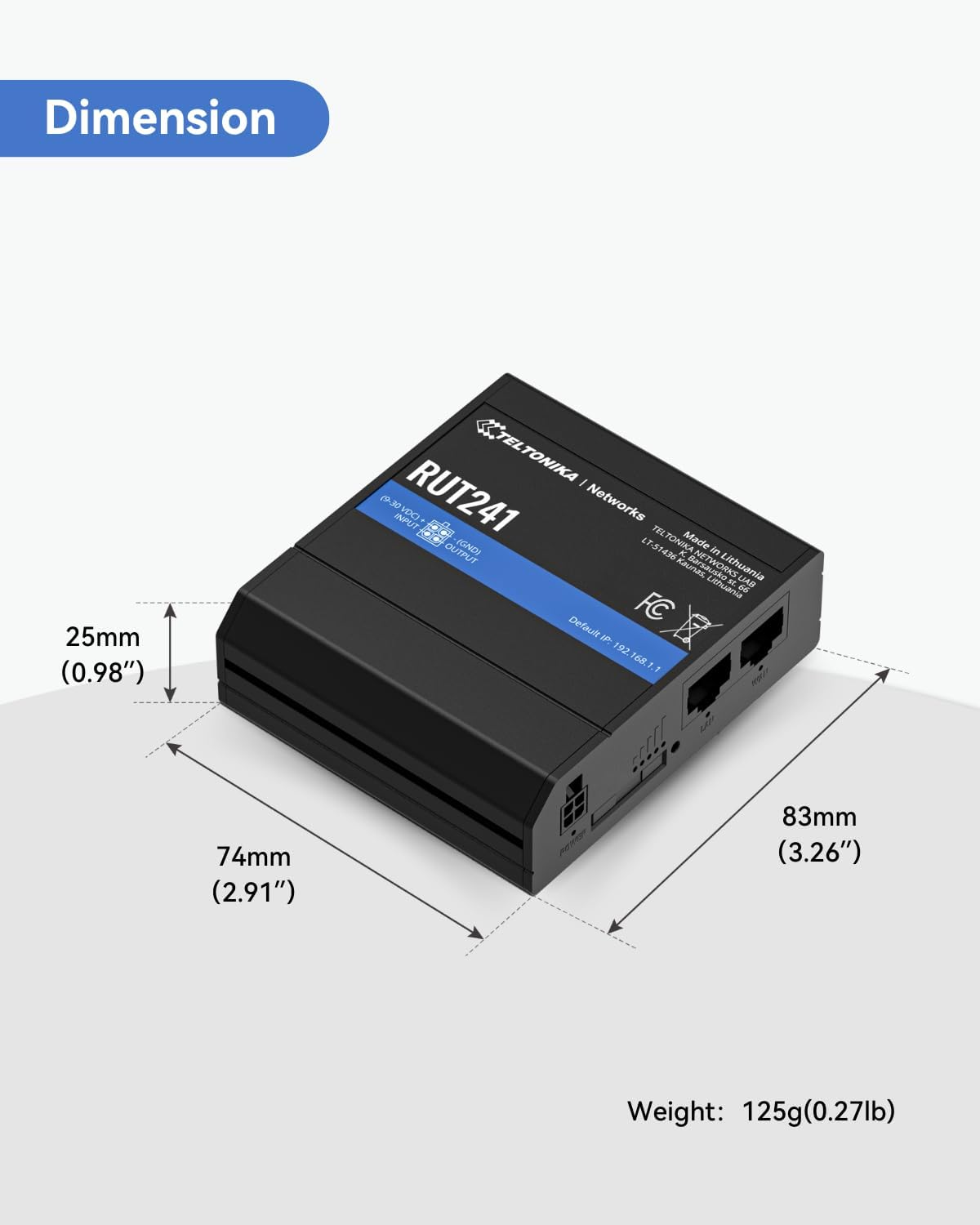
Image: The router with its dimensions labeled: 25mm (0.98") height, 74mm (2.91") width, and 83mm (3.26") depth. Weight: 125g (0.27lb).
Garanti og support
LINOVISION provides comprehensive support for the Teltonika RUT241098000 router:
- Garanti: Produktet leveres med 1 års garanti.
- Teknisk support: LINOVISION offers life-time 24/7 US Local + Global Technical Support. Assistance is available at any time.


